
Introduction
The VANLINNY 4DOF Robotic Arm Kit is an educational STEM toy designed to introduce users to robotics, engineering, and basic programming concepts. This kit allows for hands-on assembly and interactive operation, providing an engaging learning experience. The robotic arm features multiple degrees of freedom, enabling various movements and functions, including grasping and programmable actions.
Setup and Assembly
Careful assembly is crucial for the proper function of your robotic arm. Please follow these steps:
- Unpack Components: Carefully remove all parts from the packaging. Verify that all components listed in the included parts list are present.
- Assemble the Robotic Arm: Refer to the detailed assembly instructions provided in the separate manual included with your kit. Pay close attention to the visual diagrams, as they are essential for correct component placement. Assembly involves connecting various structural pieces, motors, and wiring.
- Install Battery: Once the arm is assembled, insert the provided Lithium Ion battery into its designated compartment. Ensure correct polarity.
- Charge Battery: Connect the USB charging cable to the robotic arm and a suitable power source to charge the battery before first use.

Image: Two children engaged in assembling the robotic arm kit, demonstrating the hands-on building process.

Image: An adult and child working together to assemble the robotic arm, highlighting the educational and collaborative aspect of the kit.
Operating Instructions
The robotic arm is controlled via the included remote control. Ensure the robotic arm and remote control are powered on and paired according to the separate pairing instructions.
Basic Movement and Functions:
- Arm Movement: Use the joystick or directional buttons on the remote control to move the robotic arm up, down, and rotate its base. The arm is designed to move at multiple angles.
- Grabbing Mechanism: Activate the gripper (claw) using the designated button on the remote control to open and close it, allowing the arm to pick up and release objects.
- Programming Function: The robotic arm supports basic programming. Refer to the specific programming guide in your manual to record and playback custom movement sequences. This feature allows for learning about sequential commands and automation.
- Sound Effects: The arm includes simulation sound effects that activate during certain operations.
- Remote Control Range: The remote control operates effectively within a range of 30-50 meters.
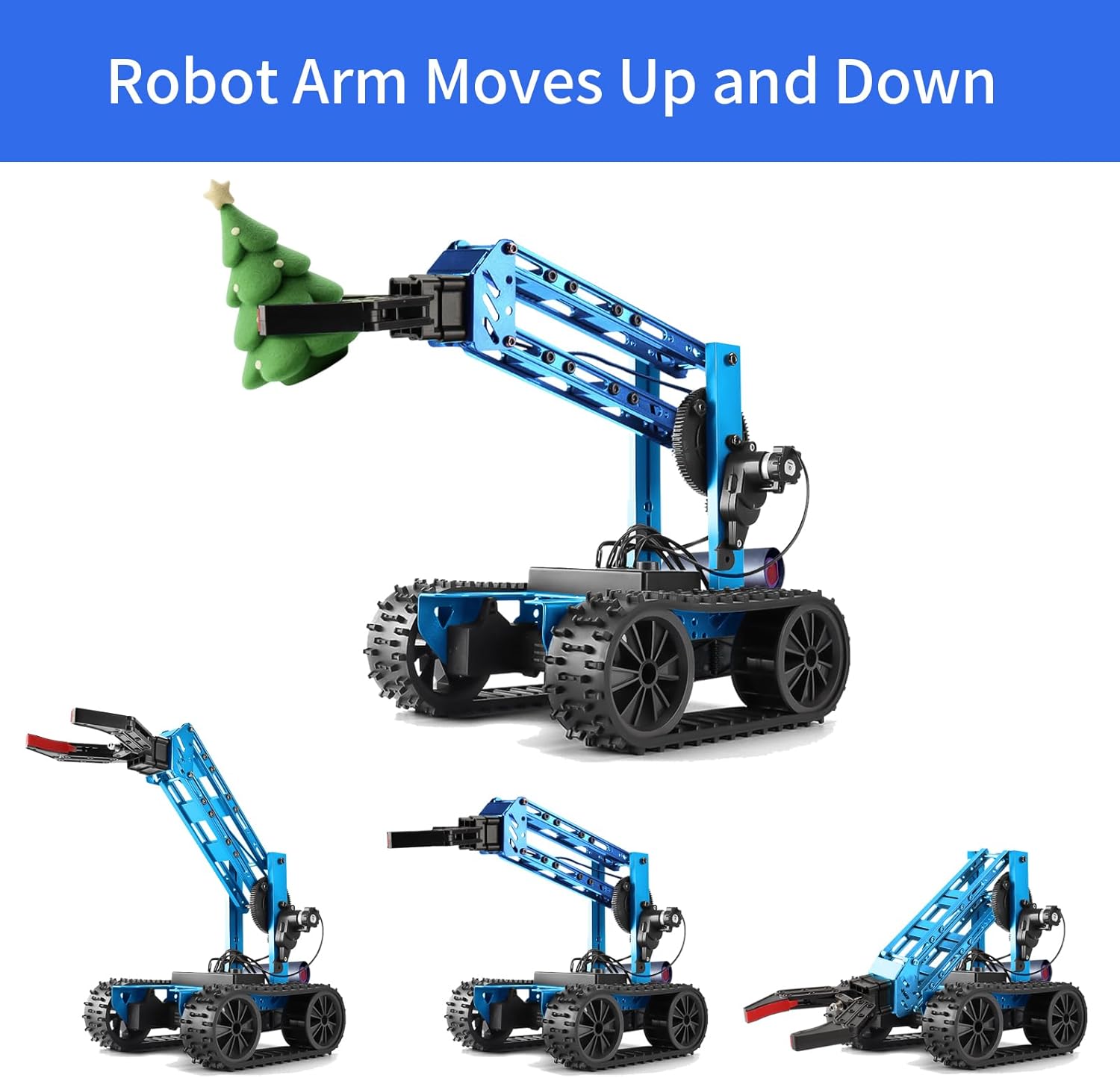
Image: The robotic arm shown in different elevated and lowered positions, illustrating its vertical movement capabilities.

Image: A child using the remote control to operate the robotic arm, with an overlay indicating its memory programming feature.

Image: A visual representation of how custom movement paths can be programmed and executed by the robotic arm.

Image: The complete robotic arm kit alongside its dedicated remote control, ready for operation.
Maintenance
To ensure the longevity and optimal performance of your robotic arm kit, follow these maintenance guidelines:
- Cleaning: Gently wipe the robotic arm with a dry, soft cloth to remove dust and debris. Avoid using water or harsh cleaning agents, as these can damage electronic components.
- Battery Care: Always use the provided USB charging cable for charging. Do not overcharge the battery. If the robotic arm will not be used for an extended period, fully charge the battery and then store it in a cool, dry place.
- Storage: Store the robotic arm and its components in a safe, dry environment away from direct sunlight and extreme temperatures.
- Inspection: Periodically check for any loose screws or connections. Tighten as necessary to maintain structural integrity.
Troubleshooting
If you encounter issues with your VANLINNY Robotic Arm Kit, please refer to the following common problems and solutions:
- Assembly Difficulties: If you find the assembly instructions unclear, rely heavily on the photographic guides provided in the manual. Double-check each step and component orientation. It is common to need to re-adjust parts during assembly.
- Robotic Arm Not Moving/Weak Movement:
- Ensure the battery is fully charged and properly connected.
- Check all motor connections for secure contact. Loose wires can prevent movement.
- Verify that the remote control is paired correctly and has fresh batteries.
- Note that the arm has a limited lifting capacity, typically around 0.5-1 pound. Attempting to lift heavier objects may result in weak or no movement.
- Gripper (Claw) Not Functioning:
- Inspect the gripper motor and its connections.
- Ensure no obstructions are preventing the claw from opening or closing.
- Battery Not Charging:
- Confirm the USB charging cable is securely connected to both the arm and the power source.
- Try a different USB port or power adapter.
- If the battery still does not charge, it may need replacement. Contact customer support.
Product Specifications
| Feature | Detail |
|---|---|
| Model Number | JK04 |
| Product Dimensions | 8 x 8 x 13 inches (20.3 x 20.3 x 33 cm) |
| Item Weight | 3.72 pounds (1.69 kg) |
| Recommended Age | 8 years and up |
| Battery Type | 1 Lithium Ion battery (included) |
| Material | ABS raw materials and aluminum alloy |
| Remote Control Range | 30-50 meters |

Image: Visual representation of the robotic arm's dimensions and its packaging for reference.
Warranty Information
VANLINNY stands by the quality of its products. If any issues arise with your robotic arm kit within the first 18 months of ownership, please contact our customer service. We are committed to providing a satisfactory solution, which may include repair, replacement, or other appropriate remedies.
Customer Support
For further assistance, technical support, or inquiries regarding your VANLINNY 4DOF Robotic Arm Kit, please visit the official VANLINNY store or contact our customer service team through the platform where you purchased the product.
VANLINNY Store: Visit VANLINNY Store on Amazon