
1. Introduction
This manual provides detailed instructions for the setup, operation, and maintenance of your zhizhi S67 Smartwatch. Please read this guide thoroughly to ensure optimal performance and longevity of your device. The zhizhi S67 Smartwatch is designed to enhance your daily life with smart communication, comprehensive health monitoring, and diverse fitness tracking capabilities.

Image 1.1: The zhizhi S67 Smartwatch, showcasing its sleek design and interchangeable bands.

Image 1.2: Overview of the smartwatch's key features including AMOLED display, voice assistant, sports modes, and IP68 water resistance.
2. Setup
2.1 Package Contents
Before proceeding, ensure all items are present in the package:
- zhizhi S67 Smartwatch
- Charging Cable
- User Manual
- Additional Strap (if included in your specific model)

Image 2.1: Illustration of the smartwatch, its dimensions, and the items included in the package.
2.2 Charging the Smartwatch
Before first use, fully charge the smartwatch. Connect the magnetic charging cable to the charging points on the back of the watch and plug the USB end into a standard USB power adapter (not included) or a computer USB port.
- A full charge typically takes approximately 2 hours.
- The battery icon on the screen will indicate charging status.
2.3 App Installation and Pairing
To unlock the full functionality of your smartwatch, you need to install the companion application on your smartphone and pair the devices.
- Download the App: Scan the QR code provided in the quick start guide or search for the designated app (e.g., 'VeryFit' as commonly associated with similar devices) in your smartphone's app store (Google Play Store for Android, Apple App Store for iOS).
- Create Account: Open the app and follow the on-screen instructions to create a user account.
- Enable Bluetooth: Ensure Bluetooth is enabled on your smartphone.
- Pair Device: In the app, navigate to the 'Device' or 'Add Device' section. Select your zhizhi S67 Smartwatch from the list of available devices. Confirm the pairing request on both your phone and the smartwatch.
- Grant Permissions: Grant necessary permissions (e.g., notifications, location, contacts) to the app for full functionality.
3. Operating Instructions
3.1 Basic Navigation
- Touchscreen: Swipe left/right, up/down to navigate through menus and features. Tap to select.
- Side Button: Typically used to return to the home screen, wake the screen, or access the main menu.
3.2 Bluetooth Calls and Notifications
The smartwatch allows you to manage calls and receive notifications directly on your wrist.
- Making/Receiving Calls: Once connected via Bluetooth, you can dial numbers, answer, or reject incoming calls using the watch's built-in speaker and microphone.
- Notifications: Receive alerts for text messages and various app notifications (e.g., Facebook, Twitter, WhatsApp, Instagram). The watch will vibrate to notify you.

Image 3.1: Visual representation of the smartwatch's Bluetooth call and message notification capabilities.

Image 3.2: The smartwatch showing various app notifications on the display.
3.3 AI Voice Assistant
Activate your smartphone's voice assistant directly from your smartwatch for hands-free control.
- Tap the voice assistant icon or use the designated gesture/button press to activate.
- Ask questions, set alarms, control music, or initiate calls.

Image 3.3: Demonstrating the AI Voice Assistant functionality on the smartwatch.

Image 3.4: The smartwatch's intelligent voice assistant in action, responding to commands.
3.4 Other Practical Functions
The smartwatch includes several convenient features to assist your daily activities:
- Music Control: Play, pause, skip tracks, and adjust volume for music playing on your connected smartphone.
- Camera Control: Use your smartwatch as a remote shutter for your smartphone's camera.
- Weather Forecast: View current weather conditions and forecasts for your location.
- Stopwatch/Timer: Utilize built-in stopwatch and timer functions for various activities.
- Alarm: Set silent alarms that vibrate on your wrist.
- Find Phone: Locate your misplaced smartphone by triggering an audible alert from the watch.
- Sedentary Reminder: Receive alerts to move if you've been inactive for too long.
- Breathing Training: Guided breathing exercises to help you relax.

Image 3.5: Display of practical functions like weather, camera control, music playback, and stopwatch.

Image 3.6: A comprehensive view of additional practical functions available on the smartwatch.
4. Health Monitoring
The zhizhi S67 Smartwatch is equipped with advanced optical sensors for continuous health tracking.
4.1 Heart Rate Monitoring
Monitor your heart rate 24/7 to gain insights into your cardiovascular health.
- Real-time heart rate data is displayed on the watch and recorded in the app.
- Set alerts for abnormally high or low heart rates through the app.

Image 4.1: The smartwatch displaying 24-hour heart rate data and trends.
4.2 Blood Oxygen (SpO2) Monitoring
Track your blood oxygen saturation levels throughout the day to ensure proper respiratory function.
- The watch provides continuous SpO2 measurements.
- View historical data and trends in the companion app.

Image 4.2: The smartwatch monitoring blood oxygen levels during an activity.
4.3 Sleep Monitoring
The smartwatch intelligently analyzes your sleep patterns, identifying deep sleep, light sleep, and wake phases.
- Wear the watch during sleep for accurate tracking.
- Review detailed sleep reports in the app to improve your rest habits.

Image 4.3: The smartwatch displaying health metrics and sleep analysis.

Image 4.4: Detailed breakdown of sleep quality, including deep, light, and awake periods.
5. Sport Modes and Water Resistance
The zhizhi S67 Smartwatch supports over 120 sport modes to track your physical activities.
5.1 Tracking Sport Activities
- Select your desired sport mode from the watch's menu (e.g., running, walking, basketball, cycling, football, yoga, climbing).
- The watch will record real-time data such as heart rate, steps, calories burned, and distance.
- Review detailed workout summaries in the companion app.

Image 5.1: The smartwatch displaying various sport modes and activity metrics.

Image 5.2: An array of icons representing the diverse range of sport modes available.
5.2 IP68 Water Resistance
The smartwatch features an IP68 water-resistant design, making it suitable for various daily activities.
- It can withstand splashes, rain, and brief immersion in water (e.g., hand washing, showering).
- Note: Not suitable for hot water, saunas, or deep diving. Avoid prolonged exposure to water.

Image 5.3: The smartwatch in a natural setting, highlighting its IP68 waterproof capability.
6. Display and Customization
The zhizhi S67 features a vibrant AMOLED display with extensive customization options.
6.1 1.43" AMOLED Touchscreen
- The 1.43-inch HD AMOLED touchscreen offers clear visuals, vivid colors, and a smooth tactile experience.
- The display is designed for durability and lightweight comfort.
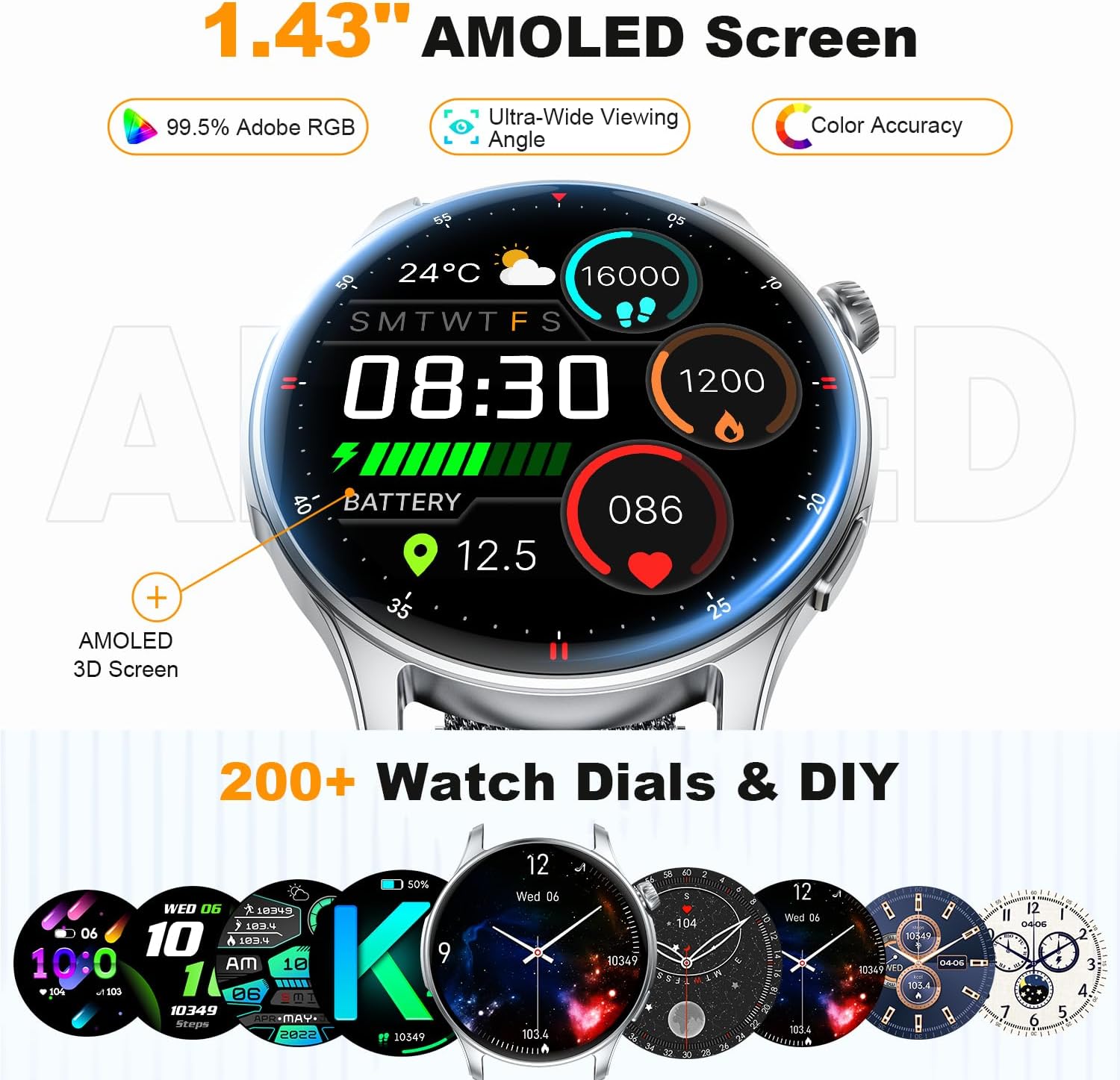
Image 6.1: The smartwatch showcasing its 1.43" AMOLED screen and various watch face options.

Image 6.2: Highlighting the AMOLED display's vibrant colors, color accuracy, and wide color gamut.
6.2 Customizable Watch Faces
- Choose from over 200 pre-designed watch faces available through the companion app.
- Personalize your watch face by uploading your favorite photos.

Image 6.3: The smartwatch's personalized AMOLED screen with options for custom watch faces.
7. Battery Life
The zhizhi S67 Smartwatch is equipped with a high-capacity battery designed for extended use.
- Continuous Use: Up to 7 days of active use.
- Standby Mode: Up to 30 days.
- Actual battery life may vary based on usage patterns, enabled features, and settings.
8. Maintenance
Proper care ensures the longevity and optimal performance of your smartwatch.
- Cleaning: Regularly wipe the watch screen and strap with a soft, dry cloth. For stubborn dirt, a slightly damp cloth can be used, followed by drying.
- Avoid Chemicals: Do not use harsh chemicals, cleaning solvents, or strong detergents, as these can damage the watch's finish and seals.
- Water Exposure: While IP68 water-resistant, avoid exposing the watch to hot water, steam, or high-pressure water jets. Dry the watch thoroughly after exposure to water.
- Storage: Store the watch in a cool, dry place when not in use. Avoid extreme temperatures.
9. Troubleshooting
If you encounter issues with your zhizhi S67 Smartwatch, refer to the following common solutions:
| Problem | Possible Solution |
|---|---|
| Watch does not turn on | Ensure the watch is fully charged. Connect it to the charger for at least 30 minutes. |
| Cannot pair with smartphone | 1. Ensure Bluetooth is enabled on your phone. 2. Make sure the watch is within range of your phone. 3. Restart both the watch and your phone. 4. Clear the app's cache or reinstall the app. 5. Check if the watch is already paired with another device. |
| Notifications not received | 1. Ensure the watch is connected to your phone via Bluetooth. 2. Check app notification permissions on your phone. 3. Verify notification settings within the companion app. 4. Ensure your phone's notification bar displays messages. |
| Inaccurate health data | 1. Ensure the watch is worn snugly on your wrist, not too tight or too loose. 2. Clean the sensor on the back of the watch. 3. Avoid excessive movement during measurements. 4. Note that smartwatches are not medical devices and data is for reference only. |
| Short battery life | 1. Reduce screen brightness. 2. Disable continuous heart rate monitoring if not needed. 3. Limit the number of active notifications. 4. Ensure the watch is fully charged each time. |
10. Specifications
Key technical specifications for the zhizhi S67 Smartwatch:
- Brand: zhizhi
- Model: S67
- Display: 1.43-inch AMOLED Touchscreen
- Dimensions: 28.5 x 8.7 x 1.7 cm (Package); 45mm (Watch Diameter), 11mm (Thickness)
- Weight: 160 g (Product)
- Battery: 1 Lithium Polymer battery (included, rechargeable)
- Battery Composition: Lithium Polymer
- Water Resistance: IP68
- Compatibility: Android 5.0 and above, iOS 9.0 and above
- Connectivity: Bluetooth
- Features: Bluetooth Calls, Smart Notifications, 24/7 Heart Rate, Blood Oxygen, Sleep Monitor, 120+ Sport Modes, AI Voice Assistant, Music Control, Camera Control, Weather Forecast, Stopwatch, Alarm, Find Phone, Sedentary Reminder, Breathing Training, Customizable Watch Faces.
11. Warranty and Support
For warranty information and customer support, please refer to the documentation provided with your purchase or contact the retailer/manufacturer directly. Keep your proof of purchase for warranty claims.
For further assistance, please visit the official zhizhi support website or contact their customer service team.


