
Introduction
The JOYO JAM Buddy III is a versatile 40W stereo guitar amplifier designed for electric guitar, acoustic guitar, bass, and microphones. It features a comprehensive suite of digital models and effects, making it suitable for practice, recording, and live streaming in various settings. This manual provides essential information for setup, operation, and maintenance of your JAM Buddy III.
What's in the Box
- 1x JAM BUDDY III Amplifier
- 1x User Manual
- 1x Wireless Transmitter
- 1x Power Adapter and 1x Power Cable
- 1x 3.5mm 4-Pin Audio Cable
- 1x Type-C to Lightning Adapter, Dual Type-C Cable
Setup
1. Powering On
Connect the power adapter to the DC IN 15V 4A port on the rear panel of the JAM Buddy III. Press the POWER button to turn on the device. The unit also features a rechargeable battery for portable use (up to 5 hours).
2. Instrument Connection
Plug your electric guitar, acoustic guitar, or bass into the GUITAR IN 1/4" jack on the rear panel. For microphones, use the MIC IN XLR/TRS combo jack. Ensure 48V phantom power is switched ON if using a condenser microphone.
3. Wireless Transmitter Setup
The JAM Buddy III includes a built-in wireless receiver. To use the wireless transmitter, plug it into your instrument's output jack. The transmitter will automatically pair with the amplifier, offering up to 65ft (20m) operating range.
4. App Installation and Bluetooth Pairing
To unlock the full potential of the JAM Buddy III, download the "JAM BUDDY" app from your device's App Store (iOS) or the official JOYO website (Android). Follow these steps to connect:
- Locate and open the App Store on your device.
- Type "JAM BUDDY" into the search bar at the bottom.
- Select the "JAM BUDDY II" app (this app is compatible with JAM BUDDY III).
- Tap to download and install the app.
- Open the app.
- Long press the BT button on the JAM BUDDY III device until the blue light flashes to enter Bluetooth pairing mode.
- In the app, tap the Bluetooth button in the top right corner.
- Wait for Bluetooth pairing with the device. Once connected, the app will display the current preset and allow for detailed control.
Note: If you cannot install third-party apps due to system restrictions on Android, please disable the restriction first, then the installation will succeed.
Video: Instructions on how to download the JAM BUDDY app from the App Store and connect via Bluetooth. The video shows navigating the App Store, searching for "JAM BUDDY", downloading "JAM BUDDY II", opening the app, and pairing with the amplifier via Bluetooth.
Operating the JAM Buddy III
1. Panel Mode Operation
The top panel features various knobs and buttons for direct control:
- AMP Selection: Use the rotary knob to select from 8 amp models (Clean, Crunch, Lead, High Gain, Special, Bass, Acoustic, Flat).
- EQ Controls: Adjust GAIN, BASS, MIDDLE, and TREBLE knobs to shape your tone.
- Effect Controls: Use the EFFECT knob to select and adjust built-in effects like Boost, Overdrive, Chorus, and Tremolo.
- Delay/Reverb: Adjust the DLY/REV knob for various delay and reverb types (Delay, Reverb, Spring, Hall).
- TAP Button: Adjusts delay time and drum machine speed.
- RHYTHM Button: Activates the drum machine with 40 rhythms.
- TUNER Button: Engages the professional tuner.
- MASTER Volume: Controls the overall output volume.
- GUITAR/AUDIO/MIC GAIN/MIC REV: Independent volume and reverb controls for guitar, audio input, and microphone.

Image: Detailed diagram of the JOYO JAM Buddy III control panel, highlighting knobs for gain, EQ (bass, middle, treble), effects (boost, chorus, tremolo), delay/reverb, and individual volume controls for guitar, audio, and microphone. The LCD screen and various buttons for Bluetooth, tuner, rhythm, and tap tempo are also visible.
2. Preset Mode and App Control
The JAM Buddy III offers 40 presets. These can be accessed and customized via the "JAM BUDDY" app. The app allows you to:
- Unlock hundreds of amp and effector models.
- Customize and save your own tones.
- Adjust parameters like gain, EQ, volume, and effect settings with greater precision.
- Access drum machine rhythms and looper functions.

Image: Screenshot of the JAM BUDDY app interface on a smartphone, showing various effect modules (OD, AMP, CAB, DYN) and sliders for adjusting gain, tone, and volume. The app provides a visual representation of the amplifier's settings and allows for remote control.
3. Looper and Drum Machine
The built-in looper offers 80 seconds of recording time and can synchronize with the drum machine rhythms. The drum machine provides 40 rhythms across various genres (Pop, Metal, Jazz, Blues, etc.).
4. Recording and Live Streaming
Utilize the OTG port and PORT 1/2 (3.5mm 4-Pin) for direct connection to smartphones or PCs. Independent recording volume control ensures clear audio output for creating high-quality music content.
Key Features
- 3-in-1 Smart Amp: 40W stereo guitar speaker compatible with electric guitar, acoustic guitar, bass, and mics. Built-in 52 amp head, 25 cabinet digital models & 49 digital effectors.
- Dual Modes & Rich Tone: PANEL Mode (8 simulation tones with GAIN, 3-band EQ, volume control, TAP button for delay/drum speed) and PRESET Mode (40 presets with app integration for hundreds of models, customization & saving).
- Wireless & Functions: Built-in wireless receiver (transmitter included), 40 drum machine rhythms, 80s Looper (sync with drums), professional tuner, and 48V phantom power for mics.
- Recording & Live Streaming: Complete interfaces (OTG port, PORT 1/2 (3.5mm 4-Pin), LINE OUT (L/R 6.35mm)) for direct connection to Smartphone/PC. Independent recording volume control.
- User-Friendly Design & Reliable: Clear screen displays preset, drums, tuner, and wireless status. Easy-to-use knobs/buttons. Rechargeable (5-hour usage) & portable (5.2kg).
Specifications
| Brand | JOYO |
| Model Name | JOYO JAM BUDDY III |
| Output Wattage | 40 Watts |
| Amplifier Type | Solid State |
| Output Channel Quantity | 2 |
| Number of Bands | 3 |
| Compatible Devices | Acoustic Guitar, Condenser and Dynamic Microphone, Double Bass, Electric Guitar, Smartphone and PC |
| Power Source | Corded Electric, Battery Powered |
| Material | Metal |
| Item Weight | 5250 Grams |
| Item Dimensions (D x W x H) | 8.3"D x 17.13"W x 8.6"H |
| Connector Type | LINE OUT (L/R 6.35mm), OTG port, PORT 1/2 (3.5mm 4-Pin) |
Maintenance
- Keep the device clean by wiping it with a soft, dry cloth.
- Avoid exposing the amplifier to extreme temperatures, humidity, or direct sunlight.
- Do not attempt to disassemble or repair the unit yourself. Refer to qualified service personnel.
- Ensure proper ventilation to prevent overheating.
Troubleshooting
- No Sound: Check all cable connections (instrument, power, audio). Ensure the amplifier is powered on and volume levels are adjusted appropriately. Verify instrument and microphone settings.
- Bluetooth Connection Issues: Ensure the amplifier is in pairing mode (blue light flashing). Restart the app and the amplifier. Check your device's Bluetooth settings.
- App Functionality Issues: Ensure the app is updated to the latest version. Restart the app. If issues persist, reinstall the app.
- Distorted Sound: Check gain levels on both your instrument and the amplifier. Reduce volume if necessary. Ensure no cables are damaged.
- Power Issues: Ensure the power adapter is securely connected. If using battery power, ensure the battery is charged.
Warranty and Support
Warranty Description: JOYO Technology provides a one-year after-sale service. If an item is claimed not as described when it was true, a completely different item or an empty box is returned, or the item is returned with missing parts, JOYO will report to Amazon after checking the returns.
Customer Support: For any product-related issues or inquiries, JOYO provides prompt service within 24 hours. Please refer to the contact information provided in your purchase documentation or visit the official JOYO website for support.
- Quick Reply: Within 24 hours.
- Returns: 30 days no reason to return.
- Replacement: Available within 12 months.
Product Media
Product Images

Front view of the JOYO JAM Buddy III amplifier, showcasing its speaker grille and compact design.

Top panel of the amplifier with all control knobs and the LCD screen visible, indicating various settings.

Rear panel of the amplifier showing all input and output jacks, including guitar in, mic in, OTG, line out, and power input.

A person playing an electric guitar connected to the JOYO JAM Buddy III, demonstrating its use in a home setting.

Close-up of the wireless transmitter plugged into a guitar, with the JAM Buddy III in the background, highlighting the wireless functionality.

A person carrying the JOYO JAM Buddy III by its handle, emphasizing its portability and compact size.
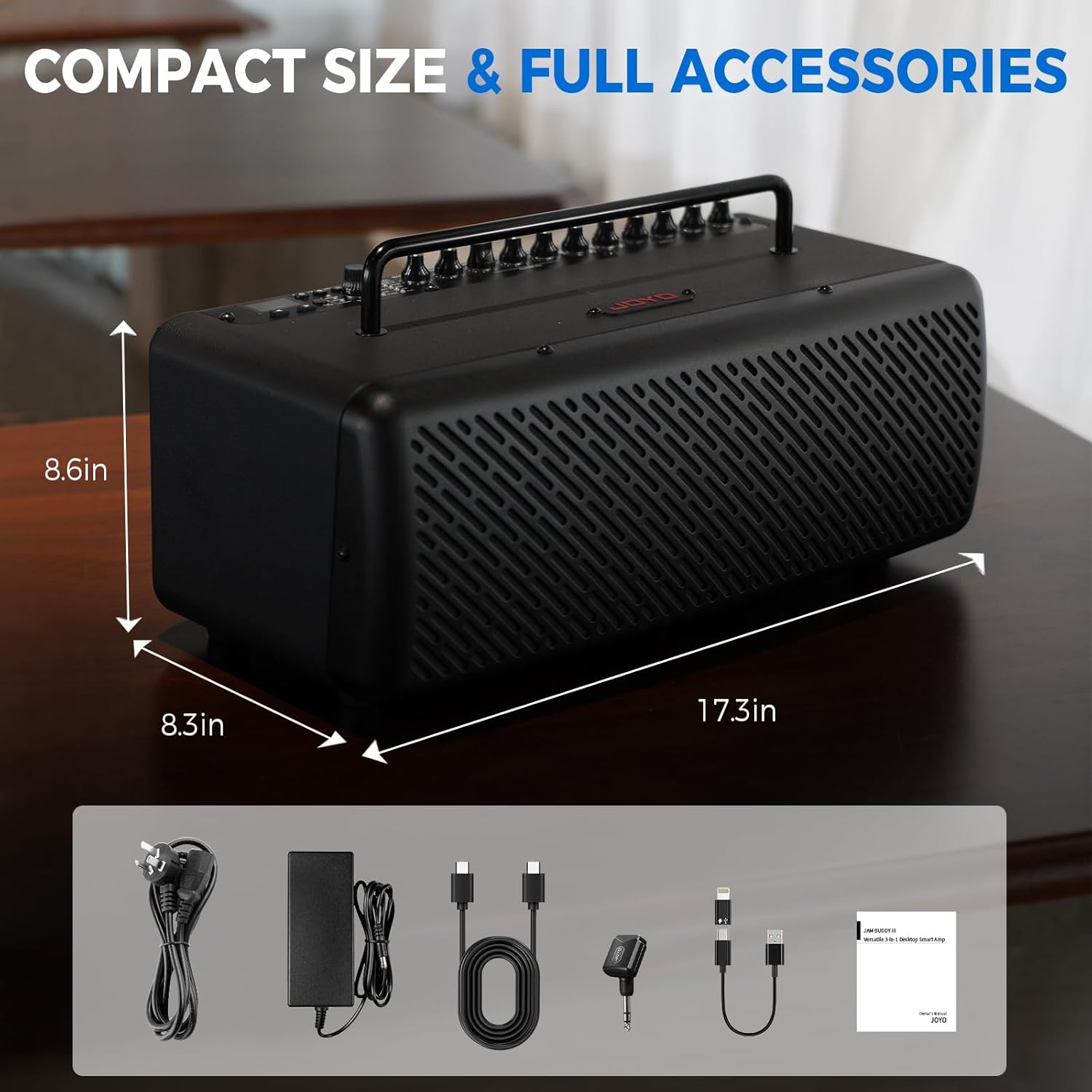
All included accessories laid out next to the JOYO JAM Buddy III, including cables, power adapter, and wireless transmitter.
Official Product Videos
Video: Instructions on how to download the JAM BUDDY app from the App Store and connect via Bluetooth. The video shows navigating the App Store, searching for "JAM BUDDY", downloading "JAM BUDDY II", opening the app, and pairing with the amplifier via Bluetooth.
Video: Demonstrates how Android phone users can download the exclusive JAM BUDDY app. The video guides through opening a browser, navigating to the JoyoAudio website, finding the JAM BUDDY III product page, and downloading the Android APK file for installation.
Video: A concise overview of the JOYO JAM BUDDY III Smart 3-in-1 Desktop Amplifier, highlighting its key features and versatility for guitar, bass, and vocals. The video showcases the amplifier's compact design and various connectivity options.

