1. Introduction
This manual provides comprehensive instructions for the JJC Slim Memory Card Case. Designed for secure and organized storage of various memory cards, this case offers robust protection against environmental factors and physical impact. Please read this manual thoroughly to ensure proper use and maintenance of your memory card case.
2. Product Features
- Large Capacity: Stores up to 12 Micro SD/Micro SDHC/Micro SDXC/TF Cards, 8 SD/SDHC/SDXC Cards, and 2 Nano SIM Cards. Includes a card retrieval pin and a flat head screwdriver for convenience.
- IP67 Waterproof & Full Protection: Constructed from premium ABS material for strength and durability, protecting against scratches and impact. Features an IP67 waterproof rating with a silicone seal to ensure a dry and safely protected interior.
- Small & Compact Size: Dimensions of 2.92×3.99×0.65" (74.2×101.43×16.5mm) make it smaller than traditional memory card cases, enhancing portability. Comes with an anti-lost carabiner for attachment to backpacks or belts.
- Customized Foam Lining: The interior features a custom-fit foam lining that facilitates easy insertion and removal of memory cards while providing cushioning against damage.
- Ergonomic Locking System: The storage case utilizes an ergonomic locking mechanism that closes firmly and can be easily opened with finger pressure, preventing accidental opening and protecting cards from loss or damage.
3. Setup and Card Insertion
This section details how to properly open the case and insert your memory cards.
- Opening the Case: Locate the ergonomic locking system on the side of the case. Gently press the latch to release the cover and open the case.
- Inserting Micro SD/TF Cards: The foam lining features dedicated slots for Micro SD/TF cards. Align the card with the slot and gently press it into the customized foam until it is securely seated.
- Inserting SD Cards: Larger slots are provided for standard SD cards. Align the SD card and press it into the foam lining. The customized foam ensures a snug fit.
- Inserting Nano SIM Cards: Dedicated smaller slots are available for Nano SIM cards. Carefully place the Nano SIM card into its designated slot.
- Using Included Tools: The case includes a card retrieval pin for ejecting SIM cards from devices and a flat head screwdriver for other small adjustments. Store these tools in their designated slots within the case.
- Closing the Case: Ensure all cards are properly seated. Close the lid firmly until the ergonomic locking system clicks into place, securing the contents.

Figure 1: Interior view of the memory card case with individual card slots and included tools.

Figure 2: The ergonomic locking system ensures secure closure.
Product Video: Slim Memory Card Case
Video 1: Demonstrates the features and usage of the JJC Slim Memory Card Case, including card insertion and the locking mechanism.
4. Operating Instructions
The JJC Slim Memory Card Case is designed for portability and ease of access.
- Portability: The compact size allows the case to be easily carried in pockets, camera bags, or attached to backpacks using the included carabiner.
- Quick Access: The ergonomic lock allows for quick and easy access to your memory cards when needed, without compromising security.
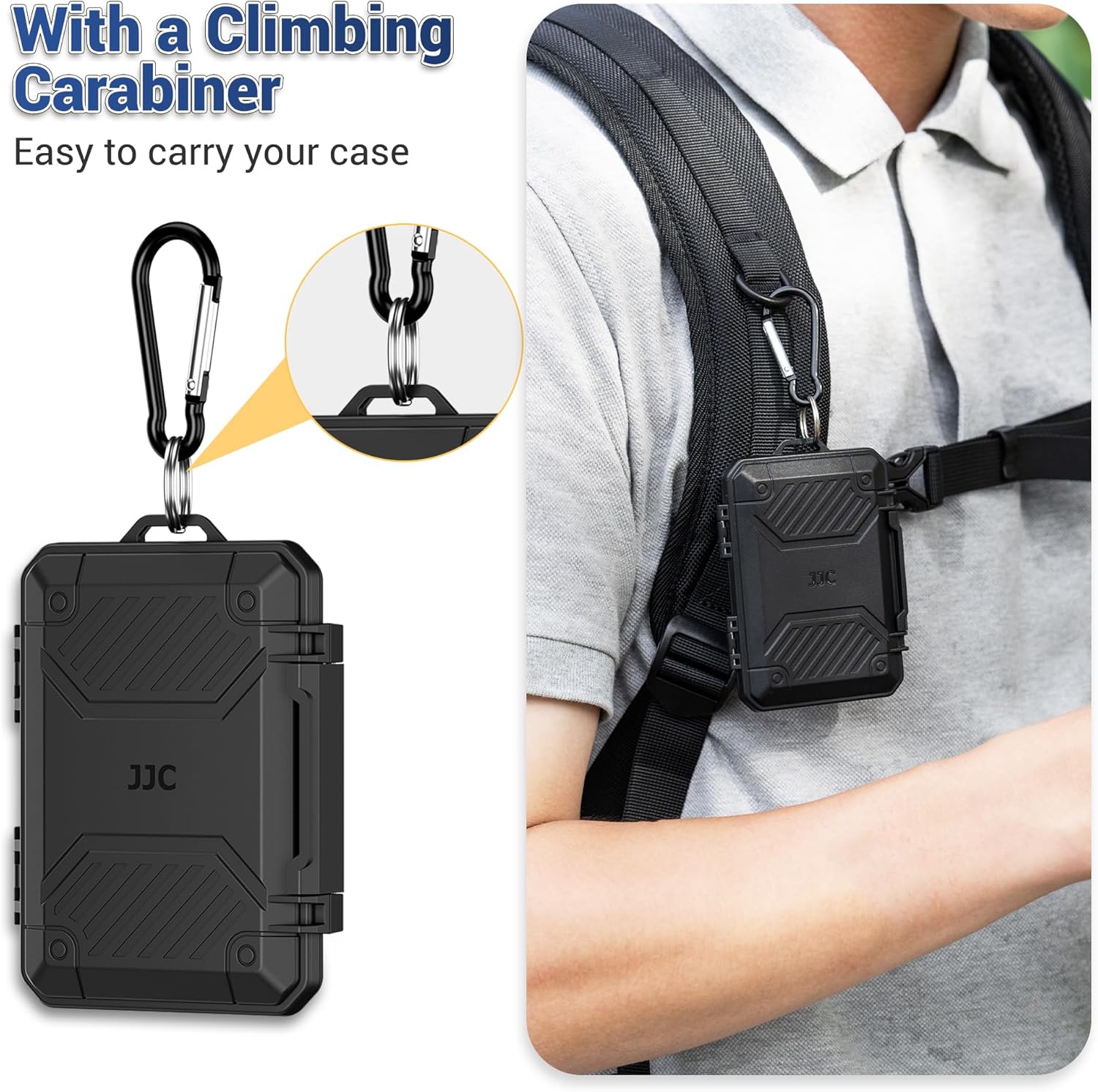
Figure 3: The included carabiner allows for convenient attachment to bags or belts.

Figure 4: The compact design makes the case easy to handle and transport.
5. Maintenance and Care
To ensure the longevity and optimal performance of your JJC Slim Memory Card Case, follow these maintenance guidelines:
- Cleaning: Wipe the exterior with a soft, damp cloth. Avoid harsh chemicals or abrasive materials that could damage the ABS shell.
- Waterproof Seal: Periodically inspect the silicone seal around the case for any signs of wear or damage. Ensure it is free from debris to maintain its IP67 waterproof rating.
- Storage: Store the case in a cool, dry place away from direct sunlight and extreme temperatures when not in use.
- Avoid Overfilling: Do not force more cards into the slots than intended, as this could damage the foam lining or the cards themselves.

Figure 5: The IP67 waterproof design protects your cards from moisture.

Figure 6: The premium ABS shell provides robust protection against impact.
6. Troubleshooting
- Case not closing properly: Ensure no cards or debris are obstructing the closing mechanism or the silicone seal.
- Cards difficult to insert/remove: Verify that the cards are aligned correctly with their respective slots. The foam is designed for a snug fit, but excessive force should not be required.
- Accidental opening: Ensure the ergonomic locking system is fully engaged and clicked into place after closing the case.
7. Specifications
| Feature | Detail |
|---|---|
| Model | Slim Memory Card Case (for 12 TF+ 8 SD + 2 Nano SIM) |
| Capacity | 12 Micro SD/TF, 8 SD, 2 Nano SIM Cards |
| Dimensions | 2.92 x 3.99 x 0.65 inches (74.2 x 101.43 x 16.5 mm) |
| Item Weight | 2.08 ounces |
| Material | Premium ABS Shell, Silicone Seal, Customized Foam Lining |
| Protection | IP67 Waterproof, Anti-Shock, Anti-Dust |
| Included Accessories | Card retrieval pin, Flat head screwdriver, Carabiner |
| Manufacturer | Jinjiacheng Photography Equipment Co.,Ltd. |
| Date First Available | September 17, 2025 |
8. Warranty and Support
For warranty information and customer support, please refer to the product packaging or visit the official JJC website. You can also visit the JJC Store on Amazon for additional product details and contact options.


