
1. Product Overview
This Leipsden privacy filter is designed for Suevery SV270ZC and SV270ZD monitors. It provides privacy protection, reduces blue light and UV radiation, and features a reversible design with both glossy and anti-glare surfaces. The filter is also treated for fingerprint resistance and easy cleaning.
Note: This product is a protective filter and not the monitor itself.
Key Features:
- Privacy Protection: Prevents viewing from side angles (approximately 60-degree viewing angle, 30 degrees from left and right of center).
- Blue Light & UV Cut: Reduces blue light by 49% and UV rays by 99% to minimize eye strain.
- Reversible Design: Offers both a glossy side for vibrant display and an anti-glare side to reduce reflections.
- Fingerprint Resistance: Special material and coating reduce visible fingerprints and allow for easy cleaning.
- Scratch Protection: Hard coat processing helps protect the screen from scratches.
- Water Repellent Coating: Repels water to protect the screen from spills.

Image 1: Overview of Leipsden Privacy Filter features, including privacy, blue light cut, reversible use, water repellency, screen protection, and fingerprint resistance.
2. Package Contents
- LCD Protective Filter x 1
- Tab Tool Set x 1 (for installation)
3. Setup and Installation
The Leipsden privacy filter can be installed using either the tab method or adhesive seals, both included in the tab tool set. Choose the method that best suits your preference and monitor design.
Important Considerations Before Installation:
- The filter is sized to cover only the display area (active area) of your monitor, not including the frame. Please verify your monitor's display area dimensions before purchase and installation.
- Due to slight variations in monitor models, a size difference of 1-3mm between the filter and the monitor may occur.
- After installation, the screen may appear slightly darker due to the filter's transparency rate of approximately 70% ± 5%.
Installation Steps (Tab Method):
- Clean your monitor screen thoroughly to remove any dust or smudges.
- Identify the top edge of your monitor screen.
- Attach the provided tabs along the top and sides of your monitor frame, ensuring they are evenly spaced and securely adhered.
- Slide the privacy filter into the tabs, making sure it is centered and flush with the screen.
- Ensure the desired side (glossy or anti-glare) is facing outwards before sliding it in.
Installation Steps (Adhesive Seal Method):
- Clean your monitor screen thoroughly to remove any dust or smudges.
- Carefully peel off the protective film from the adhesive seals provided in the tab tool set.
- Apply the adhesive seals to the corners or edges of the privacy filter.
- Align the filter with your monitor screen, ensuring it is centered and the desired side (glossy or anti-glare) is facing outwards.
- Gently press the filter onto the screen, ensuring the adhesive seals make firm contact with the monitor frame.
4. Operating Instructions
Privacy Functionality:
The privacy filter restricts the viewing angle to approximately 60 degrees (30 degrees to the left and right of the center). When viewed from outside this angle, the screen will appear dark, protecting your on-screen information from prying eyes. This feature is particularly useful in public spaces or office environments. Please note that the privacy effect does not apply to vertical viewing angles (up or down).
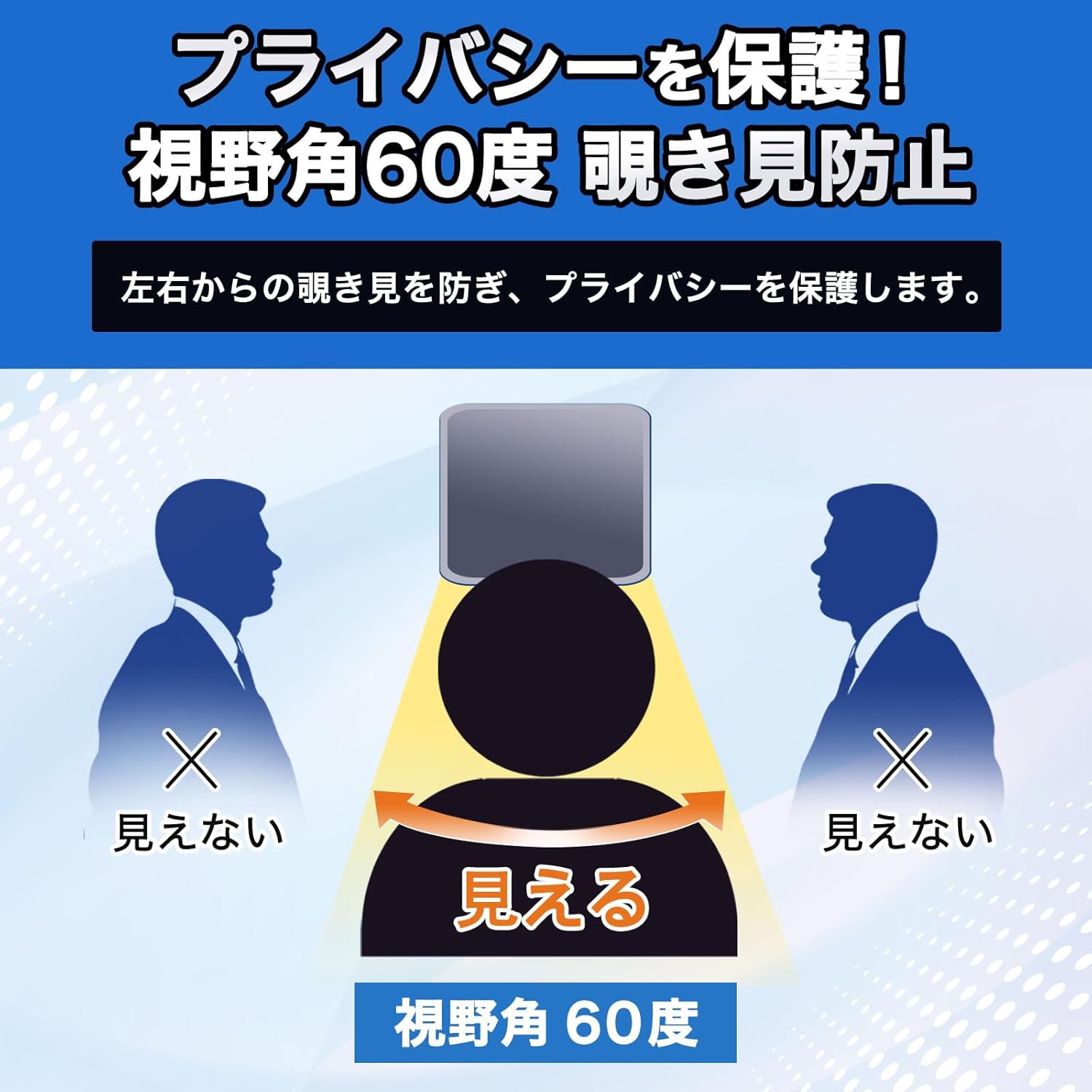
Image 2: Illustration of the privacy filter's 60-degree viewing angle, demonstrating how the screen appears visible only to the user directly in front, and dark to those viewing from the sides.
Reversible Use (Glossy vs. Anti-Glare):
The filter offers two distinct surfaces for different viewing preferences:
- Anti-Glare Side: This side effectively reduces reflections from sunlight and artificial lighting, making it ideal for use outdoors or in brightly lit environments.
- Glossy Side: This side maintains the original vibrancy and clarity of your screen, providing a sharp and vivid display for images and videos.
You can choose which side to use based on your environment and content. If you wish to switch sides, carefully remove the filter and re-install it with the desired surface facing outwards.

Image 3: Visual comparison showing the anti-glare side reducing reflections and the glossy side enhancing screen vibrancy.
Blue Light and UV Protection:
The filter is designed to cut approximately 49% of blue light and 99% of UV rays emitted from the LCD screen. This feature helps to reduce eye fatigue and discomfort during prolonged use, especially beneficial when using the monitor at night or in dimly lit conditions.

Image 4: Diagram illustrating how the privacy filter blocks blue light and UV rays from reaching the eye, reducing potential strain.
5. Maintenance and Care
Cleaning the Filter:
The filter features a special fingerprint-resistant coating, making it easy to keep clean. To clean, gently wipe the surface with a soft, lint-free cloth. For stubborn smudges, a small amount of screen cleaner specifically designed for electronics can be used. Avoid harsh chemicals or abrasive materials, as these may damage the filter's coating.

Image 5: Comparison showing a screen with fingerprints before cleaning and a clean screen after wiping, demonstrating the effectiveness of the fingerprint-resistant coating.
Water Repellent Coating:
The filter has a water-repellent coating that helps protect your screen from accidental water splashes. If water comes into contact with the filter, it will bead up, allowing you to easily wipe it away without damaging the screen underneath.

Image 6: Illustration of water droplets beading on the filter's surface, indicating its water-repellent properties.
Scratch Protection:
The hard coat processing on the filter provides an additional layer of protection against scratches and minor impacts, helping to preserve the integrity of your monitor screen.

Image 7: Diagram illustrating how the hard coat processing protects the screen from potential scratches.
6. Troubleshooting
- Screen appears too dark after installation: This is normal due to the filter's light transmission rate (approx. 70% ± 5%). If it's excessively dark, check your monitor's brightness settings.
- Filter does not fit perfectly: Ensure you have the correct size for your monitor model (Suevery SV270ZC / SV270ZD). Minor discrepancies (1-3mm) may occur due to monitor manufacturing variations. The filter is designed for the display area only, not the frame.
- Privacy effect is not strong enough: The privacy effect is designed for side viewing angles (left/right). It does not provide privacy from vertical (up/down) viewing angles. Ensure the filter is correctly oriented.
- Bubbles or dust under the filter: Remove the filter, clean both the monitor screen and the filter thoroughly with a lint-free cloth, and re-install carefully.
7. Specifications
| Specification | Detail |
|---|---|
| Brand | Leipsden |
| Compatible Devices | Suevery SV270ZC / SV270ZD Monitors |
| Filter Size (Display Area) | 597 x 336 mm (for 27-inch monitors) |
| Material | Polyethylene terephthalate (PET) |
| Special Features | Privacy protection, Blue light cut, UV cut, Reversible (glossy/anti-glare), Fingerprint resistant, Water repellent, Hard coat processing, Easy installation (tab/adhesive) |
| Finish Type | Glossy / Anti-Glare |
| Light Transmittance | Approx. 70% ± 5% |
| Blue Light Cut Rate | Approx. 49% |
| UV Cut Rate | Approx. 99% |
| Product Weight | 65 g |
| Product Dimensions | 0.01 x 0.01 x 1.27 cm (packaging/filter thickness) |
8. Warranty and Support
Information regarding warranty and customer support for this product is typically provided at the point of purchase or within the product packaging. Please refer to any included documentation or contact the seller directly for specific warranty terms and support options.
Product specifications, shape, and price are subject to change without prior notice.