1. Introduction
Thank you for purchasing the Mersoco B500 Vinyl Record Player. This manual provides essential information for the safe and efficient operation of your new turntable. Please read it thoroughly before use and retain it for future reference.
Important Safety Instructions
- Do not expose this appliance to dripping or splashing.
- Ensure proper ventilation; do not block ventilation openings.
- Do not place the unit near heat sources or in direct sunlight.
- Unplug the unit from the power outlet during lightning storms or when unused for long periods.
- Clean only with a dry cloth. Avoid harsh chemicals or solvents.
2. Package Contents
Please check that all items are present and in good condition:
- Mersoco B500 Vinyl Record Player Turntable
- Power cable
- RCA cable
- Auxiliary cable (3.5mm)
- 45 RPM adapter
- User Manual
3. Product Overview
Familiarize yourself with the components of your Mersoco B500 turntable:
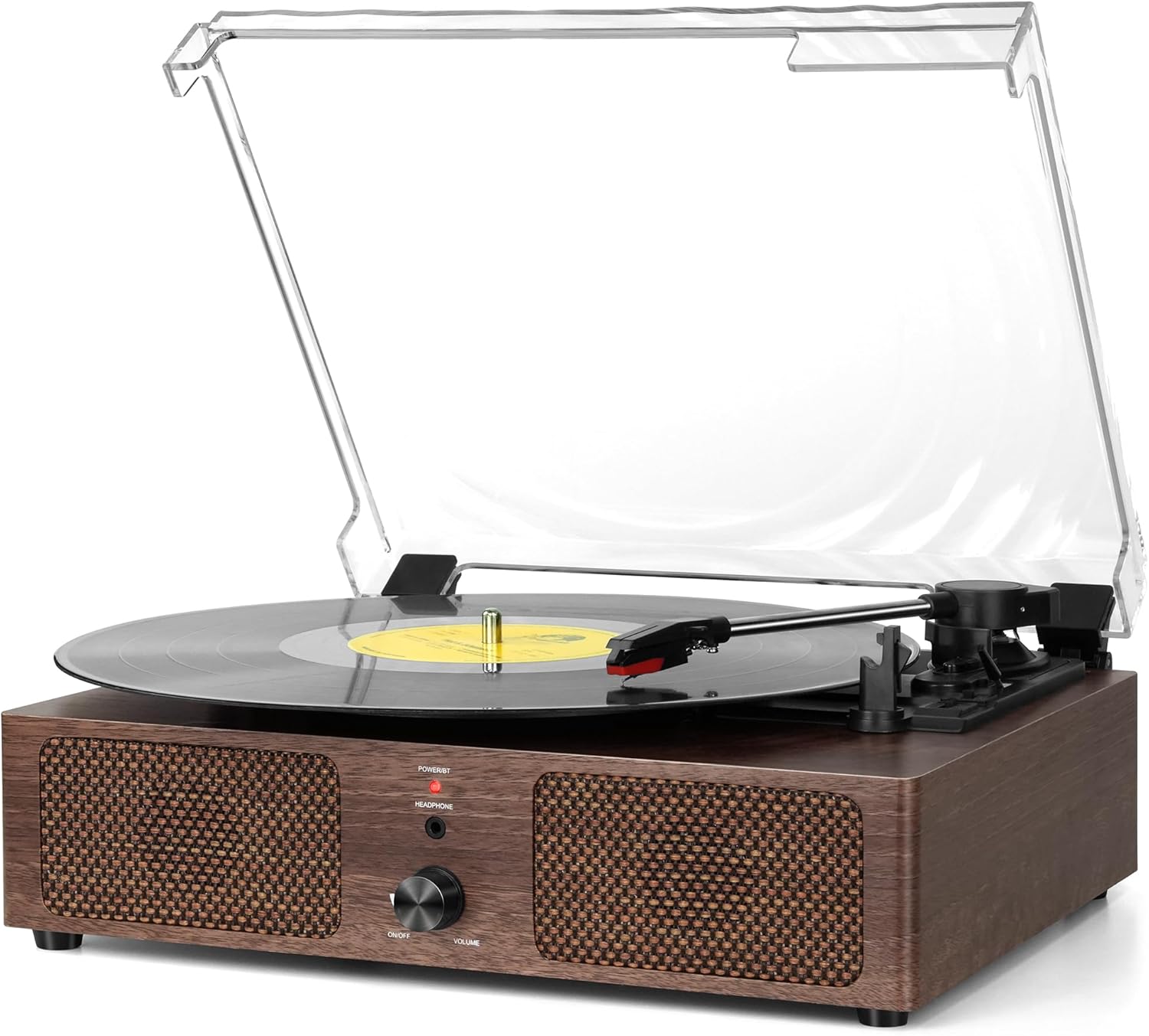
Figure 1: Front view of the Mersoco B500 Vinyl Record Player.
Key Components:
- Turntable Platter: Where records are placed.
- Tonearm: Holds the stylus and tracks the record grooves.
- Stylus (Needle): Reads the audio from the record.
- Speed Selector: Adjusts playback speed (33, 45, 78 RPM).
- Power/Volume Knob: Turns the unit on/off and controls volume.
- Built-in Stereo Speakers: For direct audio output.
- Dust Cover: Protects the turntable from dust.

Figure 2: Rear panel connections including USB, AUX-in, and RCA Line Out.
- USB Port: For playing music from USB drives and recording vinyl to USB.
- AUX-IN Jack: Connect external audio devices via 3.5mm cable.
- RCA Line Out: Connect to external amplifiers or powered speakers.
- Headphone Jack: For private listening.
4. Setup
- Unpacking: Carefully remove the turntable from its packaging. Retain packaging for future transport or storage.
- Placement: Place the unit on a stable, level surface away from direct sunlight, heat sources, and excessive dust or moisture.
- Power Connection: Connect the power adapter to the DC IN port on the product and then plug it into a 100-240V/50/60Hz AC power outlet.
- Dust Cover: The clear dust cover can be opened or closed. Ensure it is properly seated on its hinges.
- Stylus Guard: Remove the stylus guard from the cartridge before playing a record.
5. Operating Instructions
5.1 Playing Vinyl Records
- Power On: Rotate the Power/Volume knob clockwise to turn on the unit. The power indicator will light up (red).
- Place Record: Place a vinyl record on the turntable platter. For 7-inch records, use the included 45 RPM adapter.
- Select Speed: Adjust the speed selector to match the record's RPM (33 1/3, 45, or 78 RPM).

Figure 3: Speed selector for 33, 45, and 78 RPM records.
- Position Tonearm: Gently lift the tonearm using the lift lever and move it over the desired track on the record. Lower the tonearm slowly onto the record.

Figure 4: Tonearm with stylus positioned over a record.
- Adjust Volume: Rotate the Power/Volume knob to adjust the sound level.
- Auto-Stop Feature: The turntable will automatically stop playing when the record reaches the end. To disable this, set the auto-stop switch to OFF.
- After Playback: Gently lift the tonearm and return it to its rest. Secure it with the tonearm rest and security latch.
5.2 Bluetooth Playback
The Mersoco B500 can receive audio wirelessly from Bluetooth-enabled devices.
- Activate Bluetooth Mode: Turn on the turntable. The power indicator will flash blue, indicating Bluetooth pairing mode.
- Pair Device: On your smartphone, tablet, or other Bluetooth device, search for "BR" in the Bluetooth settings and connect. The indicator light will turn solid blue once connected.
- Play Music: Start playing music from your connected device. Adjust volume using the turntable's volume knob or your device's volume controls.

Figure 5: Bluetooth connection in progress.
5.3 AUX-IN Playback
Connect external audio sources using the 3.5mm auxiliary cable.
- Connect Cable: Plug one end of the 3.5mm AUX cable into the AUX-IN jack on the turntable and the other end into the headphone or AUX output of your external device (e.g., CD player, smartphone).
- Select AUX Mode: The turntable should automatically switch to AUX mode.
- Play Music: Start playback from your external device. Adjust volume using the turntable's volume knob.
5.4 RCA Line Out
For enhanced audio, connect the turntable to external powered speakers or an amplifier.
- Connect RCA Cable: Plug the RCA cable (red and white connectors) into the corresponding RCA Line Out ports on the turntable.
- Connect to External Audio System: Connect the other end of the RCA cable to the input jacks of your external amplifier or powered speakers.
- Adjust Volume: Control the volume through your external audio system.
5.5 USB Playback and Recording
The turntable supports playing MP3 files from a USB drive and converting vinyl records to MP3 format directly to a USB drive.
USB Playback:
- Insert USB Drive: Plug a USB flash drive containing MP3 files into the USB port.
- Select USB Mode: The unit should automatically detect the USB drive and switch to USB playback mode.
- Control Playback: Use the control buttons (if available on the unit, otherwise through connected device) to play, pause, skip tracks.
Vinyl to USB Recording:
- Insert USB Drive: Ensure a USB flash drive is inserted into the USB port.
- Start Vinyl Playback: Begin playing your vinyl record as described in Section 5.1.
- Initiate Recording: (Specific button for recording is not detailed in provided data, assume a general "Record" function or refer to manual for exact steps). The unit will convert the playing vinyl audio into MP3 files and save them to the USB drive.
- Stop Recording: (Assume a "Stop Record" function).
6. Maintenance
6.1 Cleaning the Stylus
- Use a soft brush, moving from back to front, to gently remove dust from the stylus.
- Avoid touching the stylus with your fingers.
6.2 Cleaning the Unit
- Wipe the dust cover and turntable housing with a soft, slightly damp cloth.
- Do not use abrasive cleaners, waxes, or polishes.
7. Troubleshooting
| Problem | Possible Cause | Solution |
|---|---|---|
| No power | Power adapter not connected or outlet not working. | Ensure power adapter is securely connected and the outlet is functional. |
| No sound from speakers | Volume too low; incorrect input mode; external speakers not connected properly (if using RCA out). | Increase volume; ensure correct mode (Vinyl, Bluetooth, AUX, USB); check RCA connections. |
| Record skipping | Dirty or damaged record; dirty or worn stylus; turntable not level. | Clean record; clean or replace stylus; ensure turntable is on a level surface. |
| Bluetooth not connecting | Turntable not in pairing mode; device too far; interference. | Ensure turntable is flashing blue; move device closer; restart both devices. |
8. Specifications
| Brand | Mersoco |
| Model Name | B500 (Vintage Vinyl Record Player Wooden) |
| Product Dimensions | 12.58 x 10.67 x 5.71 inches |
| Item Weight | 4.76 pounds |
| Material | Wood |
| Rotational Speeds | 33 1/3, 45, 78 RPM |
| Connectivity | Bluetooth, AUX-IN, RCA Line Out, USB |
| Special Features | Built-in stereo speakers, USB playback and recording, 45 RPM adapter included. |
9. Warranty and Support
Mersoco products are designed for reliability and performance. For specific warranty details, please refer to the warranty card included with your product or contact the retailer where you purchased the item.
For technical support or inquiries, please contact Mersoco customer service or the authorized retailer. Keep your purchase receipt as proof of purchase for warranty claims.


