
Introduction
This manual provides detailed instructions for the safe and effective use of your BURNNOVE 5-inch 720P Video Baby Monitor (Model ABM570). Please read this manual thoroughly before operating the device and retain it for future reference. This baby monitor is designed to provide clear audio and video surveillance of your baby, offering features such as two-way communication, night vision, and temperature monitoring without requiring a Wi-Fi connection.
What's in the Box
Carefully unpack the contents and ensure all items are present and undamaged. If any items are missing or damaged, please contact customer support.
- 1 x Baby Unit (Camera)
- 1 x Parent Unit (Monitor)
- 2 x Power Adapters
- 2 x Charging Cables
- 2 x Screws and Wall Plugs (for wall mounting)
- 1 x User Manual

Image: Contents of the BURNNOVE Baby Monitor package, showing the camera, monitor, two power adapters, two charging cables, and a user manual.
Product Overview
The BURNNOVE ABM570 baby monitor system consists of a camera (baby unit) and a monitor (parent unit), designed for reliable and secure baby surveillance.
Key Features:
- 5-inch 720P HD Display: Provides a clear, high-resolution view of your baby.
- 4x Digital Zoom: Allows for closer inspection of your baby.
- VOX Function: Voice-activated mode that automatically turns on the screen when sound is detected.
- 2.4GHz FHSS Technology: Ensures a secure, interference-free connection without Wi-Fi.
- PTZ Control: Remotely pan, tilt, and zoom the camera to adjust the viewing angle.
- Infrared Night Vision: Automatic night vision for clear monitoring in low light or complete darkness.
- Two-Way Intercom: Speak to and soothe your baby remotely.
- Feeding Reminder: Programmable alerts for feeding times.
- Built-in Lullabies: 8 soothing melodies to help your baby sleep.
- Temperature Detection: Real-time monitoring of the room temperature with alerts.

Image: The BURNNOVE baby monitor parent unit and camera unit displayed on a table, with icons illustrating its main features such as 720P HD, 3500mAh battery, two-way dialogue, PTZ control, night vision, feeding reminder, 8 lullabies, and temperature monitoring.
Setup
1. Charging the Units
Before first use, fully charge both the parent unit and the baby unit. Connect the provided power adapters to each unit and plug them into a power outlet. The parent unit has a rechargeable battery for portability.

Image: The parent unit of the baby monitor is shown charging from a wall outlet, emphasizing its 3500mAh battery capacity and long battery life.
2. Positioning the Baby Unit (Camera)
Place the baby unit in a location that provides a clear view of your baby's crib or sleeping area. Ensure it is at least 1 meter (3 feet) away from the baby to avoid potential hazards and to capture a wider view. The camera can be placed on a flat surface, mounted on a wall, or attached to a flexible stand (if purchased separately).
- Tabletop: Place on a stable, flat surface near the crib.
- Wall Mount: Use the provided screws and wall plugs to securely mount the camera on a wall.

Image: Three different setup options for the baby monitor camera are shown: mounted on a wall above a crib, placed on a table next to a baby, and attached to a flexible stand.
3. Powering On and Pairing
Turn on both the baby unit and the parent unit. The units are pre-paired at the factory. If they do not connect automatically, refer to the troubleshooting section for manual pairing instructions.
Operating Instructions
1. Basic Monitoring
Once connected, the parent unit will display live video from the baby unit. The 5-inch 720P HD screen provides a clear view. You can adjust the volume using the dedicated buttons on the parent unit.

Image: A close-up of the BURNNOVE baby monitor's 5-inch screen displaying a clear image of a baby in a crib, emphasizing the detail visible.
2. PTZ Control and Digital Zoom
Use the directional buttons on the parent unit to remotely pan (left/right) and tilt (up/down) the camera. Press the zoom button to activate the 4x digital zoom for a closer look.

Image: The baby monitor screen shows a baby in a crib, with insets demonstrating 2x and 4x digital zoom capabilities, highlighting the 5-inch 720P HD display.
3. VOX Function (Voice Activation)
Activate VOX mode to conserve battery. In this mode, the screen will automatically turn on when the baby unit detects sound above a certain threshold (e.g., baby crying). The screen will turn off after a period of silence.
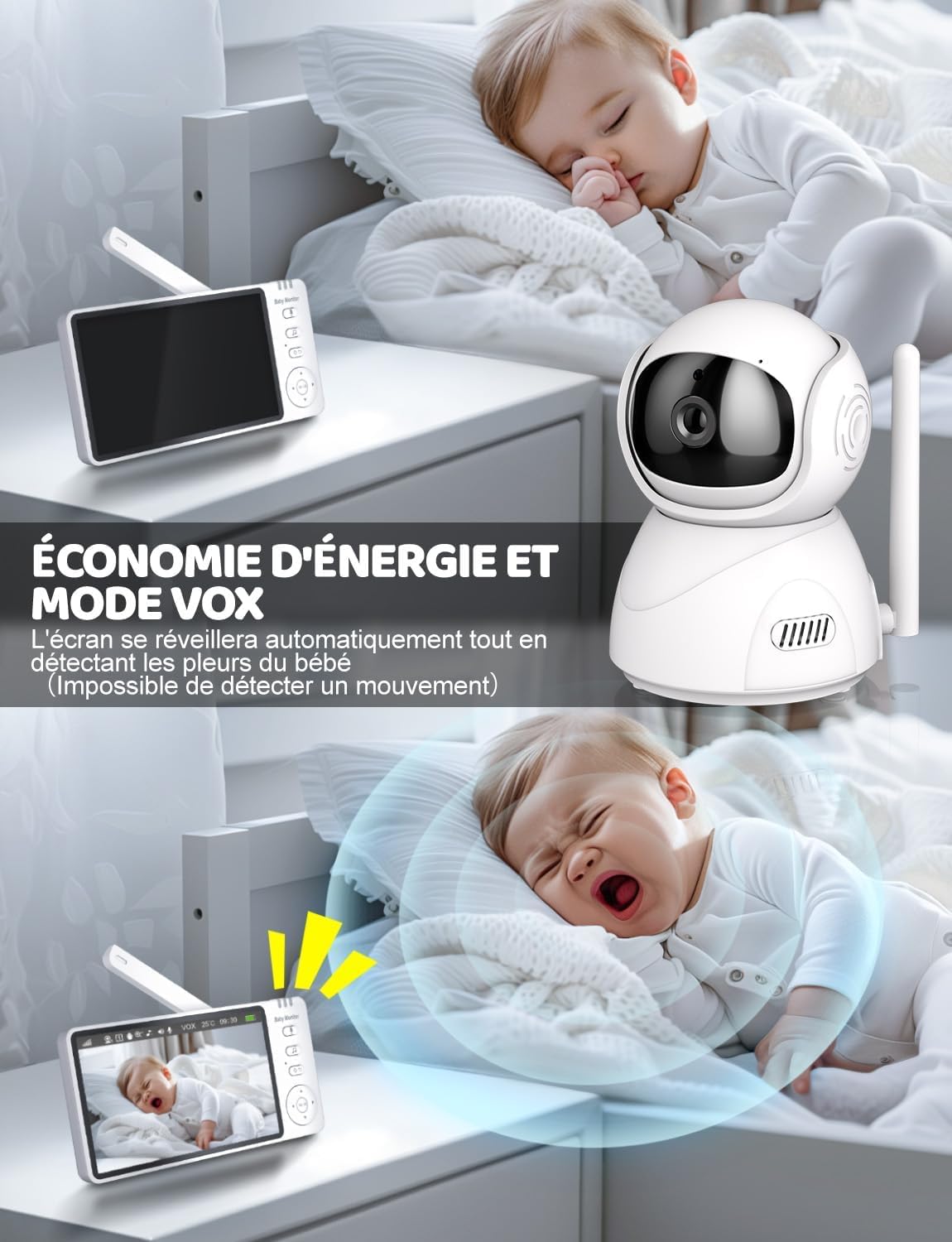
Image: A split image showing the baby monitor in VOX mode. The top half shows the screen off while the baby sleeps, and the bottom half shows the screen automatically activating when the baby cries, indicating energy saving.
4. Two-Way Intercom
Press and hold the talk button on the parent unit to speak to your baby through the baby unit's speaker. Release the button to hear your baby's sounds.

Image: The baby monitor parent unit is held by a parent, displaying a baby on screen. The baby unit camera is shown on the floor, with speech bubbles indicating two-way communication between parent and baby.
5. Night Vision
The baby unit automatically switches to infrared night vision in low light conditions, providing a clear black and white image on the parent unit.

Image: The baby monitor parent unit shows a baby sleeping in a crib in infrared night vision. Musical notes float around the camera, indicating the lullaby function.
6. Feeding Reminder
Access the menu on the parent unit to set programmable feeding reminders at intervals of 30 minutes, 1 hour, 2 hours, 3 hours, or 4 hours.

Image: A baby drinks from a bottle while the baby monitor displays icons for feeding reminder intervals: 30 minutes, 1 hour, 2 hours, 3 hours, and 4 hours.
7. Lullabies
Select from 8 built-in lullabies through the parent unit's menu to play soothing sounds for your baby.
8. Temperature Monitoring
The parent unit displays the real-time temperature of the baby's room. You can set temperature alerts to be notified if the room temperature goes above or below a set range.

Image: A parent holds the baby monitor, which shows a crying baby on screen and a red alarm icon indicating a temperature alert.
9. Multiple Cameras (Optional)
The system supports connecting up to two cameras. If you have an additional camera, you can switch between views or use a split-screen mode (check specific model features for availability).

Image: The baby monitor screen displays a split view from two cameras, one showing a baby and the other a small dog, illustrating the multi-camera support. A note clarifies that only one camera is included.
Maintenance
Cleaning
Wipe the units with a dry, soft cloth. Do not use cleaning agents or solvents. Ensure the units are powered off before cleaning.
Storage
Store the baby monitor in a cool, dry place away from direct sunlight when not in use for extended periods. Ensure batteries are charged periodically if stored for a long time.
Troubleshooting
| Problem | Possible Cause | Solution |
|---|---|---|
| No image/sound on parent unit | Units are not powered on or not paired. Out of range. Low battery. | Ensure both units are powered on and charged. Move parent unit closer to baby unit. Re-pair units (see manual for specific steps). |
| Poor image quality | Insufficient lighting. Camera lens is dirty. Out of range. | Ensure adequate lighting or check night vision activation. Clean camera lens with a soft cloth. Move parent unit closer. |
| Interference/Static | Other 2.4GHz devices nearby. Out of range. | Move the baby monitor away from other electronic devices (e.g., Wi-Fi routers, microwaves). Move parent unit closer to baby unit. |
| VOX not activating | VOX sensitivity set too low. | Adjust VOX sensitivity settings in the parent unit menu to a higher level. |
| Battery drains quickly | Continuous screen on. VOX mode not enabled. Aging battery. | Enable VOX mode. Reduce screen brightness. Ensure full charge before use. If battery life significantly degrades, consider contacting support for replacement options. |
Specifications
- Model Number: ABM570
- Screen Size: 5 inches
- Display Resolution: 720P HD (720 pixels effective capture)
- Zoom: 4x Digital Zoom
- Connectivity: 2.4GHz FHSS Wireless (No Wi-Fi required for main function)
- Night Vision: Infrared, up to 10 meters range, 8 IR LEDs
- PTZ Control: Pan, Tilt, Zoom via remote control
- Audio: Two-Way Communication, VOX Voice Activation
- Special Features: Feeding Reminder, 8 Lullabies, Temperature Detection with Alerts
- Power Source: Rechargeable Battery (Parent Unit), Power Adapter (Baby Unit)
- Battery: 1 A battery included
- Dimensions (L x W x H): 20.5 x 15 x 12.7 cm
- Weight: 850 Grams
- Color: White
- Material: ABS Plastic, Optical Glass
- Water Resistance: Not Waterproof (IP65 rated for dust and water jets, but not immersion)
- Installation Type: Portable, Tabletop, or Wall Mount
- Frame Rate: 25 Fps, 30 Fps
- View Angle: 70 Degrees
- Optical Sensor Technology: CMOS
Warranty and Support
BURNNOVE products are designed for reliability and performance. For warranty information, technical support, or service inquiries, please refer to the contact information provided with your purchase or visit the official BURNNOVE website. Please have your model number (ABM570) and purchase details ready when contacting support.