
Introduction
Thank you for choosing the DWVO TV Stand with Fireplace. This entertainment center is designed to accommodate TVs up to 75 inches and features an integrated electric fireplace, a built-in power outlet with USB ports, storage drawers, and cabinets. This manual provides essential information for assembly, operation, maintenance, and safety to ensure proper use and longevity of your product.
Safety Information
Please read and understand all safety instructions before assembly and use. Failure to follow these instructions may result in injury or product damage.
- Always use caution when handling heavy items. It is recommended that two adults assemble this product.
- Ensure the electric fireplace is installed with adequate clearance from combustible materials. Refer to the fireplace unit's specific instructions for minimum clearances.
- Use appropriate safety gear, such as gloves, during assembly to prevent cuts or pinches.
- Keep children and pets away from the electric fireplace when it is in operation, especially when the heating function is active.
- Do not exceed the maximum load capacity of the TV stand. The top surface is designed for televisions up to 75 inches.
- Ensure all electrical connections for the power outlet and fireplace are secure and comply with local electrical codes. Do not overload the power outlets.
Package Contents
Your DWVO TV Stand with Fireplace will arrive in multiple packages. Please verify all components are present before beginning assembly. If any parts are missing or damaged, contact customer support.
- TV Stand components (panels, shelves, hardware)
- 23-inch Electric Fireplace unit
- Fireplace remote control
- Built-in power outlet with USB ports
- Assembly instructions manual

The TV stand and fireplace may arrive in separate packages. Please allow for potential staggered delivery.
Setup and Assembly
Assembly is required for this product. Follow the included assembly instructions carefully. It is recommended to have two people for assembly due to the product's weight and size.
- Unpack and Identify Parts: Carefully remove all components from the packaging. Lay them out on a clean, soft surface to prevent scratches. Identify each part using the provided parts list in the assembly manual.
- Assemble the Main Frame: Follow the step-by-step diagrams in the assembly manual to construct the main frame of the TV stand. Ensure all screws and fasteners are tightened securely.
- Install Drawers and Doors: Attach the drawer slides and hinges according to the instructions. Install the drawers and cabinet doors. Adjust hinges as needed for proper alignment.
- Install the Electric Fireplace: Carefully insert the 23-inch electric fireplace unit into the designated opening in the TV stand. Ensure it is seated correctly and secured if required by the fireplace's instructions.
- Connect Power Outlet: Install the built-in power outlet unit into its designated slot. Ensure the 6.6-foot power cord is routed safely and connected to a suitable wall outlet.
- Final Checks: Before placing a TV or other items, ensure the stand is stable and all connections are secure.
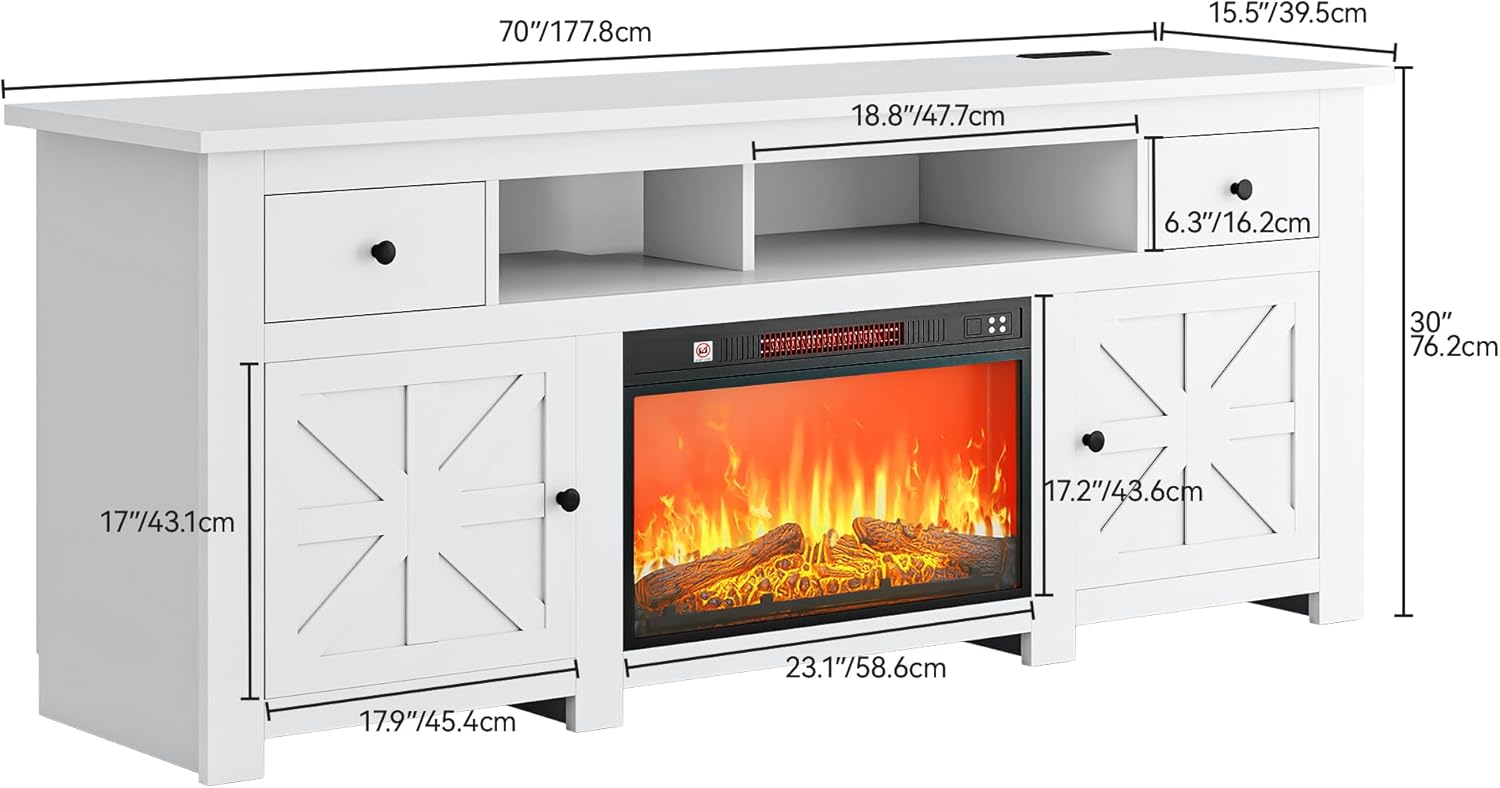
Product dimensions: 70" (L) x 15.5" (W) x 30" (H).
Operating Instructions
Electric Fireplace Operation
The electric fireplace unit comes with a remote control for convenient operation. Refer to the separate fireplace manual for detailed instructions.
- Power On/Off: Use the power button on the unit or remote to turn the fireplace on or off.
- Flame Brightness: Adjust the flame brightness using the dedicated controls on the remote or unit. Typically, multiple brightness levels are available.
- Temperature Control: Set your desired room temperature. The heater will cycle on and off to maintain this temperature.
- Timer Mode: Utilize the timer function to set the fireplace to automatically turn off after a specified duration (e.g., 30 minutes to 6 hours).
- Flame Effect Only: The flame effect can be operated independently without activating the heating function, allowing for ambiance year-round.
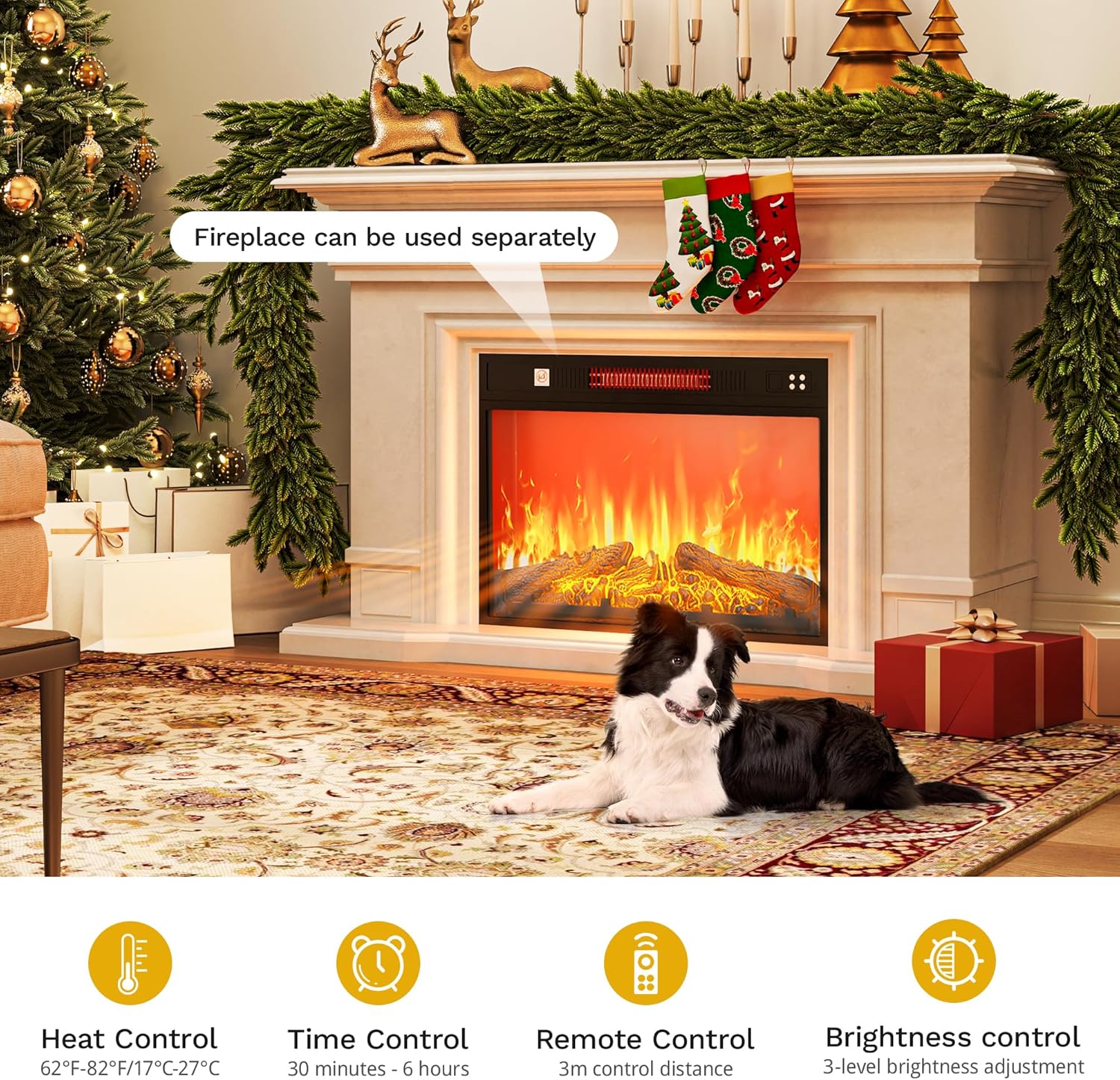
Fireplace features include heat control, time control, remote operation, and brightness adjustment.
Built-in Power Outlet
The TV stand includes a built-in power strip for convenient access to power for your devices.
- AC Outlets: The unit provides 4 standard AC outlets (120V/12A) for powering your television, media players, and other electronics.
- USB Ports: Two 5V/2A USB ports are available for charging smartphones, tablets, and other USB-powered devices.
- Power Cord: The integrated power strip features a 6.6-foot plug-in power cord. Ensure it is connected to a grounded wall outlet.

The attached socket provides 4 AC outlets and 2 USB ports.
Maintenance
Regular maintenance will help preserve the appearance and functionality of your TV stand and fireplace.
- Cleaning the Stand: Wipe surfaces with a soft, damp cloth. Avoid harsh chemicals or abrasive cleaners that may damage the finish.
- Fireplace Cleaning: Ensure the fireplace is turned off and unplugged before cleaning. Gently wipe the glass front with a soft, lint-free cloth. Keep the air intake and exhaust vents clear of dust and debris to ensure proper heat dissipation.
- Hardware Check: Periodically check all assembly hardware to ensure screws and fasteners remain tight. Retighten if necessary.
- Cable Management: Utilize the cable management holes to keep wires organized and prevent strain or damage.

Utilize cable management holes for organized wiring.
Troubleshooting
If you encounter issues with your TV stand or fireplace, refer to the following common solutions:
| Problem | Possible Cause | Solution |
|---|---|---|
| Fireplace does not turn on. | No power, unit unplugged, power switch off, remote battery dead. | Ensure the fireplace is plugged into a working outlet. Check the main power switch on the fireplace unit. Replace remote control batteries. |
| No heat from fireplace. | Heating function not activated, temperature setting too low, air vents blocked. | Activate the heating function via the remote or unit controls. Increase the temperature setting. Ensure air intake and exhaust vents are clear. |
| Power outlets not working. | Power strip unplugged, circuit breaker tripped, device not properly connected. | Ensure the TV stand's main power cord is securely plugged into a wall outlet. Check your home's circuit breaker. Ensure devices are fully plugged into the outlets. |
| Drawers/doors are misaligned. | Hinges or slides not properly adjusted. | Refer to the assembly manual for instructions on adjusting hinges and drawer slides to correct alignment. |
Specifications
| Feature | Detail |
|---|---|
| Brand | DWVO |
| Model Number | MADWVDzayO |
| Product Dimensions (D x W x H) | 15.7" x 70" x 30" (39.88 cm x 177.8 cm x 76.2 cm) |
| Material | Engineered Wood |
| Color | White |
| TV Size Compatibility | Up to 75 inches |
| Electric Fireplace Size | 23 inches |
| Power Outlet | 4 AC Outlets (120V/12A), 2 USB Ports (5V/2A) |
| Power Cord Length | 6.6 feet |
| Number of Drawers | 2 |
| Number of Doors | 4 |
| Item Weight | 113.98 Pounds |
| UPC | 199449289159 |
Warranty and Support
For warranty information and customer support, please refer to the documentation included with your purchase or contact the retailer where the product was acquired. Keep your proof of purchase for any warranty claims.


