
1. Product Overview
The LOKOOY Q6 WIFI Smart Lock is an advanced electronic door lock designed for enhanced security and convenience. It offers multiple unlocking methods and direct WIFI connectivity without the need for a separate gateway.
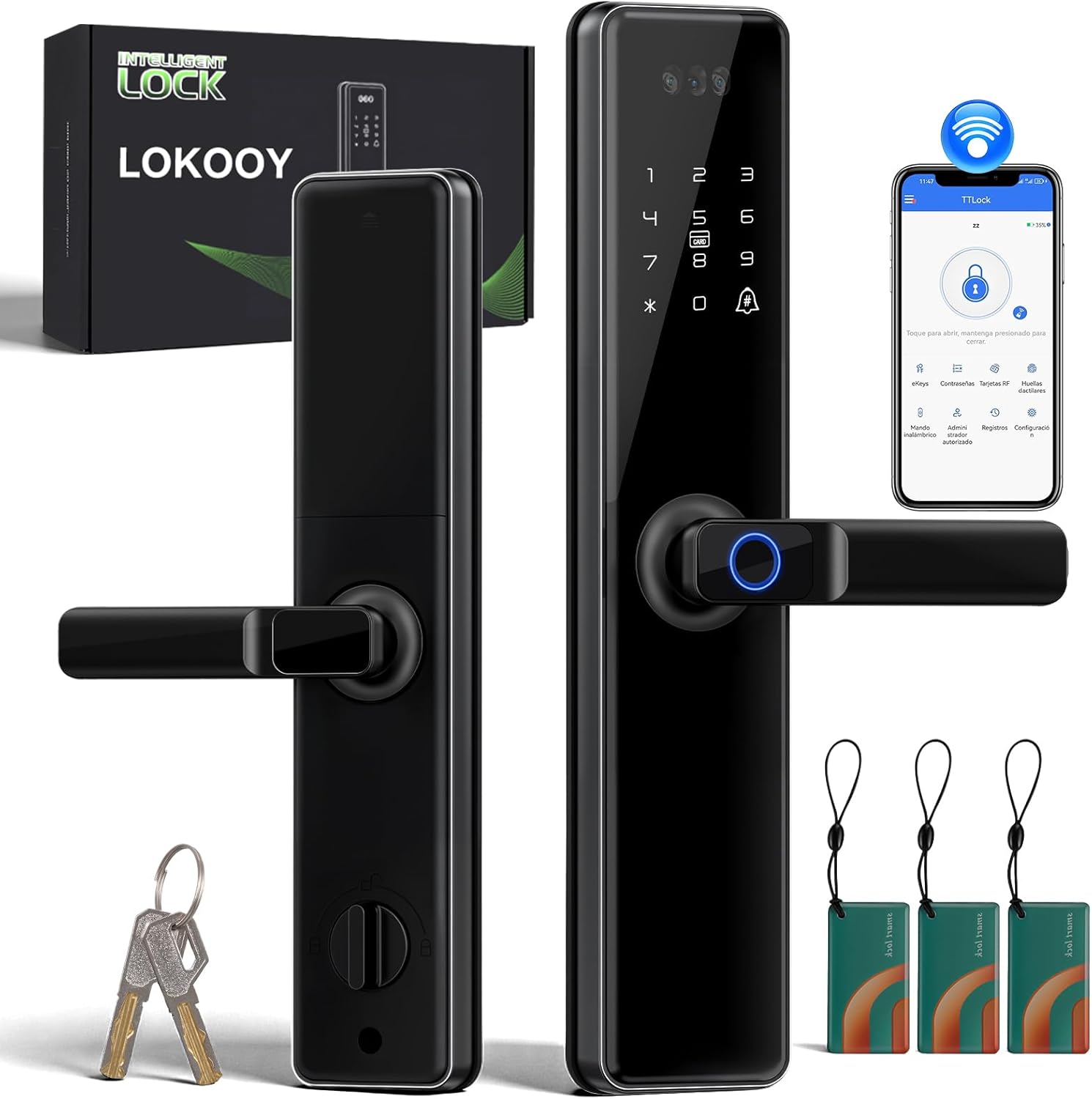
This smart lock integrates seamlessly into your home or office security system, providing features such as remote access control, real-time notifications, and robust anti-theft alarms.

2. Safety Information
- Read all instructions carefully before installation and use.
- Do not attempt to disassemble or repair the lock yourself. Contact customer support for assistance.
- Ensure the correct battery type (4 AAA) is used and installed with correct polarity.
- Keep mechanical keys in a safe, accessible location outside the property.
- Regularly check the lock for any signs of damage or malfunction.
3. Package Contents
Verify that all components are present in the package:
- 1 x Exterior Panel
- 1 x Interior Panel
- 1 x Lock Body
- 1 x Installation Accessories Package
- 3 x IC Cards
- 2 x Mechanical Keys
- 1 x Door Buckle
- 1 x User Guide (detailed installation and operation instructions)

4. Installation Guide
This section provides a general overview of the installation process. For detailed, step-by-step instructions, please refer to the dedicated User Guide included in your package.
4.1. Compatibility Verification
Before installation, ensure your door meets the following requirements:
- Door Thickness: Suitable for doors with a thickness of 5 to 8 cm.
- Lock Cylinder Dimensions: Refer to the diagram below for specific measurements.

4.2. Handle Reversibility
The lock handle is reversible to accommodate both left and right-opening doors. To change the handle direction, locate the reversing screw on the back of the lock panel. Use the provided tool to adjust the handle's orientation as needed. Ensure the arrow on the reversing screw points to the correct direction for your door.
4.3. Installation Steps Overview
- Prepare the Door: Ensure the door is properly drilled according to the template provided in the detailed user guide.
- Install the Mortise Lock: Insert the mortise lock into the door edge and secure it with screws. Ensure the security pillar is positioned correctly (usually at the bottom).
- Install the Exterior Panel: Route the connecting cables through the door. Align the exterior panel with the mortise lock and secure it.
- Connect Cables: Connect the cables from the exterior panel to the interior panel.
- Install the Interior Panel: Secure the interior panel to the door, ensuring all cables are tucked away and not pinched.
- Install Batteries: Insert 4 AAA batteries into the battery compartment of the interior panel.
- Test the Lock: Verify that all functions (handle movement, locking/unlocking mechanisms) operate smoothly before closing the battery cover.

5. Operating Instructions
The LOKOOY Q6 WIFI Smart Lock offers six convenient methods for unlocking your door:
5.1. Unlocking Methods
- Fingerprint: Utilize the high-sensitivity semiconductor fingerprint sensor for quick access (recognition time less than 0.5 seconds). The lock supports up to 200 fingerprints.
- IC Card: Tap a registered IC card on the lock's sensor to unlock. The lock supports over 300 IC cards.
- Password: Enter a pre-set password on the touchscreen keypad. The lock supports over 200 user codes, including permanent, disposable, periodic, and temporary passwords.
- Bluetooth App: Use the TTLOCK app on your smartphone to unlock the door via Bluetooth when you are within range.
- WIFI App: Connect the lock directly to your 2.4GHz WIFI network. This allows for remote unlocking and management from anywhere with an internet connection, without needing a separate gateway.
- Mechanical Key: For emergency situations or preference, use the physical mechanical keys provided.

5.2. TTLOCK App Features
The TTLOCK app provides comprehensive control and management of your smart lock:
- Keyless Access: Unlock your door with a tap on your smartphone.
- User Management: Easily add, modify, or delete user fingerprints, IC cards, and passwords.
- Real-time Notifications: Receive instant alerts on your phone when the door is unlocked or if an alarm is triggered.
- Access History: View a detailed log of who entered and when.
- Generate Passwords: Create various types of passwords (permanent, temporary, one-time, recurring) for different users.
- Voice Control: Compatible with smart assistants like Alexa for voice-activated unlocking (e.g., "Hey Alexa, unlock the door.").


6. Alarm Functions
The LOKOOY Q6 Smart Lock is equipped with several alarm features to enhance security:
- Anti-Force Alarm: If the lock body is tampered with or forced abnormally, an alarm will sound to deter intruders and protect your home.
- Low Battery Alarm: When the battery level drops below 20%, the lock will provide a voice reminder to replace the batteries.
- Error Alarm: After 5 consecutive incorrect password entries, the smart lock will automatically lock for 120 seconds. During this lockout period, the lock can still be unlocked via the TTLOCK app.
7. Maintenance
7.1. Battery Replacement
The lock requires 4 AAA batteries for power. Based on typical daily usage, batteries may need replacement approximately every 8 months. In case of complete power depletion, the lock features a USB interface for emergency charging using a portable power bank.
7.2. Care and Cleaning
To maintain the lock's performance and appearance, clean it regularly with a soft, dry cloth. Avoid using abrasive cleaners or solvents that could damage the finish or electronic components. The lock is designed with IP65 water and dust resistance, as well as resistance to high/low temperatures and shocks, making it suitable for both indoor and outdoor use.
8. Troubleshooting
For detailed troubleshooting steps, please consult the comprehensive User Guide provided with your product. Below are some common issues and general advice:
- Lock Not Responding: Check battery levels. If batteries are low, replace them or use emergency USB power.
- Fingerprint/Card/Password Not Recognized: Ensure your fingerprint, IC card, or password is correctly registered in the TTLOCK app. Clean the fingerprint sensor if necessary.
- Incorrect Password Lockout: If the lock enters a 120-second lockout after multiple incorrect password attempts, wait for the timer to expire or unlock using the TTLOCK app.
- Connectivity Issues: Ensure your WIFI network is 2.4GHz and stable. Re-pair the lock with the TTLOCK app if connection problems persist.
9. Specifications
| Feature | Specification |
|---|---|
| Model Number | HT1797-WI |
| Brand | LOKOOY |
| Color | Black |
| Dimensions (L x W x H) | 36.58 x 7.11 x 13.72 cm (14.4 x 2.8 x 5.4 inches) |
| Weight | 3.3 kg |
| Power Source | 4 AAA Batteries (not included) |
| Emergency Power | USB Interface |
| Door Thickness Compatibility | 5 to 8 cm |
| Special Features | Remote Unlock via Mobile, Direct 2.4G WIFI (No Gateway Needed), Alarm Function |
| Unlock Methods | Fingerprint, IC Card, Bluetooth App, WIFI App, Password, Mechanical Key |
| Fingerprint Capacity | 200+ |
| Password Capacity | 200+ |
| IC Card Capacity | 300+ |
| Fingerprint Recognition Speed | < 0.5 seconds |
| Durability | IP65 Water/Dust Proof, Shock Resistance, High/Low Temperature Resistance |
10. Warranty and Support
LOKOOY is committed to providing high-quality products and excellent customer service. Your Q6 WIFI Smart Lock comes with the following:
- 1-Year Free Return: Enjoy a free return period of one year from the date of purchase.
- 2-Year Free Repair: The product is covered by a two-year free repair warranty.
- Lifetime Professional Technical Support: Access professional technical assistance for the lifetime of your product.
If you have any questions or require assistance with your LOKOOY Smart Lock, please contact our professional after-sales service team. We aim to respond to all inquiries within 24 hours.