Introduction
Thank you for purchasing the Shopamaze TG113 Wireless Bluetooth Speaker. This portable speaker is designed to provide a versatile audio experience with features including Bluetooth connectivity, FM radio, USB and TF card playback, AUX input, and call handling. This manual provides detailed instructions for setup, operation, and maintenance to ensure optimal performance and longevity of your device.
Package Contents
- 1 x Shopamaze TG113 Wireless Bluetooth Speaker
- 1 x Micro USB Charging Cable
- 1 x 3.5mm Audio (AUX) Cable
- 1 x User Manual
Note: Contents may vary slightly based on region or package version.
Product Overview
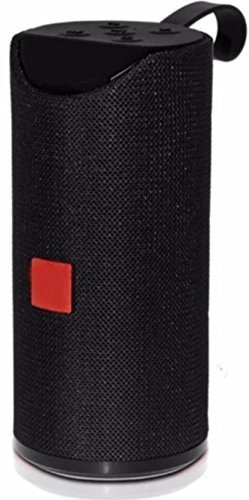
Figure 1: Front view of the Shopamaze TG113 Wireless Bluetooth Speaker.
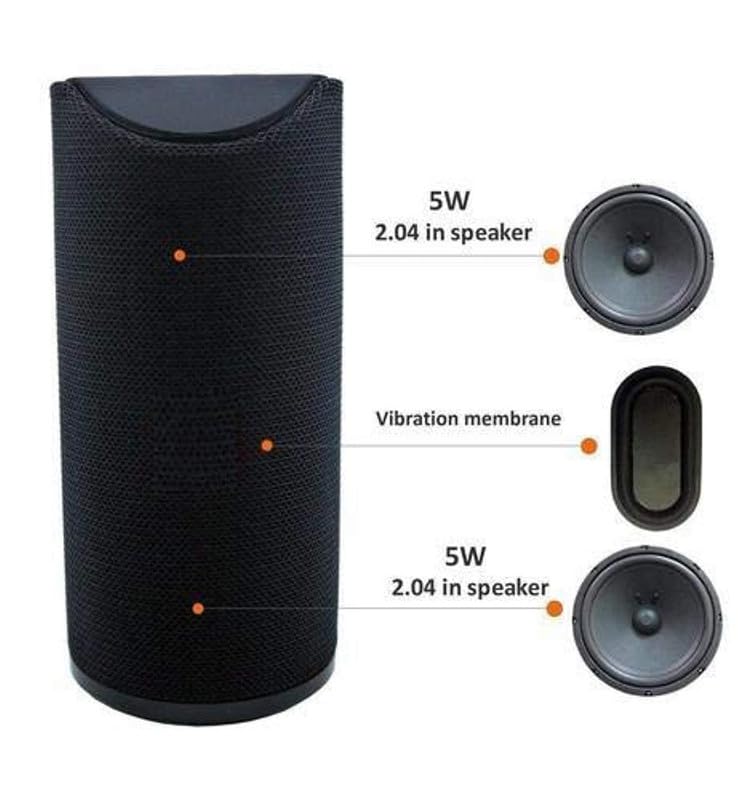
Figure 2: Internal component layout, illustrating the dual 5W speakers and central vibration membrane for enhanced bass.
Controls and Ports
Familiarize yourself with the speaker's controls and connection ports:
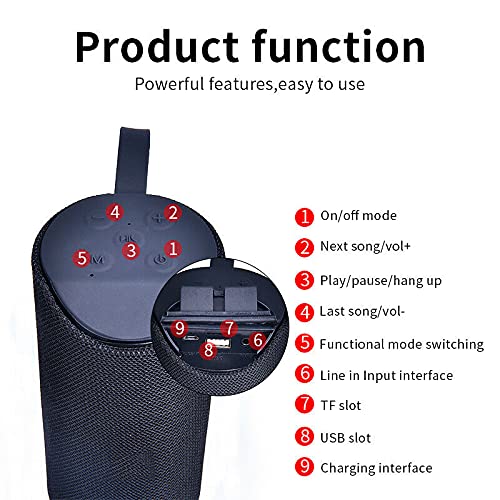
Figure 3: Top panel controls and side port diagram.
- On/Off Mode: Power button to turn the speaker on or off.
- Next Song / Volume Up (+): Short press for next track, long press to increase volume.
- Play/Pause / Hang Up: Short press to play or pause music. During a call, short press to answer or hang up.
- Last Song / Volume Down (-): Short press for previous track, long press to decrease volume.
- Functional Mode Switching (M): Press to cycle through modes (Bluetooth, FM Radio, TF Card, USB, AUX).
- Line In Input Interface (AUX): 3.5mm audio jack for connecting external devices.
- TF Slot: Slot for TransFlash (MicroSD) memory cards.
- USB Slot: USB-A port for connecting USB flash drives.
- Charging Interface: Micro USB port for charging the speaker.
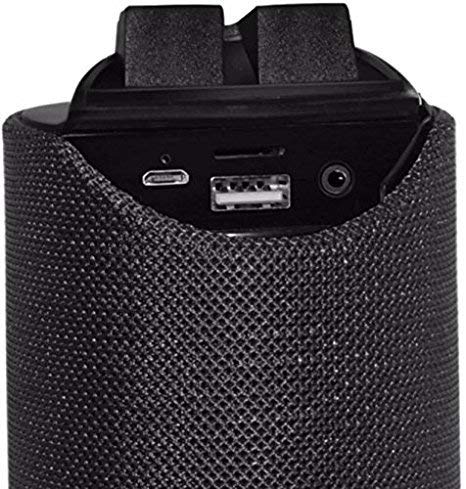
Figure 4: Detailed view of the charging, USB, and AUX ports.
Setup Guide
1. Charging the Speaker
Before first use, fully charge the speaker for at least two hours. Use the provided Micro USB cable and connect it to a compatible power source (e.g., a 220V adapter with at least 0.46A output, or a computer/laptop USB port). The charging indicator light will typically illuminate during charging and turn off or change color when fully charged.
2. Powering On/Off
- To Power On: Press and hold the On/Off Mode button (labeled '1' in Figure 3) until you hear an audible prompt or see an indicator light.
- To Power Off: Press and hold the On/Off Mode button again until the speaker powers down.
3. Bluetooth Pairing
- Ensure the speaker is powered on and in Bluetooth mode. If not, press the Functional Mode Switching (M) button until you hear the Bluetooth pairing prompt.
- On your mobile device (smartphone, tablet, etc.), enable Bluetooth and search for available devices.
- Select "TG113" or a similar name from the list of found devices.
- Once paired, the speaker will provide an audible confirmation. The Bluetooth working distance is approximately 10 meters (33 feet).
- The speaker supports automatic re-connection to the last paired device.
Operation
1. Playing Music
- Bluetooth Mode: After successful pairing, music played on your connected device will stream through the speaker. Use the Play/Pause, Next Song, and Last Song buttons on the speaker or your device to control playback.
- USB/TF Card Mode: Insert a USB flash drive into the USB Slot or a TF (MicroSD) card into the TF Slot. The speaker will automatically switch to the respective mode and begin playing audio files. If not, press the Functional Mode Switching (M) button.
- AUX (Line-In) Mode: Connect an external audio device (e.g., TV, MP3 player) to the Line In Input Interface (AUX) using a 3.5mm audio cable. Press the Functional Mode Switching (M) button to select AUX mode. Audio will be played from the connected device.
2. FM Radio
To use the FM radio function:
- Press the Functional Mode Switching (M) button to enter FM radio mode.
- Short press the Play/Pause button to automatically scan and save available FM stations.
- Use the Next Song and Last Song buttons to navigate between saved stations.
3. Call Handling
- Answering a Call: When a call comes in while connected via Bluetooth, short press the Play/Pause / Hang Up button to answer.
- Ending a Call: During a call, short press the Play/Pause / Hang Up button to end the call.
- Redial: Double-press the Play/Pause / Hang Up button to redial the last number.
4. Volume Control
Long press the Next Song / Volume Up (+) button to increase volume. Long press the Last Song / Volume Down (-) button to decrease volume. Volume synchronization with the connected device is supported.
Maintenance
- Cleaning: Use a soft, dry cloth to clean the speaker's exterior. Do not use abrasive cleaners or solvents.
- Water Resistance: The speaker is designed to be splash-proof. Avoid submerging it in water or exposing it to heavy rain. Ensure port covers are securely closed if present.
- Storage: Store the speaker in a cool, dry place away from direct sunlight and extreme temperatures.
- Battery Care: To prolong battery life, avoid fully discharging the speaker frequently. Charge it regularly, even if not in use for extended periods.
Troubleshooting
| Problem | Solution |
|---|---|
| Speaker does not power on. | Ensure the speaker is fully charged. Connect it to a power source and try again. |
| Cannot pair via Bluetooth. |
|
| No sound or low volume. |
|
| FM radio reception is poor. |
|
| Speaker automatically disconnects. |
|
Specifications
| Brand | Shopamaze |
| Model Name | TG113 |
| Connectivity Technology | Bluetooth, USB, TF Card, AUX |
| Special Features | FM Radio, Built-in Microphone, Splash-proof, Portable |
| Power Source | Battery Powered (Corded Electric for charging) |
| Bluetooth Working Distance | Up to 10 meters (33 feet) |
| Input Voltage | 5.1 Volts (AC for charging adapter) |
| Material | Metal |
| Product Dimensions | 4 x 2 x 5 cm (approximate) |
| Item Weight | 0.13 g (Note: This weight appears unusually low and may be a data entry error.) |
| Included Components | 1 Speaker, Charging Cable, Audio Cable |
Note: Specifications are approximate and subject to change without notice.
Safety Information
- Do not expose the speaker to extreme temperatures, direct sunlight, or high humidity.
- Avoid dropping or subjecting the speaker to strong impacts.
- Do not attempt to disassemble, repair, or modify the speaker yourself. This will void the warranty and may cause damage or injury.
- Keep the speaker away from children and pets.
- Use only approved charging cables and adapters.
- Dispose of the speaker and its battery responsibly according to local regulations.
Warranty and Support
For warranty information or technical support, please refer to the documentation provided at the time of purchase or contact Shopamaze customer service through their official channels. Keep your purchase receipt as proof of purchase.
For further assistance, you may visit the Shopamaze brand store on Amazon.