
1. Product Overview
The Kiseely TG1 Portable Induction Cooktop is a versatile and efficient countertop burner designed for various cooking needs. Featuring a sleek, ultra-thin design with an easy-to-clean glass surface and sensor touch controls, it offers precise temperature and power adjustments. This cooktop is ideal for both indoor and outdoor use, providing rapid heating and multiple cooking modes.

Image: Kiseely Portable Induction Cooktop highlighting its ultra-thin body and LED sensor touch controls.
2. Safety Instructions
- Ensure the cooktop is placed on a stable, heat-resistant surface.
- Use only induction-compatible cookware. Non-compatible cookware will not heat.
- Do not touch the hot surface immediately after cooking. Allow it to cool down.
- Keep children and pets away from the cooktop during operation. Utilize the child safety lock feature.
- Do not immerse the cooktop in water or any other liquid.
- Unplug the appliance when not in use and before cleaning.
- Ensure proper ventilation around the unit during operation.
- The cooktop features an automatic shut-off function if no compatible cookware is detected or after a set period of inactivity.
3. Setup
- Unpacking: Carefully remove the cooktop from its packaging. Retain packaging for future storage or transport.
- Placement: Place the cooktop on a flat, dry, and stable surface, ensuring adequate clearance from walls and other appliances for ventilation.
- Power Connection: Plug the two-prong power cord into a standard electrical outlet. The unit will beep once to indicate it is powered on and in standby mode.
- Cookware Compatibility: Verify your cookware is induction-compatible. Use a magnet to test; if it sticks firmly to the bottom of your pot or pan, it is compatible.

Image: Visual guide for induction-compatible cookware, showing cast iron as compatible and ceramic, copper, and glass as incompatible.
4. Operating Instructions
Control Panel Overview
The cooktop features a sensor touch control panel with an LED digital display for easy operation and precise control.
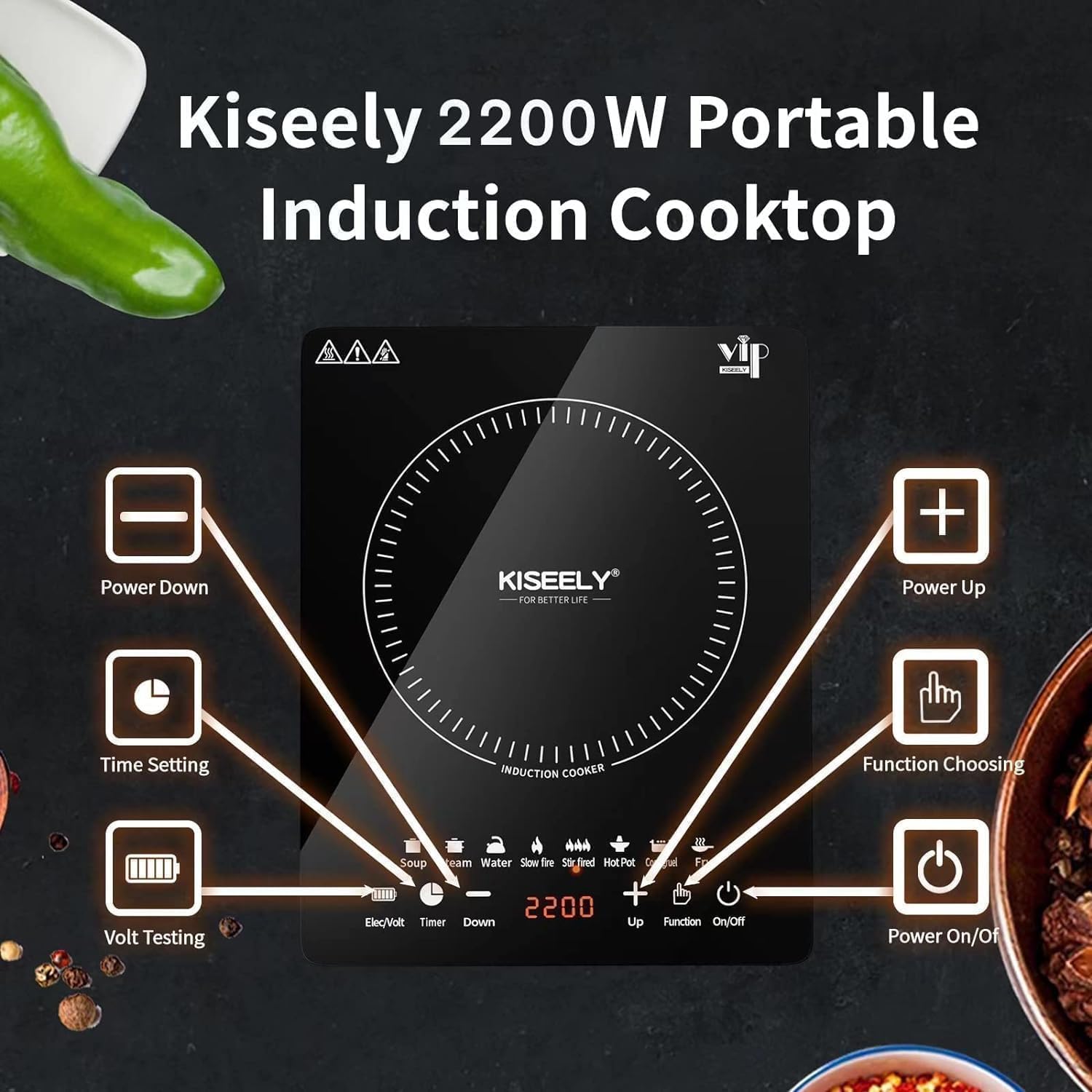
Image: Detailed view of the cooktop's sensor touch control panel with various function buttons.
Basic Operation
- Power On/Off: Press the ON/OFF button (far right) to turn the unit on. The button will light up red.
- Select Mode: Press the Function button to cycle through different cooking modes or power/temperature settings.
- Adjust Settings: Use the Up (+) and Down (-) buttons to adjust wattage (800-1800W) or temperature (140-460°F) depending on the selected mode.
- Set Timer: Press the Timer button, then use the Up (+) and Down (-) buttons to set the desired cooking time (1 minute to 3 hours).
- Child Safety Lock: Press and hold the Lock button for 3 seconds to activate or deactivate the child safety lock. The lock indicator will light up red when active.
Cooking Modes
The cooktop offers 8 pre-set cooking modes for convenience:
- Soup: Ideal for simmering soups and stews.
- Steam: For steaming vegetables or other foods.
- Water: Quickly boils water.
- Slow Fire: For gentle cooking or keeping food warm.
- Stir Fried: High heat for stir-frying.
- Hot Pot: Maintains a consistent temperature for hot pot meals.
- Congee: Specialized setting for cooking congee.
- Fry: For frying various dishes.

Image: Examples of different cooking methods possible with the Kiseely Induction Cooktop.
5. Maintenance
The Kiseely Portable Induction Cooktop features an easy-clean glass surface, simplifying maintenance.
- Cleaning: After the cooktop has completely cooled down, wipe the glass surface with a damp cloth and mild detergent. Avoid abrasive cleaners or scouring pads.
- Storage: Store the cooktop in a dry place when not in use. Its sleek and compact design allows for easy storage in cabinets or on countertops.

Image: Easy cleaning of the cooktop surface.
6. Troubleshooting
- Cooktop Not Heating: Ensure the unit is plugged in and turned on. Verify that the cookware is induction-compatible and properly placed on the cooking zone. The cooktop will display an "Error" message if no compatible pot is detected.
- Error Codes: Refer to the detailed user manual for specific error code meanings and troubleshooting steps.
- Automatic Shut-off: If the cooktop shuts off unexpectedly, check if the timer has expired or if compatible cookware was removed from the surface. The unit will automatically turn off after 30 minutes if no cookware is present and no timer is active.
7. Specifications
| Feature | Specification |
|---|---|
| Brand Name | Kiseely |
| Model Info | TG1 |
| Item Weight | 5.34 pounds |
| Product Dimensions | 14.57 x 11.4 x 2.7 inches |
| Power | 2200W (Max) |
| Max Current | 10A |
| Temperature Range | 176°F - 518°F (Note: Product description states 140-460°F, specifications state 176-518°F. Refer to product for exact range.) |
| Control Type | Sensor Touch with LED Digital Display |
| Safety Features | Child Safety Lock, Auto Shut-off |
8. Warranty and Support
For warranty information, technical support, or any product-related inquiries, please refer to the contact details provided in your product packaging or visit the official Kiseely website. Keep your purchase receipt as proof of purchase for warranty claims.