
1. Important Safety Information
Please read all instructions carefully before assembly and operation. Retain this manual for future reference.
- This appliance is for indoor use only.
- Do not operate the fireplace if the cord is damaged or if the unit malfunctions.
- Ensure the power outlet meets the voltage requirements (120V) and is properly grounded.
- Keep combustible materials (furniture, bedding, curtains, etc.) at least 3 feet (0.9 meters) from the front of the heater.
- Do not block air vents. Overheat protection is built-in, but proper ventilation is essential.
- CSA Certified: This product meets recognized safety standards.
- Always unplug the unit before cleaning or performing any maintenance.
- Supervise children and pets when the fireplace is in operation. Anti-toppling devices are included for enhanced stability.

Image 1.1: Overview of safety features including Overheat Protection and CSA Certification, alongside heating specifications like 400 sq.ft. heating area, 62°F-82°F thermostat, 4777 BTU heat output, and 0.5-8 hour timer.
2. Package Contents
Verify that all components are present before beginning assembly. If any parts are missing or damaged, contact customer support.
- 1 x SIMOE Electric Fireplace TV Stand with LED Lights
- 1 x Electric Fireplace Insert
- 2 x Remote Controls (one for LED lights, one for fireplace insert)
- 1 x Instruction Manual (this document)
- All necessary assembly hardware
3. Assembly and Setup
Assembly is required. It is recommended to have two people for assembly. Follow the step-by-step instructions provided in the separate assembly guide included with your hardware. Ensure all connections are secure before use.
3.1. Pre-Assembly Checklist
- Clear a spacious area for assembly.
- Identify all parts and hardware using the provided list.
- Gather necessary tools (e.g., screwdriver).
3.2. Key Assembly Steps (General)
- Assemble the main frame of the TV stand.
- Install the adjustable shelves and cabinet doors.
- Integrate the electric fireplace insert into the designated opening.
- Attach the LED light strips according to the specific instructions.
- Secure the anti-toppling devices to the wall for safety, especially in homes with children or pets.

Image 3.1: Close-up details of the TV stand's construction, highlighting anti-toppling devices for safety, cable management holes for organization, soft-close hinges for durability, and a stable 3-inch base.

Image 3.2: The fully assembled SIMOE Electric Fireplace TV Stand, showcasing its rustic brown finish, central electric fireplace, and side storage cabinets, with a television placed on its top surface.
4. Operating Instructions
4.1. Electric Fireplace Operation
The electric fireplace insert can be operated using its dedicated remote control or the control panel on the unit.
- Power On/Off: Press the power button to turn the fireplace on or off.
- Flame Colors: Cycle through 9 different flame colors. An automatic mode is available to transition between colors.
- Flame Brightness: Adjust the flame brightness to one of 5 levels.
- Heat Function: Activate the heater for warmth. The unit provides 4777 BTU, capable of heating up to 400 sq.ft.
- Thermostat Control: Set your desired room temperature between 62°F and 82°F. The heater will automatically turn on/off to maintain this temperature.
- Timer: Set an automatic shut-off timer for the heater from 0.5 to 8 hours.
- The flame effect can be used independently of the heat function for year-round ambiance.

Image 4.1: Visual representation of the 9 available flame colors and 5 brightness levels for the electric fireplace, including an automatic cycling mode.
4.2. RGB LED Lights Operation
The integrated RGB LED strip lights can be controlled via their dedicated remote control or a smart app.
- Power On/Off: Use the remote or app to turn the LED lights on or off.
- Color Selection: Choose from a wide range of RGB colors.
- Brightness Adjustment: Select from 10 brightness levels.
- Rhythm Modes: Choose from 4 dynamic modes: Flash, Strobe, Fade, and Smooth.
- Flash Speed: Adjust the speed of the flashing effects.
- Timed Shut-off: A 4-hour auto-off timer is available for the LED lights.
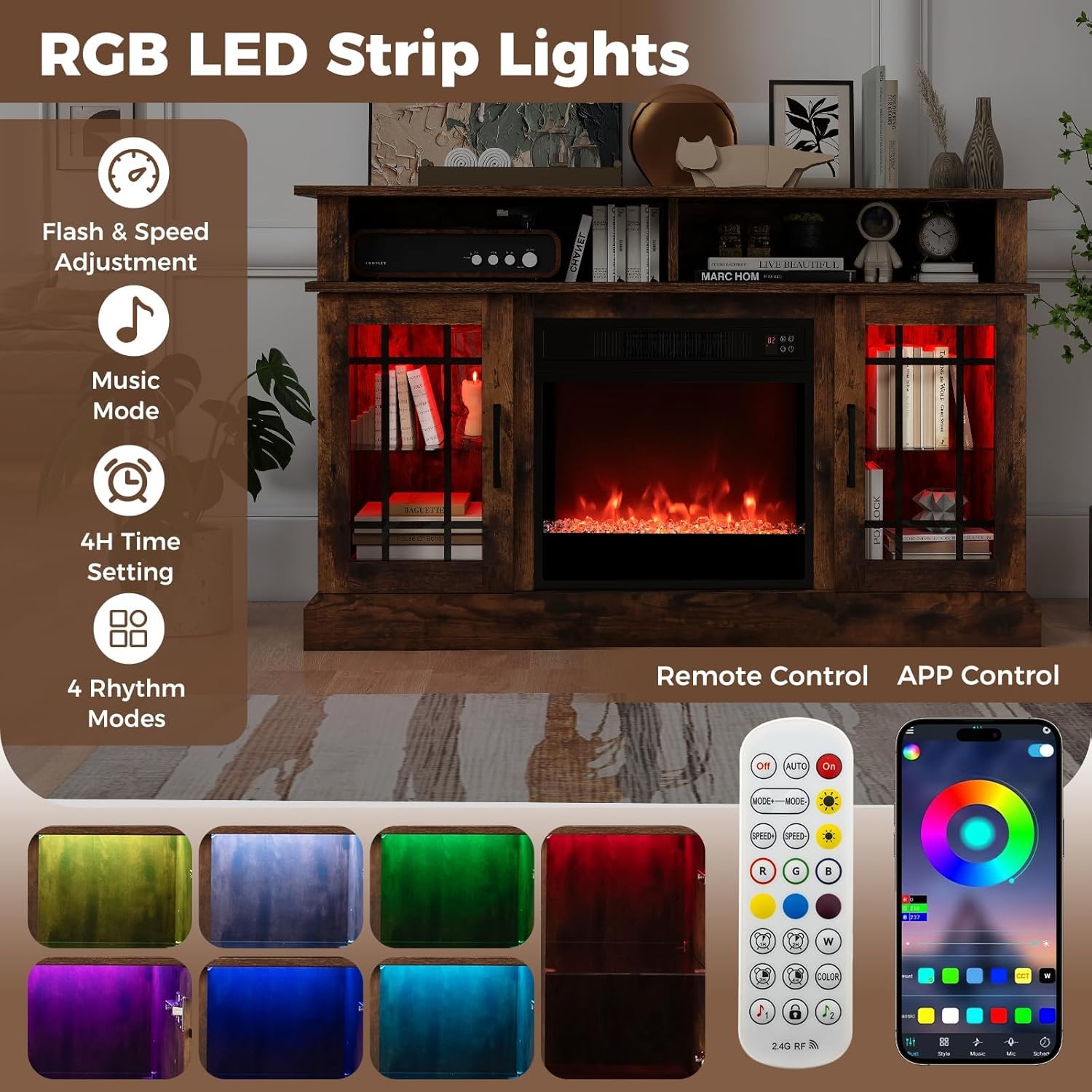
Image 4.2: Features of the RGB LED strip lights, detailing options for flash and speed adjustment, a music mode, a 4-hour timer, and four distinct rhythm modes, all controllable via remote or a smart application.
5. Maintenance
Regular maintenance ensures optimal performance and longevity of your TV stand and fireplace insert.
- Cleaning the Exterior: Wipe surfaces with a soft, damp cloth. Avoid abrasive cleaners or solvents that may damage the finish.
- Fireplace Insert: Ensure the unit is unplugged and cool before cleaning. Use a soft cloth to gently wipe the glass and exterior. Do not spray water directly onto the unit.
- Air Vents: Periodically check and clean the air intake and exhaust vents of the fireplace insert to prevent dust buildup, which can impede heating efficiency and trigger overheat protection.
- Cord and Plug: Inspect the power cord and plug regularly for any signs of damage. If damaged, discontinue use and contact a qualified electrician or customer support.
6. Troubleshooting
If you encounter issues, refer to the following common problems and solutions:
| Problem | Possible Cause | Solution |
|---|---|---|
| Fireplace does not turn on. | No power, unit unplugged, power switch off, remote battery dead. | Check power cord connection, ensure outlet is functional, replace remote batteries, press power button on unit. |
| No heat output. | Heat function not activated, thermostat set too low, air vents blocked, overheat protection activated. | Activate heat function, increase thermostat setting, clear any obstructions from vents, unplug and allow unit to cool for 15 minutes. |
| Flame effect not working. | Flame function off, LED bulb issue (rare). | Ensure flame function is activated. If issue persists, contact customer support. |
| LED strip lights not working. | LED power off, remote battery dead, app connection issue. | Check LED power, replace remote batteries, re-pair with app if applicable. |
| Remote control not responding. | Batteries dead or incorrectly inserted, obstruction between remote and unit, out of range. | Replace batteries, ensure clear line of sight, operate within specified range (up to 26 ft for fireplace, 66 ft for LED lights). |
If the problem persists after attempting these solutions, please contact SIMOE customer support.
7. Specifications
| Feature | Detail |
|---|---|
| Brand | SIMOE |
| Model Name | FP10887US-CF |
| Product Dimensions | 48"W x 16"D x 29"H |
| Fireplace Dimensions | 19.1"W x 5.1"D x 17.5"H (approximate, based on image) |
| Material | MDF, Engineered Wood, Cold Rolled Steel, Tempered Glass |
| Power Source | Corded Electric |
| Power Input | 1400W, 120V |
| Heat Output | 4777 BTU |
| Heating Area | Up to 400 sq.ft. |
| Thermostat Range | 62°F – 82°F |
| Heater Timer | 0.5 – 8 hours |
| LED Lights Timer | 4-hour auto-off |
| Flame Colors | 9 (with automatic mode) |
| Flame Brightness | 5 levels |
| LED Brightness | 10 levels |
| LED Rhythm Modes | 4 (Flash, Strobe, Fade, Smooth) |
| Cord Length | 6 ft |
| Item Weight | 85 lbs |
| Countertop Capacity | 70 lbs |
| Max TV Size | 40 inches |
| Certifications | CSA Certified |
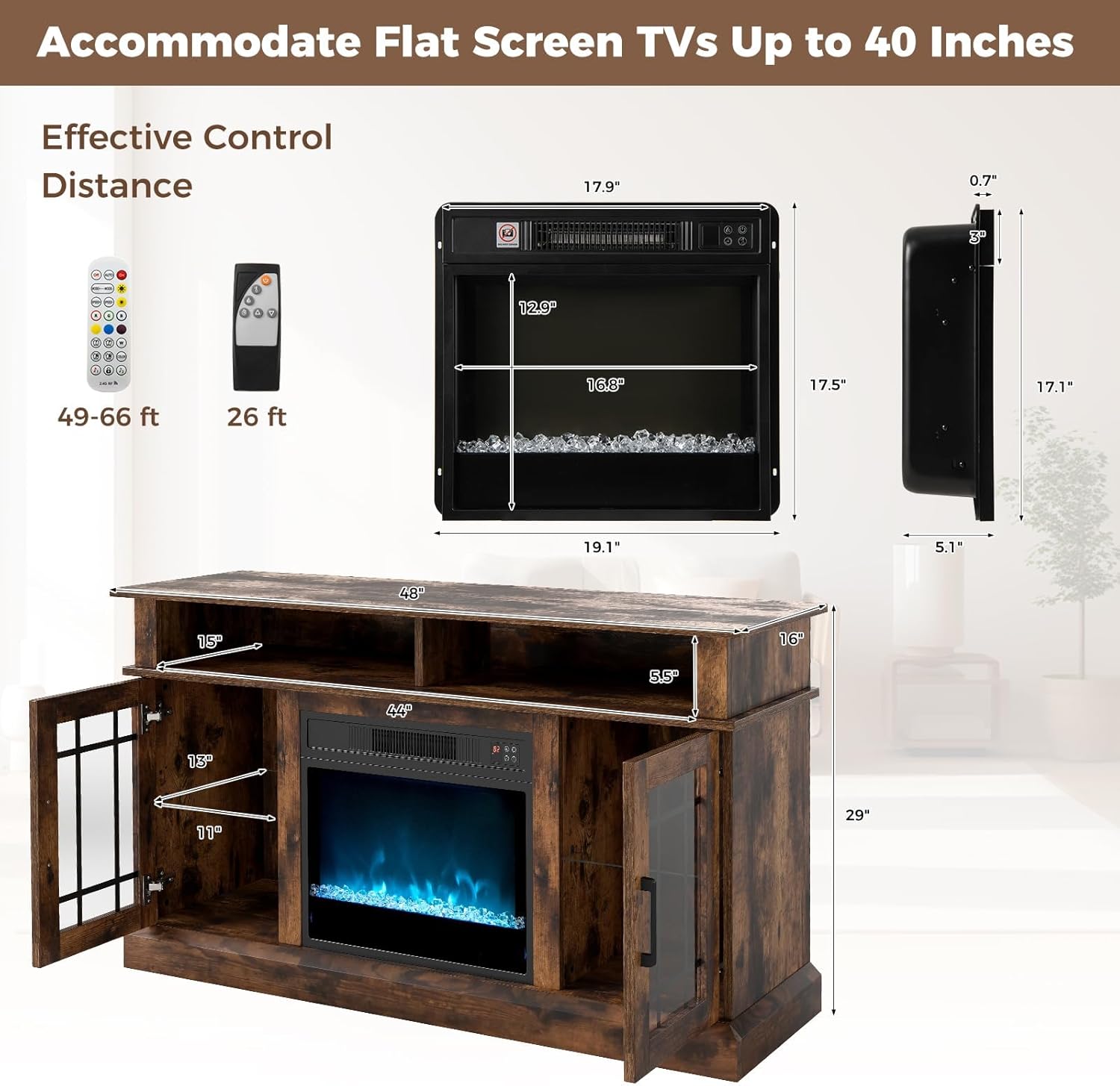
Image 7.1: Detailed dimensions of the SIMOE Electric Fireplace TV Stand and its integrated fireplace insert, including the effective control distances for both the fireplace and LED light remote controls.
8. Warranty and Customer Support
SIMOE products are manufactured with quality and care. For specific warranty details, please refer to the warranty card included with your purchase or contact SIMOE customer support directly.
If you have any questions, require assistance with assembly, or need troubleshooting support, please contact:
- SIMOE Customer Support: [Insert Customer Support Contact Information Here - e.g., website, email, phone number]
- Please have your model number (FP10887US-CF) and purchase date ready when contacting support.