
1. Introduction
This manual provides essential information for the safe and effective use of your LIFE SKY Geometric Textured Sideboard Cabinet. Please read these instructions thoroughly before unpacking, setting up, or using the product. Retain this manual for future reference.

Figure 1.1: The LIFE SKY Geometric Textured Sideboard Cabinet, showcasing its design and placement within a room.
2. Safety Information
To prevent injury or damage to the product, observe the following safety guidelines:
- Anti-Tipping: Always secure the cabinet to a wall using appropriate anti-tipping hardware (if included or recommended) to prevent accidental tipping, especially in households with children or pets.
- Weight Distribution: Distribute weight evenly across shelves and the top surface. Avoid placing excessively heavy items on one side or on the very edge of the cabinet.
- Placement: Place the cabinet on a flat, stable, and level surface. Uneven surfaces can compromise stability.
- Handling: When moving the cabinet, always lift it with assistance. Do not drag it, as this may damage the base or floor.
- Children: Do not allow children to climb on or play with the cabinet.
3. Package Contents
Verify that all components are present before proceeding with setup:
- Cabinet Body
- Doors
- Hardware (e.g., anti-tipping kit, shelf pins)
- Shelves
If any parts are missing or damaged, contact customer support immediately.
4. Setup and Placement
This cabinet is designed for minimal assembly. Follow these steps for proper setup:
- Unpacking: Carefully remove all packaging materials. Inspect the cabinet for any signs of damage during transit.
- Placement: Choose a suitable location in your dining room, entryway, hallway, kitchen, or living room. Ensure the floor is level and stable.
- Anti-Tipping Installation: If an anti-tipping kit is provided, install it according to the separate instructions included with the kit. This is crucial for safety.
- Shelf Installation: Insert the shelves into the desired positions using the provided shelf pins. Ensure shelves are securely seated.

Figure 4.1: Interior view of the cabinet, illustrating the adjustable shelf placement.
5. Operating Instructions
The sideboard cabinet is designed for straightforward use:
- Door Operation: Gently open and close the multi-doors. Avoid forcing them to prevent damage to hinges or the cabinet structure.
- Storage: Utilize the internal shelves for organizing various items. The cabinet is suitable for storing keys, mail, dining accessories, books, or decorative items.
- Weight Capacity: The top surface can support up to 220 lbs, and each internal shelf can support up to 80 lbs. Do not exceed these limits.
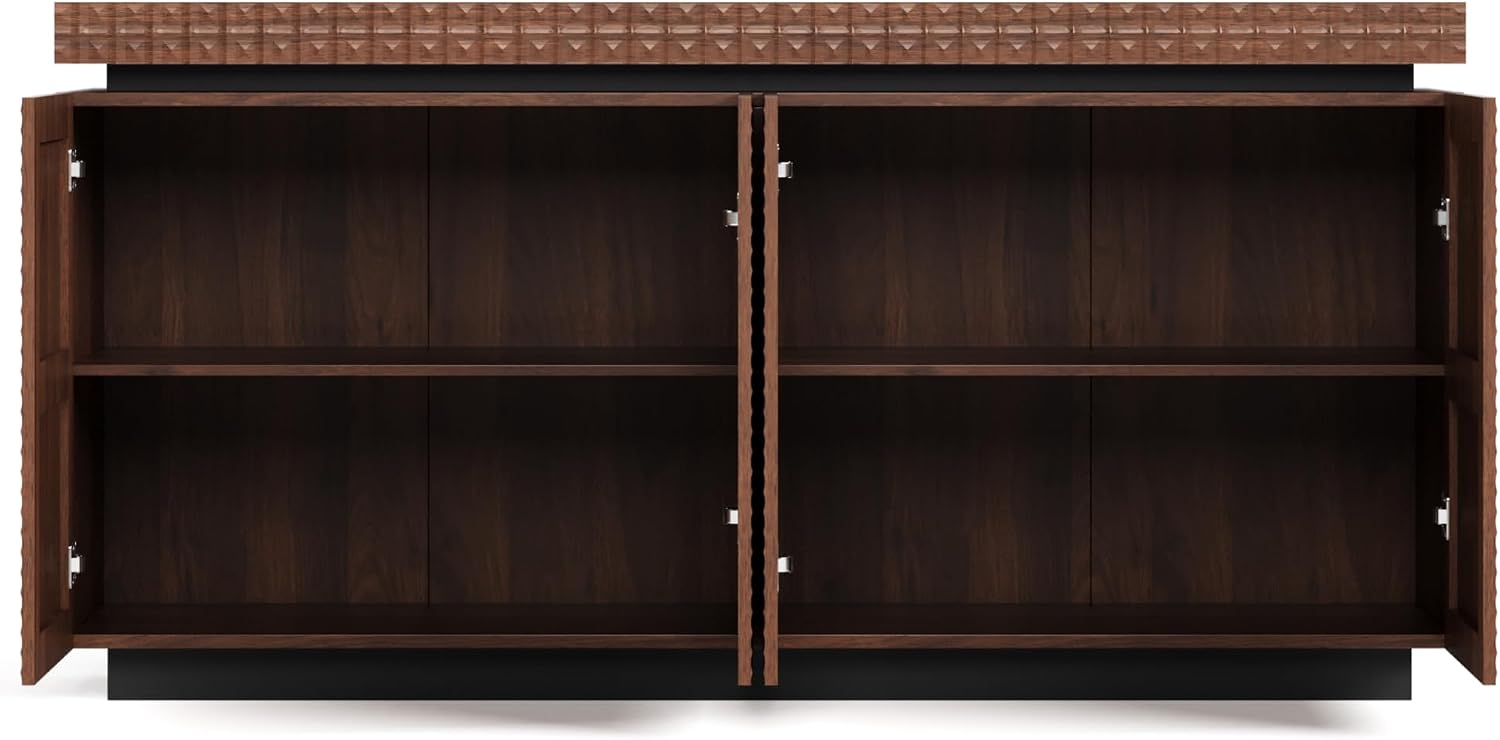
Figure 5.1: Illustration of the maximum weight capacities for the cabinet's top surface and individual shelves.
6. Maintenance and Care
Proper care will ensure the longevity and appearance of your cabinet:
- Cleaning: Wipe the surface with a soft, damp cloth. Avoid abrasive cleaners or harsh chemicals, as these can damage the wood finish and textured surface. The cabinet features an easy-clean surface.
- Dusting: Regularly dust with a dry, soft cloth to prevent buildup.
- Spills: Immediately wipe up any spills to prevent staining. The cabinet is designed to be stain-resistant.
- Protection: While the cabinet is scratch-resistant, use coasters or protective pads under items that might scratch the surface.
- Environment: Avoid prolonged exposure to direct sunlight or extreme temperature changes, which can cause fading or warping.
7. Troubleshooting
If you encounter any issues, refer to the following common solutions:
- Cabinet Wobbles: Ensure the cabinet is placed on a level surface. Adjust any leveling feet if present. Verify that all connections (if any were assembled) are tight.
- Doors Not Closing Properly: Check for obstructions inside the cabinet. Inspect hinges for damage or looseness. If adjustable, minor adjustments to hinges may be required (consult a professional if unsure).
- Surface Damage: For minor scratches, touch-up pens or furniture polish designed for wood may be used. For significant damage, contact customer support.
8. Specifications
| Brand | LIFE SKY |
| Model Name | Geometric Textured Sideboard Cabinet |
| Model Number | W2263P353791 |
| Color | Antique Brown |
| Material | Wood |
| Product Dimensions | 15.5"D x 58.3"W x 29.3"H |
| Item Weight | 117.3 pounds |
| Mounting Type | Floor Mount |
| Special Features | Anti-Tipping, Dustproof, Scratch Resistant, Stain Resistant |
| Room Type | Dining Room, Entryway, Hallway, Kitchen, Living Room |
| Assembly Required | No |
| Included Components | Cabinet Body, Doors, Hardware, Shelves |
9. Warranty and Support
For warranty information or technical support, please refer to the purchase documentation or contact LIFE SKY customer service. Contact details can typically be found on the manufacturer's official website or through your retailer.
You can visit the LIFE SKY Store on Amazon for more information.