1. Introduction
The Acclope BT60 Pro is a versatile digital battery analyzer designed for comprehensive testing of 6V, 12V, and 24V batteries. It supports various battery types including AGM, GEL, SLA, EFB, VRLA, and lithium batteries, making it suitable for motorcycles, cars, trucks, and boats. This device provides precise diagnostic data on battery health, state of charge, voltage, resistance, and ripple analysis, along with cranking and charging tests. Its cloud printing feature simplifies report management, allowing users to access detailed test results on their smartphones by scanning a QR code.
2. Safety Information
Always observe the following safety precautions when using the Acclope BT60 Pro Car Battery Tester:
- Wear appropriate eye protection and protective clothing when working with batteries.
- Ensure proper ventilation in the work area to prevent the accumulation of explosive gases.
- Avoid sparks, flames, or smoking near batteries.
- Connect the red clamp to the positive (+) terminal and the black clamp to the negative (-) terminal. The device features reverse connection protection to prevent damage.
- Do not touch battery terminals or clamps with bare hands while the tester is connected.
- Keep the device dry and clean. Do not expose it to rain or moisture.
- If battery acid comes into contact with skin or eyes, flush immediately with plenty of water and seek medical attention.
3. Package Contents
Verify that all items are present in the package:
- 1X Acclope BT60 Pro Battery Tester
- 1X User Manual
4. Product Overview
The Acclope BT60 Pro features a robust design with a clear display and intuitive controls for easy operation.
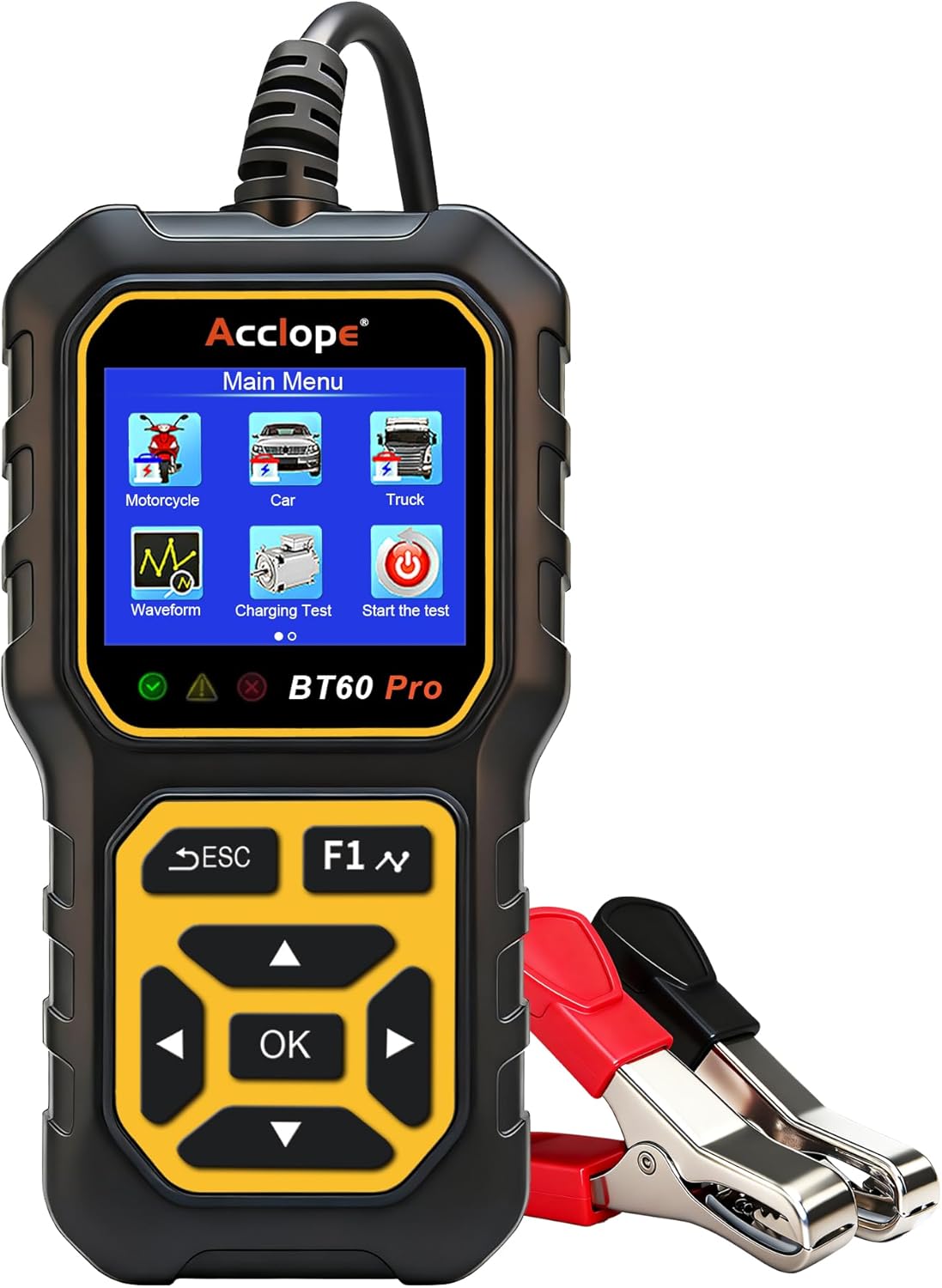
Figure 1: Front view of the Acclope BT60 Pro Car Battery Tester, showing the display screen and control buttons.

Figure 2: The main menu of the BT60 Pro, displaying options for Motorcycle, Car, Truck, Waveform, Charging Test, and Start the test.
Key Features:
- 3.2-inch LED Screen: Provides clear and bright display of test results.
- ABS Material: Ensures durability and a comfortable grip.
- Comfortable Buttons: Large, rubberized buttons for easy navigation.
- Thicker and Longer Cable: Offers convenience and flexibility during use.
- LED Light Design: Enhances visibility and safety during operation.
5. Setup and Connection
The BT60 Pro is powered directly by the battery under test, requiring no external power source. Follow these steps to connect the tester:
- Ensure the vehicle engine is off and the ignition is in the OFF position.
- Connect the red (+) clamp of the tester to the positive (+) terminal of the battery.
- Connect the black (-) clamp of the tester to the negative (-) terminal of the battery.
- The tester will power on automatically and display the main menu.

Figure 3: Illustration showing the correct connection of the red clamp to the positive terminal and the black clamp to the negative terminal of a car battery. An incorrect connection is also shown with a red 'X'.
6. Operating Instructions
Navigate the menu using the directional arrows and the 'OK' button. The 'ESC' button returns to the previous screen.
6.1. Battery Test
Perform a comprehensive battery health assessment.
- From the Main Menu, select 'Car', 'Motorcycle', or 'Truck' based on your vehicle type.
- Select the battery type (e.g., Regular Flooded, AGM Flat Plate, GEL, Lithium).
- Select the testing standard (e.g., CCA, IEC, EN, DIN).
- Set the battery rating (e.g., 580 CCA).
- Press 'OK' to start the test. The results will display State of Health (SOH), State of Charge (SOC), Voltage, Resistance, and CCA.

Figure 4: Screen displaying battery test results, including SOH (State of Health), SOC (State of Charge), Voltage, Resistance, and CCA value.
6.2. Cranking Test
Evaluates the starting performance of the battery.
- From the Main Menu, select 'Start the test'.
- Follow the on-screen prompts to turn off the engine and then start it.
- The tester will analyze the cranking voltage and time, providing a 'Cranking Normal' or 'Cranking Low' result.
6.3. Charging Test
Checks the alternator's charging system performance.
- From the Main Menu, select 'Charging Test'.
- Follow the on-screen prompts to increase engine RPM to 2500 and hold for 10 seconds.
- The tester will display loaded voltage, unloaded voltage, and ripple, indicating if charging is normal or abnormal.
6.4. Waveform Analysis
Provides real-time visual insights into battery performance during cranking and charging.
- From the Main Menu, select 'Waveform'.
- Choose between 'Real time Waveform' or 'Cranking Waveform'.
- Observe the dynamic voltage changes on the screen to identify any irregularities.
6.5. Cloud Printing
Generate and share test reports easily without an app or printer.
- After completing a test, navigate to the 'Cloud Print' option in the menu.
- A QR code will appear on the screen.
- Scan the QR code with your smartphone to view and save the detailed test report online.

Figure 5: The cloud printing feature, showing a QR code on the tester's screen that can be scanned by a smartphone to access the test report online. Example Report Link
6.6. Language Settings
Change the display language of the tester.
- From the Main Menu, navigate to 'Tool Setup'.
- Select 'Language'.
- Choose your desired language from the list (e.g., English, French, German, Spanish).

Figure 6: The language selection screen, showing multiple language options including English, Spanish, German, and French.
7. Specifications
Detailed technical specifications for the Acclope BT60 Pro:
| Brand | Acclope |
| Model Number | BT3000 |
| Power Source | Corded Electric (powered by tested battery) |
| Minimum Operating Voltage | 6 Volts |
| Maximum Operating Voltage | 36 Volts |
| Item Weight | 9.5 ounces (0.27 Kilograms) |
| Product Dimensions | 7.87 x 3.35 x 7.87 inches |
| Measurement Type | Ammeter, LCR Meter, Multimeter, Ohmmeter, Voltmeter |
| Upper Temperature Rating | 80 Degrees Celsius |
| Supported Battery Types | AGM, GEL, SLA, EFB, VRLA, Lithium (2Ah to 120Ah) |
| CCA Range | 100-3000 CCA |
| Supported Standards | CCA, IEC, EN, DIN, CA, BCI, MCA, SAE, JIS |
8. Troubleshooting
If you encounter issues with your Acclope BT60 Pro, refer to the following common troubleshooting steps:
- Device not powering on: Ensure the clamps are securely connected to the correct battery terminals. The device draws power from the battery.
- Inaccurate readings: Verify that the correct battery type and CCA rating have been selected in the device settings. Ensure battery terminals are clean and free of corrosion.
- Screen freezing or unresponsive: Disconnect the device from the battery, wait a few seconds, and then reconnect it. If the issue persists, ensure the device firmware is up to date (if applicable, check manufacturer's website).
- Cloud printing not working: Check your smartphone's internet connection. Ensure the QR code is clearly visible and not damaged. Try scanning again.
9. Official Product Videos
Watch these official videos from Acclope for visual guidance on using your BT60 Pro Car Battery Tester.
Video 1: Acclope BT60 PRO Test on LIFEO4 Lithium Battery Analysis. This video demonstrates how to use the BT60 Pro to test a LiFePO4 lithium battery, showcasing the connection process and the display of test results.
Video 2: Quick results, multiple voltage options, and cloud printing too. This video highlights the speed and versatility of the BT60 Pro, demonstrating its ability to provide quick test results and its cloud printing functionality.
10. Warranty and Support
Acclope products are designed for reliability and performance. This product comes with a standard manufacturer's warranty against defects in materials and workmanship. For specific warranty details, please refer to the warranty card included in your package or visit the official Acclope website.
For technical support, troubleshooting assistance, or inquiries about your product, please contact Acclope customer service through the contact information provided in your user manual or on the official Acclope website. Please have your product model and purchase date ready when contacting support.