
Introduction
Thank you for choosing the ANOUV Portable Charger 10000mAh, Model TW1007. This versatile power bank is designed to provide convenient and fast charging for a wide range of electronic devices, including smartphones, tablets, and smartwatches. It features a 10000mAh capacity, 22.5W PD 3.0 + QC 4.0 fast charging, built-in charging cables (USB-C, Micro USB, and for iPhone), an integrated AC wall plug, and a magnetic wireless charger for Apple Watch. Please read this manual carefully before use to ensure safe and optimal performance.
Product Overview
The ANOUV Portable Charger combines multiple charging solutions into one compact device, making it an ideal travel companion. Key features include:
- 10000mAh High Capacity: Provides ample power for multiple device charges.
- 22.5W PD 3.0 + QC 4.0 Fast Charging: Supports rapid charging for compatible devices.
- Built-in Cables: Includes USB-C, Micro USB, and for iPhone cables for universal compatibility.
- Integrated AC Wall Plug: Allows direct recharging from any standard wall outlet without extra adapters.
- Magnetic Wireless iWatch Charger: Conveniently charges your Apple Watch wirelessly.
- USB-C and USB-A Output Ports: Additional ports for connecting external cables.
- Smart LED Display: Shows the remaining battery percentage visually.
- Compact and Slim Design: Easy to carry in pockets or bags.

This image illustrates the multi-functional design of the power bank, highlighting its built-in AC plug, various output ports, and integrated charging cables, along with the digital LED display.
Safety Instructions
To prevent injury or damage to your device, please observe the following safety precautions:
- Do not disassemble, open, or attempt to repair the power bank.
- Keep the power bank away from water, moisture, and extreme temperatures.
- Avoid dropping, hitting, or subjecting the device to strong impacts.
- Do not expose the power bank to fire or direct sunlight for prolonged periods.
- Use only compatible charging cables and adapters.
- Keep out of reach of children.
- If the power bank swells, emits an odor, or becomes excessively hot, discontinue use immediately.
Package Contents
Please check the package for the following items:
- ANOUV Portable Charger 10000mAh (Model: TW1007)
- User Manual (this document)
Setup
Before first use, it is recommended to fully charge your ANOUV Portable Charger.
- Initial Charge: Connect the integrated AC wall plug directly into a standard wall outlet. The LED display will show the charging progress.
- Alternatively, you can use a USB-C cable to connect the power bank's USB-C input port to a compatible USB wall adapter.
- The power bank is fully charged when the LED display shows 100%.
Operating Instructions
Charging the Power Bank
The ANOUV Portable Charger offers two convenient ways to recharge itself:
- Using the Built-in AC Wall Plug: Extend the integrated AC plug and insert it directly into a wall socket. The power bank will begin charging. This method typically takes approximately 4 hours for a full charge.
- Using the USB-C Input Port: Connect a USB-C cable (not included) from a compatible wall adapter to the power bank's USB-C input port. This method can fully recharge the power bank in approximately 2.5 hours.

This image demonstrates how to recharge the power bank using either its integrated AC plug or a separate USB-C cable, indicating the approximate charging durations for each method.
Charging Your Devices
The power bank supports charging up to 6 devices simultaneously using its various outputs:
- Built-in Cables: Utilize the integrated USB-C, Micro USB, or for iPhone cables to directly connect to your devices.
- USB-C Output Port: Connect your device using an external USB-C to USB-C or USB-C to Lightning cable.
- USB-A Output Port: Connect your device using an external USB-A cable.
- Magnetic Wireless iWatch Charger: Place your Apple Watch on the designated magnetic pad for wireless charging.
To initiate charging, connect your device to the power bank. If charging does not start automatically, press the power button on the side of the power bank.
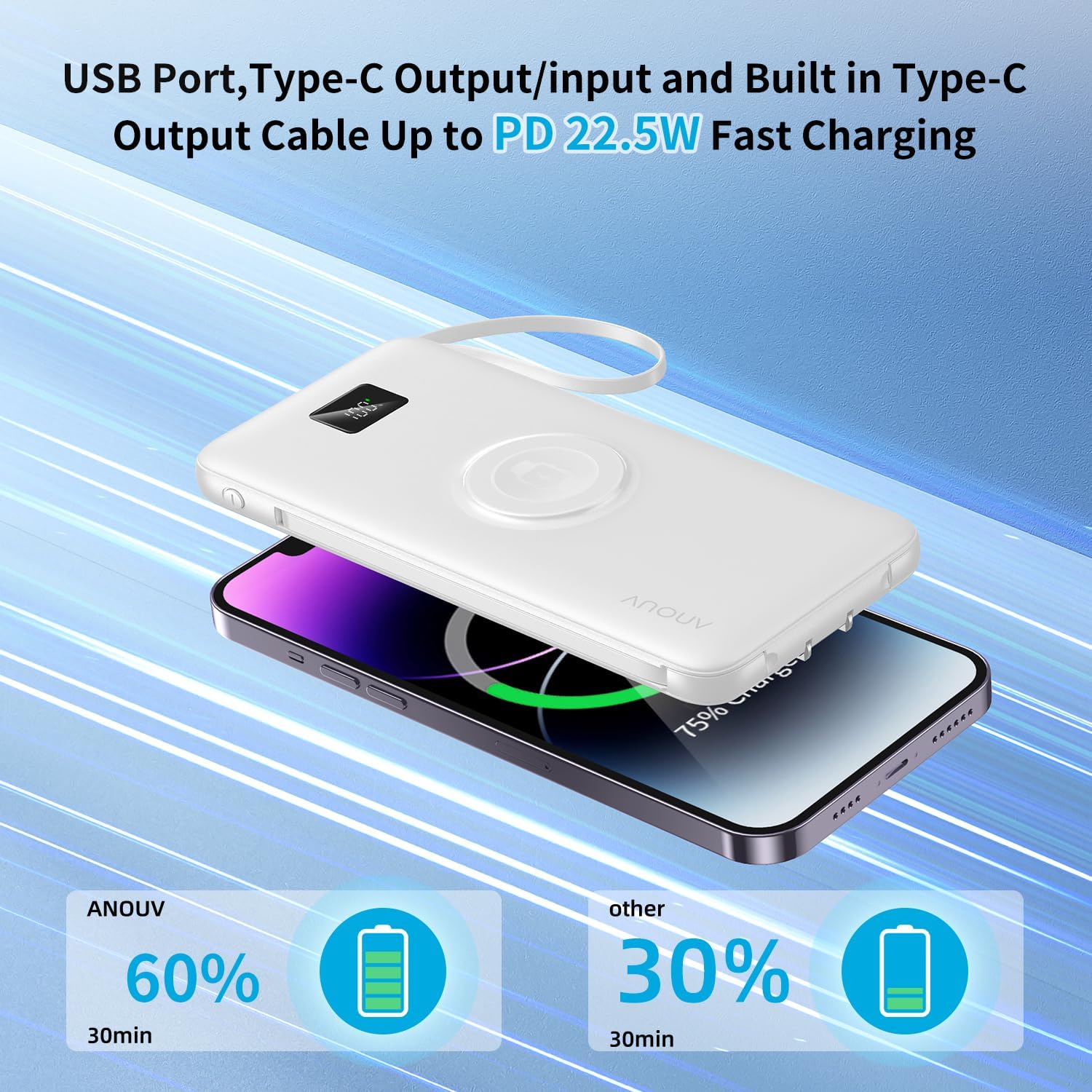
This image highlights the fast charging capability of the power bank, demonstrating how quickly it can charge a smartphone using its built-in Type-C cable.

This image illustrates the power bank's ability to charge several devices at once, showcasing its versatility for users with multiple gadgets.
Magnetic Wireless iWatch Charging
The power bank includes a dedicated magnetic pad for wirelessly charging your Apple Watch.
- Ensure the power bank is sufficiently charged.
- Place your Apple Watch directly onto the magnetic charging pad on the power bank.
- The watch should align magnetically and begin charging. If not, adjust its position.
- If charging does not start, press the power button on the side of the power bank to activate it.

This image demonstrates the magnetic wireless charging feature for Apple Watch, showing how to position the watch on the power bank for charging.
LED Display
The integrated LED display shows the remaining battery percentage of the power bank. This allows you to monitor the power level accurately and know when to recharge the unit.
Maintenance
- Cleaning: Use a soft, dry cloth to clean the surface of the power bank. Do not use harsh chemicals or abrasive materials.
- Storage: Store the power bank in a cool, dry place away from direct sunlight and extreme temperatures.
- Battery Care: For optimal battery life, fully charge the power bank at least once every three months if not in regular use.
Troubleshooting
| Problem | Possible Cause | Solution |
|---|---|---|
| Power bank not charging | AC plug not fully inserted; USB-C cable faulty or not connected properly; wall outlet not active. | Ensure AC plug is firmly in the outlet. Check USB-C cable and adapter. Try a different wall outlet. |
| Device not charging from power bank | Power bank battery depleted; cable not connected properly; power button not pressed; device incompatible. | Recharge the power bank. Ensure cables are securely connected. Press the power button to activate output. Verify device compatibility. |
| Apple Watch not charging wirelessly | Watch not positioned correctly; power bank low on charge; power button not pressed. | Adjust Apple Watch position on the magnetic pad. Recharge power bank. Press the power button. |
| Slow charging | Cable not fast-charge compatible; device not supporting fast charging; multiple devices charging simultaneously. | Use fast-charge compatible cables. Ensure your device supports PD/QC fast charging. Disconnect other devices to prioritize charging speed. |
Specifications
| Feature | Specification |
|---|---|
| Model Number | TW1007 |
| Battery Capacity | 10000 Milliamp Hours |
| Battery Cell Type | Lithium-Phosphate |
| Input (AC Wall Plug) | Standard AC input |
| Input (USB Type C) | PD 3.0 (up to 22.5W) |
| Output (USB Type C) | PD 3.0 (up to 22.5W) |
| Output (USB Type A) | QC 4.0 (up to 22.5W) |
| Output (Built-in Cables) | USB-C, Micro USB, for iPhone (up to 22.5W shared) |
| Wireless Output | Magnetic for Apple Watch |
| Number of Ports | 5 (USB-C In/Out, USB-A Out, Built-in Cables) + Wireless |
| Battery Charge Time | Approx. 3-4 Hours (AC Plug), Approx. 2.5 Hours (USB-C Input) |
| Item Dimensions (L x W x Th) | 5.7" x 2.7" x 0.7" (14.5cm x 6.9cm x 1.8cm) |
| Item Weight | 230 Grams |
| Compatible Devices | iPhone, iPad, Samsung, Google Pixel, Tablets, Apple Watch, Bluetooth headphones, fitness trackers, smart watches, etc. |
Warranty and Support
The ANOUV Portable Charger (Model: TW1007) comes with a 2-Year Warranty from the date of purchase. This warranty covers manufacturing defects and workmanship under normal use.
For warranty claims, technical support, or any questions regarding your product, please contact ANOUV customer service through the retailer where you purchased the product or visit the official ANOUV website for contact information.
Please retain your proof of purchase for warranty validation.