1. Introduction
This instruction manual provides essential information for the safe and effective use of the GENERIC PC00299 G 799F electronic component. Please read this manual thoroughly before installation and operation, and retain it for future reference. This component is designed for integration into industrial electrical systems.
2. Safety Information
Always observe the following safety precautions to prevent injury or damage to the component and associated equipment:
- Ensure power is disconnected from the system before installation or maintenance.
- Only qualified personnel should perform installation and servicing.
- Avoid touching exposed circuitry when power is applied.
- Protect the component from moisture, dust, and extreme temperatures.
- Verify correct voltage and current ratings before connecting to a power source.
3. Setup and Installation
Follow these steps for proper installation of the PC00299 G 799F component:
- Preparation: Ensure the mounting surface is clean, dry, and free from conductive debris.
- Mounting: Secure the component using appropriate fasteners through the designated mounting holes. Ensure it is firmly seated to prevent vibration.
- Electrical Connections:
- Connect power supply lines to the designated input terminals. Refer to system schematics for polarity and voltage requirements.
- Connect output lines to the appropriate system interfaces.
- Ensure all connections are secure and properly insulated.
- Verification: Double-check all connections before applying power.
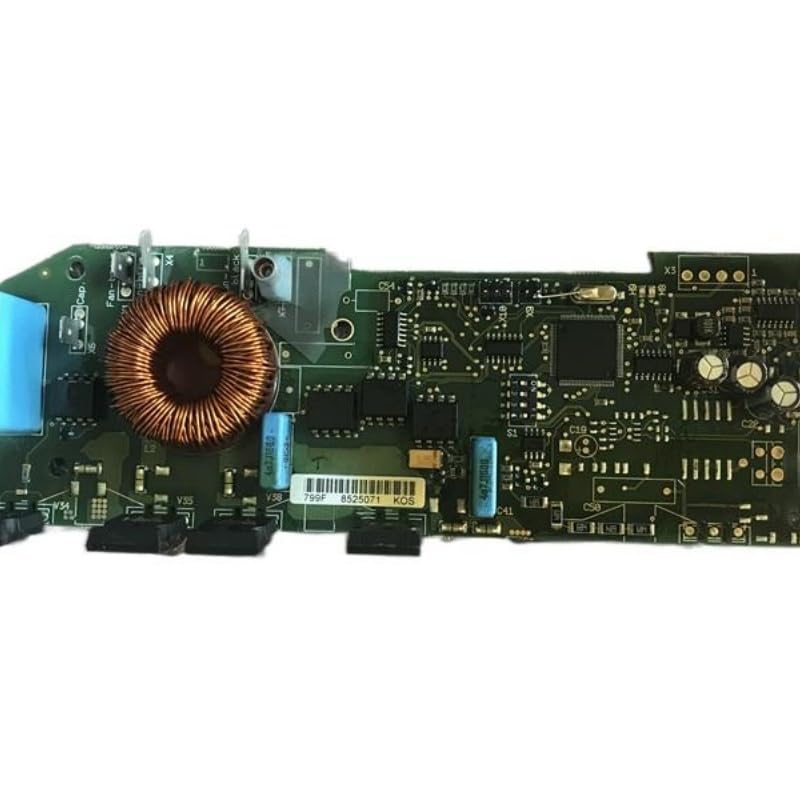
Figure 1: Overview of the PC00299 G 799F electronic component. Key features include a prominent copper inductor coil, multiple capacitors (e.g., blue cylindrical ones), and various integrated circuits. Connectors such as X3, X4, X5 are visible, along with labels like "Cap", "Fan-t", "V35", "V38", "799F", "8525071", and "KOS".
4. Operating Instructions
Once installed and powered, the PC00299 G 799F operates as an integral part of the larger system it is integrated into. Its function is typically automated or controlled by the host system. Refer to the primary system's operational manual for specific instructions on how to interact with the component's functionality.
- Ensure all system parameters are within the specified operating ranges.
- Monitor system indicators for proper component function.
5. Maintenance
Regular maintenance ensures optimal performance and longevity of the PC00299 G 799F.
- Cleaning: Periodically inspect the component for dust and debris accumulation. Use a soft, dry brush or compressed air to gently clean the surface. Do not use liquid cleaners directly on the circuitry.
- Inspection: Annually inspect all electrical connections for tightness and signs of corrosion. Check for any visible damage to the circuit board or components.
- Environmental Control: Ensure the operating environment remains within specified temperature and humidity limits.
6. Troubleshooting
If the component or the system it is integrated into exhibits unexpected behavior, consider the following troubleshooting steps:
- No Power:
- Verify that the power supply is active and connected correctly.
- Check all power cables and connections for damage or looseness.
- Intermittent Operation:
- Inspect for loose connections or environmental factors like excessive heat or vibration.
- Ensure the component is securely mounted.
- System Error Codes: Refer to the primary system's manual for interpretation of any error codes related to this component.
If issues persist after performing these steps, contact technical support.
7. Specifications
| Attribute | Value |
|---|---|
| Model Number | PC00299 G 799F |
| Brand | GENERIC |
| ASIN | B0FQWD5DFQ |
| Manufacturer | GENERIC |
| Date First Available | September 12, 2025 |
8. Warranty and Support
For information regarding the warranty period and terms for the GENERIC PC00299 G 799F, please refer to the documentation provided at the time of purchase or contact the manufacturer directly. Technical support can be obtained through the official GENERIC support channels.
Note: Unauthorized modifications or repairs will void the warranty.


