
Paukila H31
Paukila H31 Smart Watch User Manual
Model: H31
Introduction
Thank you for choosing the Paukila H31 Smart Watch. This device is designed to enhance your daily life with advanced fitness tracking, health monitoring, and smart communication features. This manual provides essential information for setting up, operating, and maintaining your smart watch to ensure optimal performance and longevity.
Safety Information
- Consult your doctor before starting any new exercise program or if you have pre-existing health conditions.
- The Paukila H31 Smart Watch is not a medical device. Health data provided is for reference only and should not be used for medical diagnosis or treatment.
- Keep the device away from extreme temperatures, direct sunlight, and corrosive liquids.
- Do not attempt to disassemble or repair the watch yourself. This will void the warranty.
- Ensure the charging contacts are clean and dry before charging to prevent corrosion.
Package Contents
- Paukila H31 Smart Watch
- Charging Cable
- User Manual
- Additional Interchangeable Band (may vary by package)
Setup Guide
1. Charging the Smart Watch
Before first use, fully charge your Paukila H31 Smart Watch. Connect the charging cable to the magnetic charging points on the back of the watch and plug the USB end into a power adapter (not included) or a computer's USB port. The watch display will indicate charging status.
2. App Installation and Pairing
To unlock the full functionality of your smart watch, you need to install the companion application on your smartphone.
- Download the App: Scan the QR code provided in the watch packaging or search for "GloryFit" in the Apple App Store (for iOS) or Google Play Store (for Android).
- Enable Bluetooth: Turn on the Bluetooth function on your smartphone.
- Open GloryFit App: Launch the GloryFit application and follow the on-screen instructions to create an account or log in.
- Connect Device: In the app, navigate to the device section (usually indicated by a watch icon or "Device" tab). Click "Connect device" or "Add device" and select "H31" from the list of available devices. Confirm the pairing request on both your phone and watch.
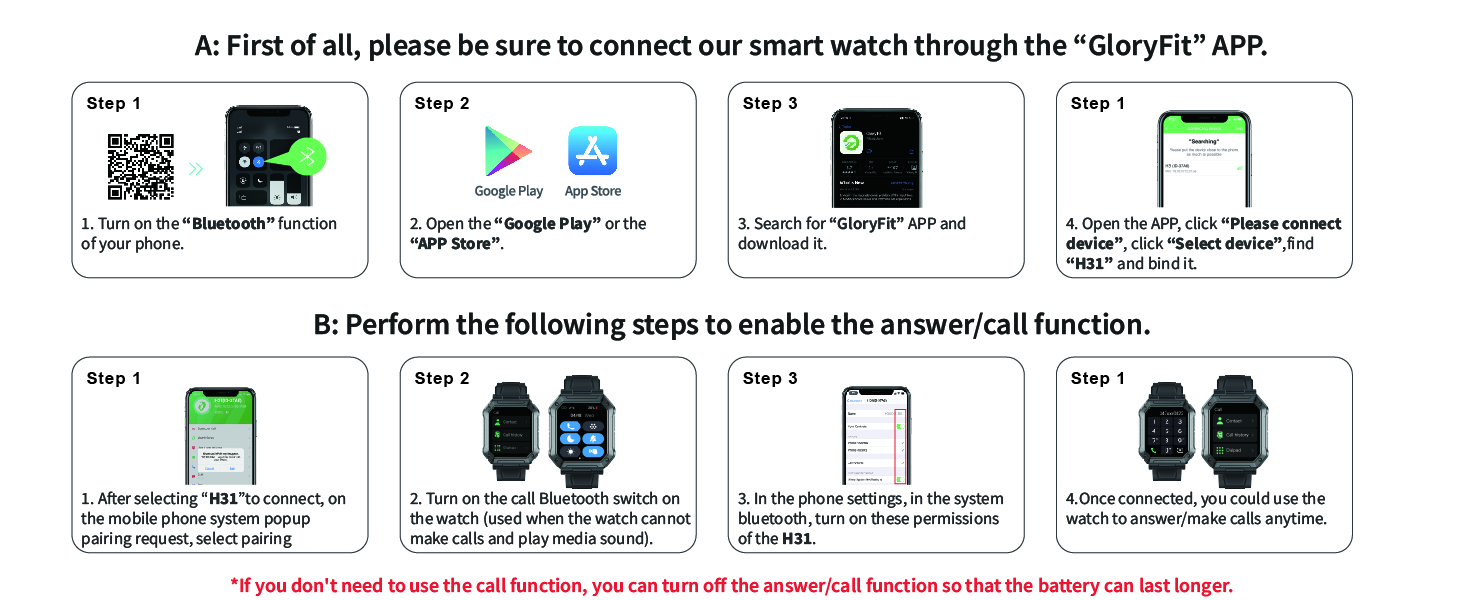
Image: Step-by-step guide for connecting the Paukila H31 Smart Watch to the GloryFit app and enabling Bluetooth call functionality.
3. Enabling Call Function
After initial pairing, perform the following steps to enable the answer/call function:
- Once the "H31" device is selected in the GloryFit app, accept the mobile phone system pop-up pairing request.
- On your smart watch, swipe down from the top of the screen to access the quick settings. Ensure the Bluetooth call switch is turned ON. (This switch is separate from the main Bluetooth connection and specifically enables call audio).
- On your smartphone, go to your phone's Bluetooth settings. Locate "H31" in the list of paired devices and ensure that permissions for calls and media audio are enabled.
- Once connected, you can make and answer calls directly from your watch.
Note: If you do not intend to use the call function, you can turn off the answer/call function on the watch to conserve battery life.
Operating Instructions
Basic Navigation
- Touchscreen: Swipe left/right, up/down to navigate menus and screens. Tap to select.
- Side Buttons: The watch typically has one or more physical buttons. Refer to the on-screen prompts for specific button functions (e.g., power on/off, return to home screen, quick access to sports modes).
- Raise to Wake: The screen will automatically light up when you raise your wrist. This feature can be enabled/disabled in the app settings.

Image: Main display of the Paukila H31 Smart Watch showing various data points.
Communication Features
- Making/Answering Calls: Once the call function is enabled, you can dial numbers directly from the watch or answer incoming calls. The watch features a built-in high-fidelity speaker and noise reduction microphone.
- Message Notifications: Receive real-time notifications for SMS, WhatsApp, Facebook, and other apps directly on your watch.
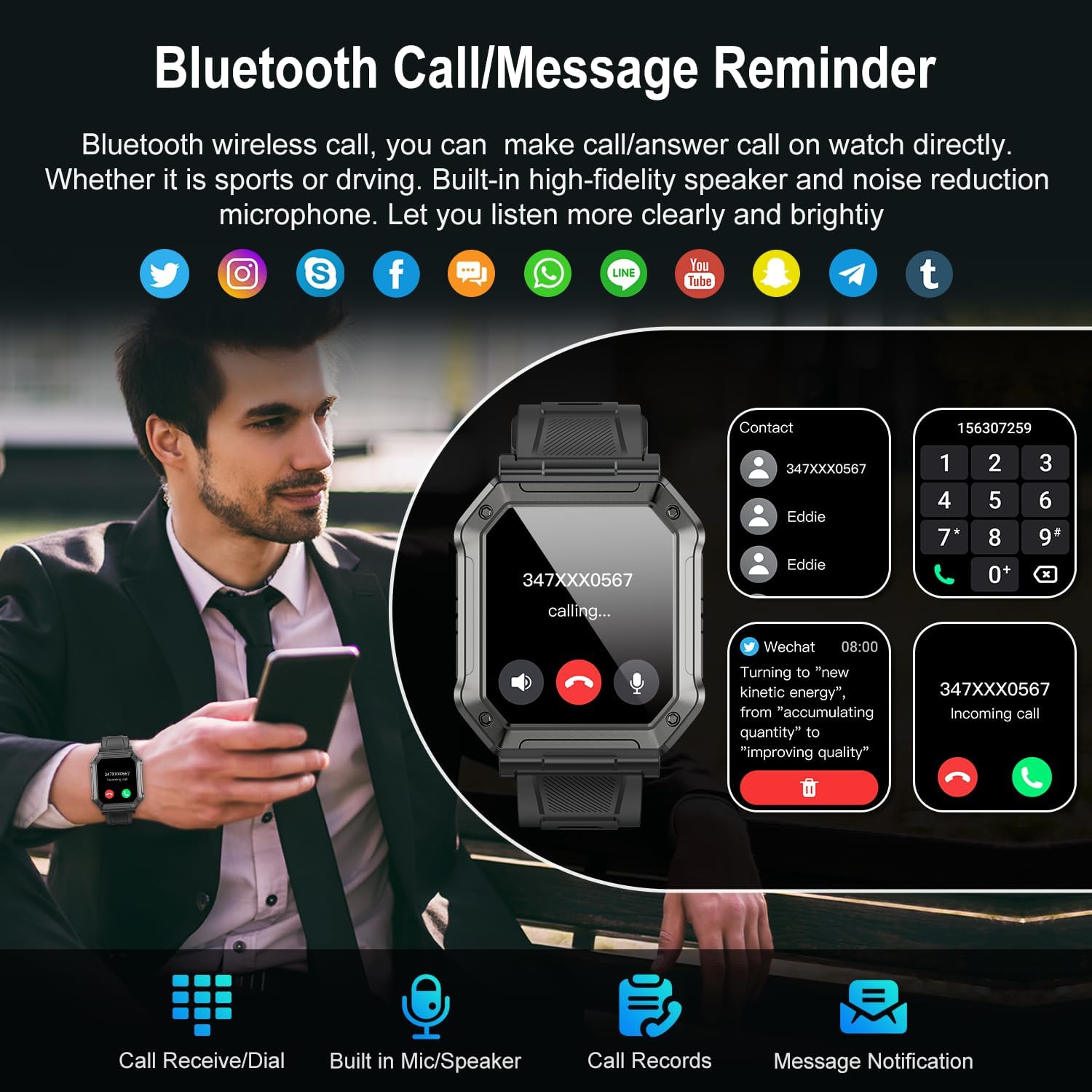
Image: Bluetooth call and message reminder features on the Paukila H31 Smart Watch.
Health Monitoring
- Heart Rate Monitor: The watch continuously tracks your heart rate. View real-time data on the watch or detailed trends in the GloryFit app.
- Blood Oxygen (SpO2): Monitor your blood oxygen levels throughout the day.
- Sleep Tracking: The watch analyzes your sleep patterns, including deep sleep, light sleep, and awake times, providing a comprehensive sleep quality report in the app.

Image: Sleep monitor and health monitoring features, including heart rate and blood oxygen tracking.

Image: Blood oxygen monitoring and AI Voice Assistant interaction on the Paukila H31 Smart Watch.
Fitness Tracking
- 112+ Sport Modes: Select from a wide range of activities such as running, cycling, badminton, hiking, and more. The watch records steps, distance, and calories burned.
- GPS via Smartphone: The watch can obtain GPS positioning through your mobile phone to accurately track your movement path during outdoor activities.
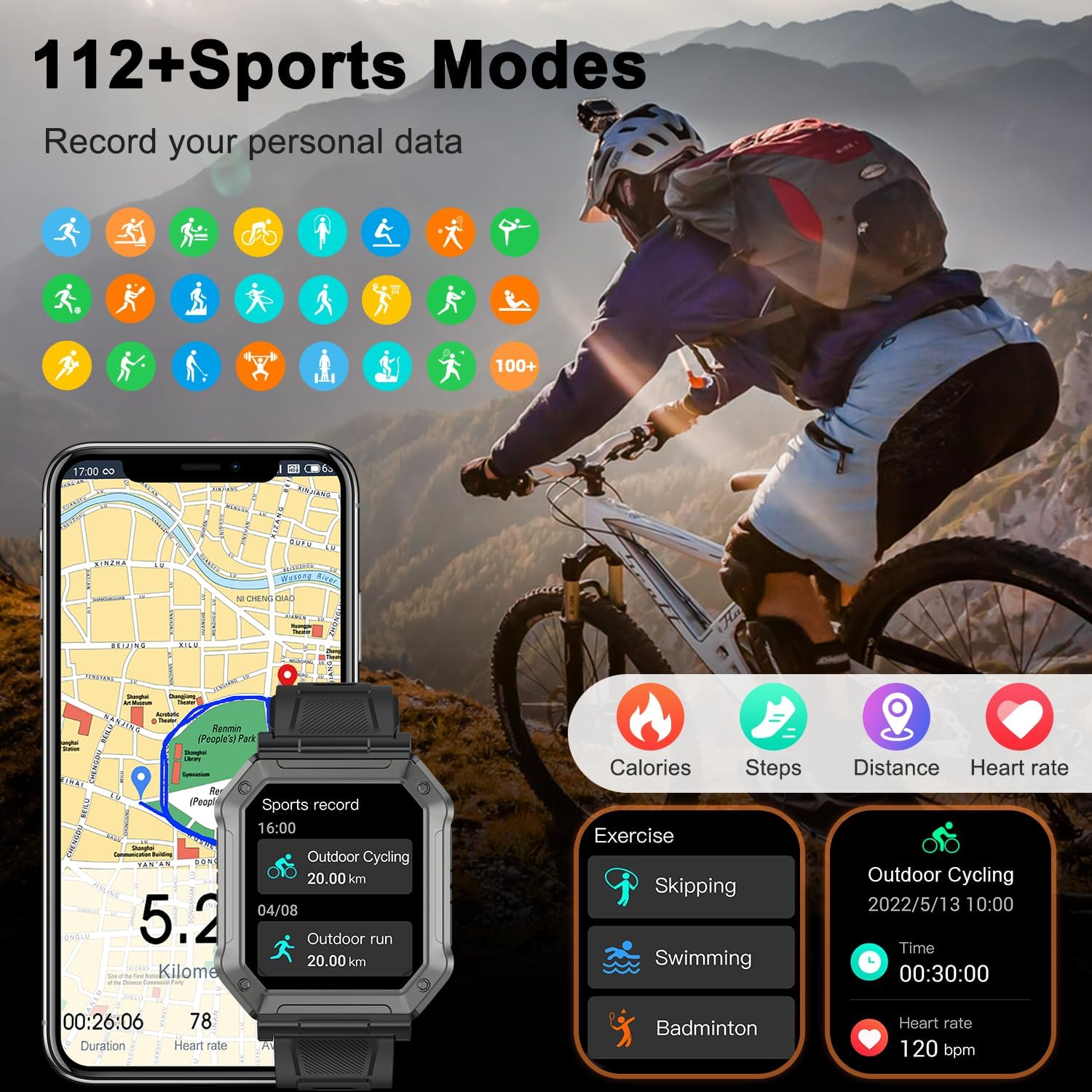
Image: Overview of 112+ sports modes and fitness tracking capabilities.
Additional Features
- Music Control: Control music playback on your smartphone directly from your watch.
- Camera Control: Use your watch as a remote shutter for your smartphone camera.
- Weather Forecast: Get real-time weather information on your wrist.
- Alarms, Stopwatch, Timer: Access utility functions for daily tasks and workouts.
- Sedentary Reminders: Receive alerts to encourage movement after periods of inactivity.
- AI Voice Assistant: Interact with your watch using voice commands for various functions.
- Customizable Watch Faces: Choose from many pre-installed watch faces or customize your own using photos from your phone via the GloryFit app.
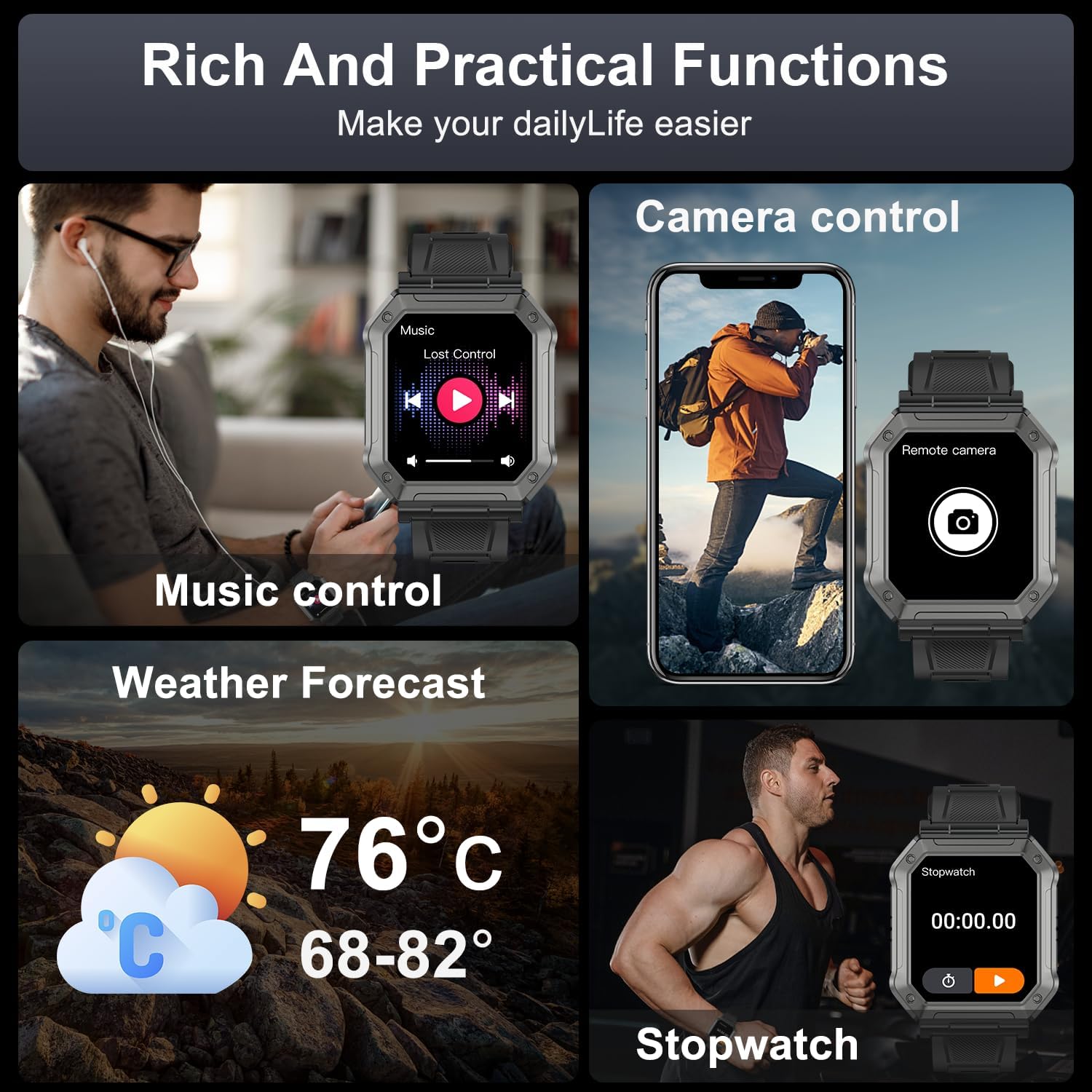
Image: Rich and practical functions including music control, camera control, weather, and stopwatch.
Maintenance
Cleaning
Regularly clean your smart watch and strap to prevent skin irritation and maintain device performance. Use a soft, damp cloth to wipe the screen and strap. Avoid using harsh chemicals or abrasive materials.
Water Resistance (IPX8)
The Paukila H31 Smart Watch is IPX8 waterproof, meaning it can withstand immersion in water under certain conditions. It is suitable for daily waterproofing needs such as handwashing, rain, and swimming in shallow water. However, it is not recommended for hot showers, saunas, or diving, as steam and high pressure can compromise the seals.

Image: Durability features of the Paukila H31 Smart Watch, including water resistance and resistance to extreme conditions.
Battery Care
- Avoid fully discharging the battery frequently.
- Charge the watch using the provided charging cable.
- Store the watch in a cool, dry place if not used for extended periods.
Troubleshooting
| Problem | Possible Solution |
|---|---|
| Watch not turning on | Ensure the watch is fully charged. Press and hold the power button for several seconds. |
| Cannot pair with phone | Ensure Bluetooth is enabled on both devices. Restart both the watch and phone. Make sure the GloryFit app is updated. Forget the device in phone's Bluetooth settings and try pairing again. |
| Call function not working | Verify that the Bluetooth call switch is enabled on the watch and that call/media audio permissions are granted for "H31" in your phone's Bluetooth settings. |
| Inaccurate health data | Ensure the watch is worn snugly on your wrist, not too tight or too loose. Clean the sensor on the back of the watch. Avoid excessive movement during measurements. |
| Notifications not received | Check app notification permissions on your phone. Ensure the GloryFit app is running in the background. Verify that notifications are enabled within the GloryFit app for specific applications. |
| Short battery life | Disable features like continuous heart rate monitoring, raise to wake, or the Bluetooth call function if not needed. Reduce screen brightness. |
Specifications
| Feature | Detail |
|---|---|
| Model Number | H31 |
| Display Type | LCD, 1.91" Full Touch Screen |
| Operating System | Android and iOS compatible (Android 5.0+, iOS 9.0+) |
| Connectivity Technology | Bluetooth 5.0 |
| Battery Type | Lithium Ion (1 required, included) |
| Battery Life | 7 to 15 days (typical usage) |
| Water Resistance | IPX8 |
| Health Monitoring | Heart Rate, Blood Oxygen (SpO2), Sleep Tracking |
| Fitness Tracking | 112+ Sport Modes, Steps, Distance, Calories, GPS via Smartphone |
| Communication | Bluetooth Call (Make/Answer), Message Notifications |
| Other Features | Music Control, Camera Control, Weather, Alarms, Stopwatch, Timer, Sedentary Reminders, AI Voice Assistant, Customizable Watch Faces |
| Item Weight | 5.1 ounces (0.14 Kilograms) |
| Manufacturer | Shenzhen Buzz Tech CO.,LTD |
Warranty and Support
The Paukila H31 Smart Watch comes with a standard manufacturer's warranty. Please refer to the warranty card included in your package or contact Paukila customer support for detailed warranty terms and conditions. For technical assistance or further inquiries, please visit the official Paukila website or contact their customer service team.
Ask a question about this manual
Ask about setup, troubleshooting, compatibility, parts, safety, or missing instructions. Manuals+ will review the question and use this page’s manual context to help answer it.