
Introduction
Thank you for choosing the PETLIV Smart Automatic Pet Feeder with Camera. This device is designed to provide convenient and reliable feeding for your pets, ensuring they receive their meals on schedule, even when you are away. Featuring smart app control, a 2K HD camera, two-way audio, and a dual power supply, this feeder offers peace of mind and enhanced pet care. Please read this manual thoroughly before use to ensure proper setup and operation.
Package Contents
Please check the package contents to ensure all items are present:
- 1 x PETLIV Automatic Pet Feeder Unit
- 2 x Feeding Bowls
- 1 x Power Adapter
- 1 x Desiccant Bag (pre-installed or separate)
- 1 x User Manual (this document)
Product Overview
Components
The PETLIV Smart Automatic Pet Feeder consists of several key components:
- Food Storage Container: 5-liter capacity for dry pet food.
- Water Tank: 4-liter capacity for water.
- Dispensing Mechanism: Ensures smooth food delivery and features an anti-clogging design.
- 2K HD Camera: Integrated camera with a 160° ultra-wide angle and infrared night vision for real-time monitoring.
- Microphone & Speaker: For two-way audio communication and voice recording.
- Control Panel: Manual feed button and status indicators.
- Power Input: For connecting the AC adapter.
- Battery Compartment: For 3 x D-size backup batteries (not included).
- Food Bowls: Two detachable bowls for feeding.
Features
- Smart App Control: Schedule meals, adjust portions, and monitor your pet's nutrition via a dedicated app. Supports both 5G and 2.4G Wi-Fi networks.
- 2K HD Camera with Night Vision: Monitor your pet in real-time with clear 2K resolution and infrared night vision for 24/7 surveillance.
- Two-Way Audio & Voice Prompts: Communicate with your pet using the built-in microphone and speaker. Record a 10-second voice message to play at meal times.
- 360° Sealed Storage: Keeps dry food fresh for up to 30 days, separated from the feeding mechanism. Includes a transparent storage box for easy monitoring of food levels.
- Anti-Clogging Design: Ensures consistent and reliable food dispensing.
- Dual Power Supply: Operates with a 5V/1A adapter and can use 3 x D-size batteries (not included) as backup in case of power outages.
- Large Capacity: 5L food container and 4L water tank, suitable for dry food kibble sizes between 5mm and 14mm.
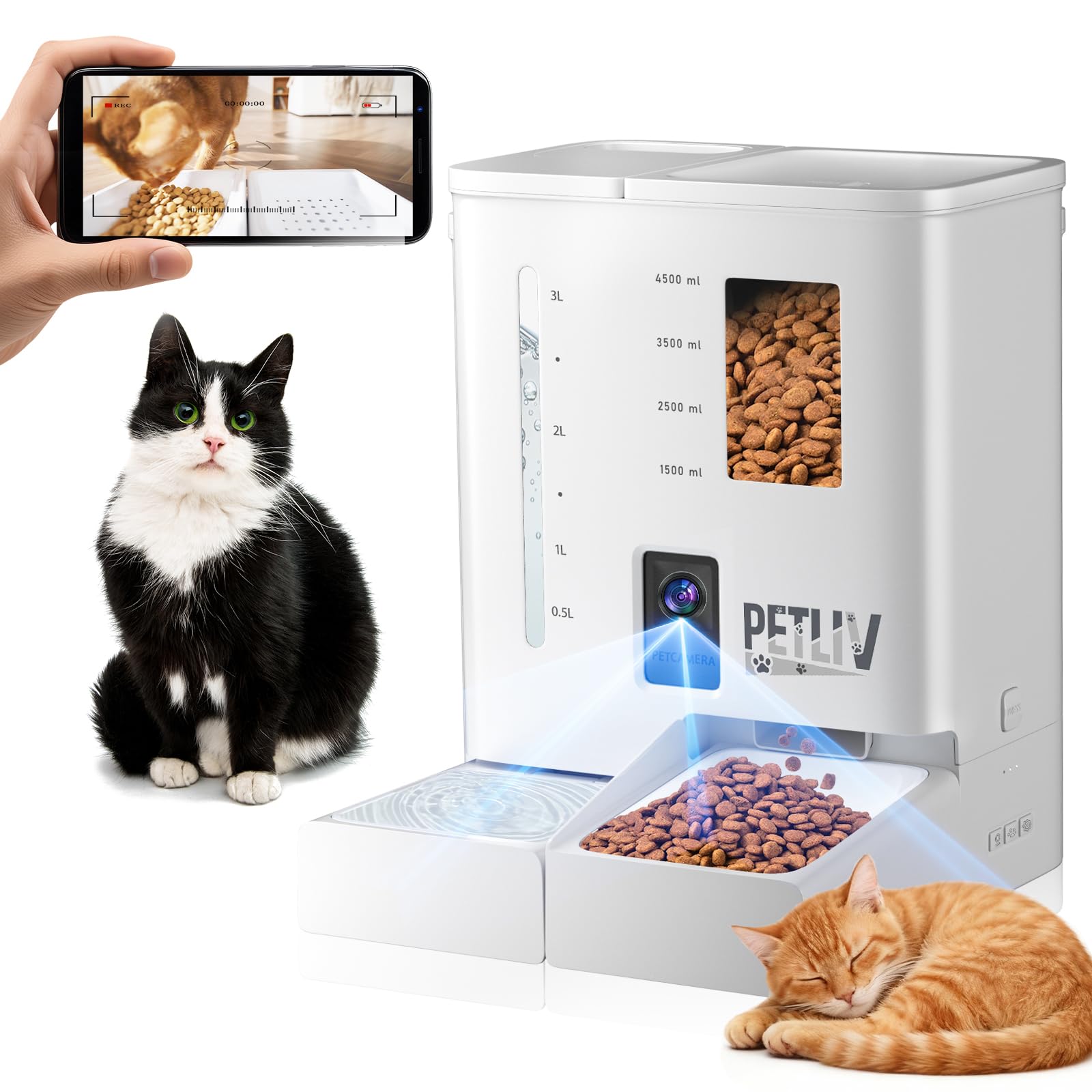
Image: The PETLIV Smart Automatic Pet Feeder, showing its main unit, integrated camera, and dual feeding bowls.
Setup Instructions
1. Unpacking and Placement
- Carefully remove all components from the packaging.
- Place the feeder on a flat, stable surface in a location accessible to your pet and within Wi-Fi range.
2. Power Connection
- Connect the power adapter to the feeder's power input port and plug it into a wall outlet.
- For backup power, open the battery compartment at the bottom of the feeder and insert 3 x D-size batteries (not included). Ensure correct polarity.
3. App Installation and Wi-Fi Connection
- Download the PETLIV app from your smartphone's app store (iOS or Android).
- Open the app and follow the on-screen instructions to create an account and add your new feeder.
- During the setup process, you will be prompted to connect the feeder to your home Wi-Fi network. The feeder supports both 5G and 2.4G networks. Ensure your phone is connected to the same network during setup.
4. Filling Food and Water
- Open the lid of the food storage container and fill it with dry pet food. Ensure the kibble size is between 5mm and 14mm.
- Fill the water tank with fresh water.
- Ensure the desiccant bag is properly placed in its compartment to maintain food freshness.
5. Attaching Bowls
- Attach the two feeding bowls to the designated slots at the base of the feeder.
Operating Instructions
1. Scheduling Meals via App
- Open the PETLIV app and select your feeder.
- Navigate to the 'Feeding Schedule' section.
- Set desired meal times and portion sizes. You can customize multiple meals per day.
2. Manual Feeding
- Via App: In the app, select the 'Feed Now' option to dispense a single portion immediately.
- Via Device: Press the manual feed button on the feeder's control panel to dispense a single portion.
3. Voice Recording
- In the app, go to the 'Voice Recording' settings.
- Record a short 10-second message. This message will play automatically before each scheduled meal to call your pet.
4. Live View and Two-Way Audio
- Open the app and select the live camera view to see your pet in real-time.
- Use the microphone icon in the app to speak to your pet, and the speaker icon to hear sounds from the feeder's location.
5. Monitoring
- The app allows you to monitor food levels, feeding history, and pet activity through the camera.
- The transparent food container also allows for visual inspection of food levels.
Maintenance
1. Cleaning
- Food Container and Bowls: Regularly detach and wash the food container and bowls with mild soap and water. Rinse thoroughly and dry completely before reassembling.
- Water Tank: Clean the water tank regularly to prevent algae buildup.
- Feeder Unit: Wipe the exterior of the feeder with a damp cloth. Do not immerse the main unit in water.
2. Desiccant Replacement
- The desiccant bag helps keep the food fresh. Replace it approximately every 30 days. The app may provide reminders for this.
3. Battery Check
- If using backup batteries, check their charge periodically to ensure they are ready in case of a power outage. Replace them as needed.
Troubleshooting
| Problem | Possible Cause | Solution |
|---|---|---|
| Feeder has no power. | Power adapter unplugged; batteries drained or incorrectly installed. | Check power adapter connection; replace or correctly install D-size batteries. |
| Food is not dispensing. | Food container empty; food jammed; dispensing mechanism blocked. | Refill food container; check for and clear any food jams; ensure kibble size is appropriate (5-14mm). |
| Wi-Fi connection fails. | Incorrect Wi-Fi password; feeder too far from router; network interference; incompatible Wi-Fi band. | Verify Wi-Fi password; move feeder closer to router; ensure your router supports 2.4G or 5G and is configured correctly. Restart feeder and router. |
| Camera not showing live view. | No internet connection; app error; camera malfunction. | Check Wi-Fi connection; restart the app; restart the feeder. |
| Two-way audio not working. | Microphone/speaker muted in app; network latency. | Check app settings for audio controls; ensure stable internet connection. |
Specifications
| Feature | Detail |
|---|---|
| Model Number | DU-F03V |
| Dimensions (L x W x H) | 20 cm x 18 cm x 30 cm |
| Weight | 3.89 Kilograms |
| Material | Plastic |
| Food Capacity | 5 Liters |
| Water Capacity | 4 Liters |
| Compatible Kibble Size | 5mm - 14mm (dry food only) |
| Power Supply | 5V/1A AC Adapter (included), 3 x D-size Batteries (not included) |
| Wi-Fi Connectivity | 2.4GHz / 5GHz |
| Camera Resolution | 2K HD (160° wide-angle, night vision) |
| Special Features | Smart App Control, Feeding Schedule, Two-Way Audio, Voice Recording, Anti-Clogging, Sealed Food Storage |
| Target Species | Cat (suitable for multiple pets) |
Warranty and Support
For warranty information and technical support, please refer to the contact details provided with your purchase or visit the official PETLIV website. Keep your purchase receipt as proof of purchase for any warranty claims.