
Introduction
This user manual provides detailed instructions for the SakerPlus 3-in-1 Portable High-Speed USB 3.0 Memory Storage device. This versatile flash drive is designed for efficient data transfer and storage across various devices, including Apple iPhones/iPads and computers with USB-A ports. Please read this manual thoroughly to ensure proper use and to maximize the device's functionality and lifespan.
Product Overview
The SakerPlus 3-in-1 Memory Storage device offers a compact and secure solution for expanding storage and transferring files. It features a retractable design that protects its multiple connectors.
- USB 3.0 Connector: For high-speed data transfer with computers and laptops.
- Lightning Connector: For compatibility with Apple iPhone and iPad devices.
- Retractable Mechanism: Protects connectors when not in use.
- Toggle Switch: Allows easy switching between connector modes.

Image 1: The SakerPlus 3-in-1 Portable High-Speed USB 3.0 Memory Storage device, showcasing its compact design and retractable mechanism.
Setup
- Initial Connection:
For Apple devices (iPhone/iPad): Insert the Lightning connector into your device's port. You may be prompted to download a companion app. Install the recommended app to manage files.
For computers/laptops: Slide the toggle switch to reveal the USB-A 3.0 connector and insert it into an available USB port on your computer. The device should be recognized automatically.

Image 2: The SakerPlus device connected to both a laptop via USB-A and an iPhone via Lightning connector, demonstrating its dual compatibility.
- App Installation (for iOS): If prompted, download and install the dedicated file management application from the App Store. This app is essential for accessing and managing files on your iOS device.
- Device Recognition: Once connected, the device will appear as an external storage drive on your computer or within the companion app on your iOS device.
Operating Instructions
Data Transfer
- From Device to Flash Drive (iOS):
Open the companion app. Navigate to your device's internal storage (e.g., Camera Roll for photos/videos). Select the files you wish to transfer. Choose the option to "Copy" or "Move" to the flash drive's directory within the app.

Image 3: An iPhone connected to the SakerPlus device, illustrating how the device provides instant expanded storage for iOS devices, enabling users to save photos and videos directly.
- From Flash Drive to Device (iOS):
Within the app, browse the files on the flash drive. Select the desired files and choose to "Copy" or "Move" them to your iOS device's internal storage.
- Using with Computer (USB-A):
Once connected, the flash drive will appear as a removable disk. You can drag and drop files between your computer and the flash drive, or use standard copy/paste functions.
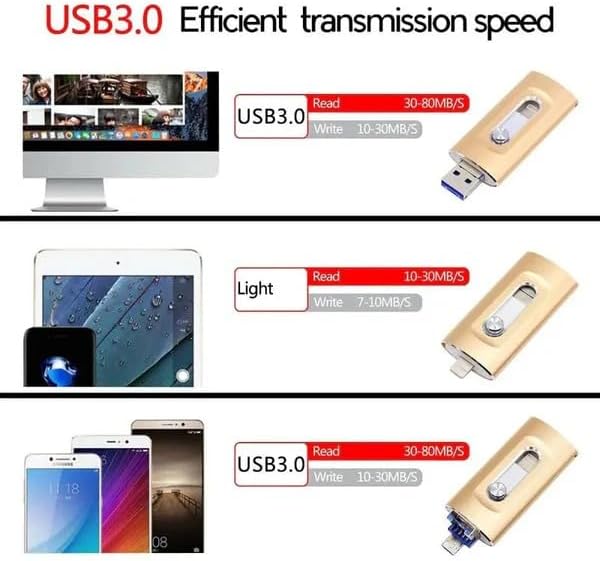
Image 4: A diagram illustrating the efficient data transmission speeds of the SakerPlus USB 3.0 device across various platforms, including computers, iPads, and smartphones.
File Management
The companion app (for iOS) and your computer's file explorer allow for basic file operations:
- Create New Folders: Organize your files by creating new directories.
- Copy/Cut/Paste: Move or duplicate files and folders.
- Delete: Remove unwanted files to free up space.
- Rename: Change the names of files or folders.
Security Features (for iOS)
To protect your private data, the companion app offers security options:
- Password Protection: Set a 6-digit password within the app to secure access to the flash drive's contents.
- Touch ID/Face ID: On compatible iOS devices, enable Touch ID or Face ID for quick and secure access to protected files without entering the password manually.

Image 5: An iPhone with the SakerPlus device connected, demonstrating the ease of transferring and managing photos, such as a skiing image, directly from the phone to the external storage.
Maintenance
- Keep Clean: Use a soft, dry cloth to gently wipe the exterior of the device. Avoid liquid cleaners.
- Protect Connectors: Always retract the connectors when the device is not in use to prevent dust and physical damage.
- Safe Removal: Always safely eject the flash drive from your computer before physically removing it to prevent data corruption. For iOS, ensure all operations are complete before disconnecting.
- Storage: Store the device in a cool, dry place away from extreme temperatures and direct sunlight.
Troubleshooting
- Device Not Recognized:
For Computers: Try connecting to a different USB port. Ensure the USB-A connector is fully extended and inserted correctly. Restart your computer.
For iOS Devices: Ensure the Lightning connector is fully inserted. Verify that the companion app is installed and updated. Try restarting your iOS device.
- Slow Transfer Speeds:
Ensure you are using a USB 3.0 port on your computer for optimal speeds. Large file transfers naturally take longer. Close other applications that might be using system resources.
- Cannot Access Files on iOS:
Confirm the companion app is open and has necessary permissions. If security features are enabled, ensure you are entering the correct password or using Touch ID/Face ID.
- Data Corruption:
Always safely eject the device from your computer. Avoid disconnecting the device during active file transfers. If data corruption occurs, reformat the drive (this will erase all data).
Specifications
| Brand | SakerPlus |
| Model Number | 9c6523b8-9472-4ac0-8079-bb188a2cf329 |
| Memory Storage Capacity | 64 GB |
| Hardware Interface | USB 3.0 |
| Connectivity Technology | USB |
| Hardware Connectivity Technology | USB Type A, Lightning (based on product features) |
| Special Feature | Dual USB Connector (Lightning and USB-A) |
| Flash Memory Type | Internal Micro SD (not user accessible) |
Note: The "Hardware Connectivity Technology" in the raw specifications listed "USB Type C", however, the product's feature bullets clearly describe a Lightning connector for Apple devices. This manual reflects the functionality described in the feature bullets. The "Micro SD" flash memory type refers to the internal storage component.
Warranty and Support
SakerPlus stands behind its products. For warranty information, technical support, or customer service inquiries, please refer to the contact information provided with your product packaging or visit the official SakerPlus website. Please retain your proof of purchase for warranty claims.