
1. Introduction
Thank you for choosing the WOOCARTY Y5 10.1" 1080P Wired Backup Camera System. This system is designed to enhance safety and visibility for a wide range of vehicles, including commercial vehicles, construction equipment, and agricultural machinery. It features a robust, industrial-grade camera and a high-definition monitor with DVR capabilities. This manual provides detailed instructions for proper installation, operation, and maintenance to ensure optimal performance and longevity of your system.
2. What's in the Box
Please verify that all components are present and in good condition upon unpacking.
- 10.1" Monitor x1
- Rear Camera x1
- 49ft Extension 4-pin Cable x1
- Fan-shaped Bracket x1
- U-shaped Bracket x1
- Remote Control x1
- Installation Tools (screws, Allen wrenches) x1 set
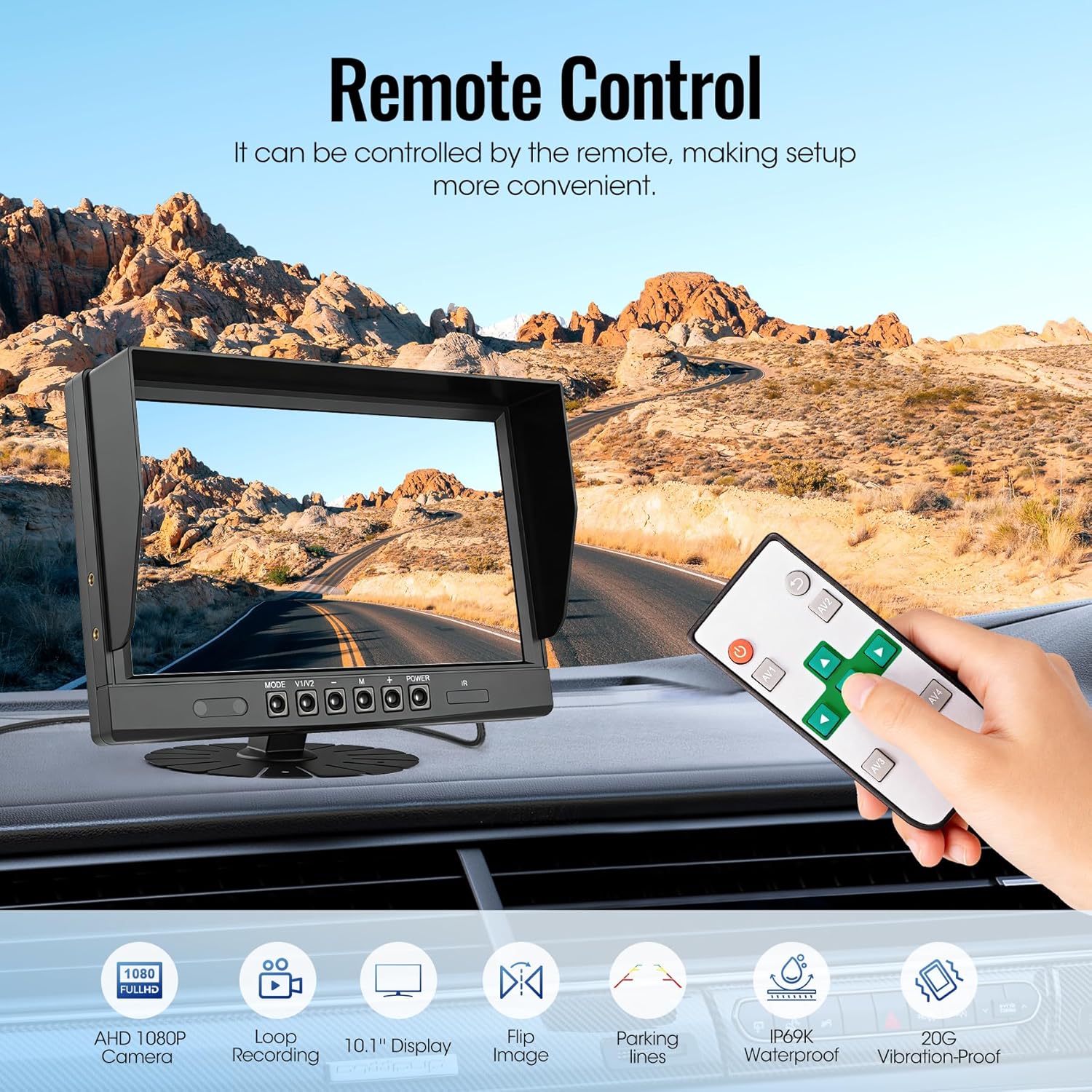
Image: All components included in the WOOCARTY Y5 Backup Camera System package.
3. Setup and Installation
Proper installation is crucial for the system's performance. It is recommended to have this system installed by a qualified professional if you are unfamiliar with vehicle electrical systems.
3.1 Camera Mounting
The camera features an IP69K waterproof rating and is designed for outdoor use. Mount the camera securely at the rear of your vehicle, ensuring a clear, unobstructed view. Use the provided fan-shaped or U-shaped bracket as appropriate for your vehicle type.
3.2 Monitor Mounting
The 10.1" monitor can be mounted using the U-shaped bracket or suction cups (if included) on your dashboard or windshield, ensuring it does not obstruct your view of the road or interfere with vehicle controls.
3.3 Wiring Diagram and Connections
The system offers two primary wiring configurations:
- Continuous Monitoring: Connect the Yellow wire to DC 12-24V positive power, the Red wire to ACC (Accessory power), and the Black wire to ground. In this setup, the trigger wire is not used, and the camera system will operate continuously when the vehicle is on.
- Reverse-Activated Viewing: Follow the continuous monitoring connections. Additionally, connect the trigger wire (typically a thin wire extending from the main cable) to the vehicle’s reverse light circuit. This enables the camera to automatically power on and display the rear view when the vehicle is shifted into reverse gear.
Ensure all connections are secure and waterproof, especially for external wiring. Use the provided 4-pin aviation-grade extension cable to connect the camera to the monitor.

Image: Detailed wiring diagram for the WOOCARTY Y5 Backup Camera System.
4. Operating Instructions
4.1 Monitor Controls
The monitor features physical buttons for various functions:
- MODE: Switches between display modes (e.g., single camera view, split-screen if multiple cameras are connected).
- V1/V2: Selects between camera inputs (for multi-camera systems).
- M (Menu): Accesses the system settings menu.
- +/-: Navigates menu options or adjusts settings (e.g., brightness, contrast).
- POWER: Turns the monitor on/off.
- IR: Activates/deactivates infrared night vision (if applicable and manually controlled).

Image: Front panel controls of the 10.1" HD Monitor.
4.2 Remote Control
A mini remote control is included for convenient adjustment of settings. Ensure the insulating sheet is removed from the battery compartment before first use. The remote allows for mirror/flip adjustments and menu navigation without directly touching the monitor.
Image: Using the remote control to operate the monitor.
4.3 Night Vision
The camera is equipped with IR LEDs for enhanced night vision, providing clear visibility in low-light conditions or complete darkness. This feature typically activates automatically.

Image: Demonstration of the camera's HD Super Night Vision.
5. Advanced Features
5.1 Intelligent Loop Recording & Playback
The system includes a DVR function that continuously records driving footage. A 32GB SD card is included for immediate use, and the system supports memory cards up to 128GB. When the memory card is full, the oldest footage is automatically overwritten by new recordings. Recordings can be accessed and played back directly through the monitor's interface.

Image: Loop Recording and Playback feature on the monitor.
5.2 Parking Guidance Lines
Drivers can enable parking guidance lines on the screen to assist with precise parking and maneuvering. These lines provide a visual reference for distance and trajectory.
5.3 Image Flip and Split-Screen Display
The monitor allows for one-touch image orientation controls (mirror/flip modes) to adapt to various camera mounting setups. For systems with multiple cameras, a split-screen display can be activated to view multiple camera feeds simultaneously, eliminating blind spots.

Image: Full screen, split screen, and image flip options.
6. Maintenance
To ensure the longevity and optimal performance of your WOOCARTY Y5 system, follow these maintenance guidelines:
- Cleaning the Camera Lens: Regularly clean the camera lens with a soft, damp cloth to remove dirt, dust, or water spots that may obstruct the view. Avoid abrasive cleaners.
- Cleaning the Monitor Screen: Use a soft, lint-free cloth to clean the monitor screen. For stubborn smudges, a screen cleaner designed for electronics can be used.
- Checking Connections: Periodically inspect all cable connections, especially the external ones, to ensure they are secure and free from corrosion or damage.
- Software Updates: Check the WOOCARTY official website for any available firmware updates for your system.
7. Troubleshooting
If you encounter issues with your system, refer to the following common problems and solutions:
| Problem | Possible Cause | Solution |
|---|---|---|
| No image on monitor | Loose cable connection, no power to monitor/camera, faulty camera/monitor. | Check all power and video cable connections. Ensure vehicle ignition is on if connected to ACC. Test power supply. |
| Image is blurry or distorted | Dirty camera lens, damaged cable, incorrect display settings. | Clean camera lens. Inspect cable for damage. Adjust monitor brightness/contrast. |
| Night vision not working | IR LEDs obstructed, faulty IR sensor. | Ensure nothing is blocking the IR LEDs. Check if IR function is enabled in settings (if manual). |
| Monitor not turning on with reverse gear | Trigger wire not connected or incorrectly connected. | Verify the trigger wire is correctly connected to the vehicle's reverse light circuit. |
| DVR not recording | SD card full, SD card not inserted, faulty SD card, recording function disabled. | Check SD card insertion and capacity. Format SD card if necessary. Ensure recording is enabled in settings. |
If these steps do not resolve the issue, please contact WOOCARTY customer support for further assistance.
8. Specifications
| Feature | Detail |
|---|---|
| Monitor Screen Size | 10.1 Inches |
| Camera Resolution | 1080P AHD |
| Camera Waterproof Rating | IP69K |
| Vibration Resistance | 20G |
| Operating Temperature | -4°F to 158°F (-20°C to 70°C) |
| Camera Angle of View | 149 Degrees (Real Angle) |
| Optical Sensor Technology | CCD CMOS |
| Recording | Intelligent Loop Recording (supports up to 128GB SD card) |
| Connectivity | Wired (4-pin aviation connector) |
| Product Dimensions (Monitor) | 7.09"L x 4.72"W x 0.78"H |
| Item Weight | 4.24 pounds (total system) |
9. Warranty and Support
9.1 Warranty Information
WOOCARTY offers an 18-month comprehensive warranty with a replacement guarantee for this product. This warranty covers manufacturing defects and ensures peace of mind regarding your purchase.
9.2 Customer Support
In the unlikely event of receiving damaged or missing components, or if you encounter any issues not covered in the troubleshooting section, please contact our dedicated support team promptly. Our customer care specialists are committed to providing satisfactory resolution within 24 hours of notification.
For support, please refer to the contact information provided with your product packaging or visit the official WOOCARTY website.