
1. Introduction
The Lisowod L03Pro Projector is a compact and intelligent device designed for versatile home entertainment. It features a CinemOS smart operating system, AI auto-setup capabilities, and supports high-definition visual and audio experiences. This manual provides essential information for setup, operation, and maintenance to ensure optimal performance.
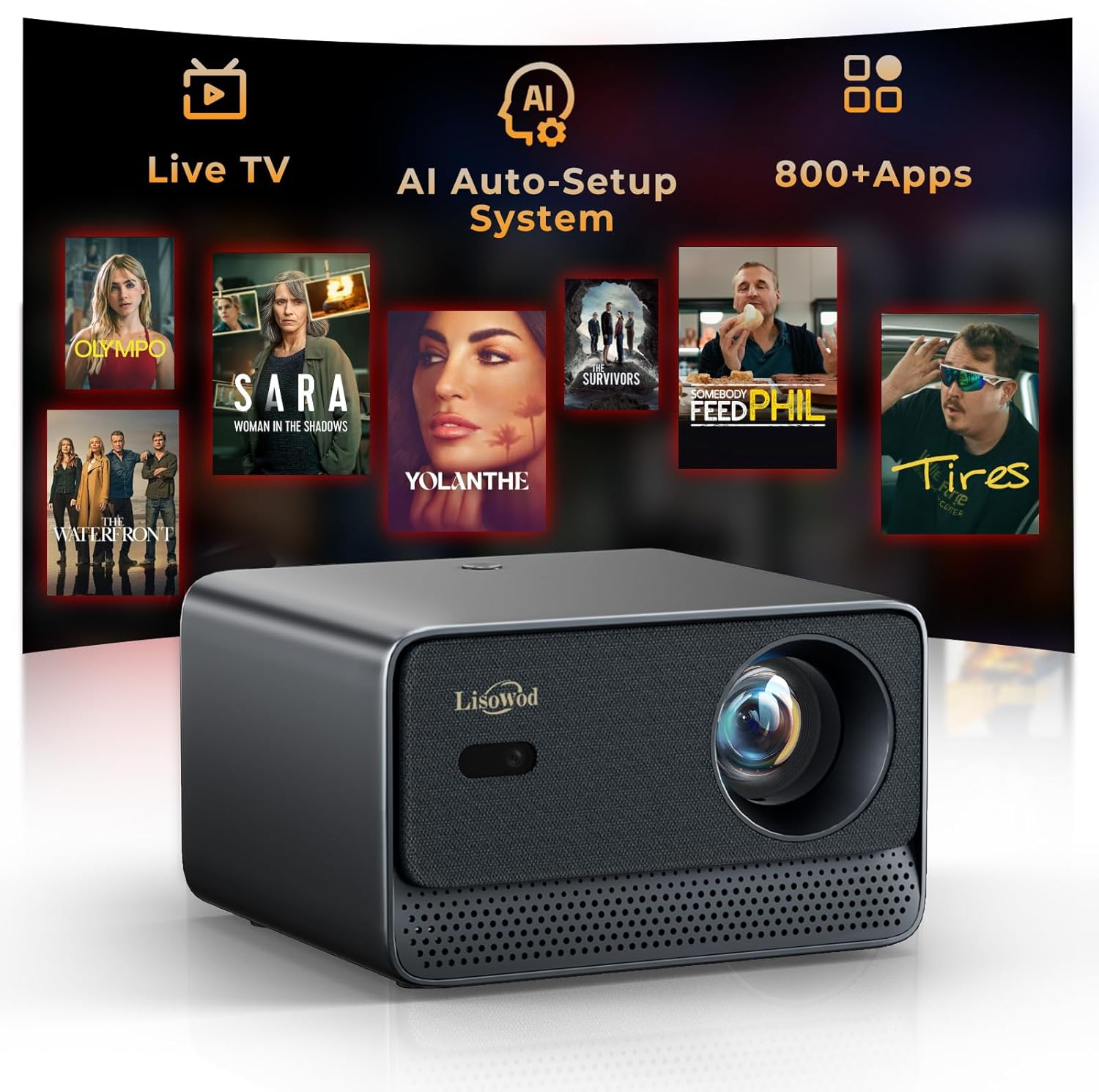
Figure 1: Lisowod L03Pro Projector
2. What's in the Box
Verify that all items are present before proceeding with setup:
- L03Pro Mini Projector (x1)
- Remote (x1, batteries not included)
- HDMI Cable (x1)
- User Manual (x1)
- Cleaning Kit (x1)
3. Setup Instructions
3.1 Powering On
- Connect the power cable to the projector's power input.
- Plug the power adapter into a wall outlet.
- Press the power button on the projector or the remote control to turn on the device.
3.2 Initial Setup and AI Auto-Setup
The L03Pro features an AI Auto-Setup system for quick and effortless configuration:
- Auto Focus: The projector automatically adjusts the image clarity.
- Auto 4-Point Keystone Correction: The image shape is automatically corrected to form a perfect rectangle, even if the projector is placed at an angle.
- Auto Obstacle Avoidance: The projection area automatically adjusts to avoid objects on the wall.
- Auto Screen Alignment: The image automatically fits within the boundaries of a projection screen if detected.
- Automatic Placement Adjustment: The projector can be placed in various positions, including upside down (ceiling mounted), and will adjust the image orientation accordingly.

Figure 2: AI Auto-Setup System demonstrating auto-focus, keystone correction, obstacle avoidance, and screen alignment.
3.3 Manual Screen Adjustment (Zoom & Shift)
For fine-tuning, use the remote control to access the 'Zoom & Shift' function to manually adjust the screen size and position.

Figure 3: Manual screen adjustment options for zoom and shift.
4. Operating Instructions
4.1 Navigation and User Interface
The L03Pro operates on CinemOS, providing a smooth and responsive user interface. Use the included remote control to navigate through menus, select applications, and adjust settings. The remote includes dedicated buttons for popular streaming services like Netflix, YouTube, and Prime Video.
4.2 Streaming Content
The projector comes with over 800 built-in applications and supports popular streaming platforms. It also offers access to over 1,000 free live TV channels without ads or subscriptions.

Figure 4: The projector's interface showing available apps and Live TV options.
4.3 Connectivity
- WiFi 6: Ensures ultra-fast and stable streaming performance.
- Bluetooth 5.2: Connect external audio devices such as speakers or headphones. The Bluetooth volume sync feature automatically matches speaker and projector volume.
- HDMI & USB: Connect external devices like gaming consoles, TV sticks, or USB drives.

Figure 5: Diagram illustrating WiFi and Bluetooth connectivity for streaming and audio.
4.4 Audio Features
The L03Pro supports Dolby Audio with 2*15W HiFi speakers, delivering clear and immersive sound. The smart sound balance feature helps prevent jarring loud jumps in audio.

Figure 6: Visual representation of the Smart Sound Balance feature for smooth audio.
4.5 Picture Modes
Adjust the visual output to suit your content with various picture modes:
- Vivid
- Standard
- Sport
- Movie
- Game
- Custom (for personalized settings)

Figure 7: The projector's menu displaying various picture modes for different content types.
4.6 Additional Features
- CEC Control: Control multiple connected devices (projector, TV sticks, gaming consoles) with a single remote via HDMI CEC.
- Game Mode: Optimized for gaming with ultra-low lag.
- Built-in Browser: Access the internet directly from the projector. You can use your phone as a touchpad by scanning a QR code for easier navigation.
- Live TV Favorites: Save your preferred live TV channels for quick access.
- Customizable Screensaver: Personalize your projector's idle display.

Figure 8: CEC Control allows a single remote to manage multiple HDMI-connected devices.

Figure 9: Game Mode provides an optimized experience with minimal input lag.

Figure 10: Access the built-in browser and control it using your smartphone as a touchpad.
5. Maintenance
5.1 Cleaning
Use the provided cleaning kit to gently clean the projector lens and exterior. Avoid abrasive materials or harsh chemicals.
5.2 Longevity and Temperature Monitoring
The L03Pro is equipped with an advanced light source designed for up to 100,000 hours of operation. A smart temperature display monitors the internal temperature to ensure long-lasting performance and safety.

Figure 11: The projector's real-time temperature monitoring display.
6. Troubleshooting
If you encounter any issues with your Lisowod L03Pro Projector, please refer to the following general troubleshooting tips:
- No Power: Ensure the power cable is securely connected to both the projector and the power outlet.
- No Image: Check that the lens cap is removed. Verify the input source is correctly selected if using an external device.
- Blurry Image: Allow the AI auto-focus to complete. If needed, manually adjust focus using the remote.
- Distorted Image: The auto keystone correction should resolve most distortions. If necessary, manually adjust keystone settings.
- No Sound: Check the volume levels on both the projector and any connected external audio devices. Ensure Bluetooth speakers are properly paired.
- Connectivity Issues: Verify your WiFi network connection. For Bluetooth, ensure the device is in pairing mode and within range.
For persistent issues or technical support, please contact Lisowod customer service.
7. Specifications
| Feature | Specification |
|---|---|
| Brand | Lisowod |
| Model Number | L03Pro |
| Display Resolution | 1920 x 1080 (Native 1080P, 4K Support) |
| Brightness | 1400 ANSI Lumens |
| Color Coverage | 98% NTSC |
| Operating System | CinemOS |
| Connectivity Technology | 3.5mm Jack, Bluetooth 5.2, IR, USB, Wi-Fi 6 |
| Special Features | AI Auto Focus, Auto Keystone Correction, Auto Obstacle Avoidance, Auto Screen Alignment, Dolby Audio 2*15W HiFi Speakers, Built-in Apps (Netflix, Prime Video, YouTube), Live TV, Built-in Browser, CEC Control, Game Mode, Smart Temperature Display |
| Item Weight | 1.98 pounds |
| Product Dimensions | 2.76 x 1.95 x 3.94 inches |
| Light Source Life | 100,000 hours |
8. Warranty and Support
Lisowod provides ongoing support and assistance for the L03Pro Projector. For any inquiries or warranty claims, please contact customer support at support_us@lisowod.com.


