Introduction
This manual provides essential instructions for the safe and efficient use of your Voomy Y724 Type G Travel Adapter. Please read this manual thoroughly before using the product and retain it for future reference.
Product Overview
The Voomy Y724 is a versatile Type G travel adapter designed for use in countries such as the United Kingdom, Ireland, Malta, Cyprus, Hong Kong, Singapore, and the United Arab Emirates. It features multiple charging options in a compact, foldable design.

Image: Front and rear view of the Voomy Y724 Type G Travel Adapter, highlighting its EU sockets, USB ports, and the foldable Type G pins.
Key Features:
- Type G Compatibility: Suitable for over 150 countries, including the UK, Ireland, Malta, and UAE.
- 6-in-1 Charging Solution: Equipped with 2 USB-C ports, 2 USB-A ports, and 2 AC outlets.
- Compact and Portable: Measures approximately 7.5 x 7.2 x 5.1 cm with a foldable design for easy storage.
- Enhanced Safety: Built-in protection against overheating, short-circuits, and overloads.
- High Power Output: Supports up to 3250W (100-250V ~ 15A max) for various devices.
- Fire-Retardant Materials: Constructed from materials designed to resist fire.
Setup
To prepare your Voomy Y724 Type G Travel Adapter for use:
- Unfold the Type G Pins: Gently pull out the three pins located on the back of the adapter until they lock into place. Ensure all pins are fully extended before inserting into a wall socket.
- Inspect the Adapter: Before each use, check the adapter for any visible damage. Do not use if damaged.
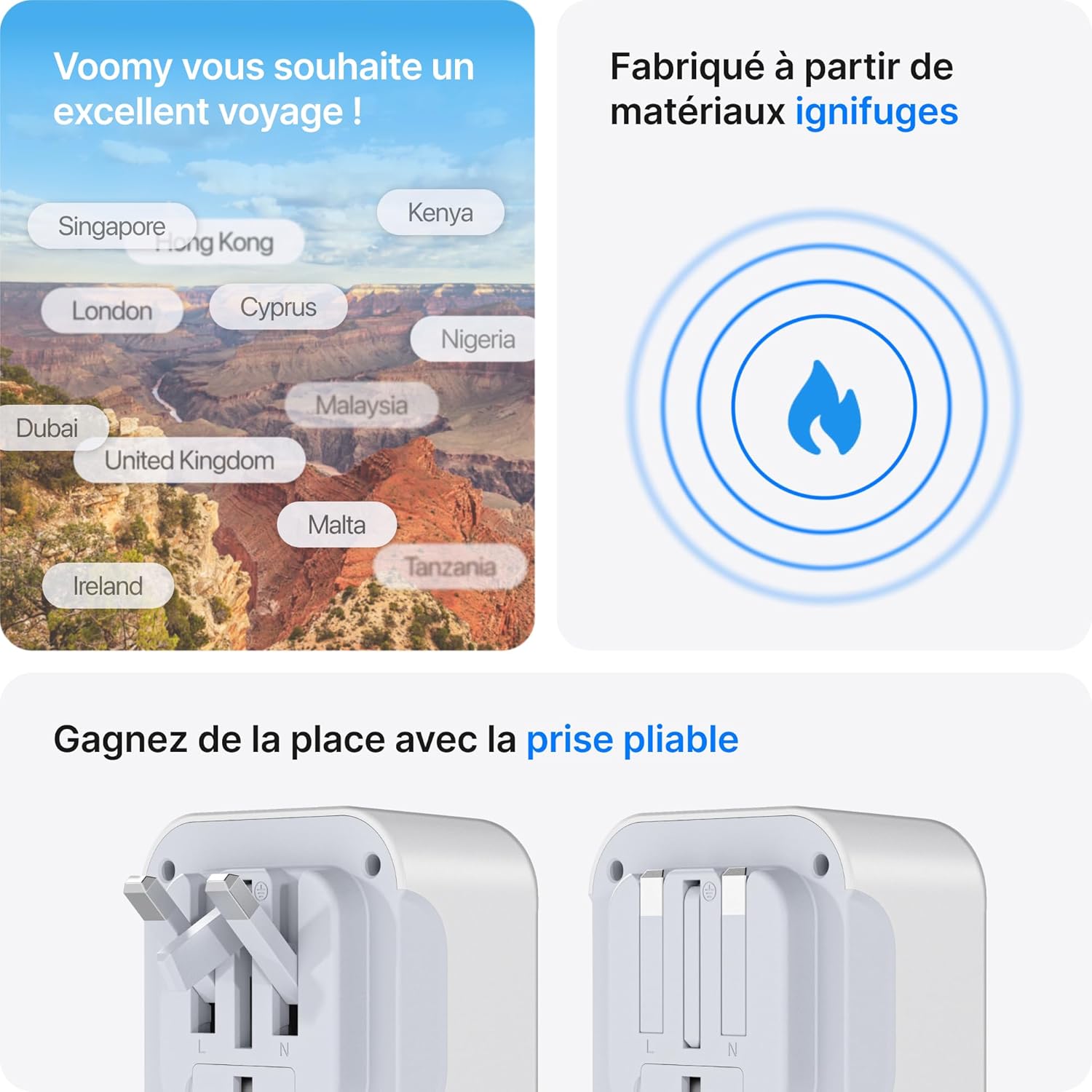
Image: Illustration of the foldable Type G pins, demonstrating how they extend for use and retract for compact storage.
Operation
The Voomy Y724 allows you to charge up to six devices simultaneously.
- Connect to Power Outlet: Insert the unfolded Type G adapter firmly into a compatible wall socket.
- Connect AC Devices: Plug your devices (e.g., laptop, hair dryer) into the two AC outlets on the front of the adapter. Ensure the total wattage does not exceed 3250W.
- Connect USB Devices: Use appropriate USB cables to connect your smartphones, tablets, smartwatches, or other USB-powered devices to the 2 USB-C ports (C1, C2) and 2 USB-A ports (A1, A2).
- Charging Indication: The adapter does not have a specific charging indicator, but your devices will show their charging status.

Image: The adapter in use, demonstrating its ability to charge multiple devices like a laptop, phone, and smartwatch at the same time.

Image: A hair dryer connected to the adapter, showcasing its capability to handle high-power appliances up to 3250W.
Compatibility
Country Compatibility (Type G Outlets):
This adapter is designed for use in countries that utilize Type G electrical outlets. These include, but are not limited to:
- United Kingdom
- Ireland
- Malta
- Cyprus
- Hong Kong
- Singapore
- United Arab Emirates
- Bahrain, Bangladesh, Belize, Botswana, Brunei, Cameroon, Channel Islands, Dominica, El Salvador, Gambia, Ghana, Gibraltar, Guyana, Guatemala, Iraq, Isle of Man, Jordan, Kenya, Kuwait, Lebanon, Macau, Malawi, Malaysia, Maldives, Mauritius, Myanmar, Nigeria, Oman, Qatar, Saint Kitts and Nevis, Saint Lucia, Saint Vincent, Saudi Arabia, Seychelles, Sierra Leone, Tanzania, Uganda, Yemen, Zambia, Zimbabwe.

Image: A visual representation of the adapter's ports (AC, USB-A, USB-C) and a map indicating its broad international compatibility.
Device Compatibility:
The adapter is compatible with a wide range of electronic devices, including:
- Smartphones (e.g., Apple iPhone, Samsung Galaxy, Google Pixel)
- Tablets (e.g., Apple iPad, Samsung Galaxy Tab)
- Laptops (e.g., Apple MacBook Air, Dell XPS, Lenovo ThinkPad)
- Gaming Consoles (e.g., PlayStation, Xbox controllers)
- Personal Care Appliances (e.g., hair dryers, flat irons)
- Wearables (e.g., Apple Watch, smartwatches)
- Audio Devices (e.g., Apple AirPods, headphones)
- Digital Cameras

Image: A collage of devices such as game controllers, iPhones, Samsung phones, irons, iPads, Galaxy Tabs, hair dryers, and AirPods Max, illustrating the adapter's universal device compatibility.
Safety Guidelines
Your safety is paramount. Please observe the following guidelines:
- Maximum Wattage: Do not exceed the maximum power rating of 3250W (15A at 250V). Overloading can cause damage to the adapter and connected devices, and poses a fire risk.
- Voltage Conversion: This adapter is a plug adapter only; it does NOT convert voltage. Ensure your devices are compatible with the local voltage (100-250V).
- Indoor Use Only: This product is intended for indoor use in dry locations only. Do not expose to moisture or extreme temperatures.
- Children and Pets: Keep out of reach of children and pets.
- Disassembly: Do not attempt to disassemble or modify the adapter. This will void the warranty and could lead to electric shock or fire.
- Integrated Protection: The adapter includes built-in protection against over-temperature, short-circuit, and over-current conditions to safeguard your devices.
Specifications
| Brand | Voomy |
| Model Number | Y724 |
| Input Voltage | 100-250V AC, 50/60Hz |
| Max Load | 15A |
| Max Power | 3250W |
| USB-C Output | Up to 3.0A (Total for both USB-C ports) |
| USB-A Output | Standard USB-A (Total for both USB-A ports) |
| Total USB Output | 5V/3.4A (Max) |
| Dimensions (L x W x H) | Approx. 7.5 x 7.2 x 5.1 cm |
| Weight | Approx. 94 grams |
| Material | Fire-retardant materials |
| Plug Type | Type G (UK standard) |
| AC Outlets | 2 (EU standard) |
| USB Ports | 2 USB-C, 2 USB-A |

Image: Visual details of the adapter's dimensions (7.5 cm x 7.2 cm), confirmation of fire-retardant materials, and maximum power output. Note: The image displays 3750W and 130 grams, but product specifications state 3250W and 94 grams, which are used in the table above.
Troubleshooting
- Device not charging:
- Ensure the adapter is firmly plugged into the wall socket.
- Check if your device's charging cable is securely connected to both the device and the adapter's USB port or AC outlet.
- Verify that the total power consumption of all connected devices does not exceed 3250W.
- Test with a different device or cable to rule out device/cable issues.
- Adapter feels warm:
- It is normal for the adapter to feel slightly warm during operation. If it becomes excessively hot, immediately unplug it from the wall and disconnect all devices. This may indicate an overload or malfunction.
- Pins not extending/retracting smoothly:
- Ensure no debris is obstructing the pin mechanism. Do not force the pins.
Maintenance
- Cleaning: Disconnect the adapter from the power outlet and all devices before cleaning. Wipe with a dry, soft cloth. Do not use liquid cleaners or abrasive materials.
- Storage: When not in use, retract the Type G pins and store the adapter in a cool, dry place away from direct sunlight and moisture.
Warranty and Support
Voomy products are manufactured to high-quality standards. For information regarding warranty coverage, technical support, or customer service, please refer to the contact details provided on the product packaging or visit the official Voomy website.

Image: The Voomy Y724 adapter, its packaging, and a small manual, representing the complete product contents.