
1. Introduction
Thank you for choosing the YUQBLITTY Large 156 LED Red Light Therapy Gloves. This device is designed to provide targeted red light and near-infrared light therapy for hands, wrists, and other body areas. It utilizes advanced dual-wavelength technology (660nm red light and 850nm near-infrared light) to support comfort and flexibility. Please read this manual thoroughly before use to ensure safe and effective operation.
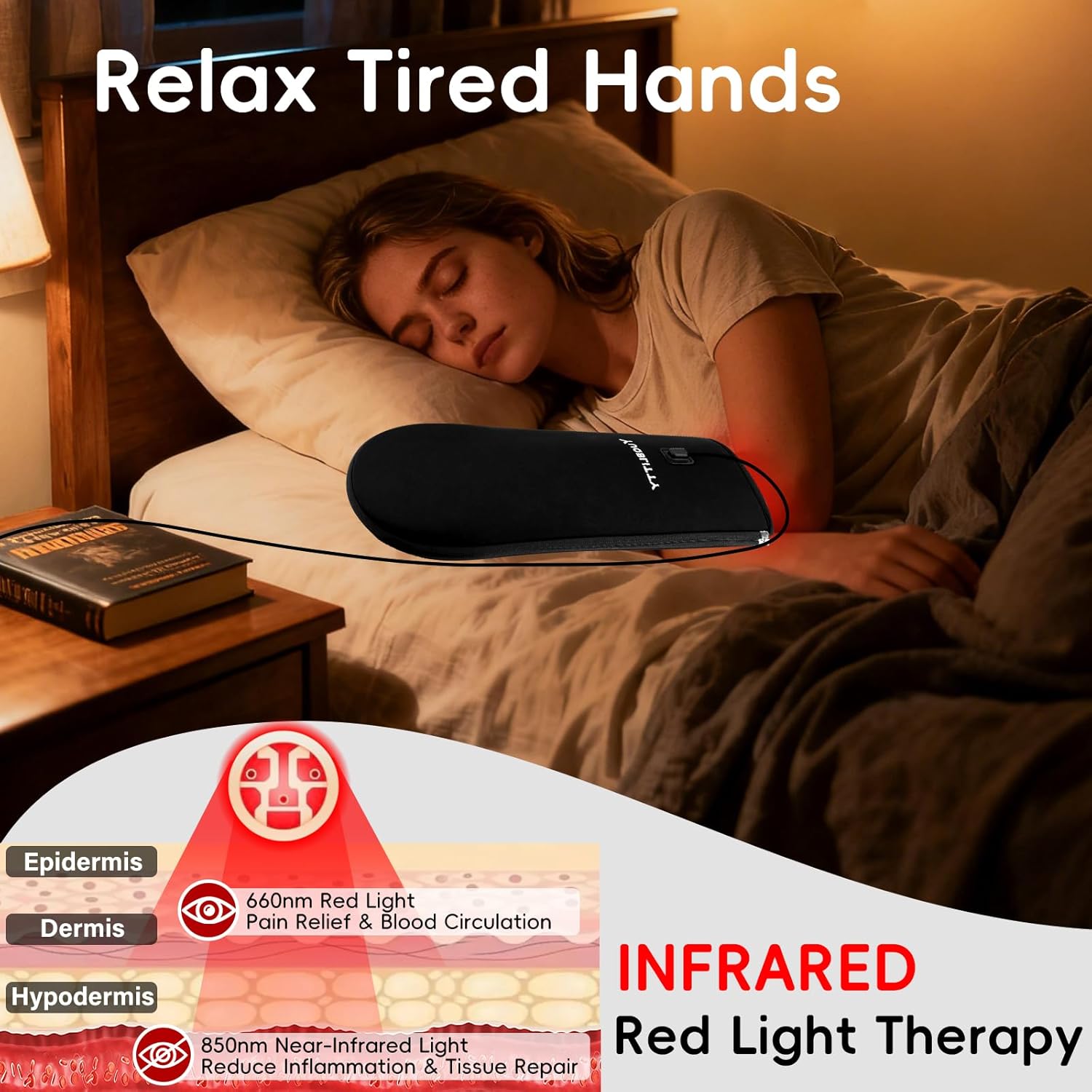
Figure 1.1: Illustration of 660nm Red Light and 850nm Near-Infrared Light penetration. 660nm red light targets the epidermis and dermis for pain relief and improved circulation. 850nm near-infrared light penetrates deeper into the hypodermis to reduce inflammation and support tissue repair.
2. Safety Information
Please observe the following safety precautions to prevent injury or damage to the device:
- Consult a healthcare professional before using this device if you have any pre-existing medical conditions, are pregnant, or are taking medications that may increase light sensitivity.
- Do not use on broken skin, open wounds, or areas with skin infections.
- Avoid direct eye exposure to the LED lights.
- Keep out of reach of children and pets.
- Do not immerse the device in water or use it in wet environments.
- Unplug the device when not in use and before cleaning.
- Do not attempt to modify or repair the device yourself. Contact customer support for assistance.
- Statements regarding dietary supplements have not been evaluated by the FDA and are not intended to diagnose, treat, cure, or prevent any disease or health condition.
3. Package Contents
Verify that all items are present in the package:
- 1 x YUQBLITTY Red Light Therapy Gloves (can be opened flat into a mat)
- 1 x Controller with LCD Display
- 1 x Power Adapter (6.6ft cord)
- 1 x User Manual

Figure 3.1: The YUQBLITTY Red Light Therapy Gloves, showing the device in its folded glove form and highlighting key features like 156 dual-wavelength LEDs, 6.6ft cable, and controller.
4. Setup Instructions
Follow these steps to set up your YUQBLITTY Red Light Therapy Gloves:
- Unpack the device and all accessories from the packaging.
- Locate the USB-C connector on the therapy gloves.
- Connect the USB-C cable from the controller to the USB-C port on the gloves.
- Connect the power adapter to the controller's power input.
- Plug the power adapter into a standard electrical outlet. The controller's LCD screen should illuminate, indicating power.

Figure 4.1: The controller with its various buttons and the power cord connection. This image illustrates the connection points for the device.
5. Operating Instructions
The YUQBLITTY Red Light Therapy Gloves offer versatile use as gloves or a flat mat.
5.1. Using as Gloves for Hands and Wrists
- Ensure the device is zipped up into its glove form.
- Slide your hand into the glove. The oversized design allows for coverage of the entire hand, palm, and forearm.
- If dexterity is needed, unzip the fingertips to allow your fingers to move freely while the wrist and forearm remain enveloped.
- Press the main power button on the controller to turn on the device.
- Use the "Therapy Light Switch" buttons (up/down arrows) to adjust the light intensity (5 levels available).
- Use the "Timer Switch" buttons (left/right arrows) to set the desired treatment time (10/15/20/25/30 minutes). The device will automatically shut off after the set time.
- The controller also features a Pulse function. Press the Pulse button to cycle through 10Hz Pulse, 40Hz Pulse, or continuous light modes.

Figure 5.1: A user wearing the red light therapy glove on their hand and wrist while engaged in office work, demonstrating the device's wearable design and flexibility.
5.2. Using as a Flat Mat for Body Areas
- Unzip the gloves completely to open them flat into a 6.6"x16.3" therapy mat.
- Place the mat on the desired body area, such as the back, waist, abdomen, or legs.
- Press the main power button on the controller to turn on the device.
- Adjust light intensity and set the timer using the respective buttons on the controller as described in Section 5.1.
- Select the desired Pulse mode if applicable.

Figure 5.2: A user relaxing on a mat with the red light therapy device placed flat on their lower back, illustrating its use as a body therapy pad.

Figure 5.3: Examples of versatile use, showing individuals applying the therapy device to their hand, forearm, lower abdomen, and even a dog using it, highlighting its adaptability for different body areas.
6. Maintenance
Proper maintenance ensures the longevity and hygiene of your device.
- Cleaning: Unplug the device before cleaning. Wipe the surface with a soft, damp cloth. Do not use harsh chemicals or abrasive cleaners. The device features a waterproof TPU film, making it easy to clean.
- Storage: Store the device in a cool, dry place away from direct sunlight when not in use.
- Care: Avoid bending or creasing the LED panel excessively. Do not pull on the power cord or controller cables.

Figure 6.1: The waterproof surface of the therapy device being cleaned with a cloth, demonstrating its easy-to-clean design.
7. Troubleshooting
If you encounter issues with your device, refer to the following common problems and solutions:
| Problem | Possible Cause | Solution |
|---|---|---|
| Device does not turn on. | Not properly connected to power, power outlet issue, or faulty adapter/cable. | Ensure all cables are securely connected. Try a different power outlet. Check if the power adapter is damaged. |
| Lights are dim or flickering. | Low power supply or device malfunction. | Ensure the power adapter is providing stable power. If the issue persists, contact customer support. |
| Controller display is not working. | Connection issue or controller malfunction. | Check the connection between the controller and the gloves. If the display remains blank, contact customer support. |
| Device gets too hot. | Prolonged use or improper ventilation. | Discontinue use immediately. Allow the device to cool down. Ensure proper airflow around the device during use. Do not cover the device with thick materials. |
8. Specifications
- Model: B0FQP9LGLM
- LED Count: 156 LEDs
- Wavelengths: 660nm (Red Light) & 850nm (Near-Infrared Light)
- Dimensions (Flat Mat): Approximately 6.6" x 16.3"
- Power Cord Length: 6.6 feet
- Timer Settings: 10, 15, 20, 25, 30 minutes (Auto-shutoff)
- Therapy Light Levels: 5 intensity levels
- Pulse Modes: 10Hz, 40Hz, Continuous
- Manufacturer: YUQBLITTY
- UPC: 734327618142
9. Warranty and Support
For warranty information or technical support, please contact YUQBLITTY customer service through the retailer where you purchased the product or visit the official YUQBLITTY website. Please have your model number (B0FQP9LGLM) and purchase date available when contacting support.