
Introduction
Thank you for choosing the CabeVibe CabLady S2 Petite Ergonomic Office Chair. This manual provides essential information for the safe assembly, operation, and maintenance of your new chair. Please read these instructions carefully before use and retain them for future reference.
Safety Information
Important Safety Guidelines:
- Always assemble the chair according to the illustrated instructions.
- Do not exceed the maximum weight capacity of 330 lbs (150 kg).
- Use caution when adjusting the chair's mechanisms to prevent injury.
- Keep the chair on a stable surface to prevent tipping.
- Ensure all bolts and screws are tightened securely before use. Periodically check and re-tighten as needed.
Package Contents
Before beginning assembly, ensure all parts are present and undamaged. If any parts are missing or damaged, please contact customer support.
- Backrest Assembly
- Seat Assembly with Mechanism
- Gas Lift Cylinder
- Chair Base with Casters
- Headrest
- Armrests (2)
- Footrest/Leg Support
- Hardware Kit (screws, washers, Allen wrench)
- Instruction Manual
Setup and Assembly
Assembly is designed to be straightforward with clear illustrated instructions included in your package. For a visual guide, please refer to the official installation video below.
Video: Official CabeVibe S2 Chair Installation Guide. This video demonstrates the step-by-step process for assembling your chair, including attaching the base, gas lift, seat, backrest, and armrests.
- Attach Casters to Base: Insert the casters into the holes on the chair base until they click into place.
- Insert Gas Lift: Place the gas lift cylinder into the center hole of the chair base.
- Attach Seat to Gas Lift: Carefully align the seat mechanism with the top of the gas lift and press down firmly.
- Secure Backrest: Attach the backrest to the seat mechanism using the provided screws and Allen wrench.
- Install Armrests: Secure the armrests to the designated points on the seat assembly.
- Attach Headrest: Slide the headrest into its slot at the top of the backrest.
- Install Footrest/Leg Support: Attach the footrest according to the instructions, ensuring it can extend and retract smoothly.
- Final Check: Ensure all connections are tight and the chair is stable before use.
Operating Instructions (Adjustments)
The CabLady S2 chair offers multiple adjustment points to customize your seating experience for optimal comfort and support.
1. Seat Height Adjustment
To adjust the seat height, locate the lever on the right side beneath the seat. Pull the lever up while seated to lower the chair, or pull it up while standing to raise the chair. Release the lever at your desired height.
2. Backrest Recline
The backrest can be reclined using a side button. Press the button to unlock the recline mechanism, lean back to your desired angle, and release the button to lock it in place. The chair offers two reclining positions.

Image: The CabLady S2 chair in a reclined position with the footrest extended, demonstrating its versatility for relaxation.
3. Lumbar Support Adjustment
The chair features adjustable low-position lumbar support designed for smaller frames. Adjust the lumbar support by moving it up or down to find the position that best supports the natural curve of your lower back. The 3-zone targeted relief lumbar system allows for precise positioning.

Image: Detailed view of the 3-zone targeted relief lumbar support, indicating adjustable positions for personalized comfort.
4. 4D Headrest Adjustment
The 4D headrest offers multiple adjustment options: height, depth, tilt, and rotation. Adjust the headrest to support your neck and head comfortably, whether sitting upright or reclining.

Image: Visual guide to the 4D headrest adjustments, showing ranges for height (6.69in), depth (1.57in), tilt (50°), and rotation (55°).
5. Flip-Up Armrests
The armrests can be flipped up 90 degrees to save space and allow the chair to slide under desks. They also offer depth adjustability (1.57in) and 35 degrees of rotation for optimal arm and shoulder positioning.
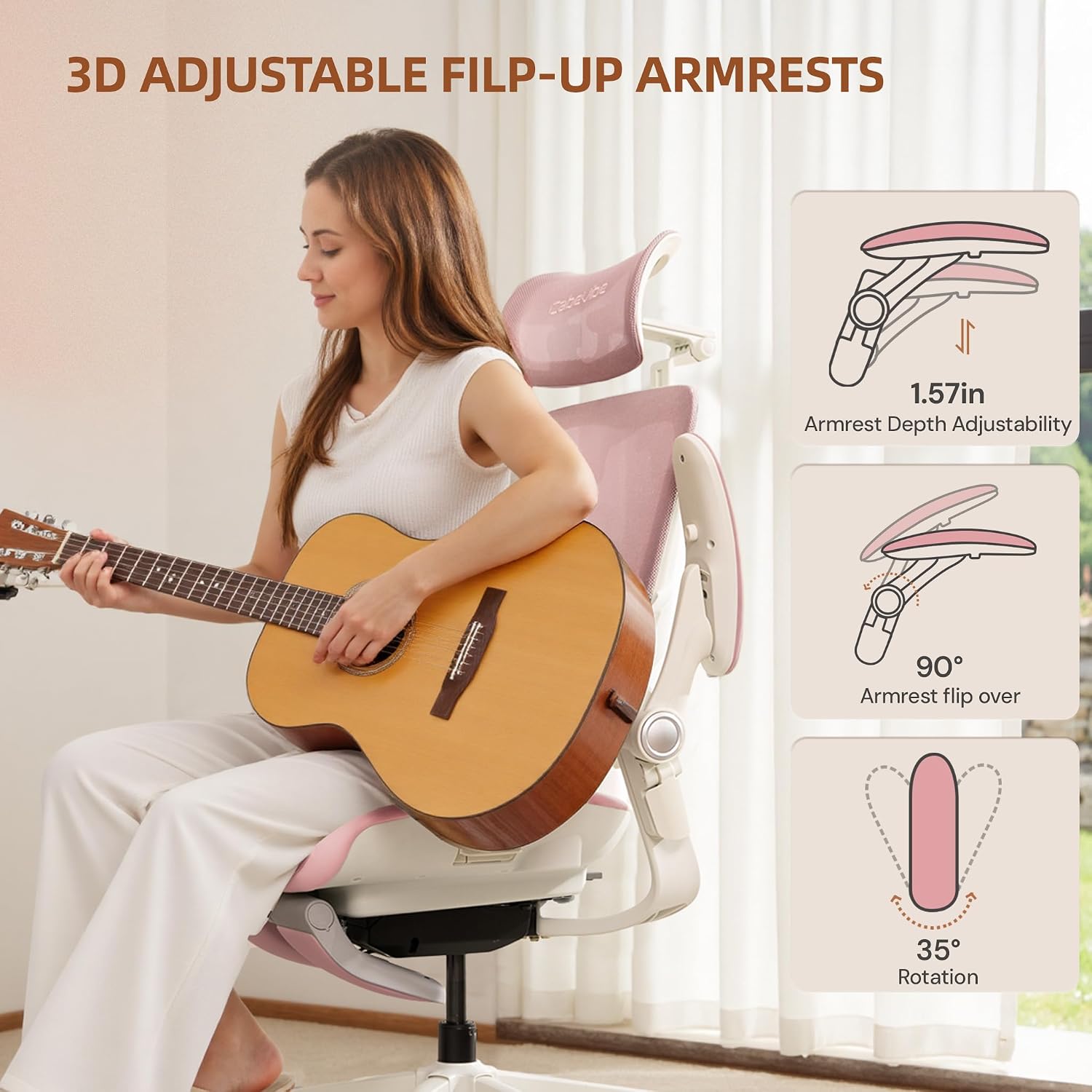
Image: Illustration of the armrest's multi-directional adjustments, including the flip-up function, depth, and rotation.
6. Built-in Footrest and Leg Support
Extend the built-in footrest and leg support for added comfort during periods of relaxation. This feature helps reduce leg fatigue and promotes better circulation.
Maintenance
To ensure the longevity and appearance of your CabLady S2 chair, follow these simple maintenance guidelines:
- Cleaning: Wipe clean with a damp cloth. Avoid harsh chemicals or abrasive cleaners, which can damage the materials.
- Inspection: Periodically check all screws and bolts to ensure they are tight. Re-tighten as necessary to maintain stability and safety.
- Casters: Keep casters free of hair and debris to ensure smooth and silent rolling.
- Fabric Care: For upholstered parts, spot clean with a mild fabric cleaner if needed.
Troubleshooting
If you encounter any issues with your CabLady S2 chair, refer to the following common troubleshooting tips:
| Problem | Possible Cause | Solution |
|---|---|---|
| Chair does not stay at desired height (gas lift sinks) | Gas lift cylinder malfunction or loose connection. | Ensure the gas lift is fully inserted into the mechanism and base. If the issue persists, the gas lift may need replacement. Contact customer support. |
| Chair is wobbly or unstable | Loose screws or improper assembly. | Check and re-tighten all assembly screws, especially those connecting the seat to the backrest and the mechanism to the base. Ensure the base is flat on the floor. |
| Casters do not roll smoothly | Debris caught in casters. | Turn the chair over and remove any hair, dust, or debris from the caster wheels. |
| Recline function does not work | Recline mechanism is locked or damaged. | Ensure the recline lock button/lever is disengaged. If the mechanism is stuck or damaged, contact customer support. |
Specifications
Detailed specifications for the CabeVibe CabLady S2 Petite Ergonomic Office Chair:
- Brand: CabeVibe
- Model Name: CabLady
- Model Number: S2
- Color: Pink S2 (Note: Other colors may be available for different variants)
- Material: Carbon Steel, Mesh, Metal, PA (Frame), Foam (Seat)
- Product Dimensions (D x W x H): 26.3" x 26.7" x 39.9"
- Item Weight: 51 Pounds
- Seat Depth: 15.7 inches
- Maximum Weight Recommendation: 330 Pounds
- Reclining Position Count: 2
- Arm Style: Rounded, Flip-Up
- Leg Style: Wheels (Dual quiet casters)
- Additional Features: Ergonomic design, Adjustable Lumbar, 4D Headrest, Built-in Footrest, Space-Saving Flip-Up Armrests

Image: Comprehensive diagram illustrating all key dimensions and adjustable ranges of the CabLady S2 chair.
Warranty and Support
CabeVibe is committed to providing high-quality products and excellent customer service. While specific warranty details are not provided in this manual, please refer to your purchase documentation or the product listing for warranty information.
For any questions, concerns, or assistance with your CabLady S2 chair, please contact CabeVibe customer support through the retailer where you purchased the product or visit the official CabeVibe website.
