
Introduction
This manual provides detailed instructions for the GWVEE Universal Replacement Remote, designed for seamless compatibility with Jimveo E30 and Goiaey GO1 projectors. It covers essential information regarding setup, operation, maintenance, and troubleshooting to ensure optimal performance and user experience.
Setup
Battery Installation
The GWVEE Universal Replacement Remote requires two AAA batteries (not included). Follow these steps to install them:
- Locate the battery compartment cover on the back of the remote control.
- Slide the cover downwards or press the latch (if present) to open the compartment.
- Insert two AAA batteries, ensuring the positive (+) and negative (-) terminals align correctly with the markings inside the compartment.
- Replace the battery compartment cover until it clicks securely into place.

Image: The remote control's battery compartment, illustrating the correct insertion of two AAA batteries. Batteries are not included with the remote.
Initial Use
This replacement remote control is designed for immediate use with Jimveo E30 and Goiaey GO1 projectors. No programming, complicated pairing, or technical installation is required. Simply insert the batteries, and the remote is ready to control your projector.

Image: The remote control positioned centrally, surrounded by images of various projectors, emphasizing its direct usability without programming.
Operating Instructions
Remote Control Layout
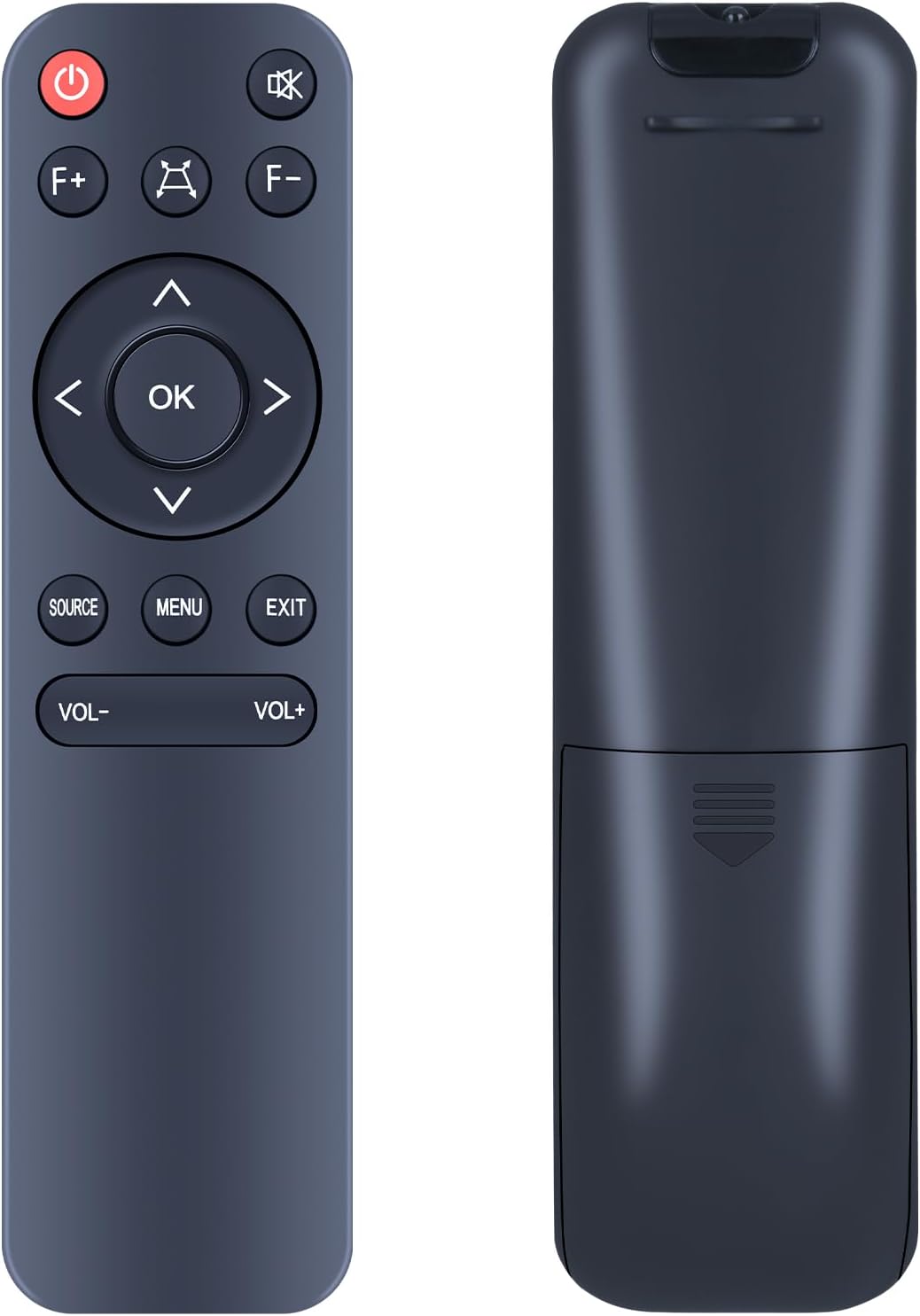
Image: A dual view of the remote control, showing its front with all buttons and its ergonomic back design.
The remote features clearly labeled buttons and an ergonomic grip for comfortable and intuitive operation. Key functions include:
- Power Button (⏻): Turns the projector on or off.
- Mute Button (🔇): Mutes or unmutes the projector's audio.
- F+ / F- Buttons: Adjust focus (if supported by the projector).
- Directional Pad (Up, Down, Left, Right) & OK Button: Navigates menus and confirms selections.
- Source Button: Selects input sources (e.g., HDMI, USB).
- Menu Button: Accesses the projector's main menu.
- Exit Button: Exits current menu or function.
- VOL- / VOL+ Buttons: Adjusts the volume level.
Compatibility and Control
This replacement remote ensures flawless synchronization and seamless operation with your Jimveo E30 and Goiaey GO1 projectors. It provides complete control over essential functions, including:
- Navigation within projector menus.
- Adjustment of menu settings.
- Control of playback functions (e.g., play, pause, stop, fast forward, rewind, if supported by the projector's media player).
- Power management (on/off).
Signal Reliability
The remote utilizes advanced infrared technology to ensure consistent and responsive control. It maintains strong signal transmission up to 30 feet (approximately 9 meters) and supports multi-angle operation (up to 120 degrees), minimizing lag or missed commands. This allows for reliable operation from various angles and distances within your viewing area.

Image: An illustration showing the remote control being used from different angles and distances, highlighting its 120-degree multi-angle control and effective range of up to 26 feet.
Maintenance
Cleaning
To clean the remote control, gently wipe it with a soft, dry cloth. For stubborn dirt, slightly dampen the cloth with water. Avoid using harsh chemicals, abrasive cleaners, or excessive moisture, as these can damage the remote's surface or internal components.
Battery Replacement
Replace the AAA batteries when the remote's responsiveness decreases or if it stops functioning. Always replace both batteries at the same time with new ones. Dispose of used batteries according to local regulations.
Storage
When not in use for extended periods, store the remote in a cool, dry place away from direct sunlight and extreme temperatures. If storing for several months, it is advisable to remove the batteries to prevent leakage.
Troubleshooting
- Remote is not responding:
- Ensure batteries are correctly installed with the correct polarity.
- Replace old batteries with new AAA batteries.
- Check for any obstructions between the remote and the projector's infrared receiver.
- Ensure you are within the effective operating range (up to 30 feet) and pointing the remote towards the projector.
- Certain buttons do not work:
- Verify that the function you are trying to use is supported by your specific Jimveo E30 or Goiaey GO1 projector model.
- Clean the remote's surface and buttons to ensure no debris is interfering with button presses.
- Intermittent control:
- This could indicate low battery power; replace the batteries.
- Minimize sources of infrared interference (e.g., direct sunlight, other IR devices).
Specifications
| Brand | GWVEE |
| Compatible Devices | Jimveo E30 Projector, Goiaey GO1 Projector |
| Max Number of Supported Devices | 1 |
| Color | Black |
| Special Feature | Ergonomic Design |
| Item Weight | 0.96 ounces (approximately 27 grams) |
| Package Dimensions | 5.43 x 1.49 x 0.63 inches (approximately 13.8 x 3.8 x 1.6 cm) |
| Manufacturer | GWVEE |
| ASIN | B0FQP31Y8P |

Image: The remote control with callouts emphasizing its sensitive buttons, comfortable grip, durable ABS material, and overall quality.
Warranty and Support
This product is backed by reliable after-sales service. For any queries, concerns, or assistance regarding your GWVEE Universal Replacement Remote, please contact the seller or manufacturer directly. Contact information is typically available through your purchase platform or the product packaging.
We are committed to ensuring your satisfaction and are available to help with any issues you may encounter.