
1. Product Overview
The Philips 72W 7400LM LED Security Light is an outdoor lighting solution designed to provide bright, adjustable illumination for various exterior spaces. Featuring three adjustable heads and a dusk-to-dawn sensor, this flood light offers efficient and customizable lighting with enhanced security features. It is constructed from durable aluminum and designed for water resistance.

Image: The Philips LED Security Light, illustrating its compact design and adjustable light heads.
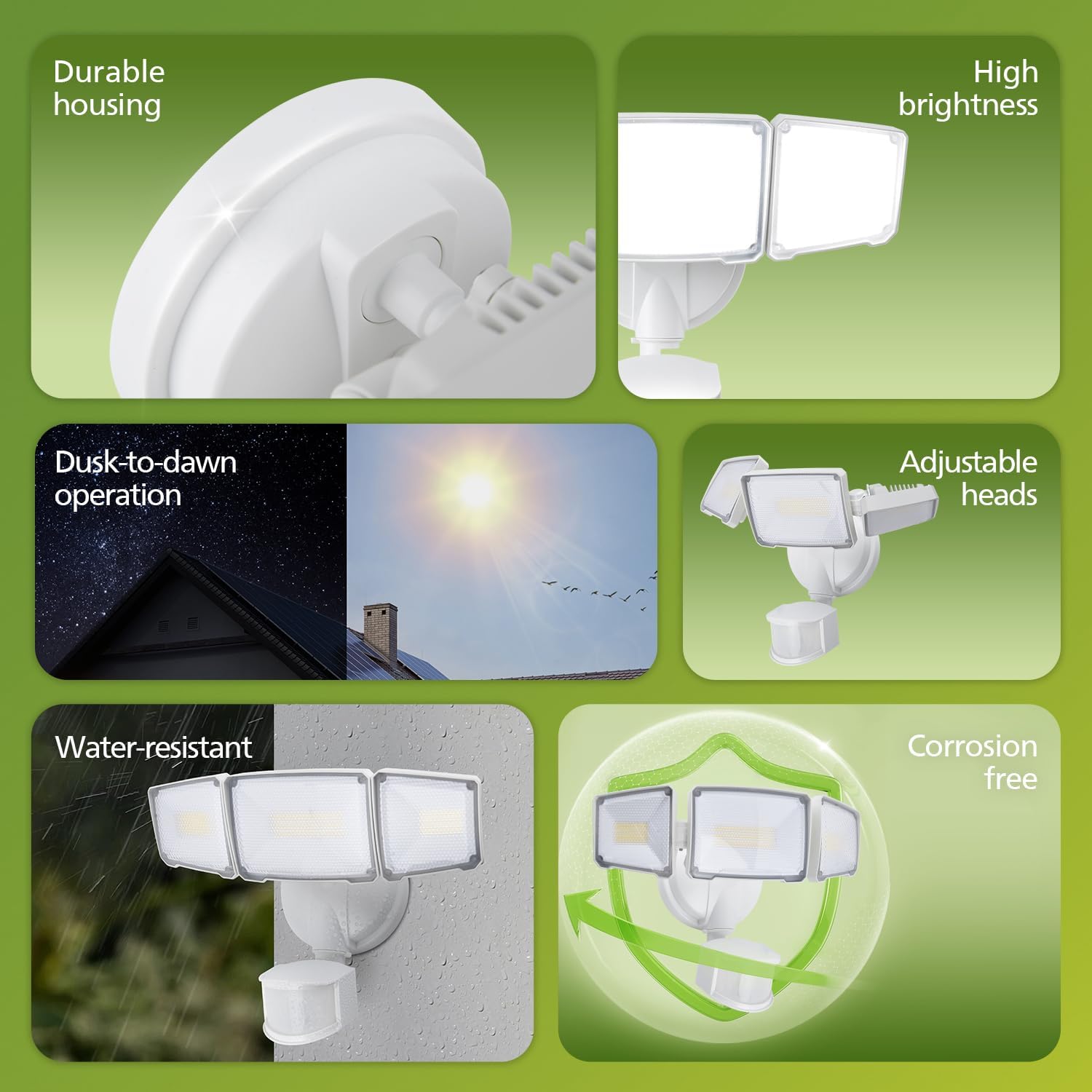
Image: Visual representation of the product's main features, including its robust build and operational capabilities.
2. Safety Information
Please read all instructions carefully before installation and use. Failure to follow these instructions may result in electric shock, fire, or other hazards.
- Electrical Safety: Ensure power is turned off at the circuit breaker before installation, inspection, or removal. All wiring must be in accordance with national and local electrical codes.
- Grounding: This fixture must be properly grounded.
- Installation: Installation should be performed by a qualified electrician if you are unsure about the process. Do not install on unstable surfaces.
- Operating Temperature: Do not operate this fixture in temperatures outside its specified range.
- Light Source: Do not stare directly into the LED light source when illuminated.
3. Package Contents
The Philips LED Security Light package includes:
- Philips 72W 7400LM LED Security Light fixture
- Mounting hardware (screws, wire nuts, gasket)
- Instruction Manual
4. Setup and Installation
The security light is designed for easy installation. Ensure the mounting surface is sturdy and capable of supporting the fixture's weight.
4.1 Mounting Options
The fixture supports two primary mounting methods:
- Wall Mounting: Attach the fixture directly to a vertical wall surface.
- Eave Mounting: Attach the fixture to a horizontal eave or soffit surface.
For both methods, ensure a tight seal between the mounting surface and the luminaire to enhance water resistance.

Image: Illustration of how the security light can be installed on a wall or under an eave.
4.2 Wiring Instructions
- Turn off power at the circuit breaker.
- Connect the fixture's wires to the corresponding household wires (black to black, white to white, ground to ground) using the provided wire nuts.
- Securely mount the fixture to the chosen surface using the provided screws.
- Ensure all connections are tight and the fixture is stable.
- Restore power at the circuit breaker.
5. Operating Instructions
The Philips LED Security Light features a highly sensitive motion sensor and dusk-to-dawn automation, offering multiple lighting modes for various needs.
5.1 Highly Sensitive Motion Sensor
The integrated motion sensor detects movement within a 180-degree adjustable angle and up to a maximum sensing range of 69 feet.
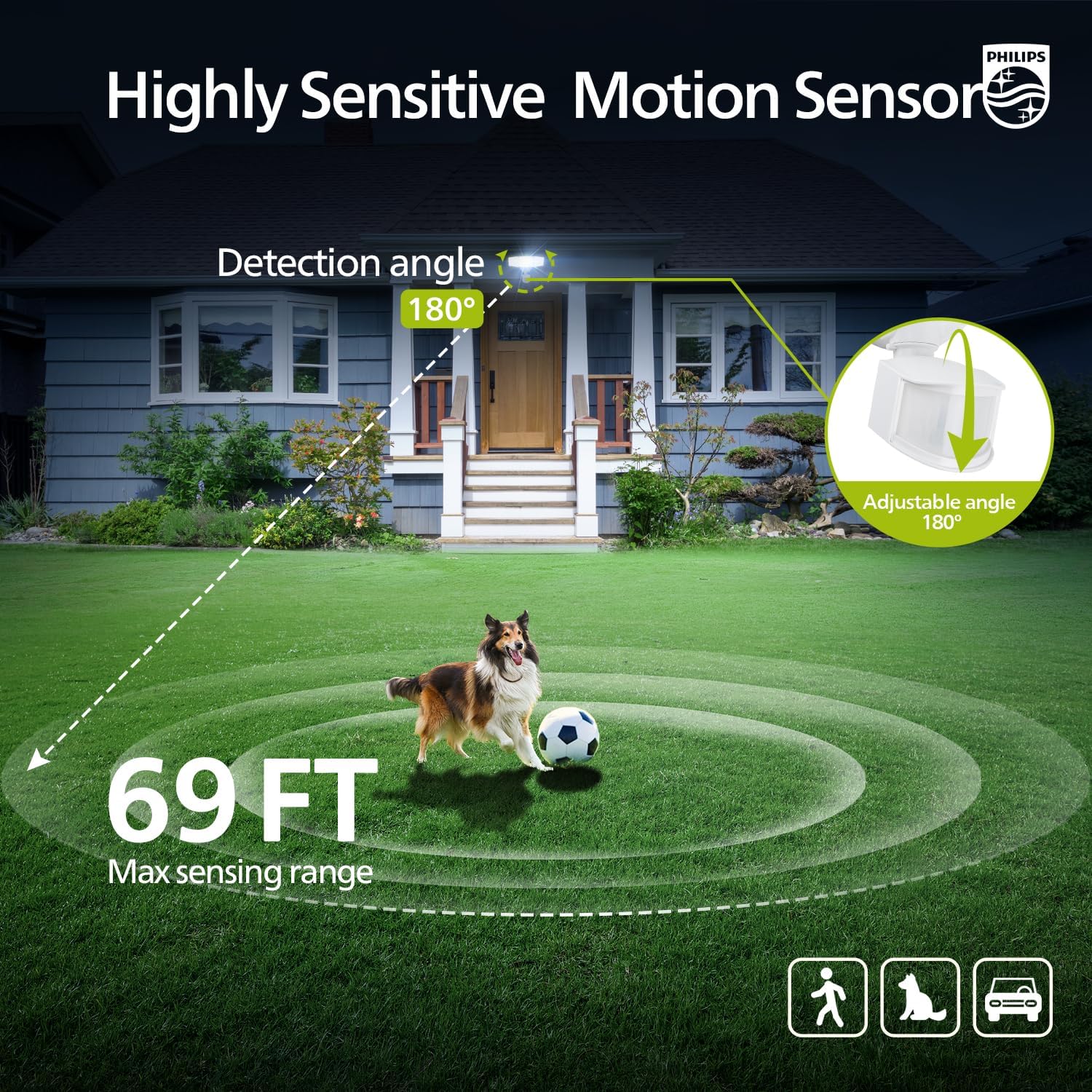
Image: Visual representation of the motion sensor's coverage area and adjustable angle.
5.2 Dusk-to-Dawn Automation
The built-in sensor automatically turns the light on at sunset and off at sunrise, providing continuous illumination during nighttime hours without manual intervention.

Image: Depiction of the light's automatic operation based on ambient light conditions.
5.3 Lighting Modes
The security light offers four distinct operating modes:
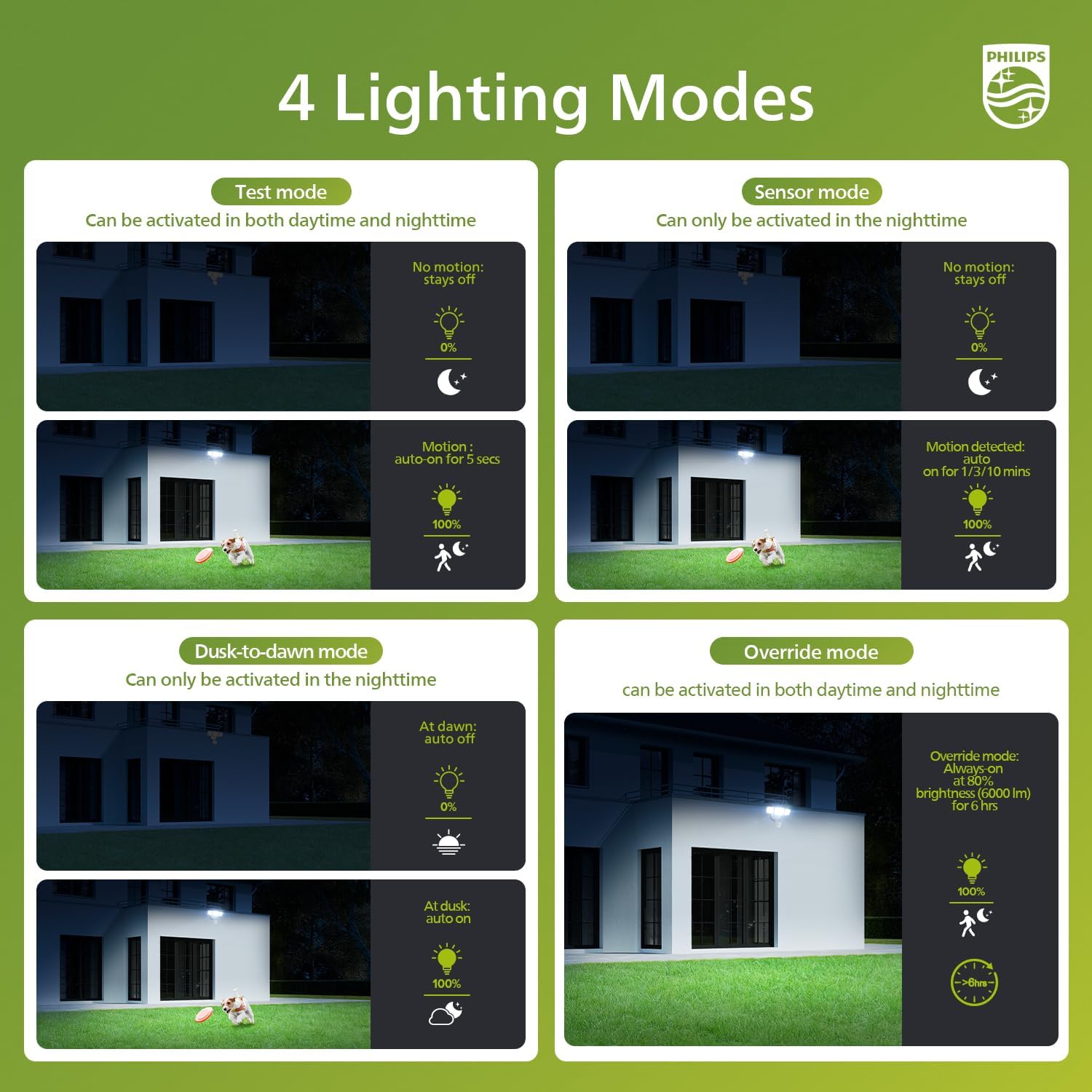
Image: Overview of the four available lighting modes and their functionalities.
- Test Mode: Can be activated in both daytime and nighttime. The light turns on for 5 seconds when motion is detected, then turns off. If no motion, it stays off.
- Sensor Mode: Can only be activated in the nighttime. The light turns on for 1/2/10 minutes (adjustable) when motion is detected, then turns off. If no motion, it stays off.
- Dusk-to-Dawn Mode: Can only be activated in the nighttime. The light automatically turns on at dusk and off at dawn, providing continuous illumination.
- Override Mode: Can be activated in both daytime and nighttime. Provides 100% brightness (6000 lm) for 6 hours, then automatically dims to 80% after 13 minutes if activated via manual override.
5.4 Manual Override Mode
To activate or deactivate the 6-hour always-on mode:
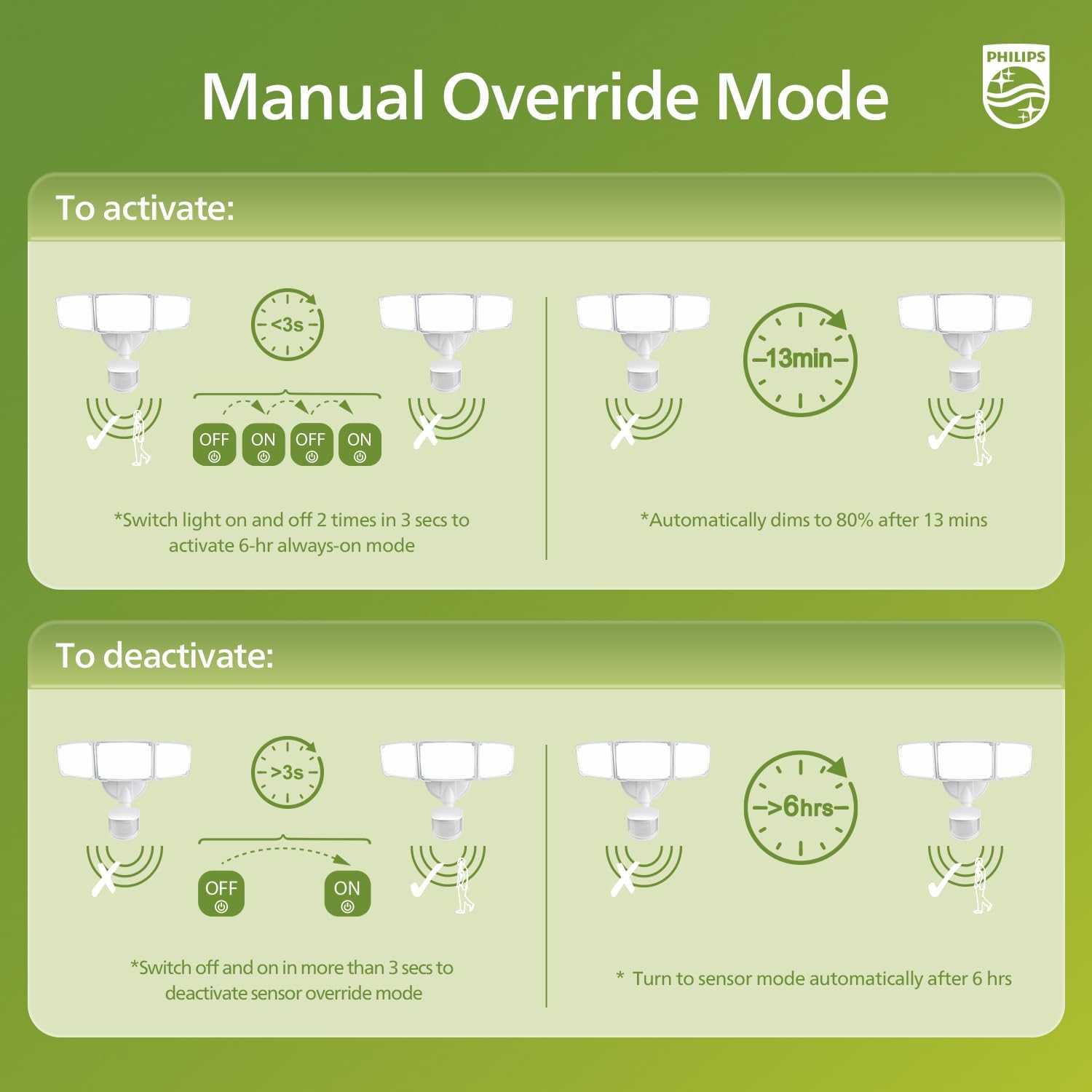
Image: Step-by-step guide for controlling the manual override feature.
- To Activate: Switch the light OFF and ON 2 times within 3 seconds. The light will activate the 6-hour always-on mode. After approximately 13 minutes, it will automatically dim to 80% brightness.
- To Deactivate: Switch the light OFF and ON in more than 3 seconds. Alternatively, the light will automatically return to sensor mode after 6 hours.
6. Maintenance
Regular maintenance ensures optimal performance and longevity of your security light.
- Cleaning: Periodically clean the fixture with a soft, damp cloth. Do not use abrasive cleaners or solvents.
- Inspection: Annually inspect the wiring and mounting hardware for any signs of wear, damage, or loosening.
- Lens: Keep the sensor lens clear of dirt, dust, and obstructions to ensure proper motion detection.
7. Troubleshooting
If you encounter issues with your Philips LED Security Light, refer to the following common problems and solutions:
| Problem | Possible Cause | Solution |
|---|---|---|
| Light does not turn on | No power, faulty wiring, sensor obstruction, incorrect mode. | Check circuit breaker. Verify wiring connections. Clear sensor lens. Ensure correct operating mode is selected. |
| Light stays on continuously | Dusk-to-dawn mode active, manual override active, constant motion detected, faulty sensor. | Check mode settings. Deactivate manual override. Adjust sensor sensitivity or clear detection area. Contact support if sensor is faulty. |
| Light flashes or flickers | Loose wiring, power fluctuations, incompatible dimmer (not supported). | Check and tighten all wiring connections. Ensure stable power supply. This fixture is not designed for use with dimmers. |
| Motion sensor not detecting | Sensor obstructed, incorrect sensitivity setting, outside detection range. | Clear obstructions from sensor. Adjust sensor angle and sensitivity. Ensure motion occurs within the 69 ft range. |
8. Specifications
- Brand: Philips
- Model: 929004696803/929004696603
- Power: 72W
- Brightness: 7400 Lumens
- Color Temperature: 5000K Daylight
- Material: Aluminum
- Heads: 3 Adjustable Heads
- Motion Sensor: 180° adjustable angle, Max 69 ft sensing range
- Features: Dusk-to-Dawn, Waterproof, Corrosion-resistant
- ASIN: B0FQNPRQZR
9. Warranty and Support
For warranty information or technical support, please refer to the product packaging or contact Philips customer service directly. Keep your purchase receipt for warranty claims.
Philips Customer Support: Please visit the official Philips website or refer to the contact information provided with your product for assistance.