
1. Introduction
The Green Soul Vision Pro V2 is an ergonomic gaming chair designed for comfort and performance. It features breathable, abrasion-resistant premium fabric and ultra-fine stitching for durability. The chair includes magnetic memory foam neck and lumbar pillows for targeted support, fully adjustable 4D armrests, an integrated retractable leg rest, and advanced functional features like a 180° recline.

Figure 1: Green Soul Vision Pro V2 chair in a typical setup.

Figure 2: Detail of the chair's breathable fabric and stitching.
2. Safety Information
- Do not stand on the chair.
- Do not use the chair as a step stool.
- Ensure all bolts and screws are securely tightened before use.
- Keep children away from moving parts during adjustment.
- Do not exceed the maximum weight capacity (refer to specifications).
- Avoid placing the chair near heat sources or direct sunlight to prevent material degradation.
3. Package Contents
Please verify that all components are present before beginning assembly. If any parts are missing or damaged, contact Green Soul customer support.
- Backrest
- Seat Base
- Armrests (2)
- Gas Lift Cylinder
- Gas Lift Cover
- Star Base
- Casters (5)
- Mechanism Plate
- Magnetic Neck Pillow
- Memory Foam Lumbar Pillow
- Hardware Kit (screws, Allen wrench)
4. Setup and Assembly
Green Soul offers complimentary installation services for this chair. Their team will contact you within 3 days of your order delivery to schedule a convenient installation appointment. If you choose to assemble the chair yourself, please follow the general steps below:
- Attach Casters to Star Base: Insert each caster into the holes at the end of the star base until it clicks into place.
- Insert Gas Lift: Place the gas lift cylinder into the center hole of the star base. Cover it with the gas lift cover.
- Attach Mechanism Plate to Seat Base: Align the mechanism plate with the pre-drilled holes under the seat base. Secure it with screws using the provided Allen wrench. Ensure the front of the mechanism faces the front of the seat.
- Attach Armrests to Seat Base: Secure the armrests to the sides of the seat base using the designated screws.
- Connect Seat Base to Gas Lift: Carefully place the assembled seat base onto the gas lift cylinder.
- Attach Backrest to Seat Base: Align the backrest with the mounting brackets on the seat base and secure it with screws.
- Install Pillows: Attach the magnetic neck pillow to the headrest and position the memory foam lumbar pillow for desired support.

Figure 3: Chair dimensions for reference during assembly and setup.
5. Operating Instructions
The Green Soul Vision Pro V2 chair offers multiple adjustment options for personalized comfort.
5.1. Height Adjustment
To adjust the chair height, pull the lever located under the seat upwards while applying or releasing body weight. Release the lever at the desired height.
5.2. Recline Function
The chair features a 180° full recline function. Pull the recline lever on the side of the seat upwards and lean back to the desired angle. Release the lever to lock the position. To return to an upright position, pull the lever and lean forward.

Figure 4: Recline range from 90° to 180°.
5.3. Rocking Function
The chair has a 30-degree rocking function. To enable rocking, pull the tilt lock lever (often the same as the height adjustment lever) outwards. To lock the chair in an upright position, push the lever inwards.
5.4. 4D Armrests
The 4D armrests can be adjusted in four directions: height, depth (forward/backward), width (inward/outward), and pivot (rotation). Use the buttons or levers on the armrests to make these adjustments.
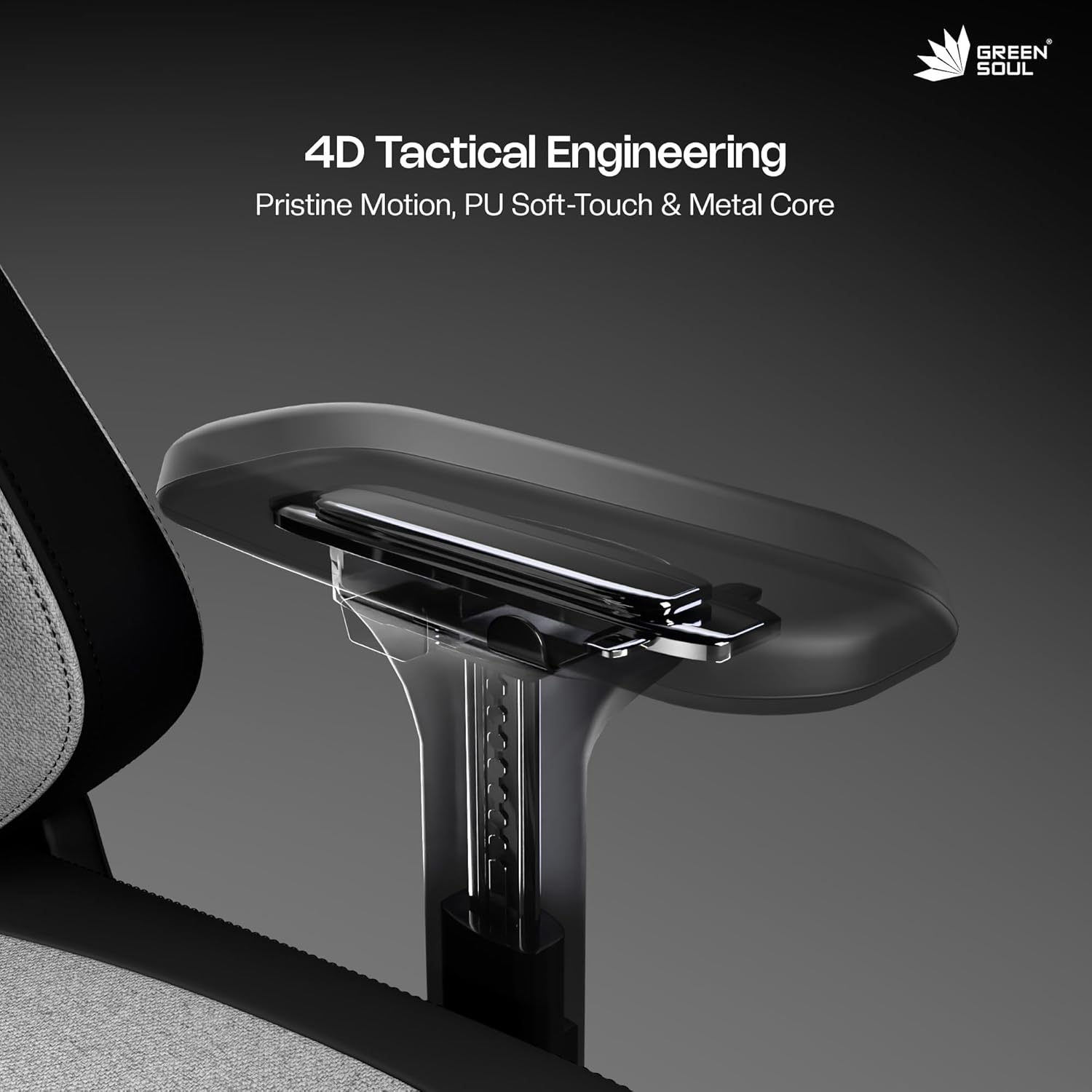
Figure 5: Detail of the 4D armrest adjustment mechanism.
5.5. Retractable Leg Rest
To use the integrated leg rest, pull it out from under the seat. Extend it to the desired length and position. Push it back in when not in use.
5.6. Magnetic Neck and Lumbar Pillows
The magnetic neck and lumbar pillows can be easily attached, removed, and repositioned to provide optimal support for your neck and lower back.

Figure 6: Overview of key adjustable features including pillows, leg rest, and wheelbase.
5.7. Video Demonstration
Video 1: A short demonstration of the Green Soul Vision Pro V2 chair's features, including the retractable leg rest, 4D armrests, magnetic neck and lumbar pillows, 180-degree recline, and flat wheelbase.
6. Maintenance
- Cleaning Fabric: Use a soft, damp cloth with mild soap and water to clean the fabric. Avoid harsh chemicals or abrasive cleaners.
- Cleaning Base and Casters: Wipe the metal base and casters with a damp cloth. Periodically remove any hair or debris from the casters to ensure smooth movement.
- Tightening Hardware: Periodically check and tighten all screws and bolts to maintain stability and safety.
- Lubrication: If any moving parts (e.g., gas lift, mechanism) begin to squeak, a small amount of silicone-based lubricant can be applied.
7. Troubleshooting
- Chair Sinks or Does Not Stay Up: This usually indicates a faulty gas lift cylinder. Contact customer support for a replacement.
- Chair Squeaks: Check all bolts and screws for tightness. If the squeaking persists, apply a small amount of lubricant to the moving parts of the mechanism.
- Casters Not Rolling Smoothly: Remove any hair, dust, or debris that may be caught in the caster wheels. Clean the wheels thoroughly.
- Armrests Are Loose: Tighten the screws securing the armrests to the seat base.
8. Specifications
| Feature | Detail |
|---|---|
| Brand | Green Soul |
| Model Name | Vision Pro V2 |
| Color | Earth |
| Material | Metal Frame, Fabric Upholstery, Foam Seat |
| Product Dimensions (D x W x H) | 49D x 72W x 123H Centimeters |
| Item Weight | 25 Kilograms |
| Back Style | Continuous Back |
| Arm Style | 4D Adjustable, Rounded |
| Leg Style | Wheels (60mm Castor Wheels) |
| Reclining Position Count | 2 (up to 180°) |
| Included Components | Magnetic Neck Pillow, Ergocurve Lumbar Cushion, Integrated Leg Rest |
| Recommended Uses | Computer, Gaming, Office |
| Assembly Required | Yes (Complimentary installation services available) |
9. Warranty and Support
The Green Soul Vision Pro V2 chair comes with a 3-year warranty, ensuring durability and peace of mind. For any product-related inquiries, support, or warranty claims, please contact Green Soul customer care.
- Customer Care: +91 8444-956-789
- Email: info@greensoul.online

Figure 7: Green Soul's commitment to quality and support.