1. Overview
This manual provides instructions for the Generic Replacement Remote Control, model vietRM#070909433, designed for use with specific LG TV models including 39LA613V-ZF, 39LA613V-ZG, and 39LA6154-ZB. This remote is a replacement unit and may not offer all functions present on the original equipment manufacturer (OEM) remote control. Please review this manual thoroughly before use.
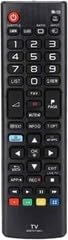
Figure 1: Rear view of the replacement remote control. This image displays the rear side of the replacement remote control, highlighting the battery compartment cover. Ensure batteries are inserted correctly for proper operation.
2. Setup
2.1 Battery Installation
- Locate the battery compartment on the back of the remote control.
- Slide the battery compartment cover downwards or press the latch and lift to open.
- Insert two AAA batteries (not included), ensuring the positive (+) and negative (-) terminals align with the markings inside the compartment.
- Replace the battery compartment cover, ensuring it clicks securely into place.
2.2 Initial Use
This replacement remote control is pre-programmed for the specified LG TV models. No additional programming is typically required. Point the remote directly at your LG TV and press the POWER button to test functionality.
Note: If the remote does not respond, ensure batteries are correctly installed and have sufficient charge. Verify that your TV model is listed as compatible.
3. Operating Instructions
The remote control features standard buttons for common TV functions. Refer to your LG TV's original user manual for detailed information on specific TV features and menu navigation.
3.1 Basic Functions
- POWER: Turns the TV on or off.
- VOL +/-: Adjusts the volume level.
- CH +/-: Changes the TV channel.
- MUTE: Mutes or unmutes the TV sound.
- INPUT/SOURCE: Selects the input source (e.g., HDMI, AV).
- MENU/SETTINGS: Accesses the TV's main menu or settings.
- NAVIGATION (Arrow buttons): Moves the cursor within menus.
- OK/ENTER: Confirms selections.
- BACK/EXIT: Returns to the previous screen or exits a menu.
- NUMBER BUTTONS (0-9): Directly enters channel numbers.
Note: Some advanced features or smart TV functions may require the original remote or specific TV settings not supported by this replacement unit.
4. Maintenance
4.1 Cleaning
To clean the remote control, gently wipe its surface with a soft, dry cloth. For stubborn dirt, slightly dampen the cloth with water or a mild, non-abrasive cleaner. Avoid using harsh chemicals, solvents, or abrasive materials, as these can damage the remote's finish or internal components.
4.2 Battery Replacement
Replace batteries when the remote's response becomes sluggish or stops working. Always replace both batteries simultaneously with new ones of the same type (AAA). Do not mix old and new batteries, or different types of batteries. Dispose of used batteries according to local regulations.
4.3 Storage
When not in use for extended periods, remove the batteries to prevent leakage and potential damage to the remote control. Store the remote in a cool, dry place away from direct sunlight and extreme temperatures.
5. Troubleshooting
| Problem | Possible Cause | Solution |
|---|---|---|
| Remote is not working. |
|
|
| Some functions do not work. |
|
|
| Buttons are sticky or unresponsive. |
|
|
6. Specifications
- Model Number: vietRM#070909433
- Compatible TV Models: LG 39LA613V-ZF, 39LA613V-ZG, 39LA6154-ZB
- Brand: Generic
- Power Source: 2 x AAA Batteries (not included)
- Special Feature: Ergonomic design
- Color: Black/White (as per product variant)
- Max Number of Supported Devices: 1
- Compatible Devices: Television
- Manufacturer: VieRemote
7. Warranty and Support
As a replacement remote control, this product is typically covered by the seller's return policy. Please refer to the purchase platform or contact the seller directly for information regarding warranty, returns, or technical support. Keep your purchase receipt or order number handy when contacting support.
Note: This is not an original LG product. Any warranty or support for the original LG TV should be directed to LG Electronics.