
1. Introduction and Overview
The SHENGJINSH A4 F1080 UV Flatbed Printer is designed for high-precision printing on a wide variety of materials. It features an F1080 piezoelectric printhead with CMYKW color configuration, enabling simultaneous white and color ink output for vibrant and detailed results.
Key features include an effective printing area of 7.8x11.8 inches (20x30cm) and a maximum print height of 3.9 inches (10cm). The printer supports resolutions from 360x360dpi up to 5760x1440dpi, ensuring high-quality output. It also incorporates an automatic cleaning function for the white ink circulation system and an infrared printing height sensor for automatic adjustment and print head protection.
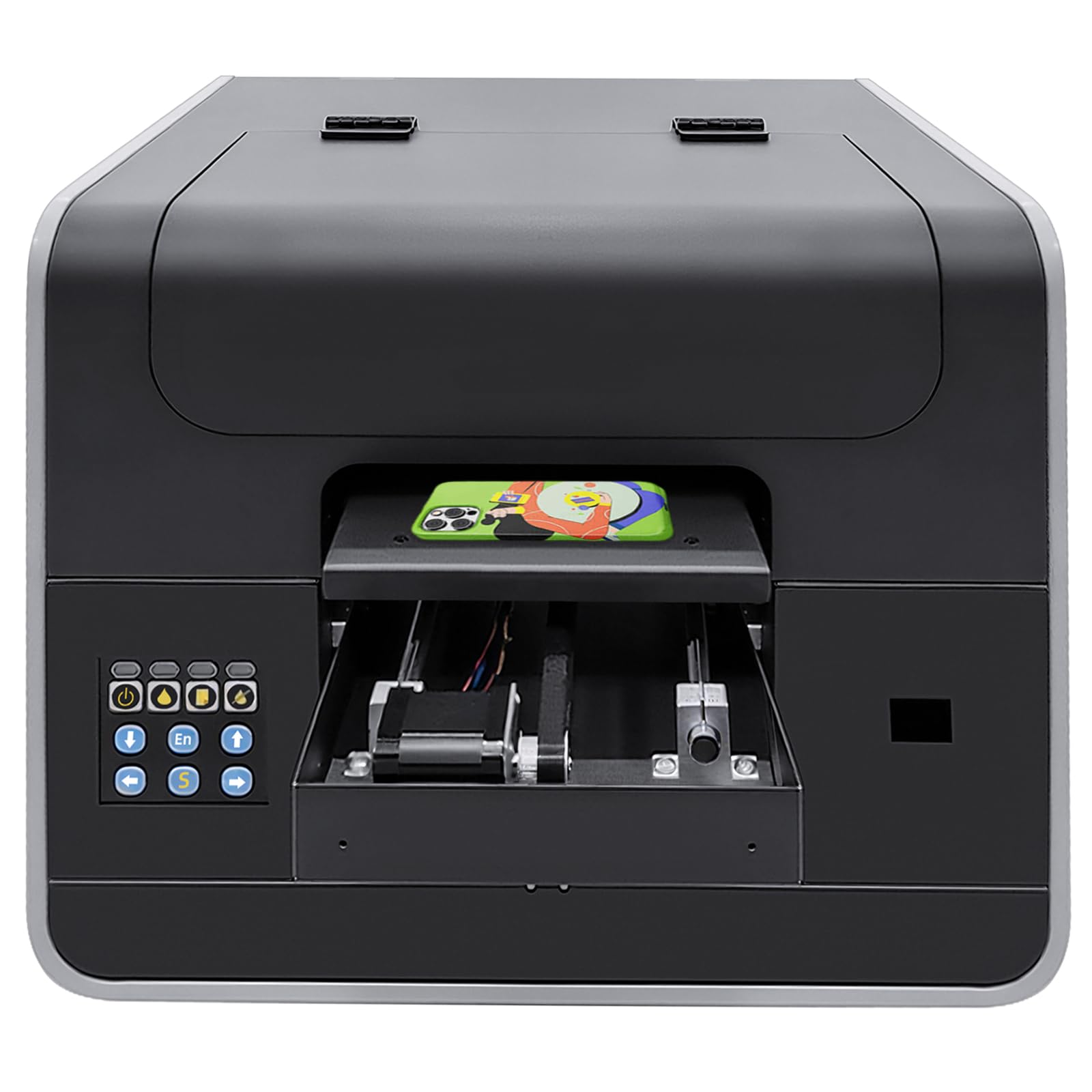
Image 1.1: The SHENGJINSH A4 F1080 UV Flatbed Printer, showcasing its compact design.
2. Product Features
- High-Precision Printing: Equipped with an F1080 piezoelectric printhead, offering CMYKW color configuration for simultaneous white and color ink output.
- High Resolution: Supports resolutions from 360x360dpi to 5760x1440dpi for crisp details and vibrant colors.
- Fast Printing Speed: Achieves high speeds in 4/6/8PASS modes, capable of printing a phone case in approximately 30 seconds.
- Automatic Cleaning: Features a white ink circulation system with a one-click automatic cleaning function to prevent nozzle blockage.
- Auto Height Adjustment: An infrared printing height sensor provides automatic adjustment, protecting the print head from damage.
- Efficient Curing: Built-in UV light ensures rapid curing of printed ink, enhancing efficiency and productivity.
- Advanced Cooling System: An air-cooling design supports prolonged printing sessions.

Image 2.1: Icons representing key features such as UV Cured LED Lamp, Auto Cleaning, White and Color Coexist, Auto Height Determination, Silent Guide Rail, and White Ink Cycle.

Image 2.2: The printer in operation, highlighting 5760*1440dpi high resolution and 4/6/8 PASS faster speed, capable of printing a phone case in 30 seconds.
3. Wide Application
This UV flatbed printer supports printing on a diverse range of materials, making it suitable for various applications. Compatible surfaces include, but are not limited to, phone cases, bottles, acrylic, fabric, crystal, leather, wood, glass, metal, cards, paper, ABS, PVC, and TPU.

Image 3.1: A visual representation of various items that can be printed, such as phone cases, cards, acrylic, metal, bottles, photos, embossed designs, U disks, and leather products.

Image 3.2: Additional examples of printed items, demonstrating the printer's versatility across different product categories and materials.
4. Setup Instructions
Follow these general steps to set up your SHENGJINSH A4 F1080 UV Flatbed Printer:
- Unboxing: Carefully remove the printer and all accessories from the packaging. Retain packaging for future transport or storage.
- Placement: Place the printer on a stable, level surface with adequate ventilation and space for operation and maintenance.
- Power Connection: Connect the power cable to the printer and then to a grounded electrical outlet. Do not power on yet.
- Ink Installation: Install the UV inks (CMYKW) into their respective reservoirs according to the labels. Ensure proper ink flow and prime the system as instructed in the detailed manual.
- Software Installation: Install the printer driver and RIP software on your computer using the provided media or by downloading from the official website.
- USB Connection: Connect the printer to your computer using the supplied USB cable.
- Initial Power On: Power on the printer. Follow any on-screen prompts or initial setup procedures from the software.

Image 4.1: The printer with its material tray extended, illustrating the area where items are placed for printing.
5. Operating Instructions
To operate your SHENGJINSH A4 F1080 UV Flatbed Printer, follow these general steps:
- Prepare Material: Place the item to be printed on the printer's flatbed tray. Ensure it is securely positioned and within the effective printing area.
- Adjust Height: The printer features automatic height adjustment. Ensure the sensor can accurately detect the material height. Manually adjust if necessary.
- Software Preparation: Open the RIP software on your computer. Import your design and configure print settings such as resolution, color mode (CMYKW), and print passes.
- Preview and Position: Use the software to preview the print job and adjust the positioning of the design on the material.
- Start Printing: Once all settings are confirmed, send the print job to the printer. The printer will begin the printing process, curing the ink with its built-in UV light.
- Remove Printed Item: After printing is complete, carefully remove the finished item from the tray.

Image 5.1: The printer actively printing on multiple phone cases placed on the flatbed tray.
6. Maintenance
Regular maintenance ensures optimal performance and longevity of your UV flatbed printer:
- Print Head Cleaning: Utilize the one-click automatic cleaning function regularly to prevent ink clogs and maintain print quality. Refer to the software for scheduled cleaning cycles.
- Wiper Blade Maintenance: Inspect and clean the wiper blade assembly to ensure it effectively cleans the print head. Replace if worn.
- UV Lamp Cleaning: Gently clean the UV lamp and reflector surfaces with a soft, lint-free cloth and appropriate cleaning solution to maintain curing efficiency.
- Ink System Check: Monitor ink levels and refill as needed. Ensure the white ink circulation system is functioning correctly to prevent pigment settling.
- General Cleaning: Keep the printer's exterior and flatbed tray clean from dust and ink residue. Use a soft cloth and mild cleaner.
- Software Updates: Periodically check for and install software and firmware updates to ensure compatibility and access to new features.
7. Troubleshooting
This section provides solutions to common issues you might encounter:
- Poor Print Quality (Streaks, Missing Colors):
- Perform a nozzle check and print head cleaning cycle.
- Check ink levels and ensure no air bubbles are in the ink lines.
- Verify print head alignment.
- Ink Not Curing Properly:
- Ensure the UV lamp is clean and functioning.
- Check UV lamp intensity settings in the software.
- Verify the correct type of UV ink is being used.
- Printer Not Connecting to Computer:
- Check USB cable connection and try a different USB port.
- Ensure printer drivers are correctly installed and updated.
- Restart both the printer and the computer.
- Material Height Detection Issues:
- Ensure the infrared sensor is clean and unobstructed.
- Verify the material is placed flat on the tray.
- Manually adjust height if automatic detection fails.
For persistent issues, consult the detailed troubleshooting guide in your full product manual or contact customer support.
8. Specifications
Detailed technical specifications for the SHENGJINSH A4 F1080 UV Flatbed Printer (Model A4 L805):
| Feature | Specification |
|---|---|
| Product Dimensions | 22 x 16 x 19.7 inches (56 x 41 x 50 cm) |
| Item Weight | 95 pounds (43 kg) |
| Item Model Number | A4 L805 |
| Brand | SHENGJINSH |
| Connectivity Technology | USB |
| Printing Technology | Inkjet (UV) |
| Printer Output | Color |
| Color | Black |
| Effective Printing Area | 7.8 x 11.8 inches (20 x 30 cm) |
| Maximum Print Height | 3.9 inches (10 cm) |
| Resolution | 360*360dpi to 5760*1440dpi |
| Ink Type | UV ink/textile ink |
| Color Profile | CMYKW |
| Nozzle | Piezoelectric nozzle |
| Ink Supply System | Fully automatic continuous ink supply system |
| Print Speed | 4/6/8PASS |
| Height Limit | Electric adjustment of infrared height limit |
| Supply Voltage | 110-220v |
| Operating System Support | WIN7/WIN10 |
| Included Components | A4 UV Printer |

Image 8.1: A visual overview of the printer's dimensions and a summary of its technical specifications.
9. Product Videos
UV Printer Prints Bottle
Video 9.1: This video demonstrates the SHENGJINSH UV printer's capability to print directly onto bottles, showcasing the process from setup to the final printed product. It highlights the printer's ability to handle cylindrical objects and produce detailed designs.
A4 UV Printer for Phone Case Bottle Acrylic Metal Leather
Video 9.2: This video illustrates the versatility of the A4 UV printer by showcasing its application on various materials, including phone cases, bottles, acrylic, metal, and leather. It provides a quick overview of the printer's broad compatibility.
10. Warranty and Support
For warranty information, technical support, or service inquiries, please refer to the documentation included with your product or contact SHENGJINSH customer service. Details regarding warranty periods and support channels are typically provided at the time of purchase or on the manufacturer's official website.