Introduction
This manual provides detailed instructions for the installation, operation, and maintenance of the Generic KFR-35W/BP3N1 Inverter Air Conditioning Circuit Board Replacement. This board is designed to replace the original circuit board in compatible air conditioning units, including various models from York. Please read this manual thoroughly before proceeding with installation or use to ensure proper function and safety.
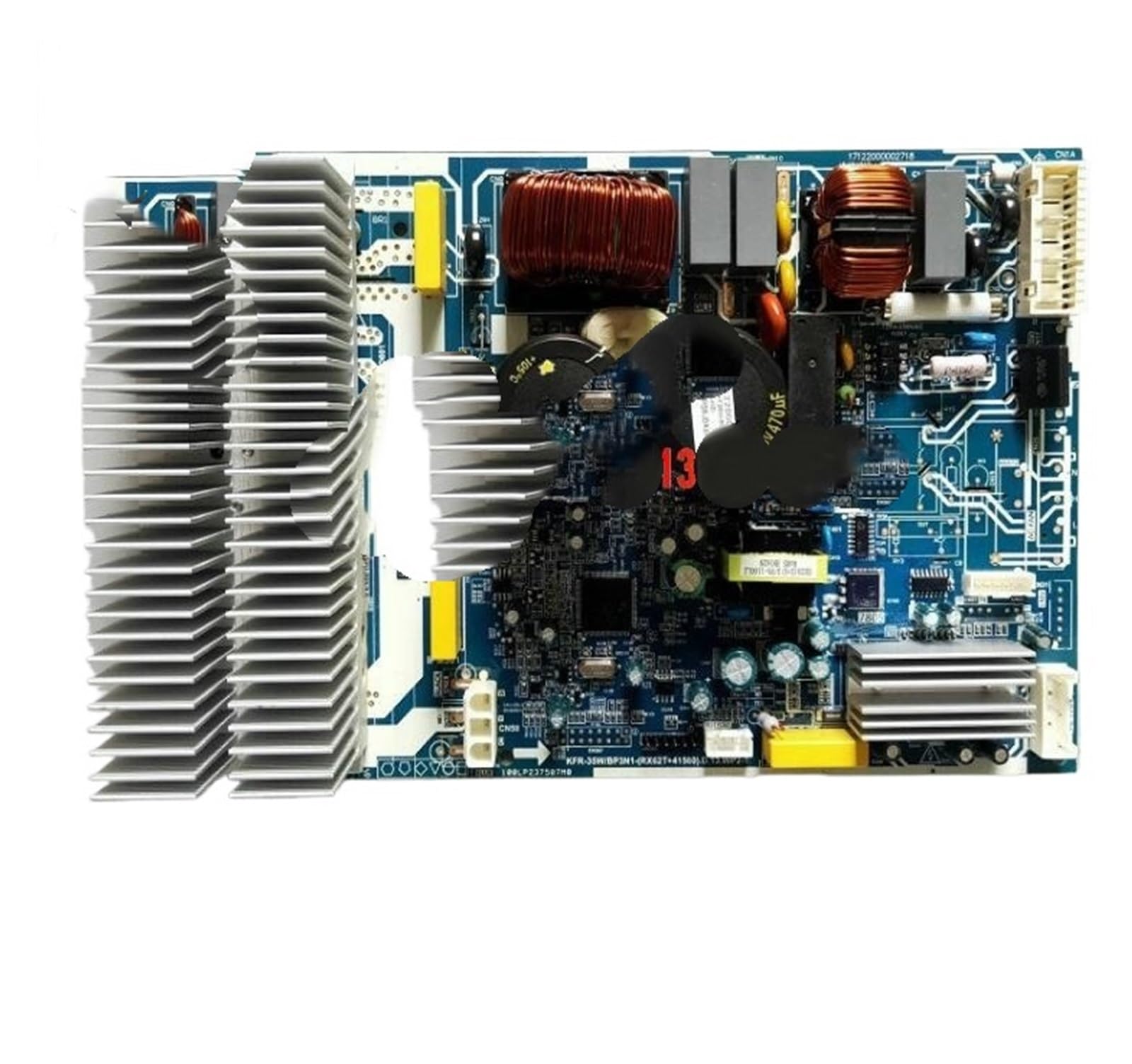
Image: The Generic KFR-35W/BP3N1 Inverter Air Conditioning Circuit Board. This image displays the main circuit board with various components, connectors, and heat sinks visible. It is a rectangular green board with integrated circuits and wiring terminals.
Safety Information
WARNING: Electrical shock hazard. Installation and servicing should only be performed by qualified personnel. Disconnect all power to the air conditioning unit before attempting any installation or maintenance.
- Always ensure the main power supply to the air conditioning unit is disconnected before beginning any work.
- Wear appropriate personal protective equipment (PPE), such as insulated gloves and safety glasses.
- Handle the circuit board by its edges to avoid damaging components or static discharge.
- Verify all connections are secure and correct before restoring power.
- Do not attempt to repair a damaged circuit board. Replace it with a new, compatible unit.
Setup and Installation
Pre-Installation Checks
- Confirm the new circuit board (Model JOUEGOUOG-ABOARD) is compatible with your specific air conditioning unit model.
- Ensure all necessary tools are available (e.g., screwdrivers, multimeter, anti-static wrist strap).
- Take photographs of the existing wiring connections on the old circuit board for reference.
- Disconnect the main power supply to the air conditioning unit at the circuit breaker.
Installation Steps
- Access the Old Board: Open the air conditioning unit's control panel or housing to access the existing circuit board.
- Disconnect Wiring: Carefully disconnect all wiring harnesses and connectors from the old circuit board. Refer to your photographs.
- Remove Old Board: Unscrew or unclip the old circuit board from its mounting points.
- Install New Board: Position the new KFR-35W/BP3N1 circuit board (Model JOUEGOUOG-ABOARD) in the same location and secure it with screws or clips.
- Connect Wiring: Reconnect all wiring harnesses and connectors to the new board, ensuring each connection matches the original configuration. Double-check against your reference photos.
- Secure Panel: Close and secure the air conditioning unit's control panel or housing.
Post-Installation Checks
- Visually inspect all connections to ensure they are firm and correctly seated.
- Ensure no loose wires are present that could interfere with moving parts or cause short circuits.
- Restore power to the air conditioning unit at the circuit breaker.
- Test the air conditioning unit's functions (e.g., cooling, heating, fan speeds) to confirm proper operation.
Operating Instructions
Once the KFR-35W/BP3N1 circuit board is correctly installed, the air conditioning unit should operate as designed. The circuit board itself does not have user-operable controls. Its function is to manage the internal operations of the AC unit based on commands received from the thermostat or remote control.
- Power On: After installation, restore power to the AC unit. The unit should perform a self-check.
- Normal Operation: Use your existing AC unit's thermostat or remote control to set desired modes (Cool, Heat, Fan), temperature, and fan speed.
- Indicator Lights: Observe any indicator lights on the AC unit's display panel. Refer to your AC unit's specific user manual for the meaning of these indicators.
Maintenance
The KFR-35W/BP3N1 circuit board is designed for long-term reliability and typically requires minimal maintenance. However, general care for your air conditioning unit will help ensure the longevity of all its components, including the circuit board.
- Keep Clean: Ensure the area around the circuit board within the AC unit remains free of dust, debris, and moisture. Dust accumulation can lead to overheating or short circuits.
- Check Connections: Periodically (e.g., annually during routine AC servicing), have a qualified technician check all electrical connections to the circuit board for tightness and corrosion.
- Environmental Control: Maintain proper environmental conditions for the AC unit to prevent extreme temperatures or humidity that could affect electronic components.
Troubleshooting
If your air conditioning unit is not functioning correctly after installing the KFR-35W/BP3N1 circuit board, consider the following troubleshooting steps. Always disconnect power before inspecting internal components.
| Problem | Possible Cause | Solution |
|---|---|---|
| AC unit does not power on. | No power supply; loose connection; faulty circuit breaker. | Check circuit breaker. Verify all power connections to the board are secure. |
| AC unit powers on but does not cool/heat. | Incorrect wiring; sensor issue; other AC component failure. | Review wiring connections against original photos. Consult a qualified technician to diagnose other AC components. |
| Error codes displayed. | Specific system fault. | Refer to your air conditioning unit's specific user manual for error code definitions and troubleshooting steps. |
| Intermittent operation. | Loose connections; overheating; power fluctuations. | Ensure all connections are tight. Check for proper ventilation around the board. Consult an electrician for power supply issues. |
If troubleshooting steps do not resolve the issue, it is recommended to contact a qualified HVAC technician for further diagnosis and repair.
Specifications
- Model Number: JOUEGOUOG-ABOARD
- Compatibility: KFR-35W/BP3N1 Inverter Air Conditioning Units, various York models
- Certification: CE certified
- Item Weight: 12 ounces
- Package Dimensions: 0.39 x 0.39 x 0.39 inches
- Manufacturer: Generic
Warranty and Support
For information regarding warranty coverage and technical support for your Generic KFR-35W/BP3N1 Inverter Air Conditioning Circuit Board, please refer to the documentation provided at the point of purchase or contact the seller directly. Keep your purchase receipt as proof of purchase.

