Introduction
This manual provides detailed instructions for the operation and maintenance of your SKMEI Model 1858 Digital Watch. Please read this manual thoroughly to ensure proper use and to maximize the lifespan of your watch.
Package Contents
- SKMEI Model 1858 Digital Watch x 1
- SKMEI Original Box x 1
- User Manual x 1
Product Overview
The SKMEI Model 1858 is a multi-functional digital watch designed for daily wear and sports activities. It features a durable ABS case, resin glass, and a comfortable PU strap. Key functions include time display, stopwatch, countdown timer, multiple alarms, calendar, dual time, and EL backlight.

Figure 1: Key Features. This image highlights the main functionalities of the SKMEI 1858 watch, including dual time, stopwatch, date display, EL light, countdown timer, alarm, 50M water resistance, and 12/24 hour format.
Watch Components
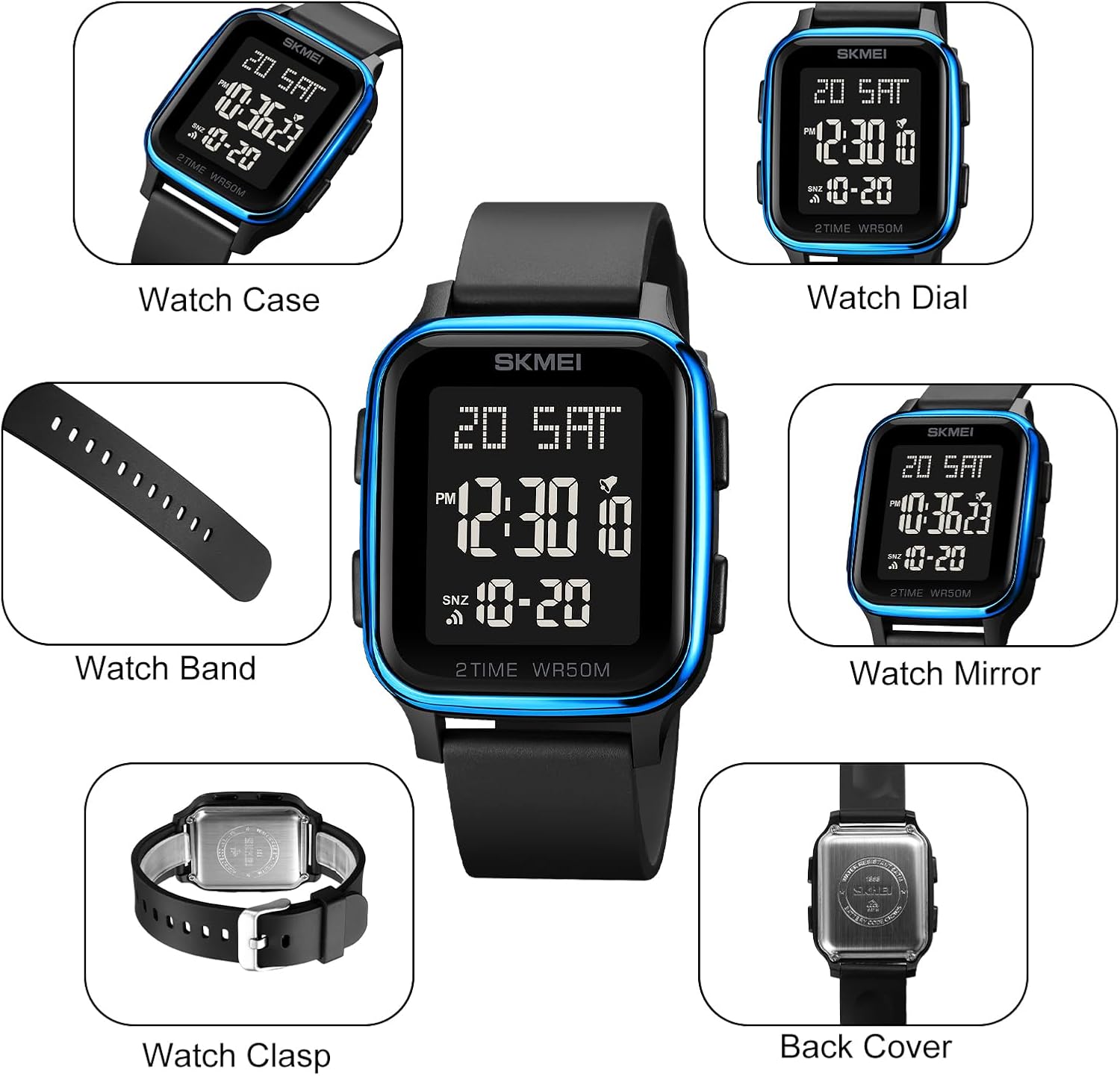
Figure 2: Watch Components. This image provides a visual breakdown of the watch's main parts, such as the watch case, dial, band, mirror, clasp, and back cover.
Button Functions

Figure 3: Watch Button Layout. This diagram illustrates the location and primary function of each button on the SKMEI 1858 digital watch.
- LIGHT Button: Activates the EL backlight for visibility in low-light conditions.
- MODE Button: Cycles through different watch modes (Time, Stopwatch, Alarm, Countdown, Dual Time).
- START/STOP Button: Used to start and stop functions in Stopwatch and Countdown modes, and to adjust settings.
- RESET Button: Used to reset functions in Stopwatch and Countdown modes, and to adjust settings.
Setup
Initial Time and Date Setting
- In Timekeeping Mode, press the MODE button repeatedly until the seconds begin to flash. This indicates you are in setting mode.
- Press the RESET button to cycle through the settings: Seconds → Hour → Minute → Year → Month → Day.
- Use the START/STOP button to adjust the flashing value. Hold the button to change values quickly.
- Once all settings are correct, press the MODE button to exit the setting mode.
12/24 Hour Format
In Timekeeping Mode, press the START/STOP button to toggle between 12-hour (P for PM) and 24-hour formats.
Operating Instructions
Timekeeping Mode
This is the default mode, displaying the current time, day of the week, and date.
EL Backlight
Press the LIGHT button to illuminate the display for approximately 3 seconds. Frequent use of the backlight will reduce battery life.

Figure 4: EL Backlight Function. The image demonstrates the watch display in normal mode and with the EL backlight activated for improved visibility in dark conditions.
Stopwatch Mode
- From Timekeeping Mode, press the MODE button once to enter Stopwatch Mode. The display will show "00:00:00".
- Press the START/STOP button to start the stopwatch.
- Press the START/STOP button again to pause the stopwatch.
- Press the RESET button to reset the stopwatch to "00:00:00".
- To record split times, press START/STOP to start, then RESET to display the split time. The stopwatch continues to run in the background. Press RESET again to return to the running stopwatch. Press START/STOP to stop, then RESET to clear.
Alarm Mode
The watch features 5 independent alarms and an hourly chime.
- From Timekeeping Mode, press the MODE button twice to enter Alarm Mode. The alarm time will be displayed.
- Press the RESET button to select the alarm number (AL1, AL2, etc.) or the hourly chime (CHM).
- To set an alarm:
- With the desired alarm selected, press the START/STOP button. The hour digits will flash.
- Use the RESET button to adjust the hour.
- Press the START/STOP button to move to the minute digits.
- Use the RESET button to adjust the minutes.
- Press the START/STOP button to confirm and exit setting.
- To turn an alarm ON/OFF: In Alarm Mode, with the desired alarm selected, press the START/STOP button to toggle it on or off. An alarm icon will appear when active.
- To turn the hourly chime ON/OFF: In Alarm Mode, select "CHM" and press the START/STOP button to toggle it on or off.
Countdown Timer Mode
- From Timekeeping Mode, press the MODE button three times to enter Countdown Timer Mode. The display will show the set countdown time.
- To set the countdown time:
- Press the START/STOP button. The hour digits will flash.
- Use the RESET button to adjust the hour.
- Press the START/STOP button to move to the minute digits.
- Use the RESET button to adjust the minutes.
- Press the START/STOP button to confirm and exit setting.
- To start/pause the countdown: Press the RESET button.
- To reset the countdown: While paused, press the START/STOP button.
Dual Time Mode
This feature allows you to keep track of a second time zone.
- From Timekeeping Mode, press the MODE button four times to enter Dual Time Mode.
- To set the dual time:
- Press the START/STOP button. The hour digits will flash.
- Use the RESET button to adjust the hour.
- Press the START/STOP button to move to the minute digits.
- Use the RESET button to adjust the minutes.
- Press the START/STOP button to confirm and exit setting.
Maintenance
Water Resistance (50M / 5ATM)
Your SKMEI 1858 watch is rated for 50 meters (5ATM) water resistance. This means it is suitable for daily use, hand washing, showering, and swimming. However, please DO NOT press any buttons while the watch is submerged in water. Avoid prolonged underwater activities such as diving, as this can compromise the water resistance.

Figure 5: Water Resistance Guide. This image illustrates the 50M water resistance of the watch, suitable for activities like hand washing, rain, sweating, and swimming, but warns against pressing buttons underwater.
Cleaning
Wipe the watch case and band regularly with a soft, dry cloth to remove dirt and moisture. For stubborn dirt, a slightly damp cloth can be used, followed by drying. Avoid using chemical cleaners, which can damage the watch materials.
Battery Replacement
The watch uses a standard watch battery. When the display dims or functions become erratic, it may be time for a battery replacement. It is recommended to have the battery replaced by a qualified watch technician to ensure proper sealing and maintain water resistance.
Storage
When not in use for extended periods, store your watch in a cool, dry place away from direct sunlight and extreme temperatures.
Troubleshooting
- Display is blank or dim: The battery may be low or depleted. Replace the battery.
- Buttons are unresponsive: Ensure the watch is not in a locked mode (if applicable, though not specified for this model). If the issue persists, a battery replacement or professional inspection may be needed.
- Water inside the watch: If mist or droplets appear inside the watch face, contact customer support immediately. This indicates a breach in water resistance. Avoid further water exposure.
- Time is inaccurate: Reset the time and date as per the "Initial Time and Date Setting" section. If inaccuracy persists, the watch module may require service.
Specifications
| Feature | Detail |
|---|---|
| Brand | SKMEI |
| Model Number | 1858 |
| Movement | Digital Quartz |
| Case Material | ABS |
| Dial Window Material | Resin Glass |
| Band Material | PU (Polyurethane) |
| Water Resistance | 50M (5ATM) |
| Functions | Time, Date, Day, Stopwatch, Countdown, 5 Alarms, Hourly Chime, Dual Time, EL Backlight, 12/24 Hour Format |
| Dial Case Width | 3.9 cm (1.54 inch) |
| Dial Case Thickness | 1.3 cm (0.51 inch) |
| Band Width | 1.8 cm (0.71 inch) |
| Band Length | 24 cm (9.45 inch) |
| Watch Weight | 32 g (1.13 oz) |

Figure 6: Product Dimensions. This diagram provides detailed measurements for the watch case width, case thickness, band width, and total watch length.
Warranty and Support
For warranty information and customer support, please refer to the documentation provided with your purchase or contact your retailer. Keep your proof of purchase for any warranty claims.