
1. Introduction
This manual provides essential instructions for the safe assembly, operation, and maintenance of your HarmoHaby 7-in-1 Toddler Tricycle. Please read this manual thoroughly before use and retain it for future reference. This versatile tricycle is designed to adapt to your child's growth, offering multiple modes from a parent-controlled stroller to a balance bike and tricycle, ensuring a safe and enjoyable experience for children aged 0 months and up.
2. Safety Information
Always prioritize your child's safety. Failure to follow these instructions may result in serious injury. This product is intended for use under direct adult supervision.
- Adult supervision is required at all times when the tricycle is in use.
- Ensure all parts are securely fastened and locked before each use.
- Do not use the tricycle near stairs, steep hills, public roads, or bodies of water such as swimming pools.
- Always use the integrated 5-point safety harness to secure your child in the seat.
- Ensure the child's feet are clear of moving parts, especially the wheels and pedals, to prevent injury.
- The maximum weight capacity for this tricycle is 55 lbs (approximately 25 kg). Do not exceed this limit.
- Regularly inspect the tricycle for any signs of wear, damage, or loose components. Discontinue use immediately if any damage is found and contact customer support.
- Children should wear appropriate protective gear, such as a helmet, especially when using the tricycle in independent modes.
3. Package Contents
Please verify that all items listed below are present and undamaged before proceeding with assembly:
- 1 x HarmoHaby 7-in-1 Toddler Tricycle (main frame, wheels, seat, push handle, canopy, pedals, footrest)
- 1 x User Manual
4. Assembly Instructions
Follow these steps carefully to assemble your HarmoHaby 7-in-1 Toddler Tricycle. Refer to the provided diagrams for visual guidance during the process.
- Unpack Components: Carefully remove all parts from the packaging and lay them out on a clean, flat surface.
- Attach Front Wheel: Secure the front wheel assembly to the main frame. Ensure it clicks firmly into place and is stable.
- Install Rear Wheels: Attach the two rear wheels to the axle on the main frame. Confirm they are securely fastened.
- Mount Seat: Slide the seat onto the designated slot on the frame until it locks. Test the seat rotation if applicable to ensure smooth movement.
- Attach Push Handle: Insert the adjustable parent push handle into the slot at the rear of the tricycle. Ensure it is fully engaged.
- Install Canopy: Attach the removable canopy to the seat back supports.
- Final Check: Before first use, thoroughly inspect all connections, bolts, and fasteners to ensure they are tight and secure. Verify that all moving parts operate smoothly and without obstruction.

Image 4.1: Overview of the HarmoHaby 7-in-1 Toddler Tricycle showcasing its various configurations.
5. Operating Modes and Adjustments
5.1. 7-in-1 Versatility
The HarmoHaby Tricycle is engineered to evolve with your child, offering seven distinct modes that support their development from infancy through early childhood. Transitioning between these modes is designed to be tool-free and straightforward.

Image 5.1: Visual guide to the 7-in-1 growth stages of the tricycle, from parent-controlled to independent riding.
- Parent Control Mode (Approx. 12M+): The parent maintains full control over steering and propulsion using the adjustable push handle. The child is secured with the safety harness, and the canopy provides shade.
- Push Mode (Approx. 12-24M): Similar to parent control, but the child can rest their feet on the folding footrest while the parent steers.
- Baby Walker Mode (Approx. 24-36M): The child can begin to push themselves with their feet, with the parent providing assistance and guidance via the push handle.
- Balance Bike (Approx. 36-48M): Pedals are removed, allowing the child to use their feet to propel and learn balance, preparing them for a two-wheeled bicycle.
- Tricycle (Approx. 48-60M): The child pedals independently, developing coordination and strength. The parent handle can be removed for full independence.
- Bicycle (Approx. 60-72M): The most advanced stage, where the child rides the tricycle independently, similar to a small bicycle.
- Folding: The tricycle can be compactly folded for convenient storage and transport.

Image 5.2: Key features including 360-degree rotatable seat, parent-controlled steering, tricycle mode, and balance bike mode.
5.2. Key Adjustments
- 360-Degree Rotatable Seat: To rotate the seat, locate the release mechanism (typically a lever or button beneath the seat). Engage the mechanism, rotate the seat to face either the parent or forward, and ensure it locks securely into position.
- Adjustable Push Handle: The parent push handle features multiple height settings. Press the adjustment buttons on the handle and slide it to the desired height. Release the buttons to lock it in place.
- Removable and Adjustable Canopy: The canopy's angle can be adjusted to provide optimal shade. It can also be removed entirely by disengaging the side clips or buttons.
- Safety Harness: Adjust the straps of the 5-point safety harness to ensure a snug and secure fit for your child. Always check that the buckle is fully engaged.
- Front Wheel Pedal Lock: A switch or button on the front wheel allows you to engage or disengage the pedals. In the locked position, pedals will not turn with the wheel, allowing the child to rest their feet. In the unlocked position, the child can pedal independently.
- Folding Rest Pedal: The child's footrest can be folded away when not needed, such as when the child is pedaling or using the balance bike mode.
- Rear Wheel Dual Brakes: Engage the levers or pedals on the rear wheels to activate the brakes, ensuring the tricycle remains stationary when parked.

Image 5.3: Labeled diagram highlighting the canopy, safety belt, strong frame, front wheel with pedal, folding rest pedal, rear wheel with dual-locking system, push rod, and seat rotation.
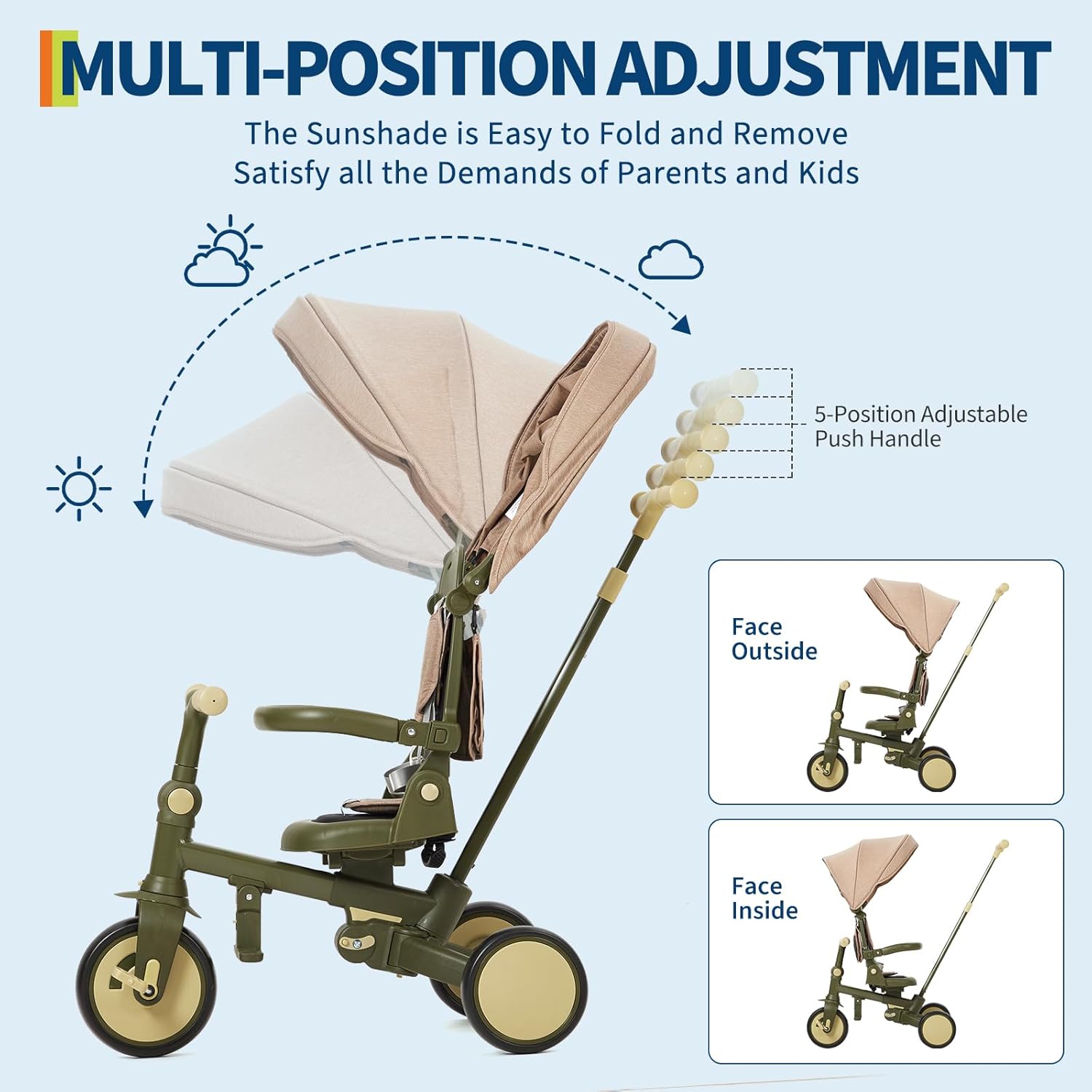
Image 5.4: Illustration of multi-position adjustment for the sunshade and 5-position adjustable push handle, demonstrating face outside and face inside configurations.
6. Folding and Storage
The HarmoHaby 7-in-1 Toddler Tricycle features a simple and efficient folding mechanism, making it easy to transport and store compactly. Consult the specific folding instructions provided with your product for detailed steps, as mechanisms may vary slightly.

Image 6.1: The tricycle folded compactly, demonstrating its suitability for storage in a car trunk or hallway, saving space.
7. Maintenance
Proper maintenance ensures the longevity and safe operation of your tricycle.
- Cleaning: Wipe down the aluminum frame and plastic components with a damp cloth and a mild, non-abrasive soap. Avoid harsh chemicals. The fabric canopy and seat cover can be spot cleaned or hand washed with mild detergent and air-dried.
- Lubrication: Periodically check and apply a small amount of light, non-toxic lubricant to moving parts such as wheel axles and steering mechanisms to ensure smooth operation.
- Inspection: Regularly inspect all bolts, nuts, and fasteners to ensure they are tight. Check for any signs of wear, cracks, or damage to the frame, wheels, or fabric components. Replace worn parts immediately.
- Storage: Store the tricycle in a dry, cool place away from direct sunlight and extreme temperatures. This prevents material degradation and extends the product's lifespan.
8. Troubleshooting
Refer to the table below for common issues and their solutions. If the problem persists, contact customer support.
| Problem | Possible Cause | Solution |
|---|---|---|
| Tricycle does not steer properly. | Loose steering rod connection or damaged mechanism. | Check and tighten all steering connections. Ensure the parent push handle is fully inserted and locked. If damaged, contact customer support. |
| Wheels are stiff or noisy. | Lack of lubrication, debris in wheel bearings, or overtightened axles. | Clean wheels and axles to remove any debris. Apply a small amount of non-toxic lubricant. Ensure axle bolts are not overtightened. |
| Safety harness is difficult to buckle/unbuckle. | Buckle mechanism is dirty, misaligned, or damaged. | Clean the buckle mechanism. Ensure all straps are correctly aligned before attempting to buckle. If damaged, do not use and contact support. |
| Tricycle does not fold correctly. | Folding mechanism obstructed or not fully disengaged/engaged. | Ensure all components are in the correct position for folding. Check for any obstructions. Refer to the specific folding instructions. |
9. Specifications
Key technical specifications for the HarmoHaby 7-in-1 Toddler Tricycle:
- Product Dimensions (Assembled): 40.3 x 19.3 x 41.1 inches (Length x Width x Height)
- Item Weight: 16.14 pounds (7.32 kg)
- Weight Capacity: 55 lbs (25 kg)
- Model Number: xE1ipvr80VeIItcFxNOUPQXcDJP2T
- Manufacturer Recommended Age: 0 months and up (with appropriate mode usage and supervision)
- Frame Material: Durable Aluminum Alloy
- Brand: HarmoHaby

Image 9.1: Detailed product dimensions and weight capacity of the tricycle in various states.
10. Warranty and Support
HarmoHaby products are manufactured with a commitment to quality and customer satisfaction. For specific warranty details, product support, or to report any issues, please refer to the warranty card included with your purchase or visit the official HarmoHaby website. Please retain your purchase receipt as proof of purchase for any warranty claims.
Customer Service: For assistance, please refer to the contact information provided on the product packaging or the official HarmoHaby website. Our support team is available to help with any questions or concerns you may have.