
1. Product Overview
The NORQIN 27-inch Embedded Industrial Touch Panel PC, Model WD01, is an all-in-one touchscreen computer designed for demanding environments. It features an industrial-grade front panel with IP65-rated dust and water protection, a 10-point capacitive G+G touchscreen, and a 1920x1080 Full HD display. This unit is built for stable, 24/7 uninterrupted operation in various industrial and commercial settings.
- Industrial-Grade Design: IP65-rated front panel for dust and water resistance, suitable for harsh environments.
- High-Performance Touchscreen: 10-point capacitive G+G touchscreen for smooth and precise interaction.
- Wide Operating Temperature: Supports operation from -20°C to 70°C.
- Versatile Connectivity: Equipped with 4xUSB, 6xCOM (4xRS232, 2xRS485), 2xLAN, 1xHDMI, and WiFi ports.
- Flexible OS Support: Runs Windows OS out of the box, with optional support for Linux, Android, or Ubuntu.


Applications
This industrial panel PC is suitable for a wide range of applications, including:
- Industrial automation and control
- Smart workshops and manufacturing environments
- Information kiosks and digital signage
- Medical care and intelligent logistics
- Self-service terminals and smart retail POS systems
- Smart homes and modern agriculture



2. What's in the Box
Carefully unpack the box and ensure all items are present:
- 1 × Industrial Panel PC
- 1 × Power Adapter
- 1 × Power Cable
- 2 × WiFi Antennas
- 2 × Embedded Buckle Kits
- 1 × Warranty Card
- 1 × Wall-mounted VESA Bracket

3. Setup
3.1 Physical Installation
The NORQIN Industrial Touch Panel PC supports various installation methods, including VESA wall-mounted, desktop, and embedded configurations.

3.2 Connecting Peripherals
Connect the necessary peripherals to the available ports on the device. The unit features a comprehensive set of I/O ports for diverse industrial applications.
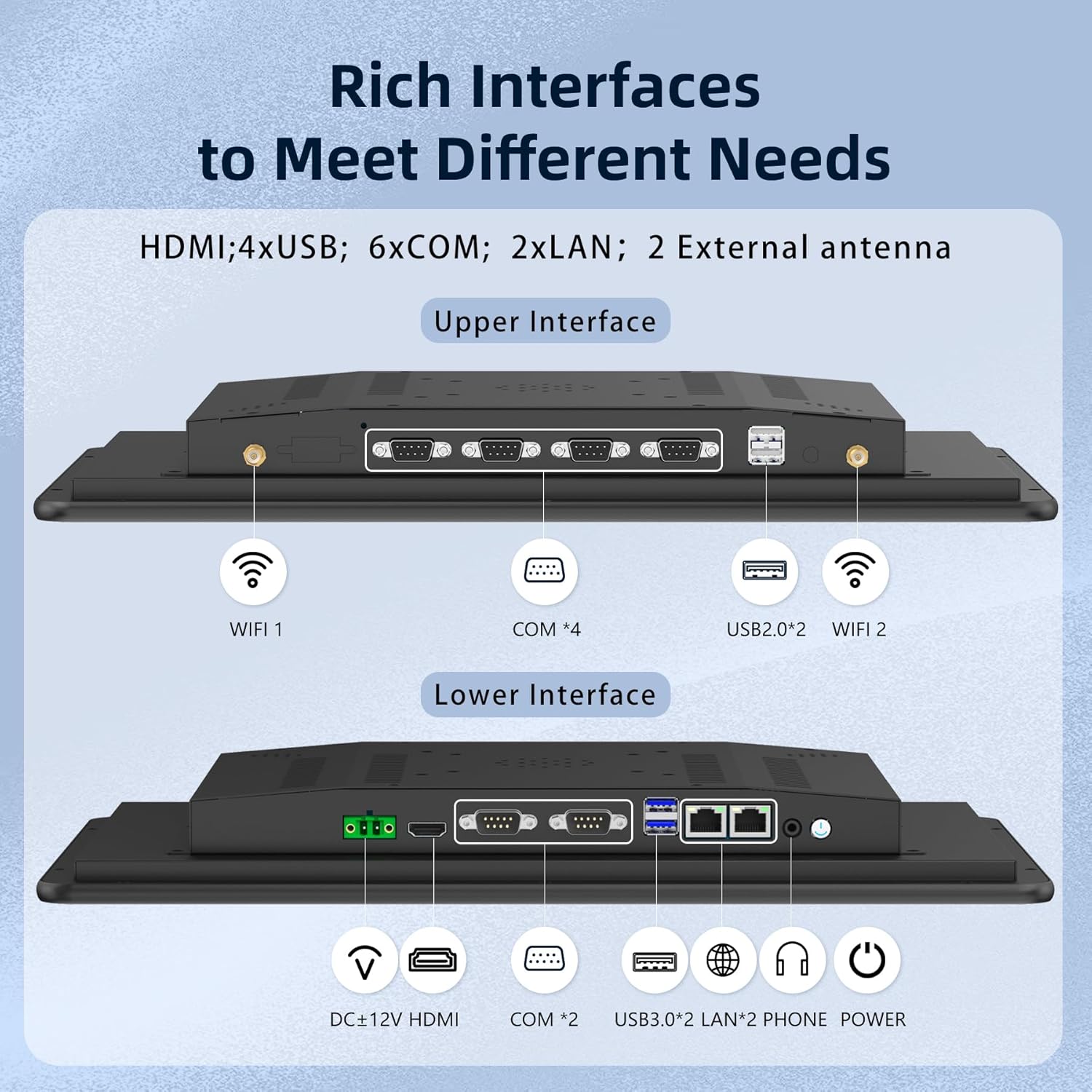
- Power: Connect the provided power adapter and cable to the DC+12V port.
- USB: Use the 4xUSB ports for connecting keyboards, mice, or other USB devices.
- HDMI: Connect an external display if required.
- LAN: Use the 2xLAN ports for network connectivity.
- COM: Utilize the 6xCOM ports (4xRS232, 2xRS485) for industrial communication.
- WiFi: Attach the two WiFi antennas for wireless network access.

3.3 Initial Power-On
After connecting all necessary cables and peripherals, press the power button to turn on the device. The system will boot into the pre-installed Windows OS.
4. Operating
4.1 Touchscreen Operation
The 10-point capacitive touchscreen provides smooth and responsive touch capabilities, supporting various gestures for intuitive interaction. It also supports glove and wet-touch operation, enhancing usability in industrial environments.

4.2 Supported Operating Systems
The panel PC comes with Windows OS pre-installed. For specific project needs, the system can be customized to run Linux, Android, Ubuntu, or other platforms.

4.3 Official Product Videos
Industrial Panel PC Computer Monitor Overview
This video provides a general overview of the NORQIN Industrial Panel PC, showcasing its design and features for various industrial applications.
All-in-One Touchscreen Computer, IP65 Capacitive Monitor
This video highlights the all-in-one design, IP65 rating, and capacitive touchscreen capabilities of the monitor, demonstrating its durability and interactive features.
Embedded Industrial Panel PC Features
This video focuses on the embedded features and robust construction of the industrial panel PC, detailing its suitability for integration into various systems.
5. Maintenance
5.1 Cleaning the Screen
To clean the touchscreen, use a soft, lint-free cloth. For stubborn marks, lightly dampen the cloth with water or a non-abrasive screen cleaner. Avoid harsh chemicals or abrasive materials that could damage the screen surface.
5.2 Environmental Considerations
The panel PC is designed for operation in a wide temperature range (-20°C to 70°C) and features IP65 dust and water resistance on the front panel. Ensure the operating environment remains within these specifications for optimal performance and longevity.

5.3 Heat Dissipation
The unit features a fanless heat dissipation structure with an aluminum alloy back cover, ensuring quiet and efficient cooling. This design is suitable for environments with high dust, strong vibration, or noise-sensitive requirements.

6. Troubleshooting
- No Power: Ensure the power adapter is securely connected to both the device and a working power outlet. Check the power cable for any damage.
- No Display: Verify that the power is on. If an external display is connected, ensure the HDMI cable is properly seated.
- Touchscreen Unresponsive: Restart the device. Ensure the screen is clean and free from obstructions. If wearing gloves, confirm they are compatible with capacitive touchscreens.
- Network Connectivity Issues: For wired connections, check the LAN cables. For WiFi, ensure antennas are attached and the device is within range of a strong signal.
- System Performance Issues: Close unnecessary applications. Ensure the operating system is up-to-date.
For further assistance, please refer to the support section or contact customer service.
7. Specifications
| Feature | Specification |
|---|---|
| Brand | NORQIN |
| Model Number | WD01 |
| Screen Size | 27 Inches |
| Resolution | 1920 x 1080 Pixels (FHD 1080p) |
| Aspect Ratio | 16:9 |
| Image Brightness | 250 Candela |
| Image Contrast Ratio | 1000:1 |
| Total USB Ports | 4 |
| Voltage | 12 Volts |
| Product Dimensions | 26.14 x 1.94 x 15.86 inches |
| Item Weight | 17.16 pounds |
| Language | English |

8. Warranty and Support
8.1 Warranty Information
This product comes with a standard manufacturer's warranty. Please refer to the included Warranty Card for specific terms, conditions, and duration of coverage. Keep your proof of purchase for warranty claims.
8.2 Customer Support
For technical support, troubleshooting assistance, or any product-related inquiries, please contact NORQIN customer service. Contact details can typically be found on the manufacturer's website or the product packaging.
When contacting support, please have your product model number (WD01) and purchase information ready to expedite the service process.


