
1. Safety Information
Please read all instructions carefully before assembly and use. Keep this manual for future reference.
- Children Safety: Children are not allowed to climb or play on the product for safety reasons. Ensure children are supervised around the coffee table.
- Weight Capacity: Do not exceed the maximum weight recommendation of 110 pounds on the tabletop. Overloading can cause damage or injury.
- Assembly: Assemble the product on a soft, clean surface to prevent scratches. Ensure all parts are securely fastened before use.
- Stability: Place the coffee table on a level surface to prevent tipping.
- Electrical Safety (LED Lights): Ensure the LED light strip is installed and connected according to instructions. Do not expose electrical components to water.
2. Product Overview
The Itaar 39.4" Lift Top LED Coffee Table is a versatile piece of furniture designed for modern living spaces. It features a unique lift-top mechanism, providing a flexible surface for dining, working, or gaming. The table also offers extensive storage options, including a hidden compartment, an open shelf, two wood drawers, and a glass display cabinet. Integrated RGB LED lighting enhances the ambiance of your living room.
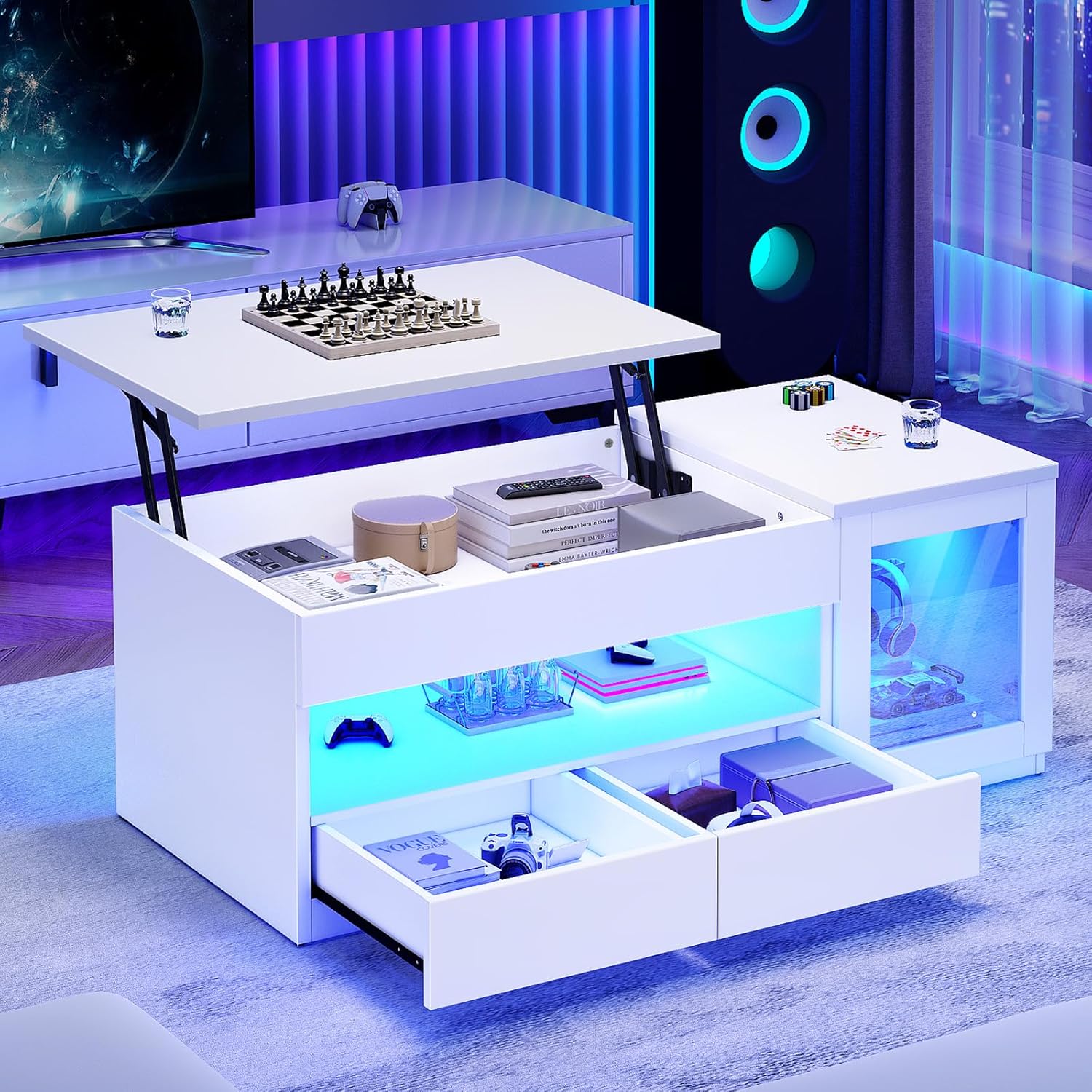
Key Features:
- Lift-Top Design: Easily raises to a comfortable height for various activities, and lowers for standard coffee table use.
- Ample Storage: Includes a hidden compartment, an open storage shelf, two smooth-gliding wood drawers, and a glass display cabinet.
- RGB LED Lighting: Customizable lighting with multiple colors and 29 flashing modes, controllable via an app or remote. Features music sync and timing functions.
- Durable Construction: Made from P2 engineered wood with a high-quality metal gas support mechanism for stable and quiet operation.

3. Package Contents
Before beginning assembly, ensure all parts and hardware are present and undamaged. Refer to the included assembly guide for a detailed list of components and their corresponding labels.
- Coffee Table Panels (Numbered)
- Hardware Pack (Screws, dowels, cam locks, etc.)
- Metal Gas Support Mechanism
- LED Light Strip with Controller and Remote
- Assembly Guide
If any item is damaged, scratched, or missing, please contact customer service for a free replacement or partial refund.
4. Specifications
| Feature | Specification |
|---|---|
| Brand | Itaar |
| Product Dimensions (D x W x H) | 19.7" x 39.4" x 23.8" |
| Item Weight | 52 Pounds |
| Maximum Weight Recommendation | 110 Pounds |
| Frame Material | Engineered Wood (P2 Grade) |
| Color | White |
| Number of Drawers | 2 |
| Special Features | Lift Top, RGB LED Lights |
| Assembly Required | Yes |
| Recommended Tools for Assembly | Hammer, Screwdriver |

5. Assembly Instructions
Assembly of the Itaar Lift Top LED Coffee Table is designed to be straightforward. Please follow the clear and detailed instructions provided in the separate assembly guide included in your package. All parts are numbered for easy identification.
Before You Begin:
- Clear a spacious area for assembly.
- Lay out all components and hardware.
- Ensure you have the recommended tools: a hammer and a screwdriver.
General Steps:
- Attach the main frame components using the provided hardware.
- Install the metal gas support mechanism for the lift-top. Ensure it is securely fastened for smooth operation.
- Assemble the drawers and install them into their designated slots.
- Attach the glass door to the display cabinet using the hinges.
- Install the LED light strip in the designated areas, following the specific instructions for wiring and placement.
- Place the top panels onto the assembled frame.

6. Operating Instructions
6.1. Lift-Top Mechanism
The coffee table features a smooth lift-top mechanism. To raise the tabletop, gently pull the front edge upwards. The hydraulic lifters will assist in the movement. To lower, gently push the tabletop down until it rests in its original position. Avoid forcing the mechanism.

6.2. LED Lighting System
The integrated RGB LED light strip can be controlled via a dedicated remote control or a smartphone application.
- Power On/Off: Use the power button on the remote or in the app to turn the lights on or off.
- Color Selection: Choose from multiple colors using the color palette on the remote or app.
- Mode Selection: Select from 29 flashing modes to create different lighting effects.
- Brightness Adjustment: Adjust the brightness levels to your preference.
- Music Sync: Activate the music sync feature via the app to make the lights respond to audio.
- Timing Function: Set schedules for the lights to turn on or off automatically using the app.

7. Maintenance
Proper care will ensure the longevity and appearance of your coffee table.
- Cleaning: Wipe surfaces with a soft, damp cloth. Avoid harsh chemicals or abrasive cleaners that may damage the finish.
- Spills: Clean spills immediately to prevent staining, especially on the engineered wood surfaces.
- Lift Mechanism: Periodically check the metal gas support mechanism for smooth operation. Do not apply excessive force.
- LED Lights: Ensure the LED light strip and controller are kept dry and free from dust.
- Fasteners: Occasionally check and tighten any loose screws or fasteners to maintain stability.
8. Troubleshooting
If you encounter any issues with your coffee table, refer to the following common solutions:
| Problem | Possible Cause | Solution |
|---|---|---|
| Lift-top is stiff or noisy. | Mechanism not properly aligned or lubricated. | Check assembly of the gas support mechanism. Apply a small amount of silicone lubricant to moving parts if necessary. |
| LED lights not turning on. | Power connection issue, faulty remote/app, or damaged strip. | Ensure power adapter is securely plugged in. Check remote battery. Try controlling via the app. Inspect the LED strip for visible damage. |
| Drawers do not slide smoothly. | Improper installation of drawer slides or obstruction. | Recheck drawer slide installation according to the assembly guide. Remove any obstructions in the drawer tracks. |
| Table feels wobbly. | Loose fasteners or uneven surface. | Tighten all screws and bolts. Ensure the table is placed on a flat, level surface. |
If the problem persists after attempting these solutions, please contact customer support.
9. Warranty and Support
Itaar is committed to providing quality products and customer satisfaction. If your item arrives damaged, scratched, or with missing parts, please contact us directly. We will arrange for free replacement parts or offer a partial refund as appropriate.
For further assistance, please refer to the contact information provided with your purchase or visit the official Itaar website.