
1. Introduction
This manual provides instructions for the fhsbxcvb AKB76040302 TV Remote Control. This remote is designed as a direct replacement for various LG TV models, offering seamless functionality without the need for complex programming. It operates using infrared technology, ensuring reliable control over your television.
2. Setup
2.1 Battery Installation
- Locate the battery compartment on the back of the remote control.
- Slide the battery cover downwards or press the latch to open it.
- Insert two AAA batteries (not included) into the compartment, ensuring the positive (+) and negative (-) terminals align correctly with the indicators inside.
- Replace the battery cover by sliding it back into position until it clicks securely.
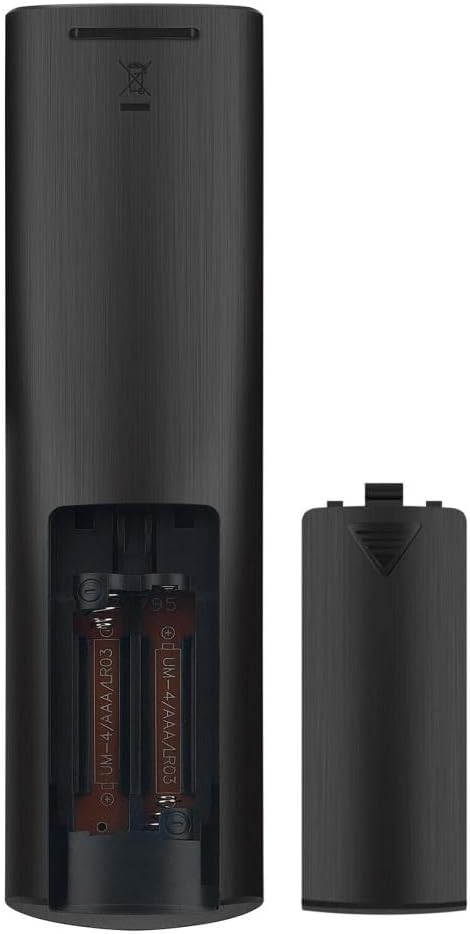
Figure 1: Battery compartment of the AKB76040302 remote control, illustrating the correct placement for two AAA batteries.
2.2 Initial Use
The AKB76040302 remote control is pre-programmed and does not require any additional setup or pairing with your LG TV. Once batteries are installed, it is ready for immediate use. Simply point the remote towards your television and begin operating.
3. Operating Instructions
This remote control provides full functionality for compatible LG TV models. Below is a general overview of common button functions. Refer to your television's user manual for specific features and menu navigation.
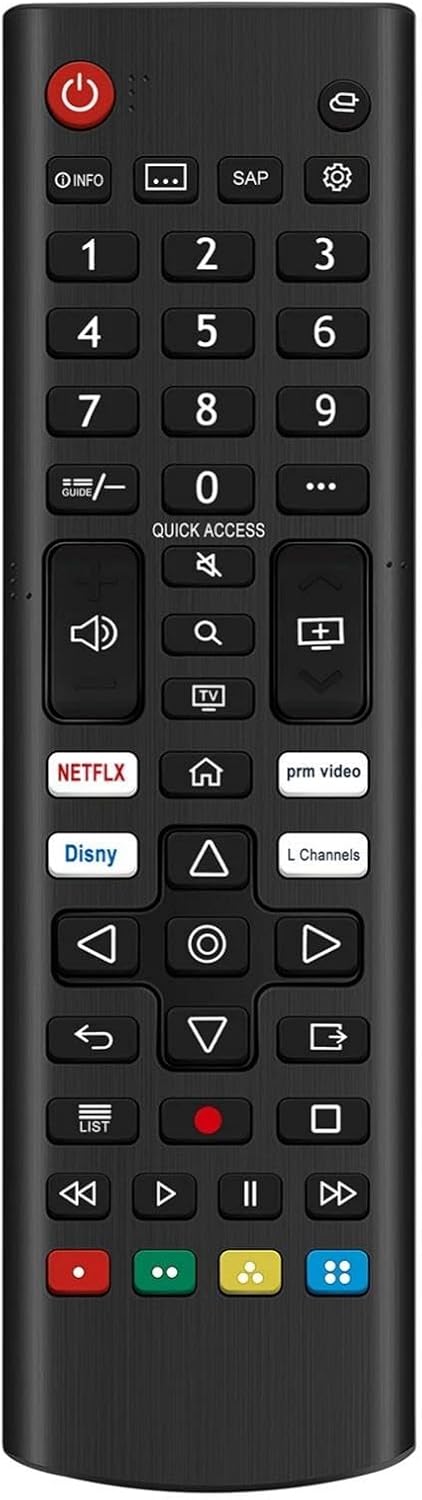
Figure 2: Layout of the AKB76040302 remote control buttons.
- Power Button (⏻): Turns the TV on or off.
- Number Buttons (0-9): Directly select channels.
- Volume Up/Down (🔊): Adjusts the audio volume.
- Channel Up/Down (⏏): Changes TV channels sequentially.
- Mute Button (🔇): Mutes or unmutes the TV audio.
- Navigation Pad (Up, Down, Left, Right, OK): Used to navigate menus and confirm selections.
- Back Button (↩): Returns to the previous screen or menu.
- Home Button (🏠): Accesses the TV's home screen or smart features.
- Quick Access: Provides quick access to frequently used functions or apps.
- Streaming Service Buttons (e.g., NETFLIX, prm video, Disny): Direct access to specified streaming applications.
4. Compatible Models
The AKB76040302 remote control is compatible with the following LG TV models:
- 24LQ51OS
- 32LM627BPUA
- 27LQ600S
- 27LQ615S
- 27LQ625S
- 24LQ520S
- 24LQ510S
- 27LQ625SPU
- 43LM5770PUA
- 60UM6900PUA
- 32LM577BZUA
- 32LM637BPUB
- 43LM6370PUB
- 32LM577BPUA
- 75UM6970PUB
- 55UP7000PUA
- 49UM7300PUA
- 43UP7000PUA
- 50UP75006LF
- 70UM6970PUA
- 50UN7000PUC
- 65UN7000PUD
- 65UP7000PUA
- 43UM6950DUB
- 27LQ625S-PU
5. Specifications
| Feature | Detail |
|---|---|
| Model Number | AKB76040302 |
| Brand | fhsbxcvb |
| Connectivity Technology | Infrared |
| Compatible Devices | Television (LG TVs) |
| Special Feature | No Programming Required |
| Max Number of Supported Devices | 1 |
| Product Dimensions | 7 x 2 x 1 inches |
| Item Weight | 1.76 ounces |
6. Troubleshooting
If you encounter issues with your AKB76040302 remote control, please refer to the following common solutions:
- Remote Not Responding:
- Ensure the batteries are inserted correctly with the correct polarity.
- Replace old batteries with new AAA batteries.
- Check for any obstructions between the remote control and the TV's infrared receiver.
- Limited Range:
- Ensure you are within a reasonable distance from the TV.
- Confirm there are no strong light sources (e.g., direct sunlight, fluorescent lights) interfering with the infrared signal.
- Specific Buttons Not Working:
- Clean the remote control surface and buttons to remove any dirt or debris that might be obstructing button presses.
- If only certain buttons are unresponsive after battery replacement and cleaning, the remote may require replacement.
7. Maintenance
To ensure the longevity and proper functioning of your remote control, follow these maintenance guidelines:
- Cleaning: Use a soft, dry cloth to wipe the surface of the remote control. For stubborn dirt, slightly dampen the cloth with water or a mild, non-abrasive cleaner. Avoid using harsh chemicals or excessive moisture.
- Battery Care: Remove batteries if the remote control will not be used for an extended period to prevent leakage and potential damage.
- Storage: Store the remote control in a cool, dry place away from direct sunlight, extreme temperatures, and high humidity.
- Handling: Avoid dropping the remote control or subjecting it to strong impacts, as this can damage internal components.