1. Product Overview
The AQItech Professional 16-in-1 Real-time Air Quality Monitor is designed to provide comprehensive indoor air quality detection. It continuously monitors various air parameters and alerts you to potential issues, ensuring a healthier environment.
Key Features:
- 16-in-1 Detection: Monitors PM1.0, PM2.5, PM10, CO2, TVOC, HCHO, Temperature, and Humidity.
- 7 AQI Alert Functions: Provides audible alerts for various air quality levels.
- High-Precision Sensors: Collects and analyzes data every 3 seconds for accurate readings.
- HD Large Display: Clear, easy-to-read screen with color-coded indicators.
- Portable & Rechargeable: Up to 4-5 hours of wireless operation with Type-C fast charging.
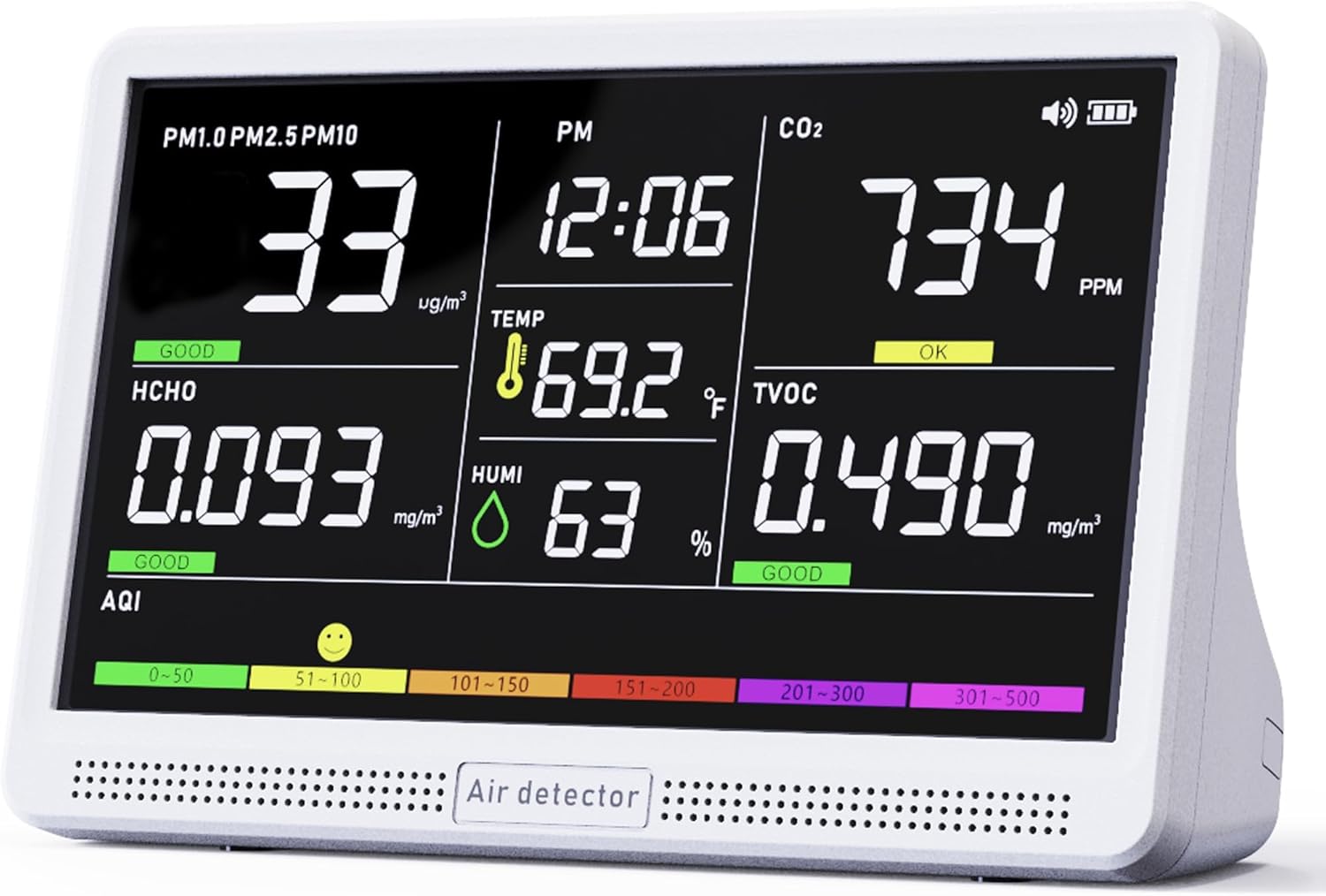
Figure 1: AQItech Air Quality Monitor displaying real-time data.
2. Setup Instructions
2.1 Charging the Device
Before first use, fully charge the air quality monitor. The device comes with a high-performance lithium battery.
- Connect the provided Type-C charging cable to the monitor's charging port.
- Plug the adapter into a standard wall outlet.
- A full charge typically takes approximately 4 hours and provides 4-5 hours of wireless operation.

Figure 2: Charging the AQItech Air Quality Monitor.
2.2 Powering On/Off
Locate the power button on the device's back panel.
- To Power On: Press and hold the power button for a few seconds until the display illuminates.
- To Power Off: Press and hold the power button again until the display turns off.
3. Operating Instructions
3.1 Understanding the Display
The monitor features an HD large display that shows real-time readings for various air quality parameters. The display is color-coded for easy interpretation of air quality levels.

Figure 3: Detailed view of the monitor's display.
Displayed Parameters:
- PM1.0, PM2.5, PM10: Particulate Matter concentrations (µg/m³).
- CO2: Carbon Dioxide levels (ppm).
- TVOC: Total Volatile Organic Compounds (mg/m³).
- HCHO: Formaldehyde levels (mg/m³).
- TEMP: Temperature (°C/°F).
- HUM: Humidity (%).
- AQI: Air Quality Index, with a color bar indicating overall air quality (Green for Good, Yellow for OK, Red for Poor).
3.2 Interpreting AQI Alerts
The monitor includes 7 types of AQI alert buzzers to notify you when air quality parameters exceed safe levels. The display also uses color indicators:
- Green: Good air quality.
- Yellow/Orange: Moderate or acceptable air quality.
- Red/Purple: Poor or unhealthy air quality, triggering an alarm.

Figure 4: Air Quality Index (AQI) thresholds and alert levels.
3.3 Adjusting Settings and Silencing Alerts
The device features simple one-touch controls for various functions:
- Temperature Unit Switch: Press the appropriate button (refer to the user manual for specific button layout) to switch between Celsius (°C) and Fahrenheit (°F).
- Silence Alarms: Double-click the alarm button to silence any active alerts.
- Other settings like screen brightness and timer adjustments can be made via the control buttons on the back panel.
4. Maintenance
4.1 Charging and Battery Life
The monitor is equipped with a high-performance lithium battery, offering 4-5 hours of continuous operation on a single charge. The included Type-C charging cable and adapter allow for quick charging. For continuous monitoring, the device can remain connected to the Type-C charger.
4.2 Cleaning and Care
To ensure optimal performance and longevity of your air quality monitor:
- Wipe the device with a soft, dry cloth. Do not use abrasive cleaners or solvents.
- Keep the sensor vents clear of dust and debris to maintain accurate readings.
- Avoid exposing the device to extreme temperatures, high humidity, or direct sunlight for extended periods.
5. Troubleshooting
5.1 Device Not Powering On
- Ensure the device is fully charged. Connect it to the charger and wait for at least 30 minutes before attempting to power it on again.
- Verify that the charging cable and adapter are functioning correctly. Try using a different compatible Type-C cable and adapter if available.
- Press and hold the power button firmly for several seconds.
5.2 Inaccurate Readings
- Ensure the device is placed in an area with good air circulation, away from direct drafts, vents, or heat sources.
- Avoid placing the monitor near sources of strong odors, chemicals, or smoke, as this can temporarily skew readings.
- Allow the device to operate for at least 5-10 minutes after powering on to stabilize sensor readings.
- If readings remain consistently unusual, refer to the full user manual for calibration instructions or contact customer support.
5.3 Alarm Triggering Frequently
- Check the specific parameter that is triggering the alarm on the display.
- Increase ventilation in the area (e.g., open windows or use an air purifier).
- Identify and remove any sources of pollution if possible (e.g., burning candles, strong cleaning agents).
- If the alarm is disruptive, double-click the alarm button to silence it temporarily.
6. Specifications
| Feature | Detail |
|---|---|
| Manufacturer | AQItech |
| Model Number | 9AQI+7 AQI Alert Buzzers+Time |
| Item Weight | 1.41 pounds |
| Product Dimensions | 8 x 2.8 x 5.7 inches |
| Battery Type | 1 Lithium Ion battery (included) |
| Charging Port | Type-C |
| UPC | 717352564493 |
7. Warranty and Support
The AQItech Professional 16-in-1 Real-time Air Quality Monitor comes with a 12-month warranty from the date of purchase, covering manufacturing defects.
For technical assistance, troubleshooting, or warranty claims, please contact AQItech customer support through the retailer's platform or the official AQItech website. Please have your model number and purchase details ready when contacting support.


