
1. Product Overview
This manual provides detailed instructions for the installation and use of the ERBQNKMIX RZ-DF57 Canbus Decoder and its accompanying 16-Pin Wiring Harness. This product is designed to facilitate the integration of an aftermarket Android head unit with your vehicle's existing electrical system.
The Canbus decoder enables communication between your vehicle's onboard computer and the Android head unit, allowing for the functionality of features such as steering wheel controls and the display of vehicle information (e.g., air conditioning status, door open warnings) on compatible head units.
Key features include a plug-and-play design for simplified installation, durable plastic and metal construction for longevity, and a reliable power relay for safe and stable power conversion.

Image 1.1: The ERBQNKMIX RZ-DF57 Canbus Decoder and 16-Pin Wiring Harness assembly.
2. Compatibility
The RZ-DF57 Canbus Decoder and 16-Pin Wiring Harness are compatible with specific Nissan vehicle models and require an aftermarket Android head unit. To ensure proper fitment and functionality, it is crucial to verify that your vehicle's original radio back panel matches the examples provided below.
Compatible Nissan Models:
- Nissan X-Trail
- Nissan Qashqai J10/J11
- Nissan Juke
- Nissan NP300
Important Note: Before installation, compare the back of your original car radio with the images provided. If your original radio's connectors or layout do not match, this cable and Canbus decoder may not be compatible with your vehicle.

Image 2.1: Examples of compatible Nissan original radio back panels (labeled B and C) for reference.
3. Package Contents
Please verify that all components are present before beginning installation:
- 1x ERBQNKMIX RZ-DF57 Canbus Decoder (integrated or separate module)
- 1x 16-Pin Android Wiring Harness
4. Installation (Setup)
Safety Precaution: Before starting any electrical work in your vehicle, disconnect the negative terminal of your car battery to prevent electrical shorts or damage.
- Remove Original Radio: Carefully remove your vehicle's original car radio according to your vehicle's service manual or a reputable guide.
- Verify Compatibility: As mentioned in Section 2, compare the connectors on the back of your original radio with the provided images and the new wiring harness. Ensure a match before proceeding.
- Connect Wiring Harness: Connect the vehicle-specific end of the 16-Pin Android Wiring Harness to the corresponding ports on your vehicle's wiring loom. The harness is designed for a plug-and-play connection.
- Connect Canbus Decoder: If the RZ-DF57 Canbus Decoder is a separate module, connect it to the designated connector on the 16-Pin wiring harness. Ensure it is securely seated.
- Connect to Android Head Unit: Connect the 16-pin connector of the wiring harness to the corresponding 16-pin port on your aftermarket Android head unit.
- Secure Connections: Ensure all connections are firm and properly seated. Avoid forcing connectors.
- Test Functionality: Before fully reassembling your dashboard, reconnect the car battery and power on the Android head unit. Test basic functions such as audio, steering wheel controls, and any vehicle information display features.
- Final Assembly: Once all functions are verified, carefully reassemble your vehicle's dashboard and secure the Android head unit in place.
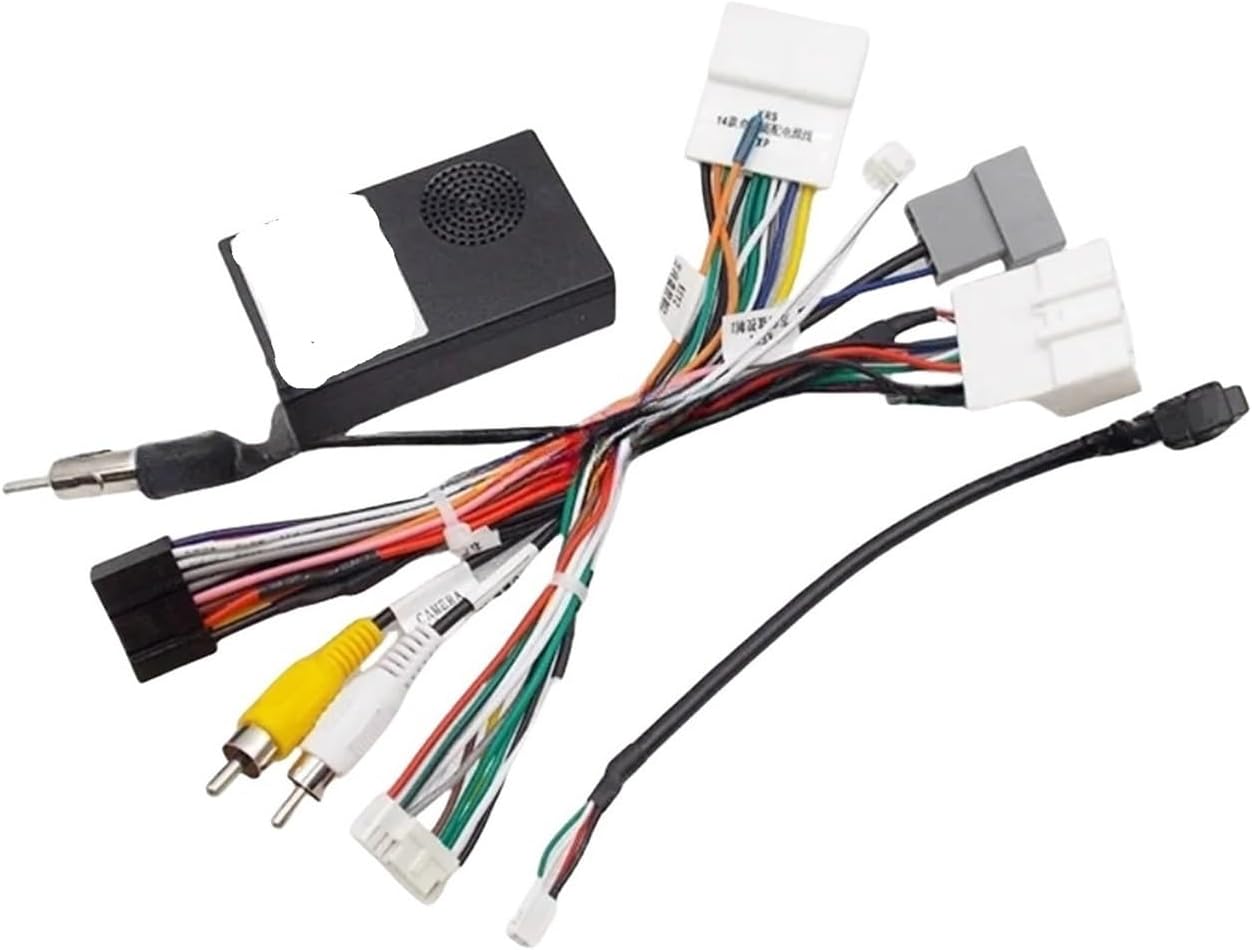
Image 4.1: Close-up view of the 16-Pin wiring harness connectors, showing various color-coded wires for different functions.
5. Operation
The ERBQNKMIX RZ-DF57 Canbus Decoder and Wiring Harness primarily function as an interface between your vehicle and the Android head unit. Once correctly installed and configured, its operation is integrated with your head unit's software.
Key functionalities enabled:
- Steering Wheel Control Integration: Allows your vehicle's factory steering wheel buttons to control functions on the Android head unit (e.g., volume, track skip, mode). Configuration may be required within the Android head unit's settings.
- Vehicle Information Display: On compatible Android head units and vehicles, the Canbus decoder can transmit vehicle data such as air conditioning status, door open warnings, and other diagnostic information for display on the head unit screen.
6. Troubleshooting
If you encounter issues after installation, consider the following troubleshooting steps:
- No Power to Head Unit:
- Check all power connections from the wiring harness to the vehicle and the head unit.
- Ensure the vehicle battery is properly connected and charged.
- Verify vehicle fuses related to the radio or accessory power.
- Steering Wheel Controls Not Working:
- Confirm the Canbus decoder is securely connected to the harness.
- Access your Android head unit's settings menu and look for 'Steering Wheel Control' or 'Canbus Settings'. You may need to configure or learn the buttons.
- Ensure your specific Android head unit model supports Canbus integration for steering wheel controls.
- No Vehicle Information Displayed:
- Verify that your Android head unit has the necessary software and interface to display vehicle information via Canbus.
- Check the Canbus settings within your head unit for proper configuration.
- Intermittent Functionality:
- Inspect all connections for looseness or poor contact.
- Ensure no wires are pinched or damaged during reassembly.
7. Specifications
- Brand: ERBQNKMIX
- Model: RZ-DF57 (Canbus Decoder)
- Product Type: 16-Pin Android Wiring Harness with Canbus Decoder
- Compatibility: Nissan X-Trail, Qashqai J10/J11, Juke, NP300 (requires compatible original radio and Android head unit)
- Connector Type: 16-Pin Android Head Unit Connector
- Material: Durable plastic and metal
- Item Weight: Approximately 1.76 ounces (50 grams)
8. Warranty and Support
For warranty information or technical support regarding the ERBQNKMIX RZ-DF57 Canbus Decoder and Wiring Harness, please contact your retailer or the manufacturer directly. Provide your purchase details and product model number (RZ-DF57) when seeking assistance.