
1. Introduction
The Caytail DK201 is a 2K wireless outdoor PTZ security camera designed for comprehensive surveillance. Featuring a high-capacity 5200 mAh battery and a 3W high-efficiency solar panel, it offers an eco-friendly and economical power solution, ensuring continuous operation. With a 360° ultra-wide field of view and IP65 certification, it is suitable for various outdoor environments.
This camera provides clear and precise 2K HD images, including color night vision. It is equipped with intelligent PIR motion detection and two-way audio for communication and immediate alerts.
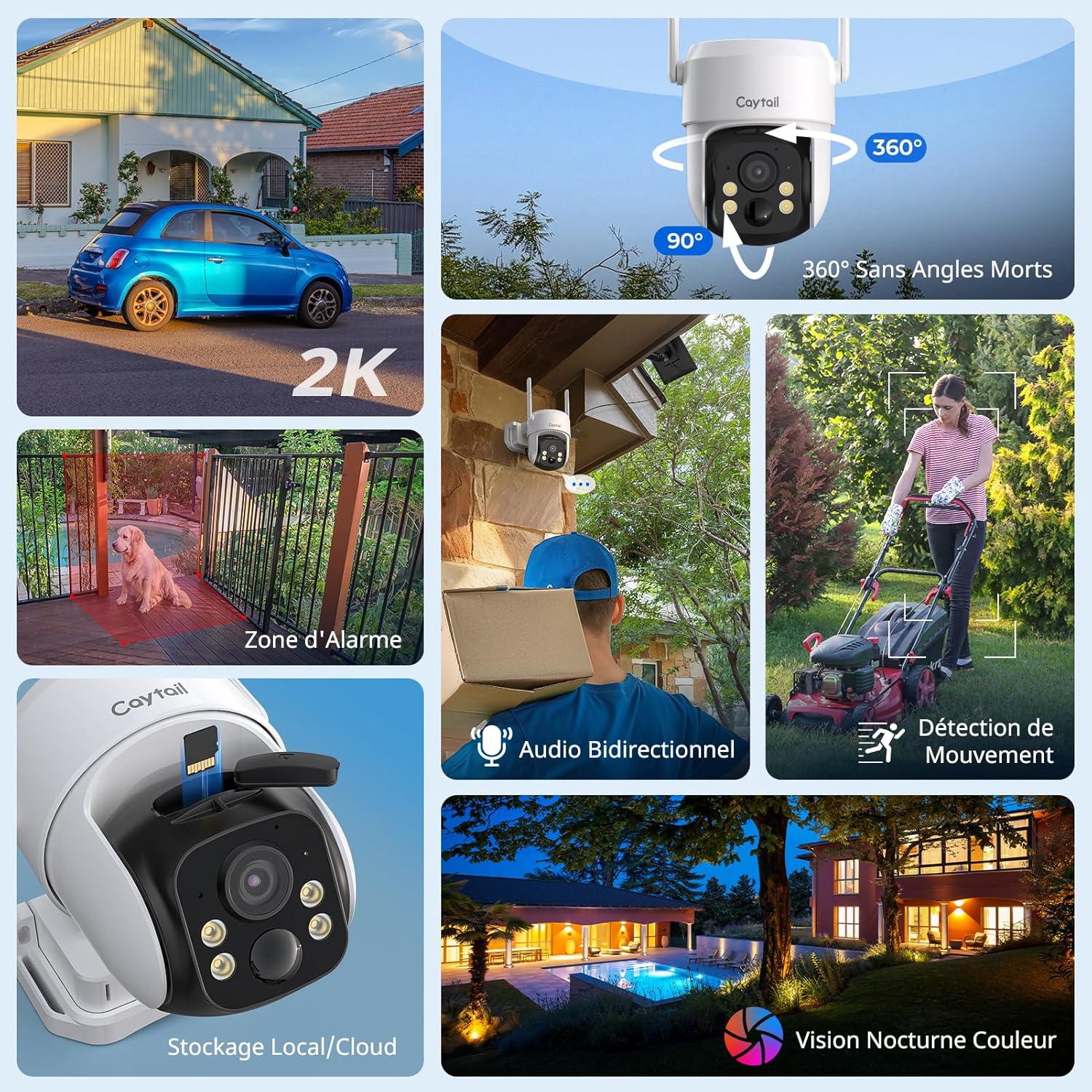
Figure 1: Caytail DK201 Camera Key Features Overview
2. Product Contents
Please verify that all items are present in the package:
- Caytail 2K Wireless Outdoor PTZ Security Camera
- Solar Panel (3W)
- Mounting Bracket
- Installation Guide
- Screws and Wall Plugs for Installation
3. Setup and Installation
3.1 Physical Installation
The camera is designed for outdoor use and can be mounted on walls, trees, or roofs. Use the provided screws and mounting bracket for secure installation. Ensure the solar panel is positioned to receive maximum direct sunlight throughout the day for optimal charging.

Figure 2: Outdoor Installation with Solar Panel
3.2 App Configuration (Ubox App)
Follow these steps to connect your camera to the Ubox app:
- Download the Ubox App: Search for "Ubox" on the App Store (iOS) or Google Play Store (Android) and install it.
- Create an Account: Open the Ubox app and register for a new account, then log in.
- Reset Camera: Press and hold the reset button on the camera for more than 3 seconds until it enters pairing mode.
- Add Device: In the app, click the "+" icon to add a new device and select "Configure Wi-Fi Device".
- Connect to Wi-Fi: Select your 2.4 GHz Wi-Fi network and enter the password to complete the connection. (Note: The camera only supports 2.4 GHz Wi-Fi networks).

Figure 3: Ubox App Connection Steps
4. Operating Instructions
4.1 Live View and PTZ Control
Access the live video feed through the Ubox app. Use the on-screen controls to pan (360° horizontally) and tilt (90° vertically) the camera to adjust the viewing angle. This allows for comprehensive coverage without blind spots.

Figure 4: 360° Pan and 90° Tilt Functionality
4.2 Motion Detection and Alerts
The camera features intelligent PIR motion detection. When motion is detected, you will receive immediate alarm notifications on your phone via the Ubox app. The camera can also trigger a sound alarm to deter intruders.

Figure 5: PIR Motion Detection in Action
4.3 Two-Way Audio
Utilize the built-in microphone and speaker for two-way communication. This allows you to speak with visitors or deter unwanted individuals remotely through the app.

Figure 6: Two-Way Audio Communication
4.4 Night Vision
The camera provides 2K HD color night vision. In low-light conditions, the camera will activate a warm light to capture clear, full-color images up to 10 meters.

Figure 7: 2K HD Color Night Vision
4.5 Storage Options
The camera supports two storage methods:
- MicroSD Card: Compatible with microSD cards up to 128 GB for local storage and loop recording.
- Cloud Storage: A 30-day free trial of cloud storage is available. Choose the storage method that best suits your needs.

Figure 8: MicroSD and Cloud Storage Options
5. Maintenance
The Caytail DK201 camera is IP65 certified, making it resistant to dust and water. This ensures reliable operation in various weather conditions.
- Cleaning: Periodically wipe the camera lens and solar panel with a soft, damp cloth to ensure clear vision and efficient solar charging.
- Solar Panel Placement: Ensure the solar panel remains free from obstructions (e.g., leaves, dirt) that could reduce its charging efficiency.
- Firmware Updates: Check the Ubox app regularly for firmware updates to ensure your camera has the latest features and security enhancements.

Figure 9: IP65 Weather Resistance
6. Troubleshooting
If you encounter issues with your Caytail DK201 camera, please refer to the following common solutions:
- Camera Not Connecting to Wi-Fi:
- Ensure your Wi-Fi network is 2.4 GHz. The camera does not support 5 GHz networks.
- Verify the Wi-Fi password is correct.
- Place the camera closer to your Wi-Fi router to improve signal strength. Thick walls can reduce signal range.
- Restart your router and the camera, then attempt to reconnect.
- Poor Image Quality:
- Clean the camera lens to remove any dirt or smudges.
- Ensure there are no obstructions in the camera's field of view.
- Check your internet connection speed. A stable connection is required for high-quality streaming.
- Battery Not Charging:
- Ensure the solar panel is clean and receives direct sunlight for several hours daily.
- Verify the connection cable between the solar panel and the camera is secure.
- In prolonged cloudy weather, the battery may drain. Consider temporarily charging the camera via USB if available.
- Motion Detection Not Working:
- Check the motion detection settings in the Ubox app to ensure it is enabled and sensitivity is adjusted correctly.
- Ensure there are no objects (e.g., tree branches, flags) that might cause false alarms due to movement.
For further assistance, please contact Caytail customer support.
7. Specifications
| Feature | Specification |
|---|---|
| Model Name | DK201 |
| Brand | Caytail |
| Connectivity Technology | Wireless, Wi-Fi (2.4 GHz) |
| Resolution | 2K (3 Megapixels effective) |
| Pan/Tilt (PTZ) | 360° Horizontal, 90° Vertical |
| Night Vision | Color Night Vision (up to 10 meters) |
| Motion Detection | PIR Motion Detector |
| Audio | Two-Way Audio |
| Power Source | Solar Panel (3W) / Built-in 5200 mAh Battery |
| Storage | MicroSD (up to 128 GB), Cloud Storage |
| Weather Resistance | IP65 Waterproof |
| Compatible Devices | Smartphone (Ubox App) |
| Dimensions | 15 x 12 x 12 cm |
| Weight | 300 Grams |
8. Warranty and Support
For warranty information and technical support, please refer to the documentation included with your product or contact Caytail customer service directly. Amazon's return policy allows for returns within 30 days of purchase.
Contact Information: Please visit the official Caytail website or refer to your purchase receipt for customer support details.