
1. Introduction
The AGARO Royal Electric Spin Scrubber is a cordless cleaning device designed to simplify various household cleaning tasks. It features adjustable speeds and an extendable handle, making it suitable for cleaning bathrooms, bathtubs, tile floors, grout, and other surfaces without extensive bending or kneeling.

Image 1.1: The AGARO Royal Electric Spin Scrubber in use, demonstrating its application in a bathroom environment.
2. Product Overview and Components
Familiarize yourself with the components of your AGARO Royal Electric Spin Scrubber before initial use.
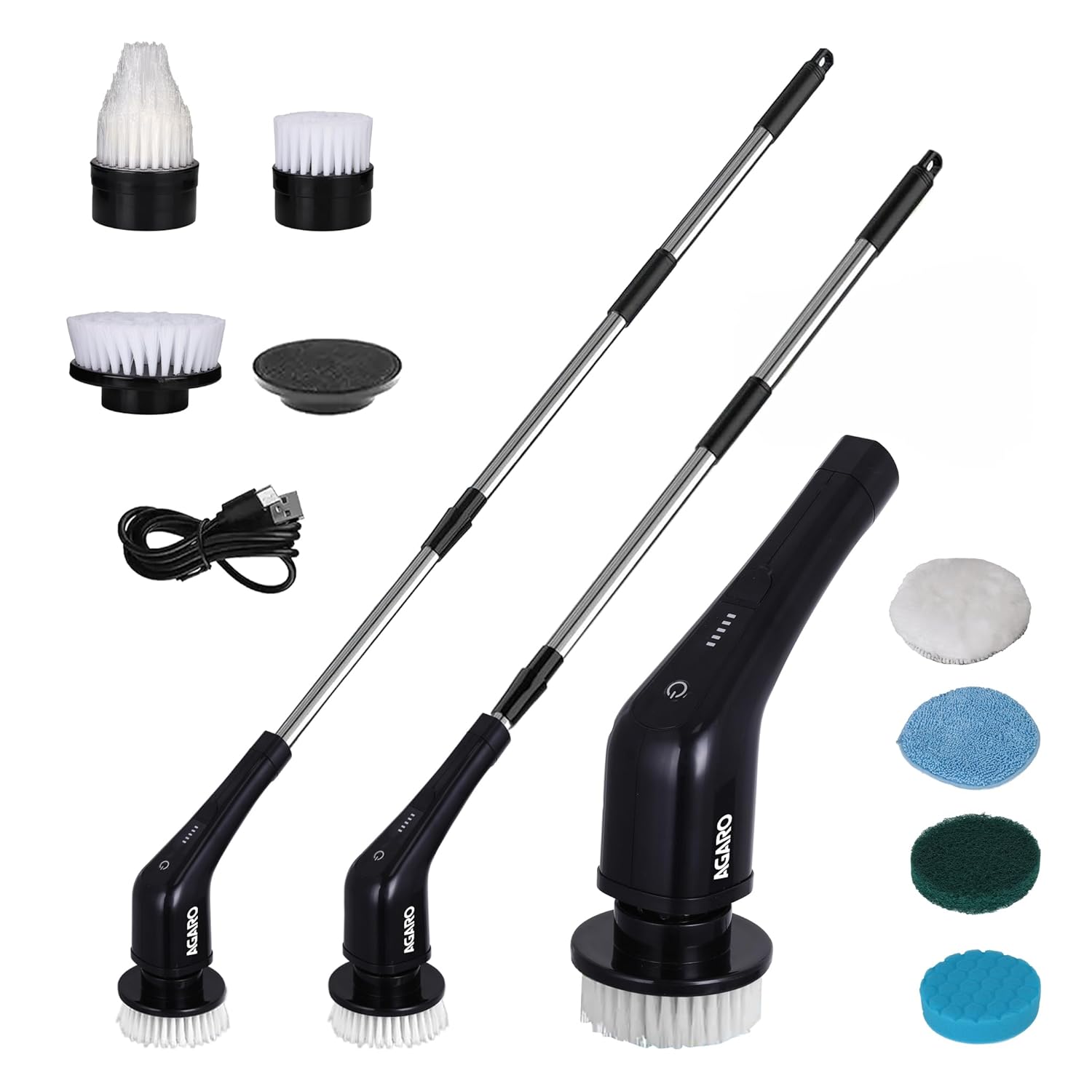
Image 2.1: Overview of the AGARO Royal Electric Spin Scrubber and its included accessories.
Included Brush Heads:
- Large Bristle Brush: For general cleaning of large surfaces.
- Small Bristle Brush: For smaller areas and detailed cleaning.
- Pointed Bristle Brush: Ideal for corners, grout lines, and tight spaces.
- Fiber Sponge Brush: For gentle scrubbing on various surfaces.
- Sponge Brush: For delicate surfaces or polishing.
- Wool Cloth Brush: Suitable for polishing and gentle cleaning.
- Cloth Brush: For general cleaning and wiping.
- Velcro Attachment: Base for attaching sponge, wool, and cloth brushes.

Image 2.2: Detailed view of the bristle and fiber sponge brush heads.

Image 2.3: Detailed view of the sponge, wool, and cloth brush heads with their Velcro attachment.
3. Setup and Charging
3.1 Initial Charging
Before first use, fully charge the scrubber's battery. The device is cordless and rechargeable.
- Locate the Type-C charging port on the main unit.
- Connect the provided Type-C charging cable to the scrubber and a suitable power adapter (not included).
- Allow 3-4 hours for a full charge. The battery indicator lights will show charging progress.
Note: Do not use high wattage chargers. A standard charger is recommended.

Image 3.1: The scrubber connected to a power source for charging.
3.2 Assembly
The scrubber can be used in a handheld configuration or with an extension rod for extended reach.
- Attaching a Brush Head: Align the desired brush head with the rotating base of the scrubber and press firmly until it clicks into place.
- Attaching the Extension Rod:
- To extend the reach, attach the extension rod by rotating it onto the main unit until secure.
- The length can be adjusted by rotating and pulling out the handle sections.
- Removing Components: To remove a brush head, pull it off firmly. To remove the extension rod, twist it counter-clockwise.

Image 3.2: Illustration of the adjustable handle lengths.
4. Operating Instructions
4.1 Powering On/Off and Speed Adjustment
The scrubber features two adjustable speeds for different cleaning needs.
- Power On: Press the power button once to turn on the scrubber. It will start at the low speed (300 RPM) by default.
- Adjust Speed: To switch to high speed (400 RPM), press and hold the power button for 2 seconds.
- Power Off: Press the power button again to turn off the scrubber.

Image 4.1: Visual representation of the two cleaning speeds.
4.2 Cleaning Procedure
The scrubber is designed for use with cleaning solutions. Apply cleaning liquid directly to the surface to be cleaned, then use the scrubber.
- Ensure the desired brush head is securely attached.
- Apply your preferred cleaning solution to the surface you intend to clean.
- Power on the scrubber and select the appropriate speed.
- Gently guide the rotating brush over the soiled area. Apply light pressure; the motor's power is designed to do the work.
- For optimal results, work in small sections.
- After cleaning, wipe the surface with a clean cloth and rinse if necessary.
Caution: While the brush head can be dipped in water, do not immerse the entire handle unit in water.

Image 4.2: Demonstrating the scrubber's versatility across different surfaces.
5. Maintenance and Care
Proper maintenance ensures the longevity and performance of your spin scrubber.
- Cleaning Brush Heads: After each use, remove the brush head and rinse it thoroughly under running water to remove any cleaning solution or debris. Allow to air dry completely before storing.
- Cleaning the Main Unit: Wipe the main unit and handle with a damp cloth. Do not use abrasive cleaners.
- Water Resistance: The scrubber has an IPX5 waterproof rating, meaning it is protected against low-pressure water jets from any direction. This allows for use in humid environments and rinsing of the brush head. However, do not immerse the entire handle in water.
- Storage: Store the scrubber in a dry place, away from direct sunlight and extreme temperatures.

Image 5.1: The IPX5 waterproof rating allows for use in wet conditions.
6. Troubleshooting
| Problem | Possible Cause | Solution |
|---|---|---|
| Scrubber does not turn on. | Battery is depleted. | Charge the scrubber for 3-4 hours until fully charged. |
| Brush head does not spin or spins weakly. | Battery is low; excessive pressure applied; brush head is obstructed. | Recharge the battery. Reduce pressure during cleaning. Check for and remove any obstructions from the brush head. |
| Extension rod feels loose. | Rod not securely tightened. | Ensure the extension rod is fully rotated and tightened onto the main unit. |
| Reduced cleaning effectiveness. | Worn brush head; insufficient cleaning solution. | Replace the brush head if bristles are worn. Ensure adequate cleaning solution is applied to the surface. |
7. Specifications
| Feature | Detail |
|---|---|
| Model | Royal |
| Brand | AGARO |
| Color | Black |
| Battery Capacity | Up to 5000mAh |
| Charging Time | 3-4 hours |
| Work Time | Up to 90 minutes on a full charge |
| Speed Settings | Low: 300 RPM, High: 400 RPM |
| Adjustable Length | Yes, with extension rod (up to 130 cm / 52 inches) |
| Item Weight | 950 Grams |
| Waterproof Rating | IPX5 |
| Number of Brush Heads | 8 (various types) |
8. Warranty and Support
AGARO offers a warranty for the Royal Electric Spin Scrubber. Please register your product online to avail of any extended warranty benefits, such as the mentioned 6-month extended warranty.
For product assistance, technical support, or warranty claims, please contact AGARO customer service.
Customer Support Contact: 98214 86487
Please retain your purchase receipt for warranty validation.
9. Safety Information
- Read all instructions before using the appliance.
- Keep the appliance away from children.
- Do not immerse the main handle unit in water. The IPX5 rating protects against splashes, not submersion.
- Use only the provided charging cable.
- Do not operate the scrubber if it is damaged or malfunctioning.
- Avoid using the scrubber on delicate surfaces that may be scratched by rotating brushes. Test on an inconspicuous area first.
- Ensure brush heads are securely attached before operation.
- Do not attempt to disassemble or repair the unit yourself. Contact customer support for service.