
1. Introduction
This manual provides detailed instructions for the assembly, operation, and maintenance of your ECOTINY HW1288BK Rolling TV Stand. Please read this manual thoroughly before installation and use to ensure safe and correct operation. Keep this manual for future reference.
The ECOTINY HW1288BK is a versatile mobile TV stand designed to accommodate 37-86 inch LCD/LED/OLED flat or curved screen TVs, supporting up to 110 lbs. It features adjustable height, rotation, tilt, and swivel functions, along with integrated storage solutions.
2. Safety Information
WARNING: Failure to read and follow these instructions may result in serious personal injury or property damage.
- Do not exceed the maximum weight capacity of 110 lbs (50 kg) for the TV stand and 11 lbs (5 kg) for the shelf.
- Ensure the TV stand is assembled correctly according to the instructions. Incorrect assembly can lead to instability.
- Always use the locking casters when the TV stand is in a stationary position to prevent accidental movement.
- Keep children and pets away from the TV stand during assembly and when moving it.
- Do not attempt to move the TV stand over uneven surfaces or obstacles with a TV mounted.
- Regularly check all screws and connections to ensure they remain tight and secure.
- Avoid placing heavy objects on the edges of the shelves to prevent tipping.
3. Package Contents
Before assembly, verify that all components are present and undamaged. If any parts are missing or damaged, contact ECOTINY customer support.

Image: All components of the ECOTINY HW1288BK Rolling TV Stand laid out, including the base, vertical column, TV mounting brackets, two shelves, casters, and various screws and tools. The product box is also visible.
The package typically includes:
- Main Base with Casters
- Vertical Support Column
- TV Mounting Brackets (left and right)
- Adjustable Steel Shelf (x2)
- Pegboard Storage Panel
- All necessary hardware (screws, washers, spacers, Allen keys)
- Instruction Manual
4. Specifications
| Feature | Detail |
|---|---|
| Model Number | HW1288BK |
| Compatible TV Sizes | 37 - 86 inches |
| Maximum TV Weight Capacity | 110 lbs (50 kg) |
| Maximum Shelf Weight Capacity | 11 lbs (5 kg) |
| VESA Mounting Patterns | 200x200, 300x200, 400x200, 300x300, 400x300, 400x400, 600x400mm |
| Height Adjustment | 2 settings, from 55.1 to 58.7 inches (center of TV) |
| Swivel Angle | +/- 30 degrees |
| Tilt Angle | +3 degrees / -5 degrees |
| Rotation | 90 degrees (portrait to landscape) |
| Material | Alloy Steel |
| Base Dimensions | 23.6" (L) x 17" (W) |
| Item Weight | 34.1 lbs |
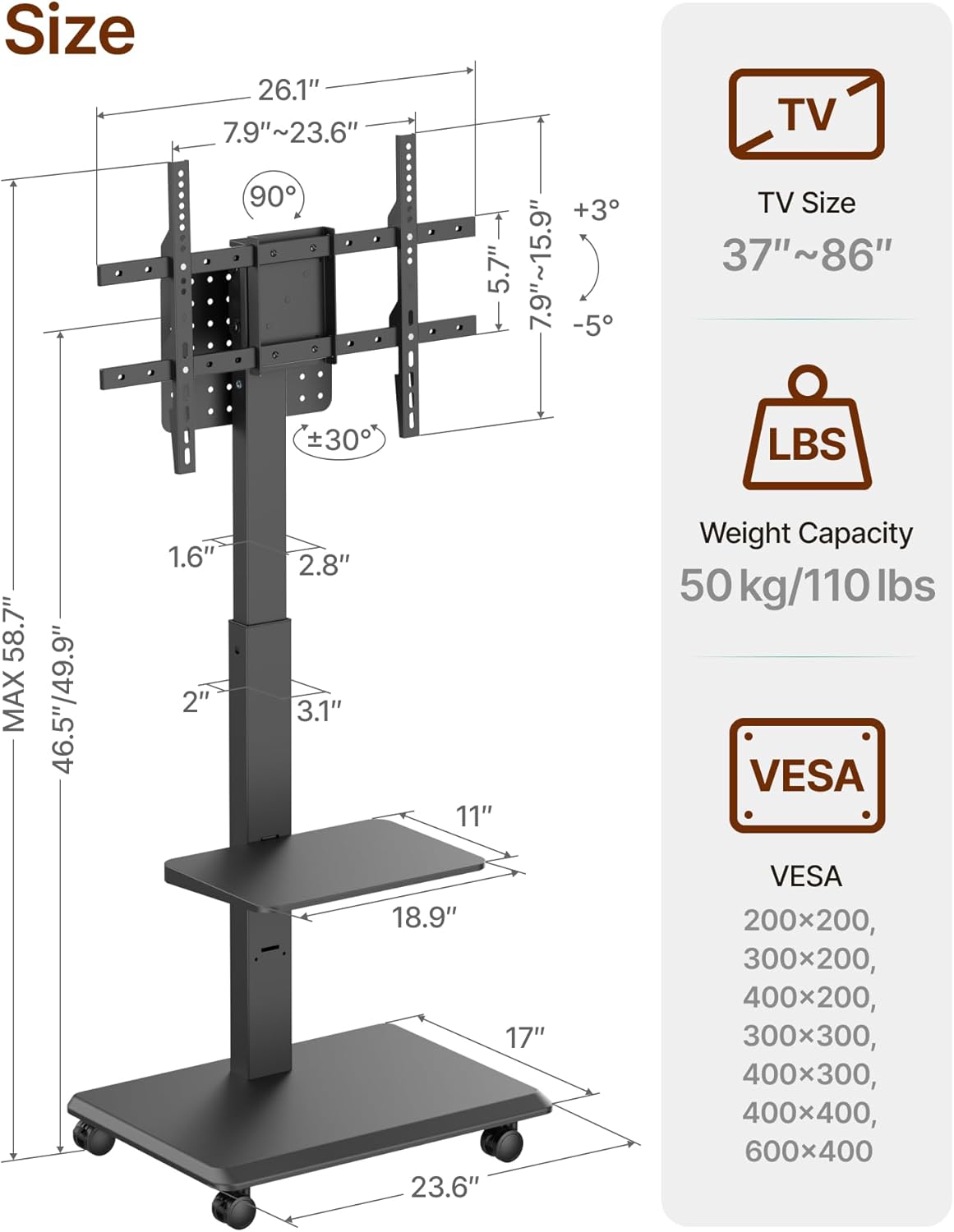
Image: A detailed diagram illustrating the dimensions of the TV stand, including maximum and minimum TV height, shelf dimensions, and overall footprint. It also specifies compatible TV sizes (37-86 inches), weight capacity (110 lbs), and supported VESA mounting patterns.

Image: A visual guide confirming TV compatibility, displaying various TV sizes (37", 65", 86") and reiterating supported VESA patterns and weight capacities for both the TV and the shelf.
5. Setup & Assembly
The ECOTINY Rolling TV Stand is designed for straightforward assembly. It is recommended to have a second person assist with mounting the TV.
5.1 Assembly Steps
- Attach Casters to Base: Secure the 360° silent wheels to the main steel base. Ensure all casters are firmly tightened.
- Connect Vertical Column: Attach the vertical support column to the base using the provided hardware.
- Install Shelves: Mount the adjustable steel shelves to the vertical column at your desired height. The stand offers 2 height levels for the shelves.
- Attach TV Mounting Brackets: Secure the TV mounting brackets to the back of your television using the appropriate screws and spacers for your TV's VESA pattern.
- Mount TV to Stand: Carefully lift the TV and hook the brackets onto the vertical column's mounting plate. Secure the TV in place with the safety screws.
- Organize Cables: Utilize the built-in cable management system and pegboard storage panel to route and conceal power cords and AV cables.
Video: An official ECOTINY video demonstrating the assembly process and key features of the Rolling TV Stand, including cable management and mobility. (Duration: 0:44)
5.2 Cable Management
The stand features strategic pathways and a pegboard storage panel to help manage cables. Route cables through the designated openings in the vertical column to maintain a clean and organized appearance.

Image: A close-up view of the cable management opening in the vertical column, showing a cable neatly routed through it.

Image: A detailed view of the pegboard storage panel located behind the TV mount, designed for hanging power strips, set-top boxes, or other accessories.
6. Operation
6.1 Adjusting TV Height
The TV stand offers 2 adjustable height settings for optimal viewing. To adjust the height, remove the TV from the mounting plate, reposition the mounting plate on the vertical column to the desired height, and re-mount the TV. Ensure the safety screws are re-secured.

Image: A visual representation of the TV stand's height adjustment capabilities, showing the maximum (58.7") and minimum (55.1") TV height settings, as well as the adjustable shelf heights.
6.2 Rotating the Screen (Portrait/Landscape)
The TV mount allows for 90° rotation, enabling seamless switching between landscape and portrait orientations. Gently rotate the TV to the desired position. Ensure the TV is securely in place after rotation.

Image: A person exercising in front of a TV mounted on the stand, demonstrating the 90-degree rotation feature for seamless landscape and portrait switching.
6.3 Swivel and Tilt Functions
The TV mount offers +/- 30° swivel and +3°/-5° tilt adjustments. These features allow you to direct the screen towards your viewing area and reduce glare.
- Swivel: Gently push the sides of the TV to swivel it left or right.
- Tilt: Loosen the tilt adjustment knobs on the TV brackets, adjust the screen to the desired angle, and then re-tighten the knobs to secure.

Image: Two diagrams showing the flexible swivel (±30°) and tilt (+3°/-5°) adjustments of the TV stand, allowing for optimal viewing angles.
6.4 Moving the TV Stand
The stand is equipped with 360° silent locking casters for easy mobility. To move the stand, unlock all casters. When the stand is in the desired position, lock the casters to prevent accidental movement.

Image: A close-up view of the 2-inch widened casters, highlighting their 360-degree rotation and locking mechanism for secure positioning.
7. Maintenance
- Cleaning: Wipe the stand with a soft, damp cloth. Avoid using abrasive cleaners or solvents that could damage the finish.
- Regular Checks: Periodically inspect all screws and connections to ensure they are tight. Re-tighten if necessary.
- Caster Care: Keep the casters free of debris to ensure smooth rolling.
8. Troubleshooting
8.1 Stand is unstable or wobbles
- Ensure all assembly screws are fully tightened.
- Verify that the TV weight does not exceed the maximum capacity of 110 lbs.
- Check that the stand is placed on a flat, level surface.
8.2 TV cannot be rotated or tilted smoothly
- For tilt adjustment, ensure the tilt knobs are loosened before adjusting and re-tightened afterward.
- Check for any obstructions behind the TV or around the mounting mechanism.
8.3 Casters are not rolling smoothly or locking
- Clear any debris (hair, dust) from the caster wheels.
- Ensure the locking mechanism is fully engaged or disengaged as intended.
9. Warranty & Support
The ECOTINY HW1288BK Rolling TV Stand comes with a 3-Year Warranty as specified by the manufacturer.
For technical support, missing parts, or warranty claims, please contact ECOTINY customer service. Refer to your purchase documentation for specific contact details or visit the official ECOTINY website.
Manufacturer: ECOTINY
Model Number: HW1288BK