
1. Introduction
This manual provides detailed instructions for the safe and effective use of your MESTEK Pinless Wood Moisture Meter, model WM710-001. This device is designed for non-destructive measurement of moisture content in various materials including wood, drywall, masonry, and other building materials. Please read this manual thoroughly before operation and retain it for future reference.
2. Safety Information
- Always operate the device within its specified temperature and humidity ranges.
- Do not expose the meter to extreme temperatures, direct sunlight, or high humidity.
- Avoid dropping the device or subjecting it to strong impacts.
- Keep the device away from water and other liquids.
- Do not attempt to open or modify the device. Repairs should only be performed by qualified personnel.
- Dispose of batteries according to local regulations. Do not mix old and new batteries or different types of batteries.
- This device is not a toy. Keep out of reach of children.
3. Product Overview
3.1 Components
The MESTEK WM710-001 Pinless Wood Moisture Meter features a robust design for reliable moisture detection.
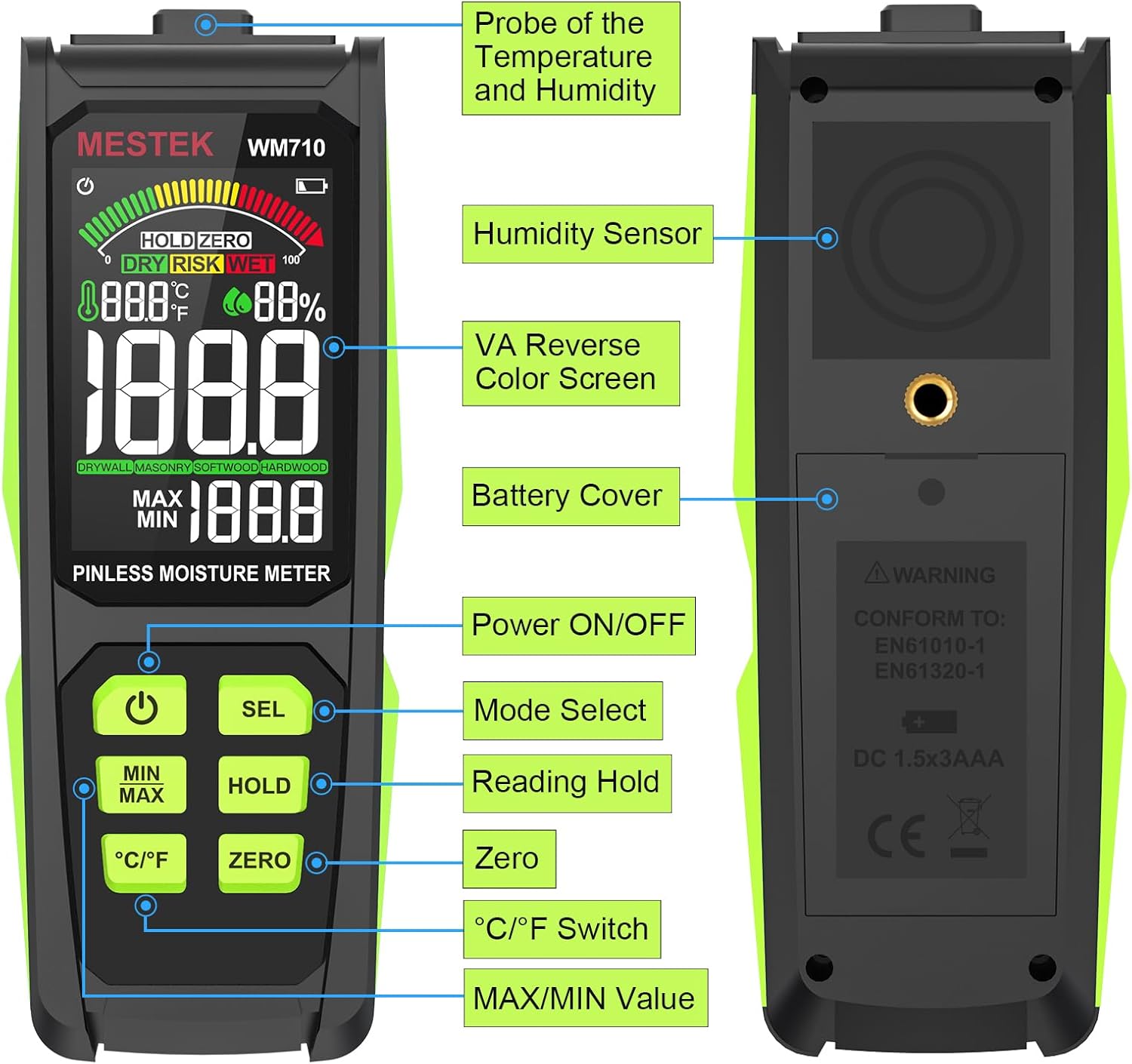
Image: Overview of the MESTEK WM710-001 Pinless Moisture Meter, highlighting its key components such as the probe, display, and control buttons.
- Probe of Temperature and Humidity: Located at the top of the device.
- Humidity Sensor: Located on the back of the device.
- VA Reverse Color Screen: High-definition display for clear readings.
- Battery Cover: Located on the back for battery access.
- Power ON/OFF Button: To turn the device on or off.
- Mode Select (SEL) Button: To switch between material modes.
- Reading Hold (HOLD) Button: To freeze the current measurement on the display.
- Zero Button: For zero calibration.
- °C/°F Switch Button: To toggle between Celsius and Fahrenheit for temperature display.
- MAX/MIN Value Button: To view maximum and minimum recorded measurements.
3.2 Display Features
The meter is equipped with a 3-inch HD color screen that provides clear and intuitive information.

Image: The MESTEK WM710-001 display illustrating various engineered functions including the 3-color analog bar, ambient temperature/humidity, measurement reading, mode selection, and MAX/MIN display.
- 3-Color Analog Bar Display: Visually indicates moisture levels as DRY (Green), RISK (Yellow), or WET (Red).
- Ambient Temperature/Humidity: Displays current environmental temperature and humidity.
- Measurement Reading: Shows the numerical moisture content.
- Mode Selection Indicator: Displays the currently selected material mode (Drywall, Masonry, Softwood, Hardwood).
- MAX/MIN Display: Shows the highest and lowest recorded moisture values.
- Battery Indicator: Shows current battery level.
- HOLD Indicator: Appears when the HOLD function is active.
- ZERO Indicator: Appears when zero calibration is active.
4. Setup
4.1 Battery Installation
The MESTEK WM710-001 requires three (3) AAA batteries for operation.
- Locate the battery cover on the back of the device.
- Use a small screwdriver (often included) to loosen the screw securing the battery cover.
- Remove the battery cover.
- Insert three new AAA batteries, ensuring correct polarity (+/-) as indicated inside the battery compartment.
- Replace the battery cover and tighten the screw.
Note: A low battery indicator will appear on the display when batteries need replacement.

Image: The MESTEK WM710-001 Pinless Moisture Meter shown with its included accessories: a carrying case, user manual, three AAA batteries, and a small screwdriver for battery compartment access.
5. Operating Instructions
5.1 Power On/Off
Press the Power ON/OFF button to turn the meter on. The device will perform a self-test and be ready for measurement within approximately 3 seconds. Press and hold the Power ON/OFF button again to turn the meter off. The device also features an auto power-off function to conserve battery life after a period of inactivity.

Image: A close-up view of the power button on the MESTEK WM710-001, indicating its function for turning the device on and off.
5.2 Mode Selection
The meter offers different modes for various materials to ensure accurate readings.
- Turn on the meter.
- Short-press the SEL button to cycle through the available material modes: Drywall, Masonry, Softwood, and Hardwood.
- Select the mode that corresponds to the material you are testing. The selected mode will be indicated on the display.
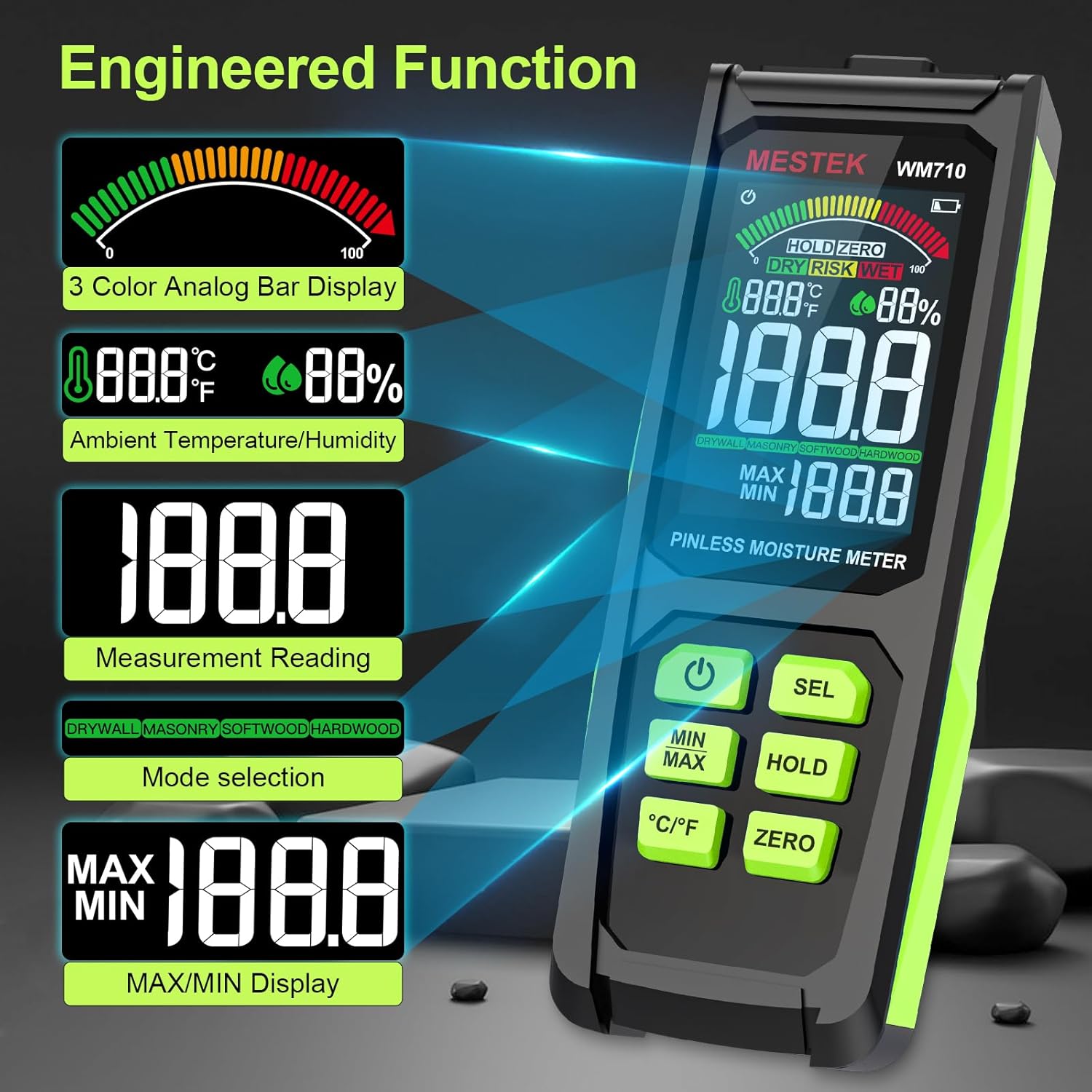
Image: The MESTEK WM710-001 display demonstrating non-invasive detection and the process of switching between Drywall, Masonry, Softwood, and Hardwood modes using the "SEL" button.
5.3 Performing a Measurement
The WM710-001 uses a non-destructive induction method to measure moisture.
- Ensure the correct material mode is selected (refer to Section 5.2).
- Place the back of the meter (where the sensor is located) flat against the surface of the material you wish to measure.
- The meter will display the moisture content reading. The maximum measuring depth is approximately 0.78 inches (20 mm).
- Observe the 3-color analog bar for a quick visual indication of moisture levels (Green for DRY, Yellow for RISK, Red for WET). An audible alarm will sound if the "WET" threshold is exceeded.

Image: The MESTEK WM710-001 in use, demonstrating accurate moisture measurement on wood logs, showing the digital reading and the analog bar.

Image: The MESTEK WM710-001 being used to measure moisture in various materials, including drywall, masonry, softwood, and hardwood, illustrating its wide range of applications.
5.4 HOLD Function
Press the HOLD button to freeze the current measurement on the display. This is useful when taking readings in hard-to-reach areas where the display cannot be easily viewed. Press the HOLD button again to release the reading and resume live measurement.

Image: A close-up view of the HOLD button and the "HOLD ZERO" indicator on the MESTEK WM710-001 display, showing how to retain a measurement reading.
5.5 ZERO Calibration
The ZERO function allows for calibration to ensure accuracy.
- Hold the meter in the air, away from any materials.
- Press the ZERO button. The display should show a reading close to 0.0.
- This calibrates the meter for ambient conditions before taking measurements.
5.6 MAX/MIN Value
Press the MIN/MAX button to display the maximum or minimum moisture reading recorded during a measurement session. Pressing it repeatedly will cycle between MAX, MIN, and current readings.
5.7 Temperature and Humidity Display
The meter also displays ambient temperature and humidity. Press the °C/°F button to switch between Celsius and Fahrenheit temperature units.

Image: A close-up view of the °C/°F button on the MESTEK WM710-001, illustrating the ability to switch between Celsius and Fahrenheit temperature units.
6. Measurement Modes and Ranges
The MESTEK WM710-001 provides specific moisture content ranges for different material types, categorized by visual and audible indicators.

Image: The MESTEK WM710-001 Humidity Alarm comparison table, showing the moisture percentage ranges for DRY (Green), RISK (Yellow), and WET (Red) conditions across different measurement modes: Drywall, Masonry, Softwood, and Hardwood.
| Measurement Mode | Green / DRY | Yellow / RISK | Red / WET |
|---|---|---|---|
| DRYWALL | 0.0 ~ 17.9 | 18.0 ~ 35.9 | 36.0 ~ 54.0 |
| MASONRY | 0.0 ~ 11.9 | 12.0 ~ 23.9 | 24.0 ~ 36.0 |
| SOFTWOOD | 0.0 ~ 31.9 | 32.0 ~ 63.9 | 64.0 ~ 100 |
| HARDWOOD | 0.0 ~ 31.9 | 32.0 ~ 63.9 | 64.0 ~ 100 |
Note: These ranges are indicative. Always consider other factors and professional advice for critical moisture assessments.
7. Maintenance
- Cleaning: Wipe the device with a soft, dry cloth. Do not use abrasive cleaners or solvents.
- Storage: When not in use for extended periods, remove the batteries to prevent leakage. Store the meter in its protective cloth bag in a cool, dry place, away from direct sunlight and extreme temperatures.
- Battery Replacement: Replace batteries promptly when the low battery indicator appears to ensure accurate readings.
8. Troubleshooting
| Problem | Possible Cause | Solution |
|---|---|---|
| Meter does not power on. | Dead or incorrectly installed batteries. | Check battery polarity. Replace with new AAA batteries. |
| Inaccurate or inconsistent readings. | Incorrect mode selected; meter not properly zeroed; sensor not flat on surface; material too thick for pinless measurement. | Ensure correct material mode. Perform ZERO calibration. Ensure sensor is flush with the surface. Note maximum measuring depth is 20mm. |
| Display is dim or flickering. | Low battery. | Replace batteries. |
| Audible alarm sounds frequently. | Material moisture content is in the "WET" range. | This indicates high moisture. Refer to the Measurement Modes and Ranges table for specific thresholds. |
| "Out of Range" alarm. | Moisture content exceeds the meter's maximum measurable range. | The material is extremely wet. The meter cannot provide a precise numerical value beyond its range. |
9. Specifications
| Feature | Detail |
|---|---|
| Model Number | WM710-001 |
| Measurement Type | Pinless, Non-destructive Induction |
| Maximum Measuring Depth | 0.78 inches (20 mm) |
| Measurement Range | 0.0 - 100.0 (material dependent) |
| Measurement Accuracy | ±4% |
| Temperature Accuracy | ±2.0°C / 3°F |
| Humidity Accuracy | ±5.0% RH |
| Display | 3-inch HD Color LCD with 3-color analog bar |
| Power Source | 3 x AAA Alkaline Batteries |
| Included Components | Moisture meter, batteries, carrying case, screwdriver, user manual |
| Item Weight | 10.2 ounces |
| Package Dimensions | 7.76 x 3.23 x 1.77 inches |
10. Warranty and Support
The MESTEK WM710-001 Pinless Wood Moisture Meter comes with a 3-year replacement warranty. If you encounter any issues with your device, please contact MESTEK customer support for assistance.
For support inquiries, please refer to the contact information provided with your product packaging or visit the official MESTEK website.

