
1. Introduction
This instruction manual provides detailed guidance for the installation and operation of the FHDBABWX 16-Pin Car Wiring Harness Adapter with CANbus Decoder, specifically designed for Toyota Fortuner models from 2017 to 2021. This adapter facilitates the integration of an aftermarket Android radio into your vehicle's existing electrical system, ensuring proper communication and functionality through the included CANbus box (Hiworld WC, Model TY39.10).
Please read this manual thoroughly before beginning installation to ensure correct setup and to prevent damage to your vehicle or the product.
2. Safety Information
- Always disconnect the vehicle's battery negative terminal before performing any electrical work to prevent short circuits and electrical shock.
- Ensure all connections are secure and properly insulated to avoid electrical hazards.
- If you are unsure about any part of the installation process, consult a qualified automotive technician.
- Do not modify the wiring harness or CANbus box. Unauthorized modifications can void the warranty and cause damage.
- Keep the product away from water and excessive heat.
3. Package Contents
Verify that all items listed below are present in your package:
- 1x FHDBABWX 16-Pin Car Wiring Harness Adapter
- 1x Hiworld WC CANbus Box Decoder (Model: TY39.10)
- Additional accessory cables (e.g., RCA, USB, Antenna adapters)
4. Product Overview
The FHDBABWX wiring harness adapter is designed to provide a seamless connection between your Toyota Fortuner's factory wiring and an aftermarket Android radio. The integrated CANbus box translates vehicle data, allowing features like steering wheel controls, reverse gear detection, and illumination signals to function correctly with the new head unit.
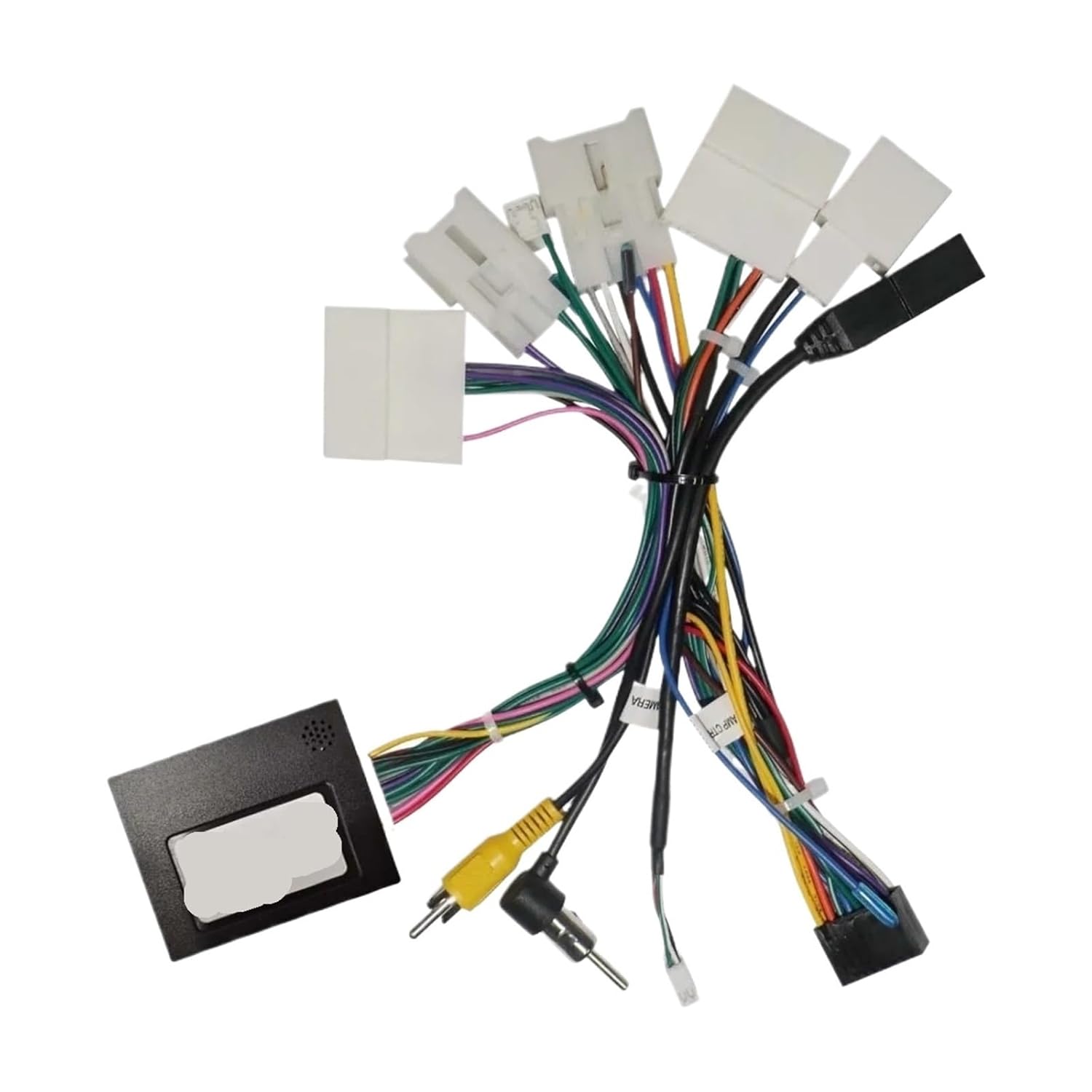
Figure 4.1: Overview of the 16-pin wiring harness adapter and CANbus box. This image displays the main components, including the multi-pin connectors for the vehicle and radio, the CANbus decoder box, and various auxiliary cables for audio/video input/output.

Figure 4.2: Detailed view of the wiring harness, including a pinout diagram for the 16-pin connector and an approximate length measurement of 22cm (0.72ft). The diagram labels individual pins such as FL+, FL-, KEY1, KEY2, ACC, Battery+12V, Battery GND, and ILL (illumination).
5. Specifications
| Feature | Detail |
|---|---|
| Product Type | Car Wiring Harness Adapter with CANbus Decoder |
| Compatibility | Toyota Fortuner (2017-2021) |
| CANbus Box Model | TY39.10 (Brand: Hiworld WC) |
| Connector Type | 16-Pin |
| Installation | Plug-and-Play |
| Functionality | Retains steering wheel controls, reverse signal, illumination, ACC, battery power, ground. |
| Package Dimensions | 0.39 x 0.39 x 0.39 inches |
| Item Weight | 1.76 ounces |
6. Setup and Installation Guide
Follow these steps carefully to install the wiring harness adapter and CANbus box:
- Prepare the Vehicle:
- Ensure the vehicle is turned off and the ignition key is removed.
- Disconnect the negative terminal of the vehicle's battery to prevent electrical issues.
- Carefully remove the factory radio from the dashboard. Refer to your vehicle's service manual for specific instructions on dashboard disassembly.
- Connect the CANbus Box:
- Locate the dedicated connector on the wiring harness for the CANbus box (TY39.10).
- Plug the CANbus box securely into this connector.
- Connect to Aftermarket Radio:
- Connect the 16-pin connector of the FHDBABWX harness to the corresponding port on your aftermarket Android radio.
- Connect any auxiliary cables (e.g., RCA for audio/video, USB, GPS antenna, 4G antenna, reverse video input) from the harness to the appropriate ports on your Android radio.
- Connect to Vehicle Wiring:
- Connect the vehicle-specific connectors on the FHDBABWX harness to the corresponding factory wiring harnesses in your Toyota Fortuner. These are typically plug-and-play connections.
- Ensure all connections are firm and fully seated.
- Test the System:
- Before fully reassembling the dashboard, reconnect the vehicle's battery negative terminal.
- Turn on the vehicle's ignition and test the functionality of the new Android radio.
- Verify that the radio powers on, audio plays, steering wheel controls function, reverse camera input works (if installed), and illumination syncs with the vehicle's lights.
- Final Assembly:
- Once all functions are confirmed, carefully route the wiring to avoid pinching or interference.
- Secure the CANbus box and excess wiring in a safe location behind the dashboard.
- Reassemble the dashboard components in reverse order of removal.

Figure 6.1: Diagram illustrating the application scenario for connecting the wiring harness and CANbus box to an Android car radio. It shows connections for radio antenna, SPDIF, USB, main power line, reverse signal, brake control, auto antenna, front/rear speakers, ACC, battery, ground, GPS navigation antenna, reverse video input cable, 4G antenna, and RCA outputs.
7. Operating Instructions
Once installed, the FHDBABWX wiring harness and CANbus box operate automatically to integrate your Android radio with the vehicle's systems. No specific user interaction with the CANbus box is required.
- Steering Wheel Controls: The CANbus box translates signals from your vehicle's steering wheel controls to the Android radio, allowing you to manage volume, track changes, and other functions directly from the steering wheel. Configuration may be required within your Android radio's settings.
- Ignition (ACC) and Battery Power: The harness provides correct ACC (accessory) and constant battery power signals to the radio, ensuring it turns on and off with the vehicle and retains memory settings.
- Illumination: The CANbus box provides an illumination signal, allowing your Android radio's display brightness to adjust automatically with your vehicle's headlights.
- Reverse Gear Detection: The harness provides a reverse signal to the Android radio, which is essential for automatic display of a reverse camera feed when the vehicle is in reverse gear.
8. Maintenance
The FHDBABWX wiring harness and CANbus box are designed for maintenance-free operation. To ensure longevity:
- Avoid exposing the components to extreme temperatures or moisture.
- Do not attempt to open or repair the CANbus box; there are no user-serviceable parts inside.
- Ensure all connections remain secure over time. If you experience intermittent issues, check the connections.
9. Troubleshooting
If you encounter issues after installation, refer to the following common problems and solutions:
| Problem | Possible Cause / Solution |
|---|---|
| Radio does not power on. |
|
| Steering wheel controls do not work. |
|
| No sound from speakers. |
|
| Reverse camera does not display. |
|
10. Warranty and Support
This product is designed for reliable performance. For any technical assistance or support, please contact your retailer or the manufacturer, FHDBABWX. Keep your purchase receipt as proof of purchase for warranty claims.
For further information or troubleshooting not covered in this manual, please refer to the support resources provided by your Android radio manufacturer, as some functionalities are dependent on the head unit's software and hardware.