
1. Introduction
The BIEMHA Smart Ring (Model VR11) is a wearable health and fitness tracker designed to monitor various physiological data points. This manual provides essential information for the proper setup, operation, maintenance, and troubleshooting of your device. It is compatible with both iOS and Android devices and does not require a subscription for app access.
2. Safety Information
- Do not attempt to disassemble or modify the device.
- Keep the device away from extreme temperatures and direct sunlight.
- Consult a medical professional before starting any new exercise regimen or if you have pre-existing health conditions. The data provided by this device is for informational purposes only and should not be used for medical diagnosis or treatment.
- Ensure the charging cable is used correctly to prevent damage or electric shock.
3. Package Contents
Please verify that all items are present in your package:
- BIEMHA Smart Ring (Model VR11)
- Charging Cable
- User Manual (this document)
4. Setup
4.1. Sizing and Fit
Before initial use, it is crucial to ensure you have the correct ring size for accurate data collection and comfort. Refer to the sizing chart below to measure your finger circumference accurately.
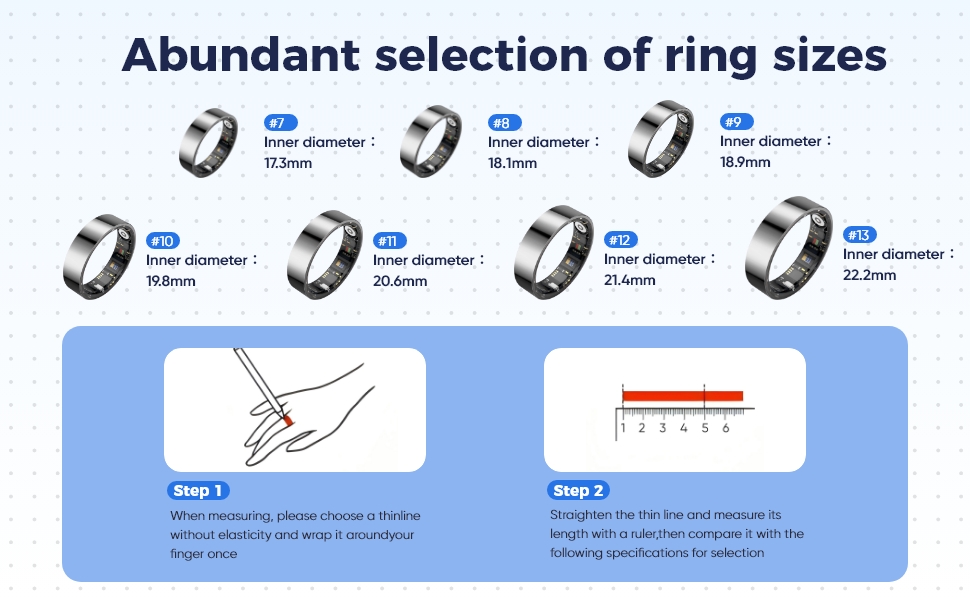
Image: BIEMHA Smart Ring sizing chart and measurement guide.
4.2. Initial Charging
Before first use, fully charge your BIEMHA Smart Ring. Connect the provided charging cable to the ring and a compatible USB power source. A full charge typically provides 3-5 days of battery life. When used with a smart charging case (sold separately), usage time can extend beyond 20 days.
4.3. App Installation
Download the official BIEMHA Smart Ring application from the Apple App Store (for iOS devices) or Google Play Store (for Android devices). Search for "BIEMHA Smart Ring" to locate the correct application. No subscription is required to access all features.
4.4. Device Pairing
- Ensure your smartphone's Bluetooth is enabled.
- Open the BIEMHA Smart Ring application.
- Follow the on-screen instructions within the app to search for and pair with your Smart Ring.
- Once paired, the app will guide you through setting up your profile and preferences.
5. Operating the Smart Ring
5.1. Health Monitoring
The BIEMHA Smart Ring features advanced 4.0 sensors that automatically measure your heart rate and blood pressure every 30 minutes when worn. It provides continuous health tracking and comprehensive wellness management throughout the day.

Image: BIEMHA Smart Ring monitoring health data, including heart rate, SpO2, and blood pressure, with family account linking.
5.2. Sleep Tracking
The ring automatically tracks your sleep quality and cycles in real-time. It provides precise data about deep sleep, light sleep, and REM stages, helping you optimize rest and recovery. The app generates reports to help you develop good sleep habits.

Image: BIEMHA Smart Ring providing smooth sleep analysis and tracking sleep quality.
5.3. Activity Tracking
Whether tracking steps, calories, or exercise performance, the smart ring provides accurate insights to support your fitness goals. It monitors various activities such as running, swimming, and cycling, displaying real-time data like heart rate, distance, and calories burned.

Image: BIEMHA Smart Ring tracking various activities, highlighting its lightweight and comfortable design.
5.4. App Features
The BIEMHA app allows you to view your health and activity data, track trends, and set personal goals. You can also link family or friends' accounts to access their health data, promoting collective wellness monitoring.
6. Maintenance
6.1. Cleaning
To clean your Smart Ring, gently wipe it with a soft, damp cloth. Avoid using harsh chemicals or abrasive materials, as these can damage the device's finish and sensors.
6.2. Water Resistance
The BIEMHA Smart Ring boasts excellent IP68 waterproof performance, with a waterproof depth of up to 80 meters. This means you do not need to remove your ring for daily wear, intense workouts, swimming, or showering.

Image: BIEMHA Smart Ring demonstrating IP68 water resistance during swimming.
7. Troubleshooting
- Device Not Connecting to App: Ensure Bluetooth is enabled on your phone and the ring is charged. Try restarting both the ring (if applicable) and your phone. Reinstalling the app may also resolve connectivity issues.
- Inaccurate Readings: Ensure the ring is worn correctly and snugly on your finger. Environmental factors or improper fit can affect sensor accuracy.
- Short Battery Life: Battery life can vary based on usage patterns and environmental conditions. If battery life significantly degrades over time, ensure the ring is fully charged using the provided cable.
- Sleep Tracking Issues: If sleep tracking appears inaccurate, ensure the ring is worn consistently throughout the night. The algorithm learns over time, so consistent wear is important.
8. Specifications
| Feature | Specification |
|---|---|
| Model Name | VR11 |
| Brand | BIEMHA |
| Item Model Number | VR11 |
| ASIN | B0FQ1FZH8C |
| Battery Life | 3-5 days (up to 20+ days with charging case) |
| Water Resistance | IP68 (up to 80 meters) |
| Connectivity | Bluetooth |
| Operating System Compatibility | iOS, Android |
| Sensors | Heart Rate, Blood Pressure, SpO2 |
| Item Weight | 3.2 ounces |
| Package Dimensions | 3.54 x 3.15 x 1.46 inches |
9. Warranty Information
The BIEMHA Smart Ring (Model VR11) comes with a standard manufacturer's warranty. Please refer to the product packaging or contact customer support for specific warranty terms and conditions. This warranty typically covers defects in materials and workmanship under normal use.
10. Customer Support
For further assistance, technical support, or warranty claims, please contact BIEMHA customer service. Contact information can usually be found on the product packaging or the official BIEMHA website. Please have your product model number (VR11) and purchase details ready when contacting support.