
1. Product Overview
The ACONEE 19 SEER 12000 BTU Ductless Mini-Split Inverter A/C Heat Pump System is designed to provide efficient cooling, heating, and dehumidifying for spaces up to 750 square feet. This 115V unit operates with a 19 SEER rating for energy efficiency and features ultra-quiet operation, as low as 42 dB(A) in sleep mode.
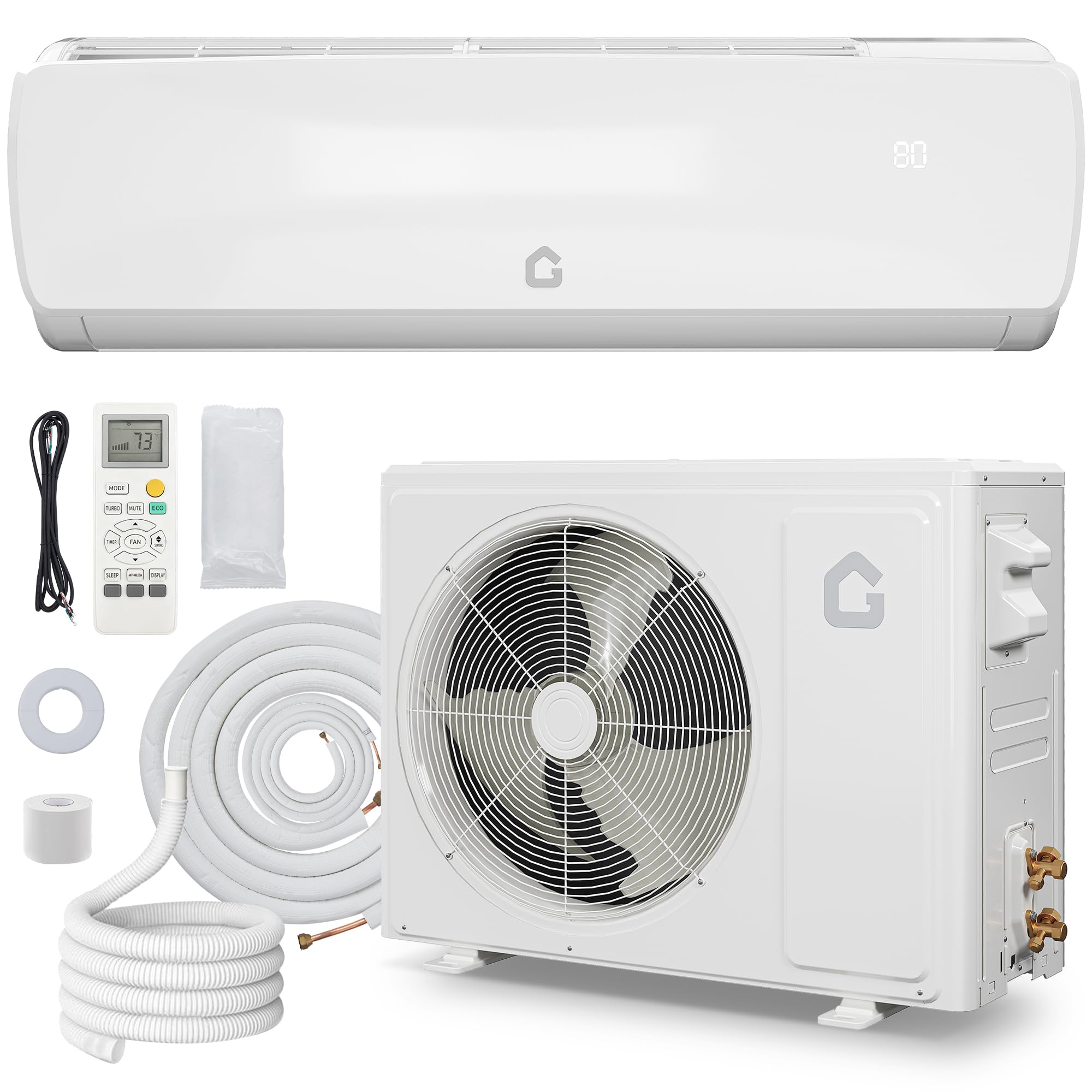
Figure 1: ACONEE 19 SEER 12000 BTU Split Air Conditioner components.

Figure 2: The ACONEE 12000 BTU system is designed to maintain optimal indoor comfort year-round for areas up to 750 sq. ft.

Figure 3: The indoor unit operates at a whisper-quiet 42 dB(A) in sleep mode, ensuring undisturbed comfort.
2. Setup and Installation
Proper installation is crucial for the optimal performance and longevity of your ACONEE Mini-Split system. It is highly recommended that installation be performed by a qualified professional to ensure compliance with all local electrical and safety codes, and to prevent damage from incorrect refrigerant handling.
Video 1: Detailed installation guide for the ACONEE 19 SEER Mini Split Air Conditioner. This video covers preparation, indoor unit installation, outdoor unit installation, and trial operation.
2.1 Preparation Before Installation
- Unpack all components and verify that all accessories are complete as per the packing list.
- Ensure the installation wall for the indoor unit is hard and firm to prevent vibration.
- Reserve adequate space around the indoor unit: 15cm above to the ceiling, 20cm above to the side walls, and 230-260cm from the floor.
- For the outdoor unit, ensure sufficient clearance: 50cm above to obstruction, 10cm above for air intake, 30cm to side obstructions, and 200cm for air outlet.
2.2 Indoor Unit Installation
- Drill pilot holes and use a '+' type screw to fasten the pegboard horizontally on the wall, ensuring it is level.
- Create a wall hole (60-80mm diameter) for piping, slanting it outwards by 5-10 degrees. Avoid pre-buried power wires.
- Pass the power cable out from the back of the indoor unit and fix it on the terminal board using a clamp.
- According to the piping direction, remove the knock-out panel with a knife and remove any burrs to prevent drain pipe damage.
- Carefully bend the pipes to the desired direction.
- Connect the connecting pipes to the indoor unit. Aim at the pipe center, tighten the taper nut with fingers, then use a torque wrench. Refer to the torque table below for specific values.
- Carefully check for any damage to joints before installation. Joints should not be reused unless re-flared.
- Use the insulation sleeve to wrap the joint part of the indoor unit and the connection pipe, then use insulating material to pack and seal the insulation pipe to prevent condensate water generation.
- Connect the water outlet with drain pipes and ensure the connection pipes, cables, and drain hose are straight.
- Use plastic cable ties to wrap the connecting pipes, cables, and drain hose. Run the pipe sloping downward.
- Put the refrigerant piping through the wall hole.
- Hang the indoor unit on the peg board. Move the unit from left to right to ensure the hook is properly positioned. Push toward the lower left side and the upper right side of the unit until the hook is embedded in the slot and makes a click sound.
- To protect piping and wires, install a pipe protecting ring and seal it with putty.
Torque Specifications for Pipe Connections
| Pipe Size (mm) | Torque (N·m) |
|---|---|
| Φ6 / Φ6.35 | 15~25 |
| Φ9 / Φ9.52 | 35~40 |
| Φ12 / Φ12.7 | 45~60 |
| Φ15 / Φ15.88 | 73~78 |
| Φ19 / Φ19.05 | 75~80 |
2.3 Outdoor Unit Installation
- Use at least 6 expansion bolts to fix the mounting brackets firmly on the wall. Ensure the brackets are level.
- Carefully place the outdoor unit onto the installed brackets.
- Use 4 screws to fix the feet of the outdoor unit to the brackets.
- Remove the nuts from the stop valves.
- Aim the pipe center of the stop valve, tighten the taper nut with fingers, then tighten with two wrenches.
- When the length of the connecting pipe is changed, extra refrigerant may need to be added or reduced. Refer to the table below.
- Remove the electrical box cover.
- Connect the cables respectively to the corresponding terminals of the outdoor unit's terminal board. Refer to the wiring diagram provided on the unit. If signals are connected to a plug, conduct a butt joint.
- Remove the grounding screw from the electric bracket, cover the grounding wire end onto the grounding screw, and screw it into the grounding hole.
- Fix the cables reliably with fasteners (pressing board).
- Put the E-parts cover back in its original place and fasten it with screws.
- Before working on the air conditioner, remove the cover of the stop valve.
- Remove the caps from the gas and liquid valves and be sure to retighten them afterward to prevent potential air leakage.
- Fully open the handle Lo of the manifold valve and apply vacuum for at least 15 minutes. Check that the compound vacuum gauge reads -0.1MPa (-76cmHg).
- After applying vacuum, fully open the stop valve with a hex wrench.
- Screw all the caps back on and tighten them securely.
Refrigerant Adjustment Table
When the length of the connecting pipe is changed, extra refrigerant needs to be added or reduced so that the operation and performance of the air conditioner will not be compromised.
| Length of connection pipe | Added or reduced refrigerant | Amount of refrigerant for the unit |
|---|---|---|
| <3M | CC≤12000Btu: reduce 20g/m CC≥18000Btu: reduce 40g/m | ≤1Kg ≤2Kg |
| 3-5M | Not needed | - |
| 5-15M | CC≤12000Btu: add 16g/m CC≥18000Btu: add 24g/m | ≤1Kg ≤2Kg |
3. Operating Instructions
Your ACONEE Mini-Split system offers versatile climate control with multiple operating modes and features for year-round comfort.

Figure 4: Multi-functions and remote control overview.
3.1 Modes of Operation
- Cool: Provides powerful cooling to quickly lower room temperature.
- Heat: Delivers efficient heating to warm your space.
- Dehumidify: Reduces humidity levels for a more comfortable environment.
- Fan: Circulates air without cooling or heating.
- Auto: Automatically selects the appropriate mode (cooling or heating) based on the ambient temperature.
- Sleep: Adjusts temperature and fan speed for quiet, comfortable sleep, typically operating at 42 dB(A).
- ECO: Optimizes energy consumption for cost savings.
3.2 Fan Speeds
The unit offers 4 fan speeds: Low, Medium, High, and Turbo, allowing you to customize airflow intensity.
3.3 Additional Features
- 4-Way Swing: Directs airflow in multiple directions for even distribution.
- Auto Clean: Helps maintain the cleanliness of the indoor unit's evaporator.
- Fast Cooling/Heating: Rapidly adjusts room temperature to your desired setting.
- 24H Timer: Allows scheduling of operation times.
- Display Light: Controls the illumination of the unit's display.
4. Maintenance
Regular maintenance ensures the efficiency and longevity of your ACONEE Mini-Split system.

Figure 5: Filter cleaning is simple and essential for maintenance.
4.1 Filter Cleaning
- The unit will provide a filter-cleaning reminder.
- To clean, open the front panel of the indoor unit and carefully remove the air filters.
- Wash the filters with lukewarm water and a mild detergent. Rinse thoroughly and allow them to air dry completely before reinserting.
- Regular cleaning (e.g., every 2-4 weeks, depending on usage) helps maintain air quality and unit efficiency.
4.2 General Cleaning
- Wipe the exterior of the indoor and outdoor units with a soft, damp cloth. Do not use harsh chemicals or abrasive cleaners.
- Ensure the outdoor unit's coils are free from debris, leaves, and other obstructions to maintain proper airflow.
5. Troubleshooting
If you encounter issues with your ACONEE Mini-Split system, refer to the following common troubleshooting steps. For complex problems, contact qualified service personnel.
- Unit not turning on: Check power supply, circuit breaker, and ensure the remote control batteries are functional.
- Insufficient cooling/heating: Verify temperature settings, ensure air filters are clean, and check for any obstructions to airflow indoors or outdoors.
- Unusual noises: Minor noises during operation are normal. If loud or persistent noises occur, inspect for loose parts or contact support.
- Water leakage: Ensure the drain hose is not blocked or kinked and is sloping downward correctly. Check all pipe connections for tightness.
- Error codes: Refer to the specific error code in the full manual (if available) or contact customer support with the code.
5.1 Trial Operation
After installation, perform a trial operation to ensure proper function:
- Use a multimeter to test for possible leaking positions on the outdoor unit shell. If electricity leakage is detected, immediately turn off power and conduct further examination.
- Remove one filter from the indoor unit.
- Pour approximately 500ml of water along the evaporator for about 20 seconds.
- Check that water drains normally from the outdoor drain pipe and that there is no leakage around the indoor unit.
6. Specifications
| Feature | Specification |
|---|---|
| Model Number | l1ZuA6uYMZeQGuNAyxSwIQhet |
| Cooling Power | 12000 BTU |
| Heating Capacity | 12500 BTU/h |
| SEER Rating | 19 |
| Voltage | 115V |
| Noise Level (Indoor) | 42 Decibels (in sleep mode) |
| Floor Area Coverage | 750 Square Feet |
| Product Dimensions (Indoor Unit) | 32.28"D x 11.98"W x 8.23"H |
| Item Weight | 21.3 pounds |
| Included Components | 1 x Outdoor Unit, 1 x Indoor Unit, 1 x Accessory Kit, 1 x User Manual |
| Special Features | Versatile 4-in-1 Mini Split, 4 Way Swing, Auto Clean, Fast Cooling |
7. Warranty and Support

Figure 6: ACONEE customer support and warranty information.
- Email Support: Receive assistance within 12 hours.
- Return Policy: 30-day unreasonable return period.
- Maintenance & Technology Support: 12 months of free maintenance and technology support.
For further assistance or to claim warranty services, please refer to the contact information provided in your product packaging or visit the official ACONEE website.