
1. Introduction
Thank you for choosing the HOCSOK Kitchen Buffet Cabinet, Model YT-PB-433. This manual provides essential information for the safe assembly, proper operation, and effective maintenance of your new cabinet. Please read these instructions carefully before beginning assembly or use, and retain them for future reference.
This versatile cabinet is designed to enhance storage and functionality in your kitchen, living room, or dining room, featuring adjustable shelves, an integrated charging station, and soft-close hinges for convenience and durability.
2. Safety Information
- Anti-Tip Protection: Always install the included anti-tip hardware to securely anchor the cabinet to a wall. Failure to do so can result in serious injury or death from tipping furniture.
- Assembly: Assembly should be performed by at least two adults. Ensure all parts are present and undamaged before starting. Do not use power tools for tightening fasteners unless explicitly instructed, as this may damage the material.
- Electrical Safety: The integrated charging station includes electrical sockets and USB ports. Ensure the cabinet is placed near a suitable power outlet. Do not overload the sockets. Keep liquids away from the charging station. If any part of the charging station is damaged, discontinue use immediately and contact customer support.
- Weight Capacity: Do not exceed the recommended weight capacity for shelves and drawers. Distribute weight evenly to maintain stability.
- Placement: Place the cabinet on a flat, stable, and level surface. Avoid placing it in areas with excessive moisture or direct sunlight, which can damage the material.
3. Package Contents
The HOCSOK Kitchen Buffet Cabinet is shipped in two separate packages. Please verify that all components listed below are present and undamaged before proceeding with assembly.
- 1 x Kitchen Cabinet (components for assembly)
- 1 x Accessory Bag (containing hardware, screws, anti-tip kit)
- 1 x Assembly Instructions Manual
Note: Packages may arrive at different times.
4. Setup and Assembly
Detailed assembly instructions are provided in the separate assembly manual included with your purchase. Please follow those instructions step-by-step. The following points offer general guidance:
- Preparation: Clear a spacious area for assembly. Lay out all components and hardware. It is recommended to have a cordless screwdriver for efficiency, but avoid overtightening.
- Team Assembly: For optimal results and safety, assembly is recommended for two people.
- Anti-Tip Installation: Crucially, install the anti-tip protection hardware as instructed in the assembly manual. This prevents accidental tipping and ensures safety.
- Door Alignment: The cabinet features soft-close hinges with 3D adjustment for perfect door alignment. Adjust as needed after full assembly.
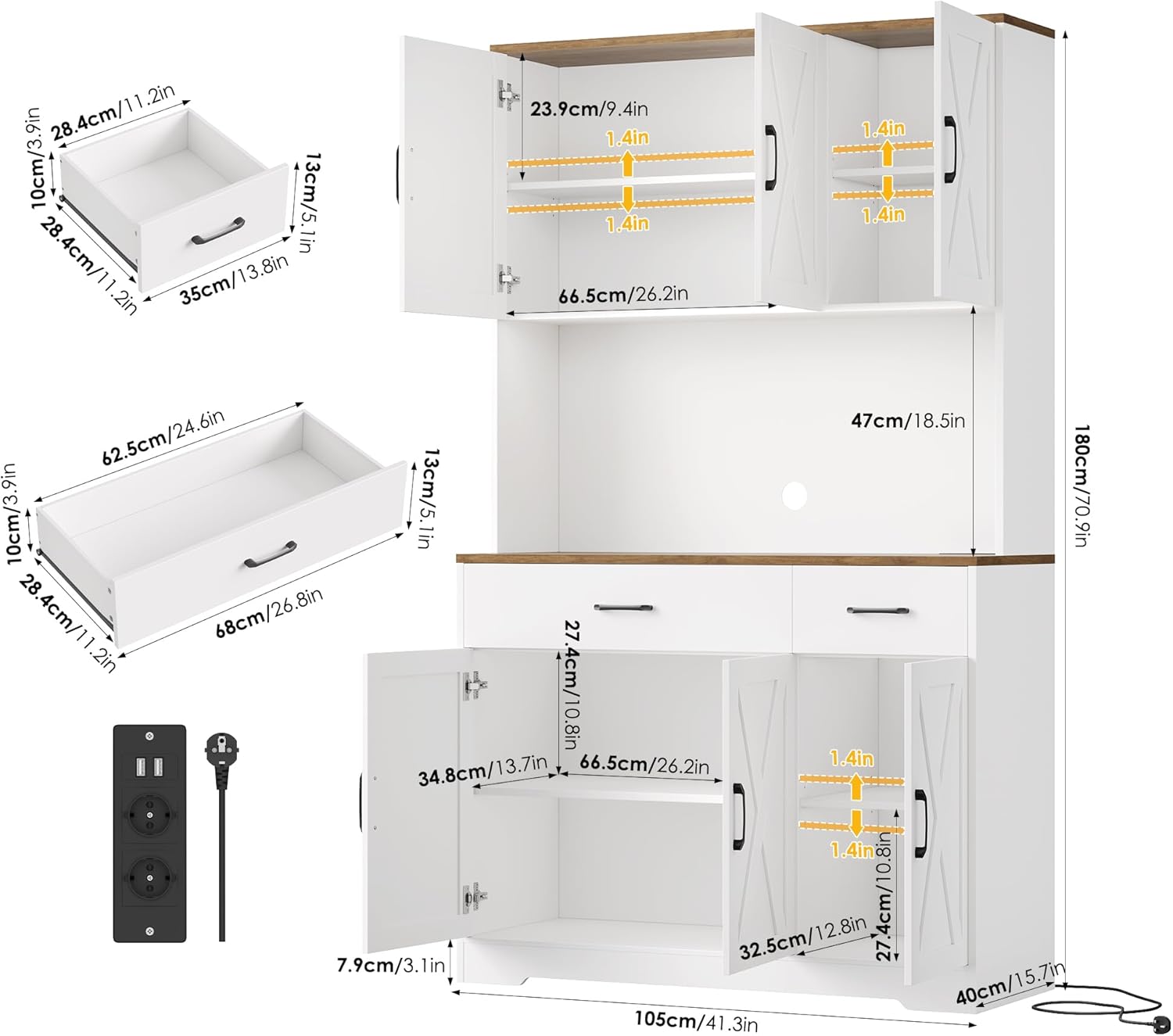
Image 1: Cabinet dimensions and structural overview. This diagram illustrates the various measurements of the cabinet, including the height of the upper and lower sections, the width of the worktop, and the depth of the unit. It also shows the internal layout with adjustable shelves and drawer sizes.
5. Operating Instructions
5.1 Adjustable Shelves
The cabinet features multiple adjustable shelves, allowing you to customize storage space according to your needs. The shelves can be adjusted in 1.4-inch (approximately 3.5 cm) increments, offering three different height positions.
- To adjust a shelf, remove all items from it.
- Carefully lift the shelf and remove the shelf pins from their current holes.
- Reinsert the shelf pins into the desired holes at the new height. Ensure all four pins are at the same level.
- Place the shelf back onto the pins, ensuring it is stable and level.
5.2 Integrated Charging Station
The cabinet is equipped with a built-in charging station on the worktop, providing convenient access to power for your appliances and devices.
- The charging station includes standard electrical sockets (230V/10A) and USB charging ports (5V/2A).
- Plug the cabinet's power cord into a wall outlet.
- Use the sockets for kitchen appliances like coffee makers or microwaves, and the USB ports for charging mobile phones or tablets.
- Integrated cable management helps keep cords tidy and out of sight.
5.3 Soft-Close Hinges
The cabinet doors are fitted with soft-close hinges, which prevent slamming and reduce wear and tear. This feature ensures quiet operation and protects your fingers.

Image 2: Adjustable shelves and integrated charging station. This image highlights the three adjustable height positions for the shelves and provides a detailed view of the built-in electrical sockets and USB ports, along with their power specifications.

Image 3: Internal storage and features. This view showcases the cabinet's interior, including the upper compartments with adjustable shelves, the central worktop area with cable management, and the lower cabinets and drawers, demonstrating its storage versatility.
6. Maintenance
Proper care will ensure the longevity and appearance of your HOCSOK Kitchen Buffet Cabinet.
- Cleaning: Wipe surfaces with a soft, damp cloth. Avoid abrasive cleaners, harsh chemicals, or solvents, as these can damage the melamine finish. For stubborn stains, use a mild soap solution and dry immediately.
- Spills: Clean up spills immediately to prevent moisture damage, especially on the worktop.
- Heat Protection: While the worktop is heat-resistant, it is advisable to use trivets or hot pads under very hot items to prevent potential damage.
- Hardware: Periodically check all screws and fasteners to ensure they are tight. Retighten if necessary, but do not overtighten.
7. Troubleshooting
- Wobbly Cabinet: Ensure the cabinet is placed on a level surface. Check that all assembly screws are securely tightened. Adjust the leveling feet if present, or place shims under the base if needed.
- Doors Not Aligning: The soft-close hinges offer 3D adjustment. Refer to the assembly manual for specific instructions on how to adjust the hinges to achieve proper door alignment.
- Drawers Sticking: Check that the drawer slides are correctly installed and free of obstructions. Ensure all screws on the slides are tight.
- Charging Station Not Working: Verify that the cabinet's power cord is securely plugged into a functional wall outlet. Check for any tripped circuit breakers. If the issue persists, contact customer support.
8. Specifications
| Feature | Detail |
|---|---|
| Model Number | YT-PB-433 |
| Brand | HOCSOK |
| Dimensions (W x D x H) | 105 x 38 x 180 cm (41.34"W x 14.96"D x 70.87"H) |
| Weight | 57.2 kg (125.8 pounds) |
| Material | Melamine plate (MDF) |
| Color | White and Brown (worktop) |
| Number of Shelves | 8 (adjustable) |
| Number of Compartments | 8 |
| Charging Station Output | 230V/10A (sockets), 5V/2A (USB) |
| Special Features | Adjustable Shelf, Anti-Tipping, Built-In Charging Station, Heat-resistant worktop, Scratch Resistant, Soft-close hinges |
| Assembly Required | Yes |

Image 4: HOCSOK Kitchen Buffet Cabinet in a kitchen setting. This image displays the cabinet with a microwave and toaster on its worktop, and its drawers open, revealing organized storage for various kitchen essentials.
9. Warranty and Support
HOCSOK is committed to providing quality products. For any questions regarding assembly, missing parts, or product functionality, please refer to the contact information provided with your purchase or visit the official HOCSOK website for customer support.
Please retain your proof of purchase for any warranty claims.

Image 5: Full front view of the HOCSOK Kitchen Buffet Cabinet. This image shows the complete cabinet with its barn-door style panels, central worktop, and overall design in a typical kitchen environment.

Image 6: Side view of the HOCSOK Kitchen Buffet Cabinet. This image presents the cabinet from a slightly angled perspective, highlighting its depth and how it integrates into a dining room setting, showcasing its versatility beyond just the kitchen.