
Introduction
This manual provides essential information for the setup, operation, and maintenance of your fhsbxcvb N2QAYB000703 TV Remote Control. This remote is designed as a direct replacement for various Panasonic TV models, offering seamless functionality without the need for complex programming.
Product Overview
The N2QAYB000703 remote control features a standard layout for easy navigation and control of your Panasonic TV. It includes dedicated buttons for power, input selection, volume, channel control, menu access, and smart TV functions like 'Internet' and 'Viera Tools'.
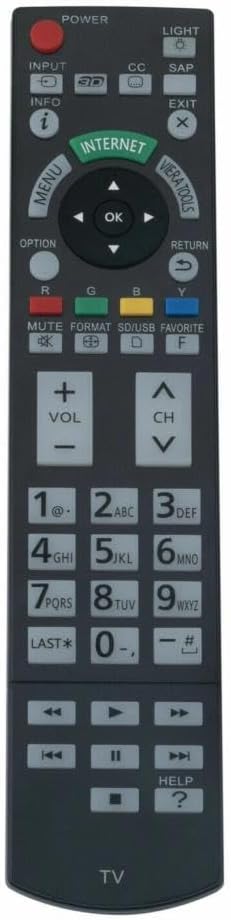
Image: Front view of the N2QAYB000703 TV remote control, displaying its full button layout.
Setup
1. Battery Installation
The remote control requires two (2) AA batteries (not included). Follow these steps to install them:
- Locate the battery compartment on the back of the remote control.
- Slide the battery compartment cover downwards to open it.
- Insert two AA batteries, ensuring the positive (+) and negative (-) terminals align correctly with the markings inside the compartment.
- Slide the battery compartment cover back into place until it clicks securely.

Image: Back view of the remote control with the battery cover removed, showing the battery placement.
2. No Programming Required
This replacement remote control is designed for immediate use with compatible Panasonic TV models. No programming, pairing, or complex setup procedures are necessary. Simply install the batteries, and the remote is ready to operate your television.
Operating Instructions
To operate your TV, point the remote control directly at the television's infrared receiver and press the desired button. Ensure there are no obstructions between the remote and the TV.
- Power Button: Turns the TV on or off.
- Input Button: Cycles through available input sources (HDMI, AV, etc.).
- Menu Button: Accesses the TV's main menu for settings and options.
- OK Button: Confirms selections within menus.
- Volume (+/-) Buttons: Adjusts the audio volume.
- Channel (CH ^/v) Buttons: Changes TV channels.
- Number Pad (0-9): Directly enters channel numbers.
- Internet Button: Accesses smart TV internet features.
- Viera Tools Button: Opens Panasonic's Viera Tools menu for quick access to features.
- Mute Button: Silences the TV audio.
Compatible Models
This N2QAYB000703 remote control is compatible with the following Panasonic TV models:
- TC-P65GT50, TC-P50GT50, TC-P55GT50, TC-P60GT50
- TC-P50ST50, TC-P55ST50, TC-P60ST50, TC-P65ST50
- TC-P55VT50, TC-P65VT50
- TC-L4DT50, TC-L55DT50, TC-L47DT50
- TC-L55LE54
- TC-L42ET5, TC-L55ET5, TC-L47ET5
- TC-L47WT50, TC-L55WT50, TC-L47WT50X, TC-L55WT50X
- TCP65GT50, TCP50GT50, TCP55GT50, TCP60GT50
- TCP50ST50, TCP55ST50, TCP60ST50, TCP65ST50
- TCL42ET5, TCL55ET5, TCL47ET5
- TCP55VT50, TCP65VT50
- TCL4DT50, TCL55DT50, TCL47DT50
- TCL55LE54
- TCL47WT50, TCL55WT50, TCL55WT50X, TCL47WT50X
Maintenance
- Cleaning: Wipe the remote control with a soft, dry cloth. Do not use liquid cleaners or abrasive materials.
- Battery Replacement: Replace batteries when the remote's performance degrades or it stops responding. Always replace both batteries at the same time with new ones of the same type.
- Storage: Store the remote in a dry place, away from direct sunlight, extreme temperatures, and high humidity. If the remote will not be used for an extended period, remove the batteries to prevent leakage.
Troubleshooting
- Remote not responding:
- Check if the batteries are inserted correctly with the correct polarity.
- Replace old batteries with new ones.
- Ensure there is a clear line of sight between the remote and the TV's infrared sensor.
- Verify that the TV is powered on.
- Limited operating range:
- Replace the batteries.
- Ensure no strong light sources (like direct sunlight or bright fluorescent lights) are interfering with the infrared signal.
Specifications
| Feature | Detail |
|---|---|
| Brand | fhsbxcvb |
| Model Number | N2QAYB000703 |
| Connectivity Technology | Infrared |
| Max Number of Supported Devices | 1 |
| Compatible Devices | Television |
| Special Feature | No Programming Required |
| Controller Type | Button Control |
| Maximum Range | 10 Meters |
| Item Weight | 0.15 Pounds |
| Item Dimensions L x W x H | 9"L x 2"W x 1"H |
| UPC | 751641040398 |
Warranty Information
This product comes with a 30-day warranty from the date of purchase. Please retain your proof of purchase for any warranty claims.
Support Information
For further assistance or if you encounter issues not covered in this manual, please refer to the seller's support channels or the product listing page where you made your purchase. Ensure you have your product model number (N2QAYB000703) and purchase details ready when seeking support.