
1. Introduction
Thank you for choosing SURGOAL Merino Wool Heated Socks. These socks are designed to provide warmth and comfort in cold conditions, featuring advanced heating technology and smart controls. Please read this manual thoroughly before use to ensure proper operation and maintenance.

Image 1.1: Overview of SURGOAL Merino Wool Heated Socks with included batteries and a representation of the mobile application interface.
2. Product Overview & Features
The SURGOAL Merino Wool Heated Socks are engineered for optimal warmth and durability. Key features include:
- Material Composition: Crafted from 35% Merino wool and 30% nylon, providing efficient thermal insulation, moisture-wicking properties, and breathability.
- Advanced Heating: Full-foot surround heating technology with composite metal fiber elements for even heat distribution across toes, soles, and insteps.
- High-Capacity Batteries: Equipped with two 8500mAh Lithium-Polymer rechargeable batteries, offering up to 15 hours of continuous warmth.
- Smart Control: Temperature adjustment via a dedicated mobile application or directly using the battery button.
- Fast Charging: Batteries fully recharge in approximately 3.5 hours using a 66W charger.
- Safety Certified: UL/FCC dual safety standards for protection against overheating and short circuits.
- Machine Washable: Designed for direct machine washing without the need for a laundry bag.

Image 2.1: Illustration of the sock's material blend, highlighting Merino wool, nylon, and spandex for warmth and breathability.
3. Package Contents
The SURGOAL Merino Wool Heated Socks package includes the following items:
- 2 Pairs of Heated Socks
- 1 Pair of 8500mAh Rechargeable Batteries
- 2 Charging Cables
- 1 User Manual
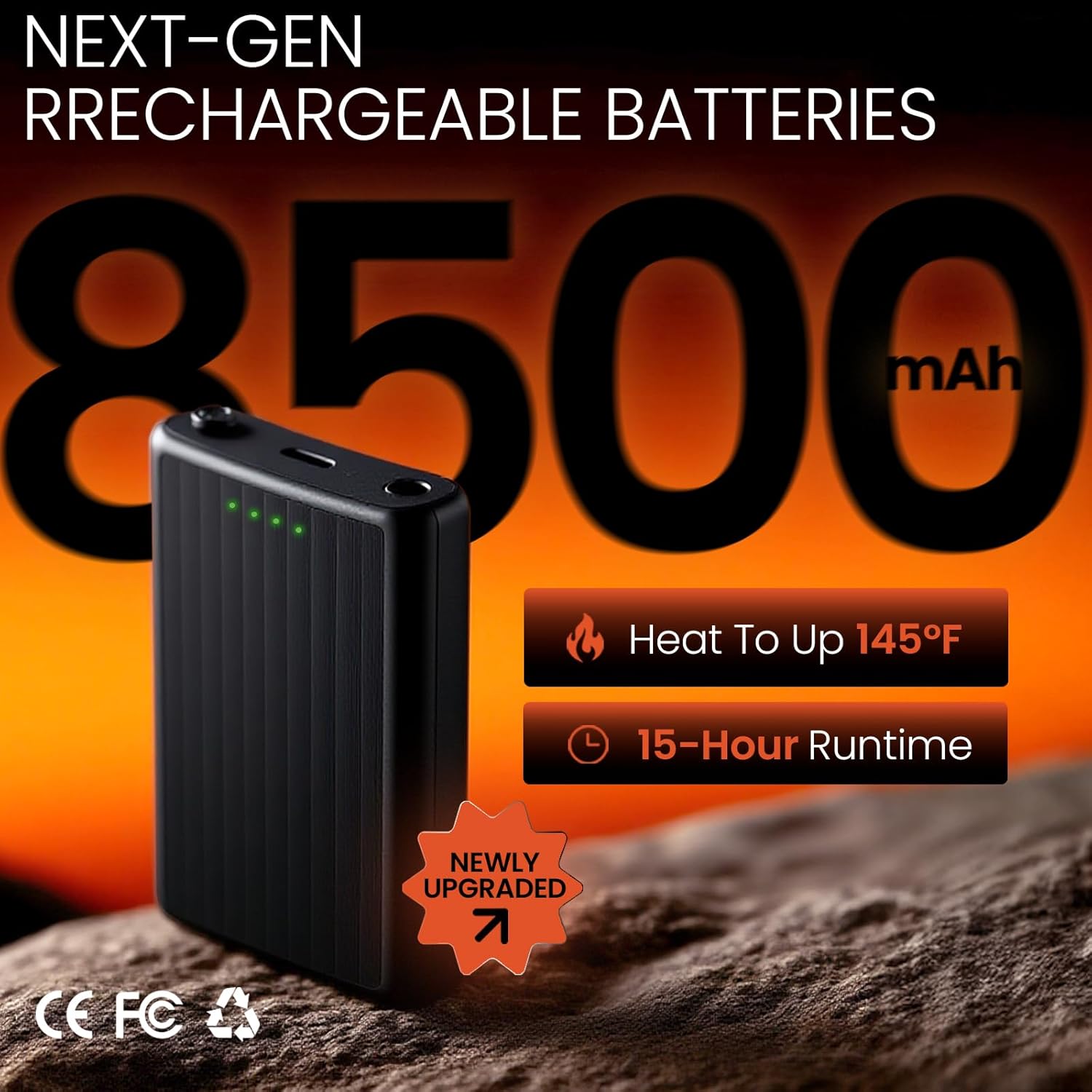
Image 3.1: Contents of the SURGOAL Heated Socks package, showing two pairs of socks, batteries, and charging accessories.
4. Setup
4.1 Charging the Batteries
Before initial use, fully charge both 8500mAh batteries. Use the provided charging cables and a 66W charger (not included) for optimal charging speed.
- Connect the charging cable to the battery's charging port.
- Plug the other end of the cable into a compatible USB power adapter.
- The indicator lights on the battery will show the charging status. A full charge is indicated when all lights are solid green.
- Charging typically takes approximately 3.5 hours.

Image 4.1: The 8500mAh battery pack, showing its charging port and LED indicators for battery level.
4.2 Inserting Batteries into Socks
Each sock has a dedicated pocket for its battery pack.
- Locate the battery pocket on the side of each sock, usually near the top cuff.
- Unbutton the flap covering the pocket.
- Connect the sock's power cable to the battery's output port.
- Carefully slide the connected battery into the pocket and secure the flap with the button.
Video 4.1: Demonstration of inserting the battery pack into the sock's pocket and connecting the power cable.
4.3 App Installation (Optional)
For advanced control, download the companion mobile application.
- Scan the QR code provided in the included user manual or search for "DRCDC" in your device's app store (Google Play or Apple App Store).
- Install the application on your smartphone.
- Follow the in-app instructions to pair your socks via Bluetooth.

Image 4.2: The mobile application interface, illustrating options for precise temperature regulation, quick temperature settings, and timed power-off.
5. Operating Instructions
5.1 Powering On/Off & Adjusting Temperature (Battery Button)
To power on the socks and adjust heating levels using the battery button:
- Press and hold the power button on the battery pack for 2 seconds to turn the socks on/off.
- Once powered on, press the button once to cycle through the temperature levels. Each press will change the indicator light color and heating level:
- Purple: Low (104-113°F) - Up to 15 hours runtime
- Blue: Medium (113-131°F) - Up to 13 hours runtime
- Green: Medium-High (131-145°F) - Up to 8 hours runtime
- Red: High (145°F) - Up to 6 hours runtime
5.2 Adjusting Temperature (Mobile App)
If you have installed the mobile application, you can control the socks wirelessly:
- Ensure your socks are powered on and paired with the app via Bluetooth.
- Open the app on your smartphone.
- Use the app interface to precisely adjust the temperature, select quick heat settings, or set a timed power-off.
Video 5.1: A user demonstrating the mobile application's functionality for controlling the heated socks' temperature settings.

Image 5.2: Visual guide to multi-scenario outdoor experiences, detailing recommended temperature settings and battery life for various activities.
6. Care and Maintenance
6.1 Washing Instructions
The socks are machine washable. Follow these steps to ensure longevity:
- Remove the batteries from the sock pockets before washing.
- Ensure the power cable connector is securely tucked into the sock pocket.
- Machine wash on a gentle cycle with cold water (up to 120°F).
- Do not bleach, iron, or dry clean.
- Air dry only. Do not tumble dry.
6.2 Battery Care
- Store batteries in a cool, dry place when not in use.
- Avoid exposing batteries to extreme temperatures or direct sunlight.
- Charge batteries fully before long-term storage and recharge every 3-6 months to maintain battery health.
7. Sizing Information
The SURGOAL Merino Wool Heated Socks are designed as 'One Size' to accommodate a range of foot sizes.
- One Size (OS):
- Men's Shoe Size: 7-10 US
- Women's Shoe Size: 6.5-10 US
- Sock Shaft Length: 14 inches (±0.2)
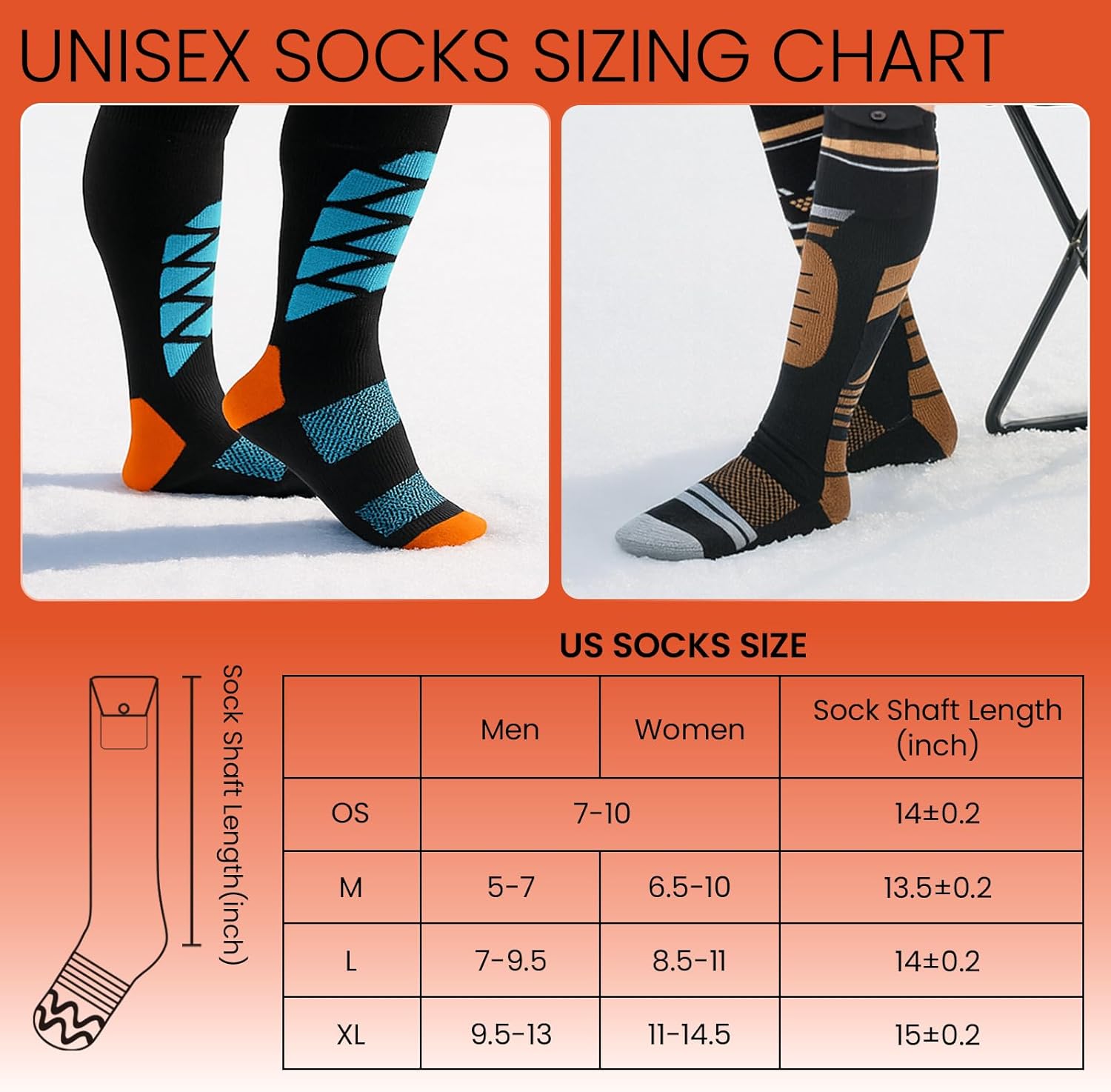
Image 7.1: US Socks Sizing Chart, detailing the 'One Size' fit for both men and women, including approximate shaft length.
8. Troubleshooting
If you encounter issues with your heated socks, consider the following common solutions:
- Socks not heating: Ensure batteries are fully charged and correctly connected to the sock's power cable. Check that the power button on the battery is pressed and held for 2 seconds to turn on.
- Uneven heating: Verify that the heating elements are not creased or folded inside the sock. Ensure the battery is fully charged.
- App connectivity issues: Make sure Bluetooth is enabled on your smartphone and the socks are within range. Try restarting the app and the socks.
- Short battery life: Ensure batteries are fully charged. Higher heat settings consume more power, reducing runtime. Consider using a lower heat setting for extended use.
9. Specifications
| Feature | Specification |
|---|---|
| Model Name | DZG-08 |
| Material | 35% Merino Wool, 30% Nylon, 35% Spandex |
| Battery Type | Lithium-Polymer |
| Battery Capacity | 8500 mAh (per battery) |
| Max Temperature | 145°F (63°C) |
| Runtime | 6-15 hours (depending on heat setting) |
| Charging Time | Approx. 3.5 hours (with 66W charger) |
| Control Method | Battery Button, Mobile Application |
| Safety Certifications | UL/FCC |
10. Warranty and Support
SURGOAL Merino Wool Heated Socks come with a 1-year warranty from the date of purchase. This warranty covers manufacturing defects under normal use.
For any issues, questions, or support needs, please contact SURGOAL customer service. Refer to the contact information provided on the product packaging or the official SURGOAL website.