
Introduction
Thank you for choosing the XenonLab VisionAir HAP606 Air Purifier. This manual provides essential information for the safe and efficient operation, maintenance, and troubleshooting of your new air purifier. Please read this manual thoroughly before use and retain it for future reference.

The XenonLab VisionAir HAP606 Air Purifier in light white, featuring a digital display for PM2.5 levels and a top control panel.
Setup
Unpacking and Filter Installation
- Carefully remove the air purifier from its packaging.
- Place the unit on a flat, stable surface.
- Turn the air purifier upside down. Twist the base cover counter-clockwise to unlock and remove it.
- Remove the sealed filter from inside the unit. The filter is typically wrapped in plastic for protection during shipping.
- Remove all packaging from the filter.
- Insert the unwrapped filter back into the air purifier. Ensure it is seated correctly.
- Replace the base cover and twist clockwise to lock it securely.
- Place the air purifier upright and connect the power cord to a suitable electrical outlet.

Visual guide demonstrating the simple three-step process for filter replacement: twisting to remove the old filter, inserting the new one, and pressing the reset button.
Operating Instructions
The XenonLab VisionAir HAP606 features an intuitive touchscreen control panel on the top of the unit.

An overview of the XenonLab VisionAir HAP606's smart features, including PM2.5 monitoring, multiple fan speeds, filter replacement reminder, timer settings, auto mode, child lock, 20dB low noise operation, and a light display indicator.
Controls and Functions
- Power Button: Press to turn the unit ON or OFF.
- Fan Speed: Cycle through different fan speeds (e.g., Low, Medium, High, Turbo) to adjust purification intensity.
- Auto Mode: Activates intelligent purification. The unit automatically adjusts fan speed based on real-time air quality readings.
- Sleep Mode: Reduces fan speed to the lowest setting and dims/turns off display lights for quiet operation during sleep. Operates at approximately 20dB.
- Timer: Set the air purifier to operate for a specific duration (e.g., 1, 2, 4, 8 hours) before automatically turning off.
- Light Control: Toggles the display lights ON or OFF.
- Child Lock: Press and hold the lock button to disable the control panel, preventing accidental changes to settings. Repeat to unlock.
- Filter Reset: After replacing the filter, press and hold the reset button for 5 seconds to reset the filter lifetime indicator.
Air Quality Monitoring (AQI & PM2.5 Display)
The air purifier features a real-time PM2.5 digital display and an intuitive color-coded Air Quality Indicator (AQI) light. This allows you to monitor the air quality in your environment instantly.
- PM2.5 Display: Shows the concentration of particulate matter 2.5 micrometers or less in diameter (µg/m³).
- AQI Light: Changes color to indicate current air quality:
- Green: Good air quality
- Yellow: Moderate air quality
- Red: Poor air quality

The air purifier's real-time AQI display, showing PM2.5 levels and corresponding color-coded light indicators to provide instant air quality feedback.
Maintenance
Filter Replacement
The XenonLab VisionAir HAP606 utilizes a 3-stage filtration system (Pre-filter, H13 HEPA filter, Activated Carbon filter) that captures 99.97% of airborne particles down to 0.3 µm. The filter lifetime indicator will illuminate when it's time to replace the filter.
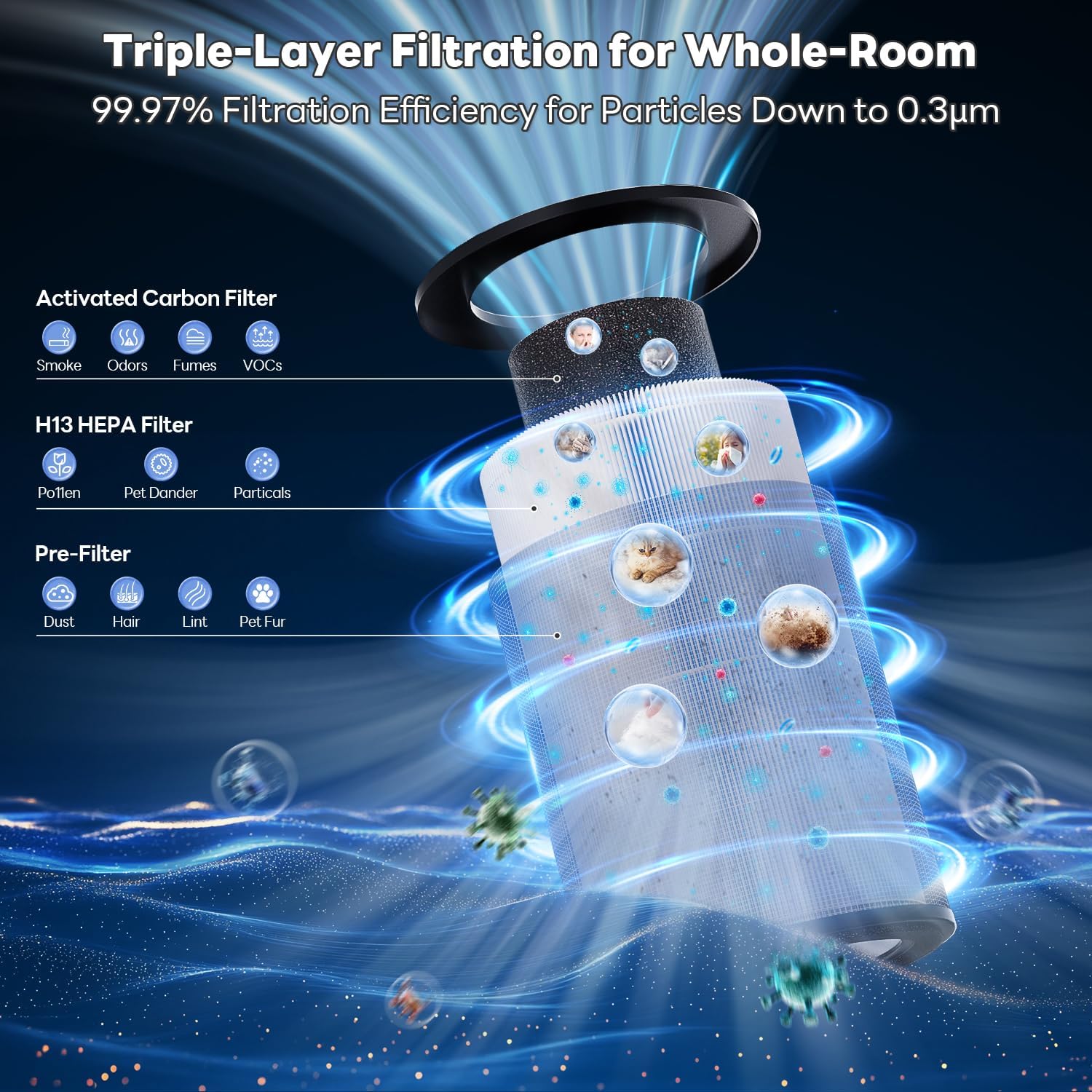
A visual breakdown of the air purifier's 3-stage filtration system, detailing the Pre-filter, H13 HEPA filter, and Activated Carbon filter.
To replace the filter:
- Turn off and unplug the air purifier.
- Turn the unit upside down and twist the base cover counter-clockwise to remove it.
- Remove the old filter and dispose of it properly.
- Insert a new XenonLab HAP606 replacement filter (ensure all packaging is removed).
- Replace the base cover and twist clockwise to lock it.
- Plug in the air purifier and turn it on. Press and hold the "Reset" button for 5 seconds until the indicator light turns off to reset the filter lifetime counter.
Cleaning the Unit
- Always unplug the air purifier before cleaning.
- Wipe the exterior of the unit with a soft, dry cloth. Do not use abrasive cleaners or solvents.
- The pre-filter layer of the 3-stage filter can be gently vacuumed to extend its life, but the HEPA and activated carbon layers are not washable and must be replaced.
Troubleshooting
| Problem | Possible Cause | Solution |
|---|---|---|
| Unit does not turn on | Power cord not securely plugged in; No power from outlet. | Check power cord connection; Test outlet with another device. |
| Airflow is weak | Filter is dirty or clogged; Unit is in a low fan speed mode. | Replace filter; Increase fan speed setting. |
| Unusual noise | Filter not installed correctly; Obstruction in fan. | Reinstall filter; Check for and remove any obstructions. |
| Air quality reading seems inaccurate | Sensor is dirty. | Gently clean the air quality sensor opening with a dry cotton swab. |
Specifications
- Model Number: HAP606
- Product Dimensions: 7.2"D x 7.2"W x 13.9"H
- Weight: 3.79 Pounds
- Coverage Area: Up to 1800 Square Feet (circulates air 4 times per hour in 450 sq ft)
- Noise Level (Sleep Mode): 20dB
- Filtration System: 3-Stage (Pre-filter, H13 True HEPA, Activated Carbon)
- Certifications: ETL, FCC, EPA, CARB
Warranty and Support
XenonLab is committed to providing quality products and customer satisfaction.
- Money-Back Guarantee: 30-day money-back guarantee.
- Warranty: 2-year warranty.
- Technical Support: Lifetime technical support. Responses via Amazon within 2 business days.
For further assistance, please contact XenonLab customer support through your Amazon order page.
