
1. Safety Instructions
Please read all instructions carefully before assembly and use. Retain this manual for future reference.
- Ensure all parts are present and undamaged before beginning assembly. Do not use if any parts are missing or broken.
- Assemble the vanity desk on a soft, clean surface to prevent scratches.
- Keep small parts and packaging materials away from children and pets to prevent choking hazards.
- Always use the desk on a flat, stable surface to prevent tipping.
- Do not overload drawers or shelves. Distribute weight evenly.
- For electrical components (LED mirror, USB ports, outlets):
- Ensure the power cord is not pinched or damaged.
- Do not expose electrical components to water or excessive moisture.
- Unplug the vanity desk from the power outlet before cleaning or if not in use for extended periods.
- Do not attempt to repair or modify the electrical components yourself. Contact qualified personnel for service.
2. Package Contents
Verify that all components listed below are included in your package. If any items are missing or damaged, please contact customer support.
- Vanity Desk Panels (various sizes)
- LED Mirror Assembly
- Stool Components
- Hardware Pack (screws, dowels, cam locks, etc.)
- Power Strip with USB Ports and AC Outlets
- Hair Dryer Holder
- Instruction Manual

Image 2.1: Overview of the Wohh Walnut Small Vanity Desk, showing the complete assembled product with mirror, storage, and stool.
3. Assembly Instructions
Follow these steps carefully to assemble your vanity desk. It is recommended to have two people for assembly.
3.1 Prepare for Assembly
- Clear a spacious area for assembly.
- Lay out all components and hardware. Refer to the parts list to identify each piece.
- Gather necessary tools (e.g., screwdriver, hammer).
3.2 Assemble the Main Desk Frame
- Attach the side panels to the bottom and back panels using the provided screws and dowels.
- Secure the desktop panel to the assembled frame.
3.3 Install Drawers and Shelves
- Assemble the drawer boxes according to the diagrams.
- Install drawer slides onto the desk frame and the drawer boxes.
- Insert the assembled drawers into the desk.
- Attach the upper storage shelves to the desktop using the designated hardware.
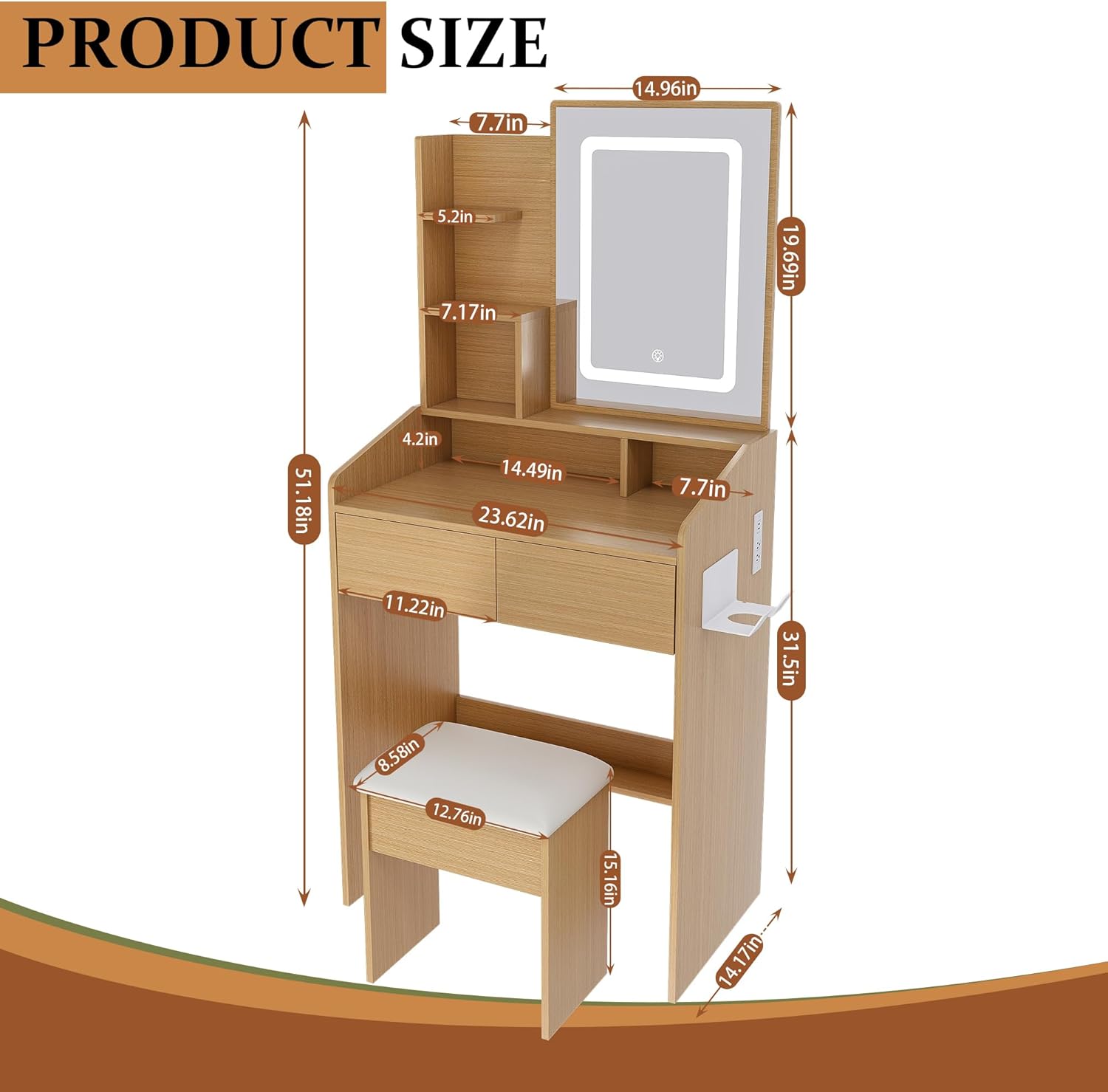
Image 3.1: Detailed view showing the two storage drawers, open shelves, and the integrated hair dryer stand, illustrating key assembly points.

Image 3.2: Close-up view of the vanity desk's drawers and open shelves, highlighting the construction and storage capacity.
3.4 Attach LED Mirror and Power Strip
- Carefully attach the LED mirror assembly to the designated area on the desktop.
- Mount the power strip with USB ports and AC outlets to the side of the desk as shown in the diagrams.
- Connect the mirror's power cable to the power strip or a suitable wall outlet.
3.5 Assemble the Stool
- Attach the stool legs to the stool seat using the provided hardware.
- Ensure all connections are tight and stable.
4. Operating Instructions
4.1 LED Mirror Operation
The integrated LED mirror features adjustable brightness and three lighting modes.
- Power On/Off: Tap the touch sensor button on the mirror to turn the lights on or off.
- Change Light Color Mode: Short press the touch sensor button to cycle through the three light color modes: Cool White, Warm White, and Warm Yellow.
- Adjust Brightness: Long press the touch sensor button to adjust the brightness level. Release when the desired brightness is achieved.

Image 4.1: Illustration of the LED mirror's three lighting modes (Cool White, Warm White, Warm Yellow) and the adjustable brightness feature.
4.2 Charging Station Usage
The vanity desk includes a built-in power strip for convenient charging of electronic devices.
- AC Outlets: Plug in standard electronic devices (e.g., hair dryer, curling iron) into the 125V/12A AC outlets.
- USB Ports: Use the 5V/2.1A USB-A and Type-C ports to charge smartphones, tablets, and other USB-powered devices.
- Ensure the vanity desk is plugged into a wall outlet for the charging station to function.

Image 4.2: Detailed view of the integrated power strip, highlighting the two AC outlets, one USB-A port, and one USB-C port for device charging.
5. Maintenance
Proper care will extend the life and appearance of your vanity desk.
- Cleaning the Desk: Wipe surfaces with a soft, damp cloth. Avoid abrasive cleaners or harsh chemicals that may damage the wood finish.
- Cleaning the Mirror: Use a glass cleaner and a soft, lint-free cloth. Do not spray cleaner directly onto the mirror; apply it to the cloth first.
- Electrical Components: Ensure the power is disconnected before cleaning around the power strip or mirror. Use a dry cloth to wipe dust.
- Tighten Hardware: Periodically check and tighten all screws and fasteners to maintain stability.
6. Troubleshooting
If you encounter issues, refer to the following common problems and solutions.
- LED Mirror Lights Not Working:
- Ensure the vanity desk is properly plugged into a working power outlet.
- Check if the power cord is securely connected to the mirror and the power source.
- Tap the touch sensor button firmly to ensure activation.
- USB Ports or AC Outlets Not Providing Power:
- Verify the vanity desk is plugged into a live power outlet.
- Check if the power strip's own power switch (if present) is turned on.
- Test with a different device to rule out device-specific issues.
- Desk Feels Unstable:
- Ensure all assembly screws and fasteners are tightened securely.
- Verify the desk is placed on a level surface.
7. Specifications
Key specifications for the Wohh Walnut Small Vanity Desk, Model W2699P.
| Feature | Detail |
|---|---|
| Model Number | W2699P |
| Product Dimensions | 14.7"D x 23.6"W x 51.9"H |
| Item Weight | 80 pounds |
| Material | Engineered Wood |
| Color | Wood |
| Assembly Required | Yes |
| LED Mirror Features | 3 Lighting Modes, Adjustable Brightness |
| Charging Station | 2 AC Outlets (125V/12A), 1 USB-A Port (5V/2.1A), 1 Type-C Port (5V/2.1A) |

Image 7.1: Detailed product dimensions for the vanity desk and stool.
8. Warranty and Support
For warranty information or technical support, please refer to the purchase documentation or contact the manufacturer directly. Keep your proof of purchase for any warranty claims.
Manufacturer: Wohh
For further assistance, please visit the Wohh Store on Amazon.