
Introduction
The XO Poppy 4-in-1 Power Station is a multi-functional device designed to charge your smartphone, Apple Watch, and AirPods wirelessly, while also providing a digital alarm clock. This station helps consolidate your charging needs into a single, organized unit. Please read this manual carefully to ensure proper use and optimal performance of your device.
Package Contents
- 4-in-1 Charging Station
- Power Adapter
- User Manual
Product Overview
The 4-in-1 Power Station integrates multiple charging capabilities and a digital clock into a compact design. It features a dedicated stand for wireless phone charging, a dock for Apple Watch, and a pad for AirPods.

Figure 1: The XO Poppy 4-in-1 Power Station with a smartphone, Apple Watch, and AirPods charging, alongside a digital alarm clock.

Figure 2: The 4-in-1 Power Station on a nightstand, showing a phone charging, an Apple Watch charging, and the digital alarm clock display.
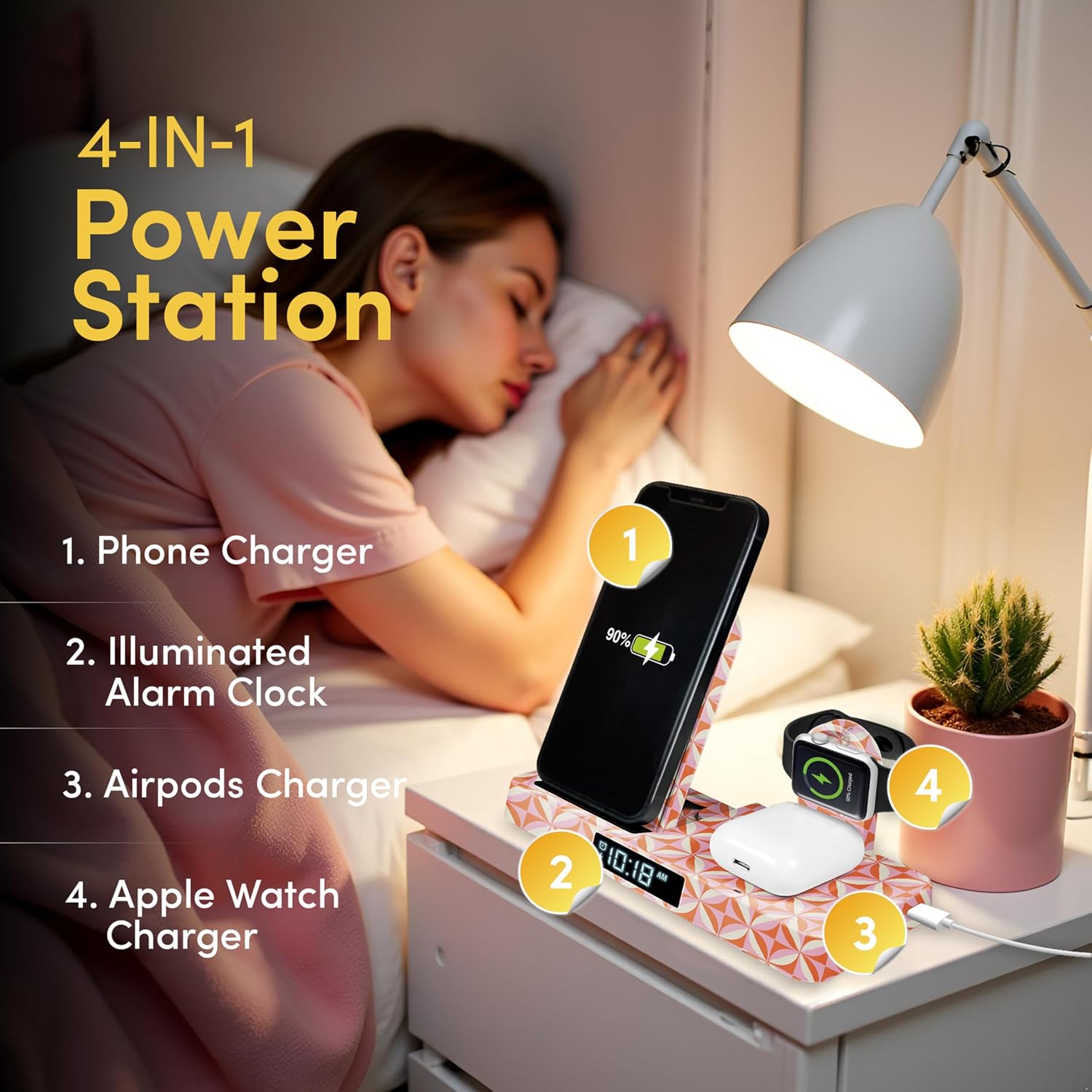
Figure 3: The XO Poppy 4-in-1 Power Station in its folded configuration, highlighting its compact design.
Setup Instructions
1. Connecting Power
- Connect the provided USB Type-C cable to the input port on the back of the charging station.
- Plug the other end of the USB Type-C cable into the included power adapter.
- Insert the power adapter into a standard wall outlet. The digital clock display should illuminate, indicating the device is powered on.
2. Initial Placement
Place the charging station on a flat, stable surface. Ensure there is adequate space around the device for proper ventilation.
Operating Instructions
1. Wireless Phone Charging
Place your Qi-compatible smartphone vertically on the charging stand. Ensure the phone is centered on the charging pad for optimal contact. The phone's screen should indicate charging has begun. This station supports 15W wireless charging.
2. Apple Watch Charging
Place your Apple Watch onto the dedicated magnetic charging dock. Ensure the watch is properly aligned and secured to initiate charging. The watch screen should display the charging indicator.
3. AirPods Charging
Place your AirPods case (with wireless charging capability) onto the designated charging pad at the base of the station. The indicator light on your AirPods case should confirm charging is active.
4. Setting the Digital Alarm Clock
Refer to the small buttons located near the digital display. Typically, there are buttons for 'SET', 'UP', and 'DOWN'.
- Press the 'SET' button to enter time setting mode. The hour digits will likely flash.
- Use the 'UP' or 'DOWN' buttons to adjust the hour.
- Press 'SET' again to move to minute adjustment, then use 'UP' or 'DOWN'.
- Continue pressing 'SET' to cycle through alarm settings (if available) and other clock functions.
- Once settings are complete, wait a few seconds for the display to exit setting mode automatically, or press 'SET' one last time to confirm.
Video 1: A demonstration of the XO Poppy 4-in-1 Power Station with Wireless Charging, showcasing its features and usage.
Adjustable Viewing Angles
The phone charging stand features a flexible, foldable design with 5 custom viewing angles. This allows you to adjust your smartphone's position for comfortable viewing during video calls, media consumption, or checking notifications while it charges.

Figure 4: The 4-in-1 Power Station demonstrating its multiple adjustable viewing angles for optimal screen visibility.
Maintenance
Cleaning
To clean the device, disconnect it from the power source. Use a soft, dry, lint-free cloth to wipe the surfaces. Avoid using abrasive cleaners, solvents, or aerosol sprays, which may damage the finish or internal components.
Storage
When not in use for extended periods, store the charging station in a cool, dry place away from direct sunlight and extreme temperatures.
Troubleshooting
Device Not Charging
- Check Power Connection: Ensure the power adapter is securely plugged into both the charging station and the wall outlet.
- Proper Alignment: For wireless charging, ensure your device is correctly centered on the charging pad. Slight adjustments may be needed.
- Remove Phone Case: Thick phone cases (especially those with metal or magnets) can interfere with wireless charging. Try removing the case.
- Compatibility: Verify that your smartphone, Apple Watch, and AirPods support wireless charging (Qi standard for phones/AirPods).
- Restart: Disconnect and reconnect the power to the charging station.
Alarm Clock Issues
- Time Not Displaying: Ensure the power station is connected to a power source.
- Incorrect Time: Follow the 'Setting the Digital Alarm Clock' instructions to adjust the time.
Unstable Device Placement
- Phone: Ensure the phone is seated correctly against the rubberized stopper on the charging stand.
- Apple Watch: Confirm the watch band is not obstructing the magnetic connection or causing the watch to tilt.
Specifications
| Brand | XO Poppy |
| Model Number | PY-STCT-F01 |
| Connector Type | USB Type C |
| Compatible Devices | Airpods, Apple Watch, Smartphones, Wireless Charging Devices |
| Compatible Phone Models | Qi charging Supported devices |
| Included Components | Charging Station, Power Adapter, User Manual |
| Special Features | 5 Viewing Angles, Digital Alarm Clock, Foldable Design, Qi Compatible, Wireless Charging |
| Input Voltage | 9 volts |
| Amperage | 3 A |
| Wattage | 15 watts |
| Output Current | 3 A |
| Output Voltage | 9 volts |
| Number of Concurrent Devices | 3 |
| Material | ABS Plastic, Metal |
| Item Weight | 8 ounces |
| Specification Met | Qi |
Warranty and Support
Warranty Information
This product is covered by the Amazon Standard 30 Day Return Policy. Please refer to Amazon's return policy for details regarding returns and exchanges.
Customer Support
For further assistance, troubleshooting not covered in this manual, or product inquiries, please visit the XO Poppy brand store on Amazon or contact Amazon customer service directly.